

Import a Dify application
This walkthrough imports an application exported from Dify — a chat assistant on an OpenAI model — into an Aggregate, a Release and a Manifest that build the standard library’s Dify installation, carrying the application, for Kubernetes as they are written, then builds them and runs the result. Every file and every block of output below comes from a real run; the application and each stage of the walkthrough are in the import-dify example, where a check script runs the import again, compares what it writes, what it prints and the blocks this page quotes with the files kept there, and validates and builds what the import wrote.
Scaffold the example
You can run this import with the commands on this page, or have your AI assistant run it for you.
Write the example into a new folder named after it:
aggrega scaffold --example import-difyIt then prints the commands to run next. The first changes into the new folder;
the one after it, below, changes into its source folder, which holds what this
page imports and is where the import runs:
cd import-dify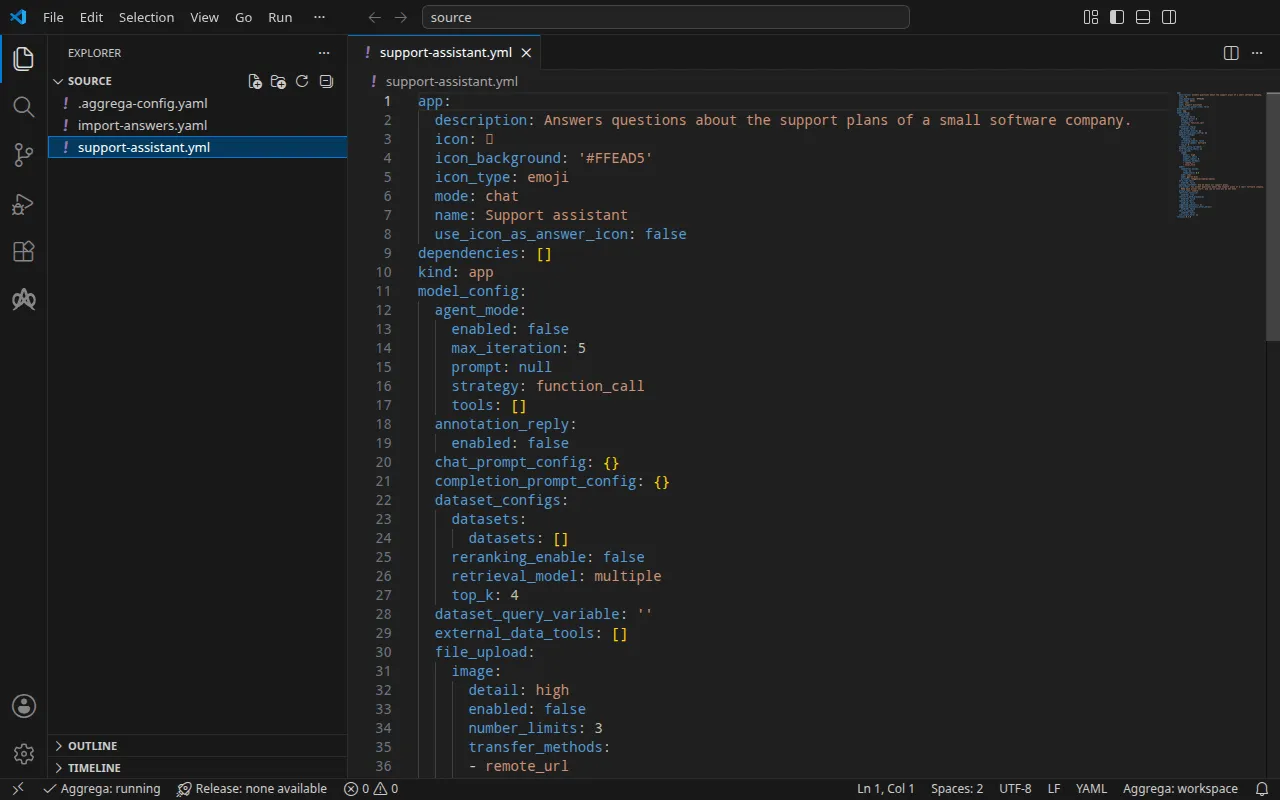
The application
support-assistant.yml, written for this walkthrough, is a chat application in
Dify’s DSL, the YAML Dify exports for an application, at DSL version 0.7.0:
an opening statement, a short prompt, and the model it answers with, named by
its provider:
model: completion_params: stop: [] temperature: 0.4 mode: chat name: gpt-4o-mini provider: langgenius/openai/openaiBeside it, an .aggrega-config.yaml makes the folder a workspace:
# The workspace key marks this directory as the workspace root, so an import run# here writes its drafts beside support-assistant.yml.workspace: {}# The registry the importer is fetched from the first time an import needs it.default_registry: hub.aggrega.aiand import-answers.yaml holds the answers to what no application can hold:
the installation’s application secret, the key Dify signs sessions with and
encrypts the model-provider keys it stores under; and the owner account the
application is imported under, its email and its password. On Kubernetes each
secret is read from a Kubernetes Secret, so its answer is that Secret’s name;
the same file serves an import for Docker Compose, as
On Docker Compose shows:
# Values the import could not draft from the source, keyed by the drafted file and the key path inside# it. Write each one beside its key; an import of the same source, and a sync, read them from here and# ask nothing. A secret is never written here: its key asks where the secret comes from — a variable# name, ${NAME}, or the name of a Kubernetes Secret.release.yaml: # Passed down to core/dify's secret_key parameter, which has no default; that parameter's description # in core/dify says what the value is. spec.parameters.secret_key: "dify-credentials" # Email address of the installation's owner account, read only when values.app_definition is set. The # step that imports the application creates this account when it performs Dify's first-time setup, and # signs in as it; on an installation whose setup has already run, it names an existing account allowed # to import applications, and the password attached to the owner_password slot is that account's. # Required when values.app_definition is set: the build halts when it is empty. It has no default. spec.boundaries.platform.aggregates.dify.components.api.infra.owner_email: "owner@example.com" # The origin of the secret value, written by the operator in the Release. Read exactly as # values.origin is. Write it here or in values.origin, never in both. A secret: name where it comes # from, never the value. spec.boundaries.platform.aggregates.dify.components.api.features.owner_password.infra.origin: "dify-owner"owner@example.com stands for an email of your own; dify-credentials and
dify-owner are the Secrets Run it creates. Without the file, an
import at a terminal asks for each of the three values, one question at a
time, and writes your answers into a new answers file; where nothing can be
asked, it writes that file with the three keys and empty answers, lists them,
and exits with status 1.
The import answers file
describes the file in full.
The workspace names no catalog folder, so the import reads the standard-library
catalog from the registry it fetches its importer from: a signed snapshot of the
published catalog, fetched, verified and kept in the workspace’s content cache
by the first import, and named by its digest in the record the import writes
beside its drafts. A workspace that names its own catalog folders — in
AGGREGA_CATALOG_DIRS, or under workspace.catalog_dirs — imports against
those instead. Change into source:
cd sourceRun the import
The standard library’s Dify installation is realized on Kubernetes and on
Docker Compose. This walkthrough names the helm target:
aggrega import support-assistant.yml --target helmOn standard output it lists what it wrote:
wrote aggregate.yamlwrote release.yamlwrote manifest.yamlwrote .aggrega-import.jsonOn standard error, with <workspace> standing for the folder you ran it in:
[… omitted: a warning that the importer runs unverified, printed where its module is read from beside its Plugin entity in a catalog folder rather than fetched]read as the dify format, with drafted paths relative to <workspace>warn: node model_config.model (model) names the model "gpt-4o-mini" of the model provider "langgenius/openai/openai", whose credentials are set inside Dify, and core/ai-agent/dify configures that for itself rather than reaching it through a socket, so the draft wires no part for itmade no choice for model_config.model (model)Pull complete: <workspace>/release.lock (entities=25, source_artifacts=0, external_inputs=0)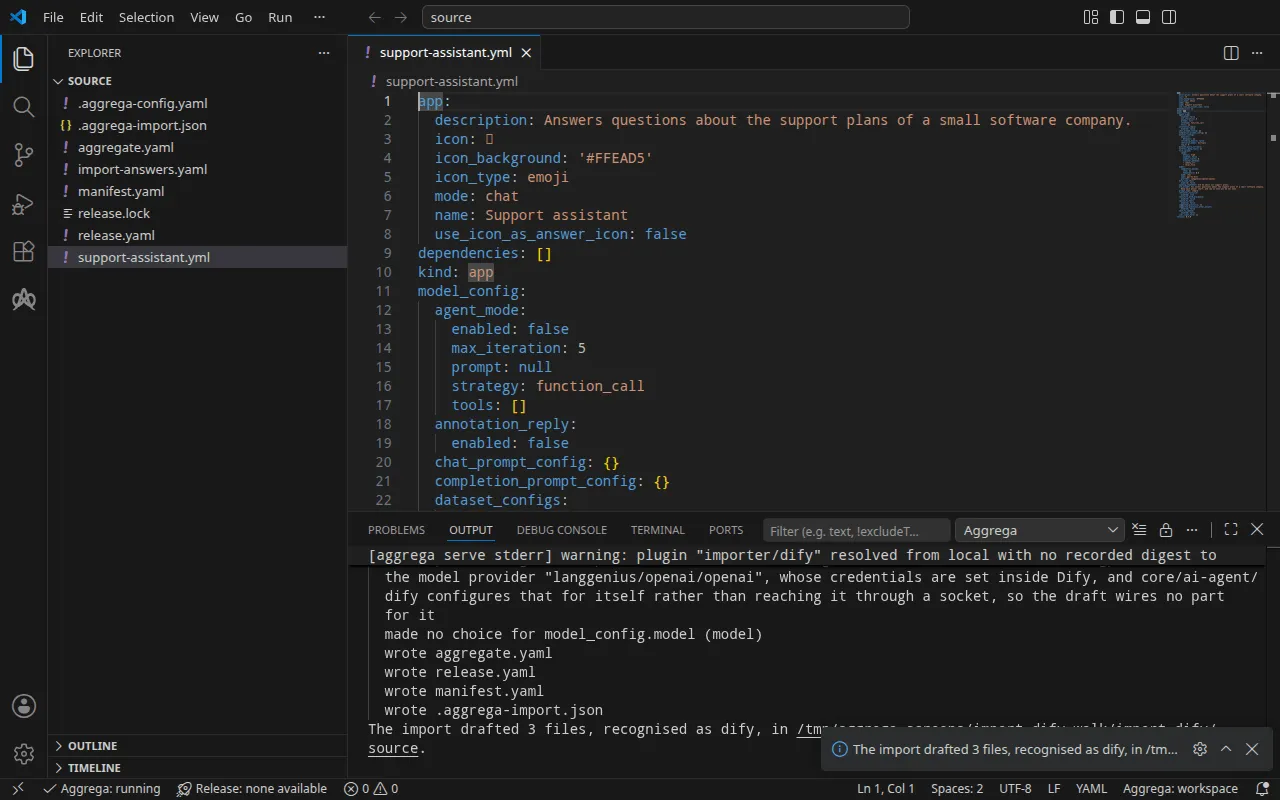
- The
warnline says that the model stays inside Dify: Dify configures its model providers, and their keys, for itself, so the draft wires no model. Once Dify runs, you install its OpenAI provider and set the provider’s key, as Test it shows. - The
Pull completeline is the pull. With every value answered from the answers file, the import pulled the drafted Release’s dependencies, asaggrega pulldoes, and wroterelease.lock; the build below needs nothing more.
What it writes
The Aggregate, the Release and the Manifest are named
imported/support-assistant, after the application’s name, Support assistant under app, reduced to support-assistant — an application with
no name is named after its file — under the namespace the importer’s
target_namespace setting sets, imported unless you set another
(Settings).
aggregate.yaml — the standard library’s Dify installation, core/dify, an
Aggregate the draft composes under aggregates, with the application carried
as written in its app_definition parameter, most of it left out here, and
the installation’s secret_key passed down from a parameter the draft
declares:
apiVersion: aggrega.ai/v1beta1kind: Aggregatemetadata: name: imported/support-assistant version: 0.1.0 description: Draft Aggregate imported from a source in the dify format.spec: parameters: secret_key: type: string required: true minLength: 1 description: "Passed down to core/dify's secret_key parameter, which has no default; that parameter's description in core/dify says what the value is." aggregates: # An import sees the Components of the workspace's catalog and none of its Aggregates, so it does not check that the catalog holds core/dify. dify: type: core/dify parameters: secret_key: "{{ .parameters.secret_key }}" app_definition: | app: description: Answers questions about the support plans of a small software company. [… omitted: the rest of the application, as exported] version: 0.7.0The installation is ten components — Dify’s API server, its worker, its
scheduler, its web front end, its code sandbox, its plugin runtime, an egress
proxy, PostgreSQL, a Redis-compatible cache and Weaviate — wired to each
other, and the import of the application is a step its API server’s Recipe
renders. Its application secret has no default in core/dify, so the draft
declares secret_key as a parameter of its own, with no default, and passes
it down for the Release to fulfill. The installation’s other credentials keep
the defaults core/dify gives them, as Run it describes.
release.yaml — the Release, which routes the installation into a boundary,
platform, and fulfills what the application cannot supply from the answers
file:
apiVersion: aggrega.ai/v1beta1kind: Releasemetadata: name: imported/support-assistant # environment is a drafted default, since no source names the environment this Release deploys to; change it to name the one it deploys to. environment: development version: 0.1.0 description: Draft Release imported from a source in the dify format.spec: aggregate: imported/support-assistant manifest: imported/support-assistant parameters: # Left for the Release, since the source cannot supply it: secret_key, which the drafted Aggregate declares and passes down to core/dify; that parameter's description there says what the value is secret_key: "dify-credentials" boundaries: platform: aggregates: dify: components: api: infra: # Lets the installation reach Dify's plugin marketplace, which the plugin serving the application's model, such as OpenAI's, is installed from. marketplace_enabled: true # Left for the Release, since the source cannot supply it: components.api.infra.owner_email, the email of the installation's owner account the application is imported under, on the api component of core/dify owner_email: "owner@example.com" features: owner_password: type: core/referenced-secret infra: # Left for the Release, since the source cannot supply it: the name of a Kubernetes Secret already in the namespace holding, under the data key value, the owner account's password. origin: "dify-owner" worker: infra: # Lets the installation reach Dify's plugin marketplace, which the plugin serving the application's model, such as OpenAI's, is installed from. marketplace_enabled: true scheduler: infra: # Lets the installation reach Dify's plugin marketplace, which the plugin serving the application's model, such as OpenAI's, is installed from. marketplace_enabled: trueenvironmentisdevelopment, a default the comment above it says to change to the environment the Release deploys to.secret_keyis the name of the Secret holding the application secret,dify-credentials, under the data key the installation names,secret-key: the Manifest reads every credential from a Secret already in the namespace.- The owner account is set on the installation’s
apicomponent, in the routing entry that places the installation in its boundary: its email, and its password attached as acore/referenced-secretnaming the Secret that holds it,dify-owner, under the data keyvalue. The comments above the answered values say why the import could not draft them. marketplace_enabledistrueon the API server,api, its worker and its scheduler, on every target: the installation reaches nothing of Dify’s vendor unless the Release allows it, and the OpenAI provider the application answers with is a plugin Dify installs from its plugin marketplace, as Test it shows. Each of the three reads its own setting.
manifest.yaml — a Helm Recipe for each component the installation composes,
and the realization that reads a credential from a Secret already in the
namespace:
apiVersion: aggrega.ai/v1beta1kind: Manifestmetadata: name: imported/support-assistant version: 0.1.0spec: mappings: components: type: core/datastore/postgres: helm/postgres core/datastore/redis: helm/redis core/datastore/weaviate: helm/weaviate core/ai-agent/dify-ssrf-proxy: helm/dify-ssrf-proxy core/ai-agent/dify-sandbox: helm/dify-sandbox core/ai-agent/dify-plugin-daemon: helm/dify-plugin-daemon core/ai-agent/dify: helm/dify core/ai-agent/dify-worker: helm/dify-worker core/ai-agent/dify-worker-beat: helm/dify-worker-beat core/ai-agent/dify-web: helm/dify-web features: type: core/referenced-secret: helm/k8s-existing-secret--target maps the component types of the installation the draft composes as
well as its own. Where the catalog offers several Helm Recipes for one type, as
it does for PostgreSQL, it maps the one named after the type, helm/postgres.
.aggrega-import.json is the record of what the import wrote, which a later
aggrega import --sync reads, and release.lock pins every catalog entity the
Release resolves to, by version and digest.
Validate and build
aggrega validate --release release.yamlaggrega build --release release.yaml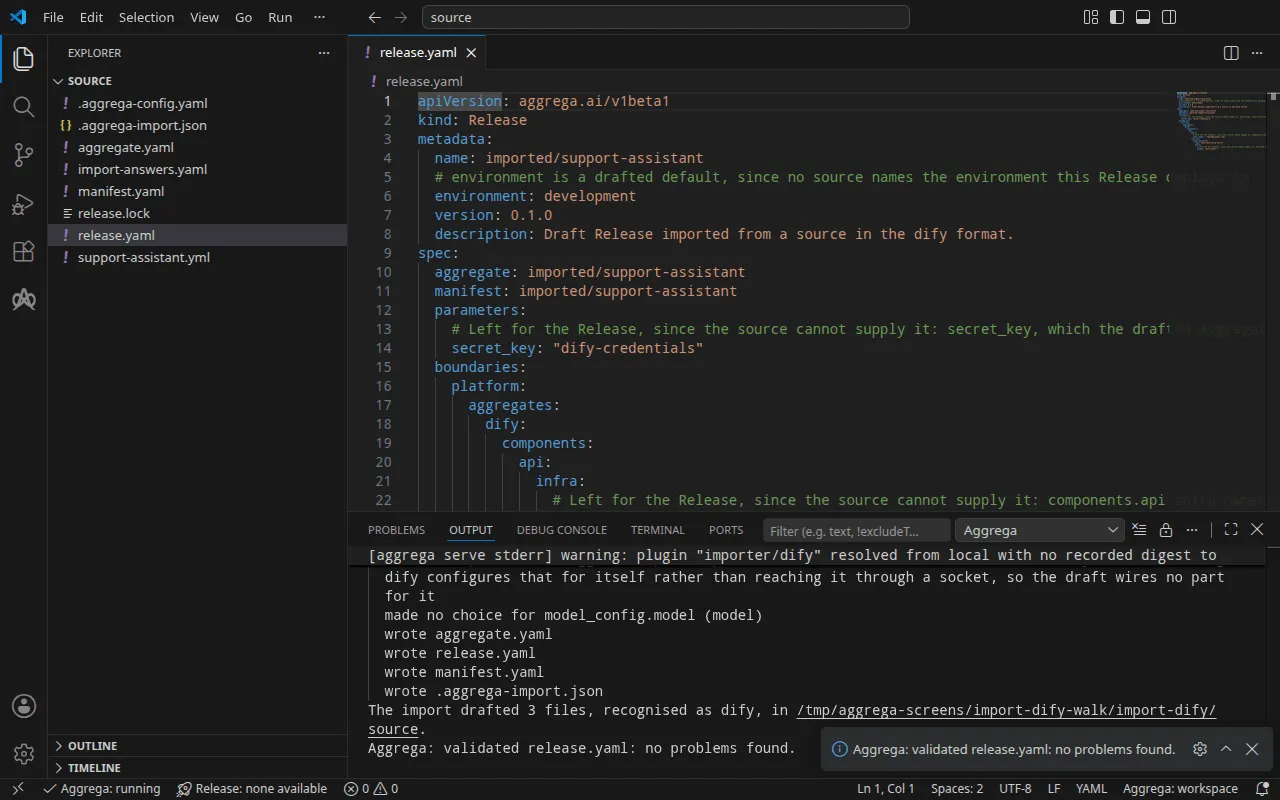
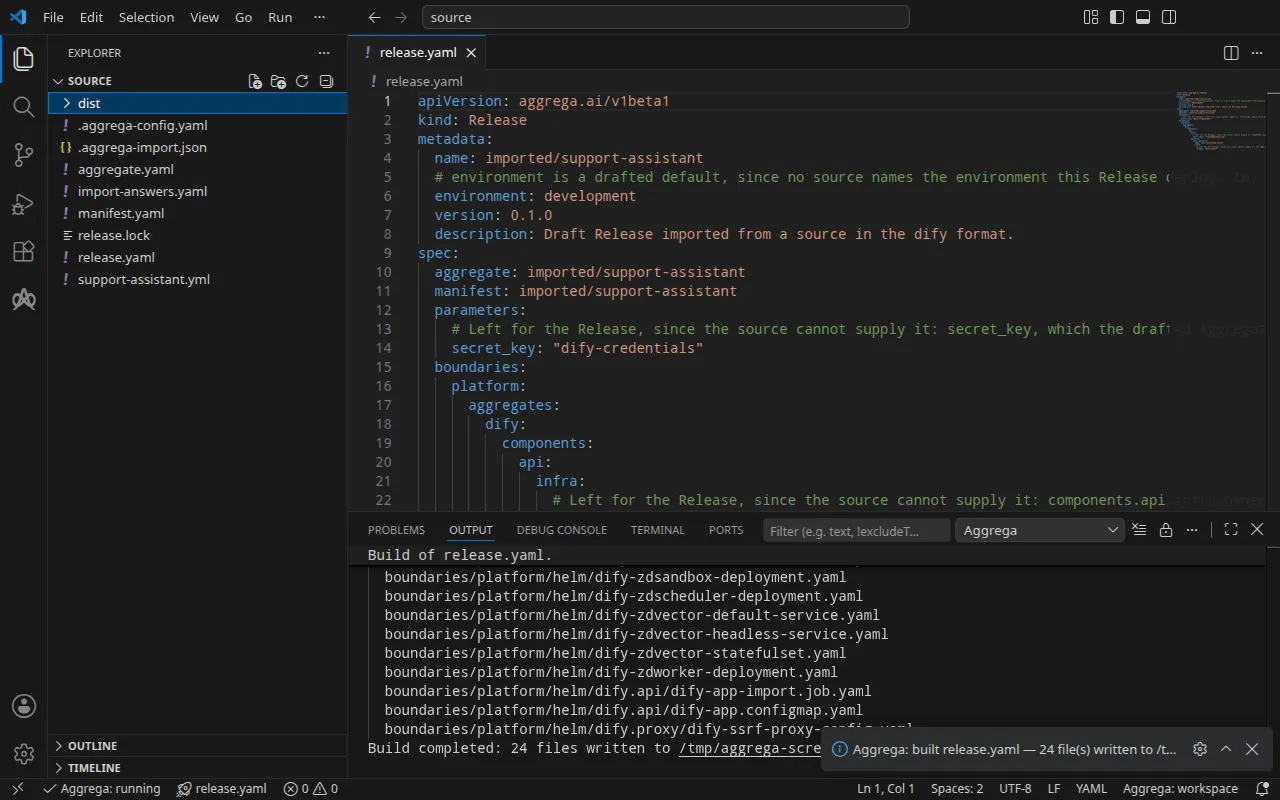
The validation prints:
notice: LINT: Feature "core/referenced-secret" at core/referenced-secret:1.0.0 declares property "origin" in both values: and infra: pillars (path: origin)release dependency validation passed: release.yaml (schema-pillar + dependency pillars)and the build, with <workspace> standing for the folder holding the drafts:
notice: LINT: Feature "core/referenced-secret" at core/referenced-secret:1.0.0 declares property "origin" in both values: and infra: pillars (path: origin)[… omitted: a total build time, which differs per run]Build completed: 24 files written to <workspace>/distThe notice line is advisory: the secret Feature accepts its origin from the
Aggregate’s values or the Release’s infra, and the notice reports that one
leaf is declared in both. It changes no verdict.
The build writes the installation’s Kubernetes manifests under
dist/boundaries/platform/helm/. Among them is the Job that imports the
application, dify.api/dify-app-import.job.yaml. It waits for Dify’s API
server to answer, performs Dify’s first-time setup as the owner account the
Release names where that setup has not run, and imports the application:
spec: podFailurePolicy: rules: - action: FailJob onExitCodes: containerName: import operator: In values: [2] template: spec: restartPolicy: Never containers: - name: import image: "langgenius/dify-api:1.17.0" command: ["python", "/seed/import.py"] env: - name: DIFY_API_URL value: "http://dify-zdapi-default:5001" - name: OWNER_EMAIL value: "owner@example.com" - name: OWNER_PASSWORD valueFrom: secretKeyRef: name: "dify-owner" key: "value" volumeMounts: - name: seed mountPath: /seed readOnly: true volumes: - name: seed configMap: name: dify-zdapi-appThe application itself is in the ConfigMap beside it. When Dify refuses what
the step sends it, with a client-error reply other than a request timeout or a
rate limit, or by reporting the import failed, the step prints the message
Dify’s reply carries and exits with status 2, as it does when the definition
names no application under app.name; the Job’s podFailurePolicy fails the Job at
that attempt, since a retry would be refused the same way; any other failure,
such as the server not answering within about ten minutes, is retried.
With an AI assistant
An AI assistant set up with Aggrega’s tools can do the same: paste this prompt into it.
Use the Aggrega tools only, and create no folder yourself. If the Workspace folder holds no `import-dify` folder yet, call the `scaffold` tool once with `example` set to `import-dify` and no `dir`: it writes the example into a new `import-dify` folder, whose `source` folder holds what this page imports. Then call the `import` tool with `workspace_root` set to `import-dify/source`, `source` set to `support-assistant.yml` and `target` set to `helm`: it reads the answers it needs from `import-answers.yaml` beside `support-assistant.yml`, writes its drafts into `import-dify/source` and pulls what they need. Then call the `validate` tool with `workspace_root` set to `import-dify/source` and `release` set to `release.yaml`, and the `build` tool with `workspace_root` set to `import-dify/source`, `release` set to `release.yaml` and `write` set to true. Tell me which files the build wrote; they are under `import-dify/source/dist/`.Open it in VS Code
With the
Aggrega extension for Visual Studio Code
installed, open the folder import-dify/source in VS Code, where the import
wrote its drafts. The folder holds one Release, the drafted release.yaml, so
the editor selects it for you; once On Docker Compose has
drafted a second Release into compose, Aggrega: Select Release… chooses
the one the editor works on. The editor checks the drafts against the selected
Release as you edit them, marking what it finds in the file and in the Problems
panel. Aggrega: Show topology graph, in the Command Palette, draws the
selected Release’s components and the connections between them.
Aggrega: Build, Aggrega: Preview build and Aggrega: Pull act on the
same Release, and each is also a button on the Commands panel of the
Aggrega view in the activity bar; Build writes its files into the folder’s
dist/. Use Aggrega in Visual Studio Code covers the rest.
Run it
Before applying the manifests, create the Secrets they read. A workload naming
a Secret that does not exist does not start. Two hold what the answers file
named: dify-owner, holding the owner’s password under value, and
dify-credentials, holding the application secret under secret-key. The
installation’s four other credentials — its database password and three keys
its components present to each other — keep the defaults core/dify gives
them, and on Kubernetes each default is the name of the Secret the manifests
read it from: dify-db-password-for-evaluation-only under db-password,
dify-code-execution-key-for-evaluation-only under code-execution-key,
dify-plugin-daemon-key-for-evaluation-only under plugin-daemon-key, and
dify-inner-api-key-for-evaluation-only under inner-api-key. Create those
four too, each holding a value of your own; to read them from Secrets named
otherwise, pass the names to core/dify in the Aggregate’s dify entry,
under parameters, as db_password, code_execution_key,
plugin_daemon_key and inner_api_key.
Set the owner’s password in your shell, as DIFY_OWNER_PASSWORD, since you
sign in with it below. Dify takes an owner password of at least eight
characters holding a letter and a digit: given any other, the import Job fails
as soon as Dify refuses the setup, and its log reads
first-time setup was refused with HTTP 422: Validation error for parameter 'payload',
the reply Dify gives an owner account it refuses. The wait below waits for the
Job to complete, and a failed Job never completes, so it then runs to its
timeout; run
kubectl wait --for=condition=failed job/dify-zdapi-app-import --timeout=15m
in a second terminal beside it, and that wait returns as soon as the Job
fails. Delete the Job and the dify-owner Secret, create the Secret again with
a password Dify takes, and apply again.
Write one file for each of the five other Secrets, holding one line: the data
key, =, and a value of your own — dify-credentials.env with secret-key=,
db-password.env with db-password=, code-execution-key.env with
code-execution-key=, plugin-daemon-key.env with plugin-daemon-key= and
inner-api-key.env with inner-api-key=. Then create the six Secrets. The
cluster holds the values then, so delete the files:
printf 'value=%s\n' "$DIFY_OWNER_PASSWORD" > dify-owner.envkubectl create secret generic dify-owner --from-env-file=dify-owner.envkubectl create secret generic dify-credentials --from-env-file=dify-credentials.envkubectl create secret generic dify-db-password-for-evaluation-only --from-env-file=db-password.envkubectl create secret generic dify-code-execution-key-for-evaluation-only --from-env-file=code-execution-key.envkubectl create secret generic dify-plugin-daemon-key-for-evaluation-only --from-env-file=plugin-daemon-key.envkubectl create secret generic dify-inner-api-key-for-evaluation-only --from-env-file=inner-api-key.envrm dify-owner.env dify-credentials.env db-password.env code-execution-key.env plugin-daemon-key.env inner-api-key.envApply the manifests, as the run step of
How an import runs explains — -R reaches the
Job and the two ConfigMaps in dify.api/ and dify.proxy/ — then wait for the
import Job and read its log, and wait for the plugin runtime:
kubectl apply -R -f dist/boundaries/platform/helm/kubectl wait --for=condition=complete job/dify-zdapi-app-import --timeout=15mkubectl logs job/dify-zdapi-app-importkubectl rollout status statefulset/dify-zdpluginsservice/dify-zdapi-default createddeployment.apps/dify-zdapi created[… omitted: a line for each of the other Services, Deployments and StatefulSets]job.batch/dify-zdapi-app-import createdconfigmap/dify-zdapi-app createdconfigmap/dify-zdproxy-config createdjob.batch/dify-zdapi-app-import condition metfirst-time setup done: owner account owner@example.comimported 'Support assistant' as application 7e03e85c-b13f-4ddc-b539-040470a61d4cpartitioned roll out complete: 1 new pods have been updated...The log names the application’s identifier, which Test it needs.
Test it
Dify’s API answers at http://127.0.0.1:5001. On Kubernetes, forward a local
port to the API server’s Service, dify-zdapi-default, in the namespace you
applied to, and leave the command running in a second terminal:
kubectl port-forward -n <namespace> svc/dify-zdapi-default 5001:5001On Docker Compose, started as On Docker Compose shows,
the Release publishes the API at that address already, and the console at
http://127.0.0.1:3001. Open http://127.0.0.1:3001/signin, the console’s
sign-in page; / redirects there. The page sends its requests to the API at
http://127.0.0.1:5001, and Dify’s API answers a browser only for pages
served from the address the drafted console_url names,
http://127.0.0.1:3001, so sign in there as the owner. Opened at any other
address, the console’s requests get no such answer and the browser refuses
each reply; publish the console on another port and change console_url with
it.
The application also answers through the API, with no browser involved. In a
terminal where DIFY_OWNER_PASSWORD is set, sign in as the owner. The console
API takes the password Base64-encoded, and signing in leaves the session in
cookies.txt. Every later console request sends the session back, with the
CSRF token from the same file in an X-CSRF-Token header; a request without it
is refused with CSRF token is missing or invalid.
printf '{"email": "owner@example.com", "password": "%s"}' "$(printf %s "$DIFY_OWNER_PASSWORD" | base64 | tr -d '\n')" | curl -sS -c cookies.txt http://127.0.0.1:5001/console/api/login -H 'Content-Type: application/json' -d @-CSRF=$(awk '$6 == "csrf_token" {print $7}' cookies.txt){"result":"success"}Dify’s model providers are plugins, and a new installation holds none. Install
Dify’s OpenAI provider, at version 1.1.0, the one the run installed; the plugin
runtime fetches it from Dify’s marketplace, which the drafted
marketplace_enabled lets the installation reach, so the installation must
reach the internet:
curl -sS -b cookies.txt -H "X-CSRF-Token: $CSRF" -H 'Content-Type: application/json' \ http://127.0.0.1:5001/console/api/workspaces/current/plugin/install/marketplace \ -d '{"plugin_unique_identifiers": ["langgenius/openai:1.1.0@1ded02acee56efd5788c86fd447d792e4923e959554a4942f440c7859d164340"]}'{"all_installed":false,"task_id":"01a1dc0a-653d-756b-a104-e5d6d1e43695","task":null}With marketplace_enabled deleted from the Release, Dify refuses the request
instead, with
{"code":"invalid_param","message":"marketplace is not enabled","status":400}.
The installation runs in the background. Ask for its task, with the
task_id the reply names, until its status is success:
curl -sS -b cookies.txt -H "X-CSRF-Token: $CSRF" \ http://127.0.0.1:5001/console/api/workspaces/current/plugin/tasks/<task id>{"task":{"id":"01a1dc0a-653d-756b-a104-e5d6d1e43695",[… omitted: when it was created and last updated],"status":"success","total_plugins":1,"completed_plugins":1,"plugins":[{"plugin_unique_identifier":"langgenius\/openai:1.1.0@1ded02acee56efd5788c86fd447d792e4923e959554a4942f440c7859d164340",[… omitted: the plugin's status, its icon and its names in four languages]}]}}Write the provider’s key into openai.json, as
{"credentials": {"openai_api_key": "your OpenAI key"}}, set it, and delete
the file:
curl -sS -b cookies.txt -H "X-CSRF-Token: $CSRF" -H 'Content-Type: application/json' \ http://127.0.0.1:5001/console/api/workspaces/current/model-providers/langgenius/openai/openai/credentials \ -d @openai.jsonrm openai.jsonDify checks the key with one request to the provider before it keeps it, and
answers {"result":"success"} for a key the provider accepts. The run set a
placeholder, and Dify refused it with OpenAI’s answer:
{"code":"invalid_param","message":"Error code: 401 - {'error': {'message': 'Incorrect API key provided: sk-place*****************-key. You can find your API key at https:\/\/platform.openai.com\/account\/api-keys.', 'type': 'invalid_request_error', 'code': 'invalid_api_key', 'param': None}, 'status': 401}","status":400}An application answers requests made with an API key of its own. Create one,
with the application’s identifier from the log of the step that imports it —
on Docker Compose,
docker compose -p support-assistant -f ../dist/boundaries/platform/compose/docker-compose.yaml logs dify-zdapi-app-import:
curl -sS -X POST -b cookies.txt -H "X-CSRF-Token: $CSRF" \ http://127.0.0.1:5001/console/api/apps/<application id>/api-keys{"id":"8d6c1eb1-cf61-4825-9b04-f32689ed0489","type":"app","token":"[… omitted: the key]","last_used_at":null,"created_at":1794693042}and send the application a message with the key, the reply’s token:
curl -sS http://127.0.0.1:5001/v1/chat-messages \ -H 'Authorization: Bearer <app key>' -H 'Content-Type: application/json' \ -d '{"inputs": {}, "query": "In one short sentence: what does a support plan cover?", "response_mode": "blocking", "user": "test-it"}'With the placeholder refused, the model has no key, and Dify says so:
{"code":"provider_not_initialize","message":"Model gpt-4o-mini credentials is not initialized.","status":400}The runs on Kubernetes and on Docker Compose got the same replies. With a key
the provider accepts, the reply carries the model’s answer at answer.
On Kubernetes, stop the port forward, then remove what you applied, the Secrets and the session file:
kubectl delete -R -f dist/boundaries/platform/helm/kubectl delete secret dify-owner dify-credentials dify-db-password-for-evaluation-only dify-code-execution-key-for-evaluation-only dify-plugin-daemon-key-for-evaluation-only dify-inner-api-key-for-evaluation-onlykubectl delete pvc data-dify-zddb-0 storage-dify-zdplugins-0 data-dify-zdvector-0rm cookies.txtKubernetes keeps the volume claims a StatefulSet made when the StatefulSet is
deleted, so the third command removes them, and with them the database, the
installed plugin and the vector store. On Docker Compose,
docker compose -p support-assistant -f ../dist/boundaries/platform/compose/docker-compose.yaml down -v
removes the stack and its volumes.
On Docker Compose
The same application imports for Docker Compose with the compose target,
from the same answers file. The drafts for Kubernetes already sit in source,
so draft the Compose ones into a folder of their own with --output-dir; the
import reads the answers file beside the application all the same:
aggrega import support-assistant.yml --target compose --output-dir composeDocker Compose has no Secret to name, so for compose the draft writes the
application secret and the owner’s password itself, each as a variable
reference that Docker Compose fills from the environment of whoever starts the
stack. Only the owner’s email is owed there. The import keeps the two Secret
names in the answers file without applying them, and says so on standard
error:
info: the answers file <workspace>/import-answers.yaml also answers spec.boundaries.platform.aggregates.dify.components.api.features.owner_password.infra.origin in release.yaml, spec.parameters.secret_key in release.yaml, which these drafts do not leave empty; those answers are kept there and not appliedThe drafted Release reads the application secret from DIFY_SECRET_KEY and
the owner’s password from DIFY_OWNER_PASSWORD, and publishes the API on port
5001 and the front end, console, on 3001 of the loopback address:
parameters: # Passed by reference, never as a value: secret_key, which the drafted Aggregate declares and passes down to core/dify; that parameter's description there says what the value is; it is read from the variable DIFY_SECRET_KEY, which a target substituting variable references, as Docker Compose does when the stack starts, reads from the environment, so no file carries the value. secret_key: "${DIFY_SECRET_KEY}" [… omitted: the boundary, the marketplace switch, and the owner's email, answered as above] # Published on this machine's loopback address, 127.0.0.1: reachable from this machine only, by any process running on it. Delete this line to keep the service internal. published_port: 5001 console_url: "http://127.0.0.1:3001" features: owner_password: type: core/referenced-secret infra: # Attached by reference, never as a value: the owner account's password, read from the variable DIFY_OWNER_PASSWORD, which a target substituting variable references, as Docker Compose does when the stack starts, reads from the environment, so no file carries the value. origin: "${DIFY_OWNER_PASSWORD}" [… omitted: the worker and the scheduler, each with the marketplace switch, as above] console: infra: # Published on this machine's loopback address, 127.0.0.1: reachable from this machine only, by any process running on it. Delete this line to keep the service internal. published_port: 3001Each port is reachable from your machine only, as its comment says, and
deleting a line keeps that service on the stack’s network alone. The front end
listens on 3000 inside its container and is published on 3001, so it runs
beside another example publishing 3000. The API server’s console_url is the
address the front end is published at, so a port you change for the front end
is changed there too.
The Manifest maps each component to its Compose Recipe and
core/referenced-secret to compose/dotenv-referenced-secret, which writes
each reference into the Compose file as it stands. Validate and build from the
new folder:
cd composeaggrega validate --release release.yamlaggrega build --release release.yamlThe build writes under dist at the workspace root, and the workspace is
still source, the folder holding .aggrega-config.yaml: the Compose file is
source/dist/boundaries/platform/compose/docker-compose.yaml, which from
compose is ../dist/boundaries/platform/compose/docker-compose.yaml, and no
dist folder is written inside compose. The file carries
SECRET_KEY: ${DIFY_SECRET_KEY} and OWNER_PASSWORD: ${DIFY_OWNER_PASSWORD}
rather than either value. Set both variables in your shell, or in a .env
file beside the Compose file, before you start the stack.
The installation’s four other credentials keep the defaults core/dify gives
them, and on Docker Compose each default is the value itself, written into the
Compose file as it stands: DB_PASSWORD: dify-db-password-for-evaluation-only,
with POSTGRES_PASSWORD the same on the database, and likewise
dify-code-execution-key-for-evaluation-only,
dify-plugin-daemon-key-for-evaluation-only and
dify-inner-api-key-for-evaluation-only. Every reader of the catalog holds
these defaults, so they serve evaluation only. To replace one, declare a
string parameter for it in the drafted Aggregate, pass it down in the dify
entry’s parameters under core/dify’s name for it — db_password,
code_execution_key, plugin_daemon_key or inner_api_key — as the draft
passes secret_key, and fulfill it under the Release’s parameters. A
Release writing db_password: "${DIFY_DB_PASSWORD}" builds a Compose file
carrying DB_PASSWORD: ${DIFY_DB_PASSWORD} and
POSTGRES_PASSWORD: ${DIFY_DB_PASSWORD}, filled from the environment like the
two above.
Start the stack from compose, with the owner’s password one Dify takes, as
Run it describes:
export DIFY_SECRET_KEY='a long random value of your own'export DIFY_OWNER_PASSWORD='a password of your own'docker compose -p support-assistant -f ../dist/boundaries/platform/compose/docker-compose.yaml up -d --wait--wait returned in about a minute in the run, once every server reported
healthy. The step that imports the application runs beside them and exits once
it has; its log then reads:
first-time setup done: owner account owner@example.comimported 'Support assistant' as application 7fae73f4-826b-4918-a623-a3383aa0da8cTest it reaches the installation at the two published ports.