

The topology graph
Topology graph — renders the selected Release’s compiled IR as an interactive graph: boundary and subsystem containers, each boundary or subsystem declared inside another drawn inside it, provenance-styled edges, pan and zoom, click-a-node to select it and double-click to open its source file, and click an edge to select the connection it draws.
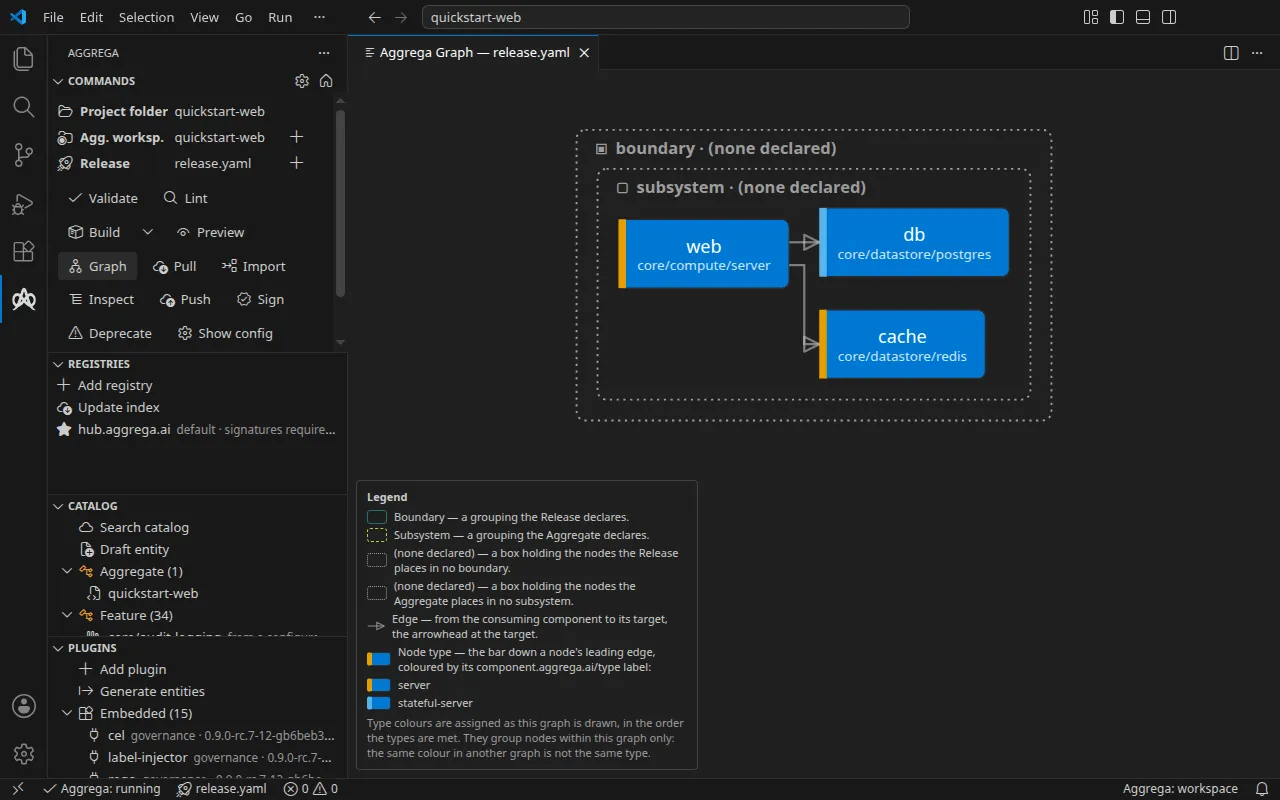
Each container’s title names its kind as well as its grouping, so the outer box and the inner one read apart even in a workspace that declares neither — where both would otherwise carry the same name. A grouping nobody declared, which the compiler creates for components a Release or an Aggregate lists at the top level, is titled as declaring none, and its box is drawn apart from a declared grouping’s — a dotted, neutral border — so it does not read as a grouping of that name; one you declared keeps its name whatever it is, default included.
Each edge carries an arrowhead at the end it points to: an edge runs from the consuming component to its target, and the arrowhead is drawn in the edge’s own colour and dash. A node’s box is sized by measuring the text it draws, both the node’s name and the component beneath it, so neither runs past its border however long the component name is.
A legend at the lower left names each grouping by the document that declares it — a boundary by the Release, a subsystem by the Aggregate — and, where the drawing has one, the box holding the nodes in none, with what it holds; it says which end of an edge is its target; and it names the colour bar down a node’s leading edge and each colour the drawing gives it, beside the component.aggrega.ai/type value that colour stands for exactly as the label is written, with a row for nodes carrying no such label where there are any. It says what those colours do not mean: they are assigned as each graph is drawn, so they group nodes by type within one graph and the same colour in another graph is not the same type. The legend stays where it is whatever you do to the drawing, so wherever the drawing is fitted to the panel — its first drawing, and each time you ask for the graph — it is fitted to the part of the panel above the legend: within the panel’s whole width and the height left above the legend, centred from side to side, so the legend covers none of the drawing however many rows it carries. In a panel too short to leave any room above the legend, the drawing is fitted to the whole panel.
Selecting a node opens a panel listing what is attached to it: each attachment’s Feature and resolved version, the slot it fills or that it fills no declared slot, the FeatureRecipe that realizes it, by name and version, when the compiled graph names one, where it came from, the labels it declares, and the values its author wrote. An attachment written on one of the component’s connections — under features: on a uses entry, in the Aggregate or the Release — is not in that list: it is drawn on the connection it belongs to, as the compiled graph records it, and the node’s panel says when its connections carry any.
Clicking an edge selects the connection it draws and opens the panel on it, titled by the consuming component and its target and naming the socket and the alias, with that connection’s attachments drawn as a node’s are — each one’s Feature and resolved version, the slot it fills, the FeatureRecipe that realizes it when the compiled graph names one, and its values — or a sentence saying nothing is attached to it. Selecting a node clears a selected connection and the other way round; Escape or the panel’s close button clears either, and a redraw keeps the selection while the rebuilt graph still draws the node, or the connection from the same component through the same socket under the same alias.
Below a node’s attachments, under May attach, the panel lists the Features whose declared applicability that node’s labels satisfy on the graph of the Release the panel shows — the Features declared by the documents in the workspace that Release reads, every one but those in a catalog directory only other Releases read, and those held by the catalog directories that Release builds against — each named with its kind and either the workspace file that declares it or the configured catalog it was resolved from. That list is what those Features declare they apply to, not a decision that attaching one will build — and when it is empty it says that no Feature’s declared applicability matches those labels, which is a narrower statement than nothing being attachable. A request the language server could not answer says so in place of the list rather than leaving it blank. A Feature declared behind a link leading out of the workspace — a link to a directory outside it, or a link named like a YAML file that leads to a file outside it — is not offered, because the language server reads no entity through such a link, though your editor’s file tree shows the Feature. Where the workspace holds such a link, a line under the list, or under the sentence standing in for an empty one, says so: Features reached through this link are not offered, because it leads outside the Aggrega workspace: followed by the link’s path relative to the workspace — or Features reached through these links are not offered, because each leads outside the Aggrega workspace: for several, the links to directories first. It names the links the language server reports in the terms of the Release the panel shows, as the Catalog panel does in the selected Release’s. Where that report cannot be read, the list is drawn without the line and the reason is written to the Aggrega output channel; a list that could not be produced carries no line.
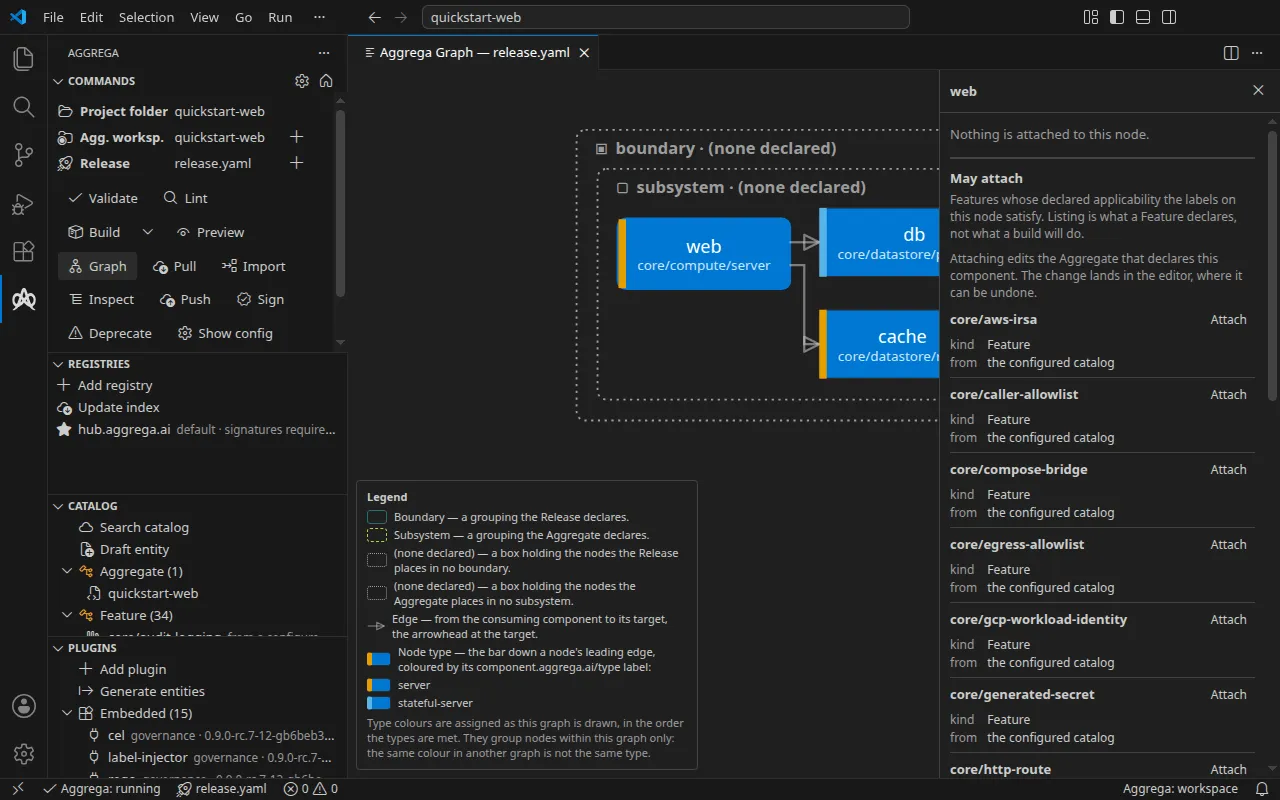
Each row carries an Attach control that commits it: the compiler is asked which document declares the selected component and where inside that document such an attachment belongs, and the entry is written there through the editor — so it joins the undo history, lands on the buffer you are looking at rather than on the last version saved to disk, and leaves the comments and formatting around it as you wrote them. Nothing is saved on your behalf; the edit is a change like any other, and the compiler re-validates it as it would after any edit. The graph redraws when you save, because the topology is compiled from the documents as they stand on disk and an attachment still sitting in the buffer is not yet part of one. The attachment is named after the Feature, and attaching a Feature already attached under that name is refused rather than written twice. A component declared inside a subsystem attaches by the same press as one declared at the top level, and for the same reason both work: the graph identifies a component by its position in the compiled topology, that position does not say which keys the component’s author wrote, and so the extension asks rather than reconstructing — the answer names the document and the path to the block inside it, and both are carried into the edit as they arrived. Where there is no such place to name — an id the graph does not carry, a node it records no document for, or a component whose own block cannot be named in the document it was authored in — what the panel shows is the reason the compiler gave, not a wording of this extension’s own.
A selected connection’s panel has a May attach section of its own: the slots that connection’s socket declares, in the order the component declares them, each with whether it is required, whether what fills it handles sensitive material, the delivery it permits, its selector and its description, and under each slot the Features the language server answers may fill it on that connection — those whose declared applicability the consuming component’s labels satisfy and whose own labels satisfy the slot’s selector. Where no slot may be filled, the panel says why in the language server’s terms — a Feature drew the connection, the socket is one the component does not declare, or the socket declares no slots — and offers nothing to attach. Pressing Attach under a slot writes the Feature under the slot’s name, a <slot>: entry whose type: names the Feature, on that connection’s entry in the document that drew the connection: the Release for a connection the Release drew, the Aggregate otherwise. A connection selected from its entry in a document, by Aggrega: Attach a Feature to the connection at the cursor, is written in that document instead — the Release, for the Release’s own entry for a connection the Aggregate drew — and the panel’s line under May attach then says the Feature is written on that connection’s entry in the document the command was run in. The compiler is asked where that entry goes in that document, any part of the path the document does not carry yet is written with it, and the edit lands in the editor as a node’s does, unsaved. A slot the graph already shows filled on that connection is refused before anything is asked, and a refusal from the compiler is shown in its own words.
A value the compiler reports as sensitive is withheld by the language server from the graph it sends, and withheld again by the extension before the graph is handed to the view at all, so it is not in the view to be shown — the panel names the field and says why it is withheld, and an attachment whose sensitivity marking is in a shape the panel does not recognise withholds every value rather than guessing at it. An attachment drawn on a connection is withheld by exactly the same rule as one drawn on a node, under the same setting. aggrega.graph.showSensitiveValues turns the withholding off for an author who needs to read back what they wrote: only while it is on does the graph request ask the language server for those values, and the settings page says what that displays.
Nodes are laid out in the order the Release’s waves are brought up in, so a boundary that declares a syncWave: appears ahead of the boundaries that wait on it. Hovering a node names its component and resolved version, its labels, its declared wave, and the catalog entity’s own metadata — license, repository, home, keywords and maintainers — showing only the fields the entity actually declares.
An open graph re-renders itself whenever an authored document in the workspace is saved, so it follows your edits without being reopened; it redraws on a save rather than on a keystroke because the topology is compiled from what is on disk. It redraws as well when the selected Release’s lockfile is written — by Aggrega: Pull, by a build with Auto pull, or by aggrega pull in a terminal — because the graph is pinned against that lockfile, and it also redraws when the language server becomes answerable again, so a graph left open across a restart recovers on its own.
A redraw you did not ask for leaves your view where you put it: the pan and zoom you had are kept, whether or not the rebuilt topology differs, so a node the rebuilt layout puts where it was stays under the same part of the panel, and one it puts elsewhere — an added component can shift the ones around it — moves within the view you kept rather than taking the view with it. That includes a redraw that lands while the graph is behind another tab, which you come back to as you left it.
Aggrega: Show topology graph fits the drawing to the panel again, which is the way back to the whole shape after zooming into part of it. A large topology is fitted whole rather than cropped, so a big one arrives small: you see how it is put together, and reach the names by zooming in. Where two or more groupings held in one box lay out taller than they are wide, they are drawn next to one another rather than stacked in one column, so a large topology uses the panel’s width and its first fit draws it larger than a single column would let it.
A rebuild the compiler refuses keeps the drawing you had rather than blanking it — the topology is still worth reading and still where you were working — and dims it, so a drawing that is no longer current is not mistaken for one that is; the notice above it carries the compiler’s own reason. The drawing comes back to full strength as soon as one is built. Layout is computed in the view; the compiler ships topology, never coordinates.