

Choose the Release you work on
Selected Release — a status-bar indicator and a Release row at the top of the Commands panel, each naming the one Release the editor is working on. Everything that acts on a Release — validation, the topology graph, build, preview build and pull — acts on that one. A graph panel already open keeps the Release it was drawn from when you select another, and showing the graph again draws the newly selected one. The graph, build, preview build and pull read the catalog directories that Release builds against: its own, where your workspace configuration names some for it under workspace.releases, and otherwise the workspace’s — the same ones aggrega build --release reads at a terminal, so one window builds each Release of a workspace against its own catalog with no flag to pass. The Catalog panel, an inspection, the Catalog row’s check, hover, completion, Go to Definition, Find References and Find Implementations answer in the selected Release’s terms too: where your workspace configuration names catalog directories for each Release, each reads the documents the workspace holds but those in a directory only another Release reads, and the catalog directories the selected Release builds against — so a name several variants declare, one per Release, resolves to the selected Release’s. With no Release selected they answer in the workspace’s own terms. See Selecting a Release.
Selecting a Release
Most of what the extension does is scoped to a Release: which catalog directories are read, which components resolve, which lockfile pins apply, and which findings a document draws. The extension therefore works on one selected Release at a time, and it shows you which one in the status bar, next to a rocket icon.
A Release you pick is remembered by that editor window. When the language server connects, a remembered choice is checked against what the workspace still offers and restored when it is still there; when it has gone, the editor tells you so and falls back to what your workspace implies, which is where the selection starts when you have chosen nothing in this window. That answer comes from, in order of precedence:
build.authoring_releasein.aggrega-config.yaml, the committed setting a whole team shares..aggrega/active-release, a local marker file that is not committed.- The single Release in the workspace, when there is exactly one.
Click either indicator to select a different Release (or run Aggrega: Select Release… from the Command Palette). The change takes effect immediately — nothing restarts, every open YAML file is re-checked against the Release you just picked, and the Catalog panel reads its list again for it; the same follows when a Release is taken as the language server connects. Being remembered is local to the editor window: choosing writes nothing into your workspace. Where your focus was on the Commands panel as the chooser opened — on its Release row, or on any of its controls — it goes back to that control when the chooser closes, whether you chose a Release or dismissed it; opened from anywhere else, the chooser leaves the panel without the focus.
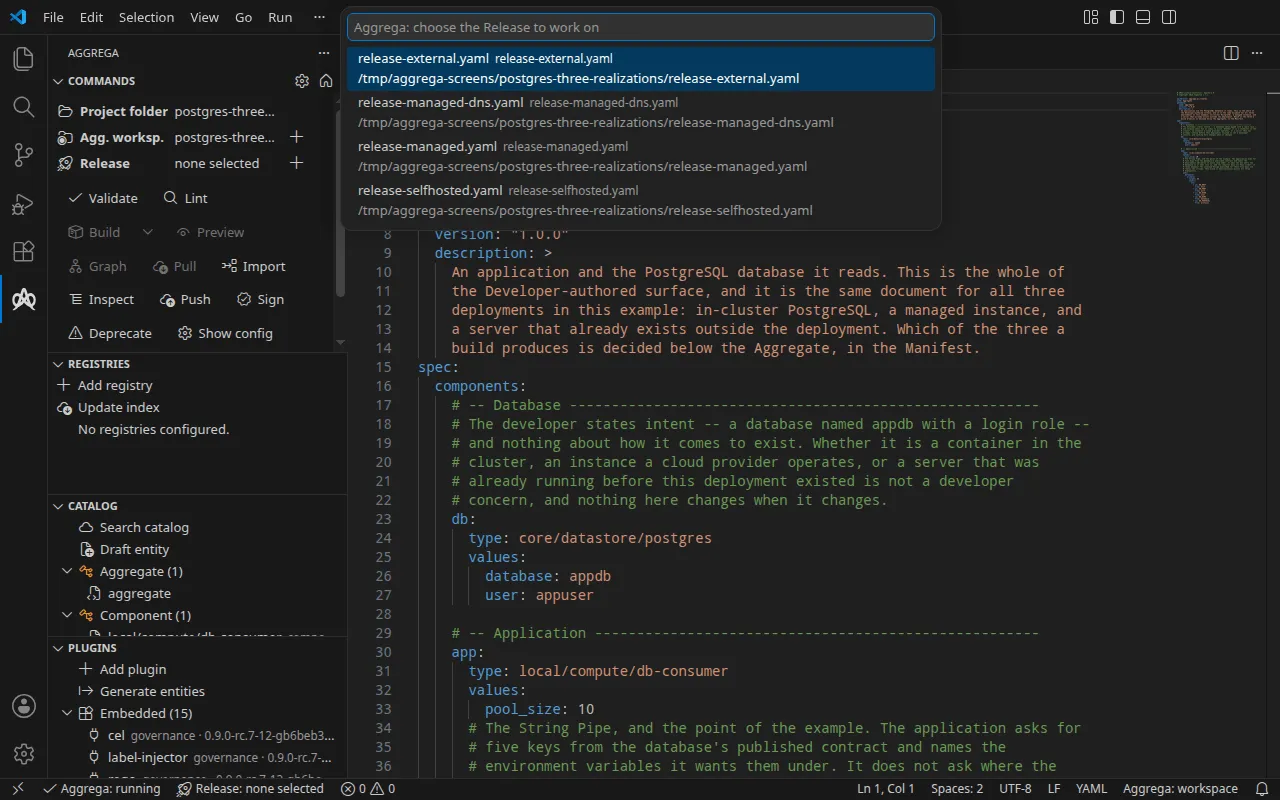
The Releases on offer are the ones inside the folder the language server anchored to, named
relative to it, because that is the form it accepts. Where a Release cannot be offered, the
editor says how many and where they sit rather than leaving them out silently. The language
server reads no Release through a link out of that folder, so a Release your editor’s file tree shows
through a link leading out of it — a link to a directory outside, or to a Release file outside —
is not offered. The one exception is a link to a Release file that the workspace configuration
names, as build.authoring_release or as a key of workspace.releases: that Release is read
through its link and offered. Opening the chooser says so in a notification of its own, naming
by its path relative to that folder each such link standing where the language server would
otherwise read: the links to directories first, then the links to files. A link whose name
ends in .yaml or .yml is named whatever the file it leads to holds, because that file is not
read to find out.
When you want a choice recorded in the workspace itself — so a fresh checkout starts on it — two commands do that, and neither changes what you are working on right now:
- Aggrega: Set the selected Release as this workspace’s default has the language server
write the currently selected Release into
.aggrega/active-release. That file is local to your checkout, so it is the right place for a personal default. Where.aggregaor the marker is a link leading outside the Aggrega workspace, nothing is written, and the notification carries the compiler’s own words for why. - Aggrega: Set authoring_release in .aggrega-config.yaml… opens the configuration file so
you can set
build.authoring_release. That setting is committed and shared, and it outranks the marker file. Where the language server reports that the configuration file is a link leading outside the Aggrega workspace, the file is not opened, and an error says it leads outside the workspace, so Aggrega does not use it; the welcome page’s control that creates a workspace configuration does the same with a file it finds already there.
If the workspace offers no Release — none configured, no marker, and not exactly one file to fall back on — the indicator says so, and it says which of two things is true. It reads Release: none selected where there are Releases to choose between and you are on none of them, and Release: none available where the Aggrega workspace offered none at all. The second is not a state you can answer by choosing, so its tooltip names the ways out of it — work in a different Aggrega workspace, or create a Release — rather than sending you to a list that can only come back empty. Where nothing has read the workspace yet, the tooltip says that rather than reporting a count nobody took. Every one of those readings carries what was looked for, and the full account is written to the Aggrega output channel. Validation still runs in that state: you get the findings a document answers on its own — whether it parses, and whether its own shape is admissible — and the checks that need a Release are skipped until you select one.