

n8n ワークフローをインポートする
このウォークスルーでは、n8n からエクスポートされたワークフロー——OpenAI のチャットモデルとメモリを使ってチャットメッセージに答える AI エージェント——を、書かれたとおりのままでワークフローを載せた n8n を Docker Compose 向けにビルドする Aggregate、Release、Manifest にインポートし、それらをビルドして結果を実行します。以下のすべてのファイルと出力ブロックは実際の実行から得たものです。ワークフローとウォークスルーの各段階は import-n8n サンプルにあり、そこではチェックスクリプトがインポートを再実行し、書き出した内容、表示した内容、このページが引用するブロックを、そこに保存されたファイルと比較し、インポートが書き出したものを検証してビルドします。
サンプルを生成する
このインポートは、このページのコマンドで実行することも、AI アシスタントに実行させることもできます。
例の名前を付けた新しいフォルダーに例を書き出します。
aggrega scaffold --example import-n8nその後、次に実行するコマンドを表示します。最初のコマンドは新しいフォルダーに移動します。それに続く以下のコマンドは、新しいフォルダーの source フォルダーに移動します。このフォルダーには、このページがインポートするものが入っており、インポートはここで実行します:
cd import-n8n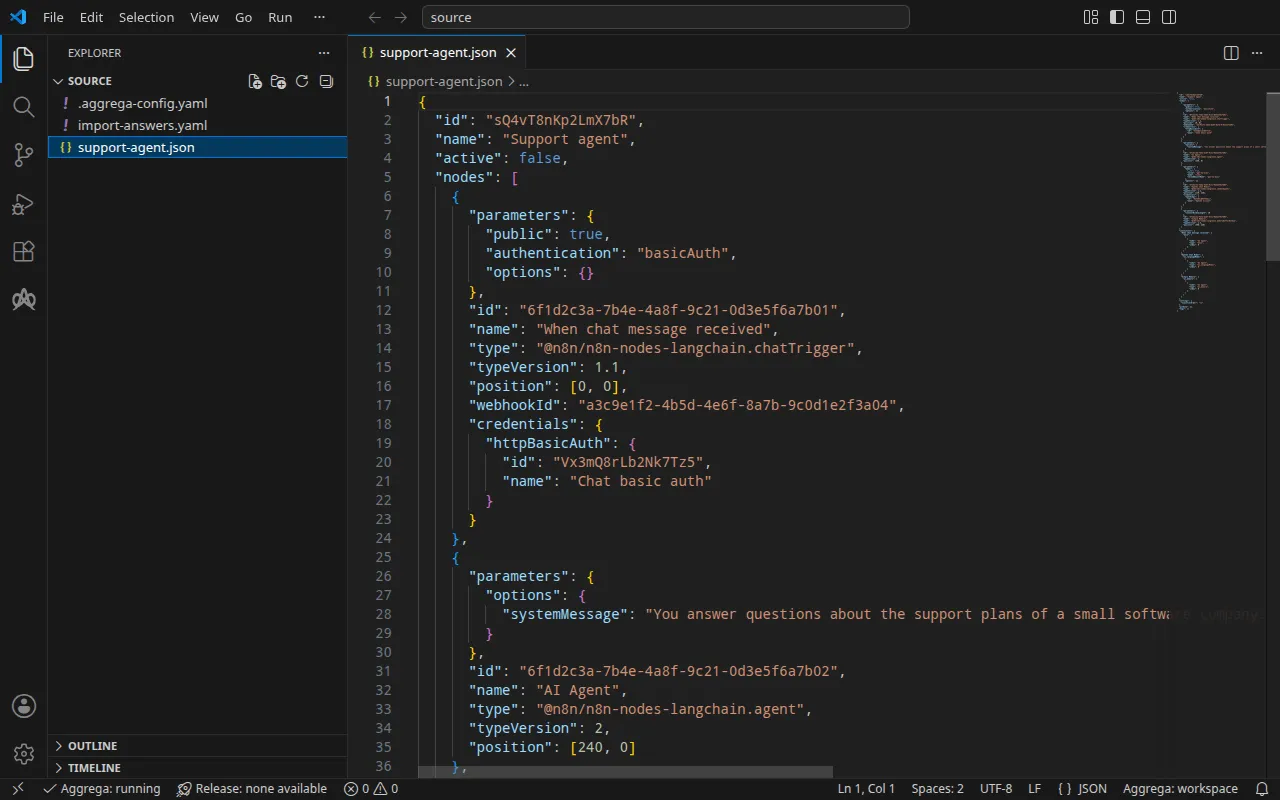
ワークフロー
このウォークスルーのために、n8n がワークフローをエクスポートする形式で書かれた support-agent.json は、4 つのノードを保持しています。チャットトリガー、短いシステムメッセージを持つ AI Agent、gpt-4o-mini を選択する OpenAI Chat Model ノード、そして Simple Memory ノードで、これらは、n8n が各接続の出発元ノードの名前ごとに列挙する接続で結ばれています。チャットトリガーは公開されているため、その URL に送られたチャットメッセージがワークフローを開始します。トリガーは送信者にユーザーとパスワードを求め、n8n が保存している Basic 認証の資格情報と照合します:
"parameters": { "public": true, "authentication": "basicAuth", "options": {} }, [… omitted: the node's identifier, name, type, version, position and webhook identifier] "credentials": { "httpBasicAuth": { "id": "Vx3mQ8rLb2Nk7Tz5", "name": "Chat basic auth" } }モデルノードも同じ方法で、参照によって資格情報を選択します——エクスポートには各資格情報の識別子と名前が含まれ、ユーザー、パスワード、キーは決して含まれません:
"parameters": { "model": { "__rl": true, "value": "gpt-4o-mini", "mode": "list", "cachedResultName": "gpt-4o-mini" }, "options": {} }, "id": "6f1d2c3a-7b4e-4a8f-9c21-0d3e5f6a7b03", "name": "OpenAI Chat Model", "type": "@n8n/n8n-nodes-langchain.lmChatOpenAi", "typeVersion": 1.2, "position": [120, 220], "credentials": { "openAiApi": { "id": "Rb7nW2xQ9kT4mZ1c", "name": "OpenAI account" } }ワークフローの横にある .aggrega-config.yaml によって、このフォルダはワークスペースになります:
# The workspace key marks this directory as the workspace root, so an import run# here writes its drafts beside support-agent.json.workspace: {}# The registry the importer is fetched from the first time an import needs it.default_registry: hub.aggrega.aiまた import-answers.yaml は、どのワークフローにも保持できないものへの回答を保持します。Docker Compose 向けのインポートには回答は不要です。OpenAI キーを、Docker Compose がシェルから値を埋める変数参照でアタッチするためです。Kubernetes 向けのインポートは、Kubernetes Secret の名前でキーをアタッチします。その名前は利用者にしか指定できないため、ファイルがその Secret を指定します(Kubernetes の場合を参照):
# Values the import could not draft from the source, keyed by the drafted file and the key path inside# it. Write each one beside its key; an import of the same source, and a sync, read them from here and# ask nothing. A secret is never written here: its key asks where the secret comes from — a variable# name, ${NAME}, or the name of a Kubernetes Secret.release.yaml: # The origin of the secret value, written by the operator in the Release. Read exactly as # values.origin is. Write it here or in values.origin, never in both. A secret: name where it comes # from, never the value. spec.components.n8n.uses.model.openai-chat-model.features.credential.infra.origin: "openai-api-key"インポート回答ファイルで、このファイルを詳しく説明しています。
インポートは各ノードをワークスペースのカタログの Components と照らし合わせて評価し、--target はそのカタログの Recipes から Manifest を下書きします。ワークスペースはカタログフォルダーを指定していないため、インポートはインポーターの取得元であるレジストリから標準ライブラリのカタログを読み込みます。これは公開されたカタログの署名付きスナップショットで、最初のインポートが取得・検証してワークスペースのコンテンツキャッシュに保持し、インポートが下書きの隣に書き込む記録の中でそのダイジェストによって示されます。AGGREGA_CATALOG_DIRS または workspace.catalog_dirs で独自のカタログフォルダーを指定しているワークスペースは、代わりにそれらに対してインポートします。source に移動します:
cd sourceインポートを実行する
aggrega import support-agent.json --target compose標準出力には書き出したものが一覧表示されます:
wrote aggregate.yamlwrote release.yamlwrote manifest.yamlwrote .aggrega-import.json標準エラーには次のように出力されます(<workspace> は実行したフォルダーを表します):
[… omitted: a warning that the importer runs unverified, printed where its module is read from beside its Plugin entity in a catalog folder rather than fetched]read as the n8n format, with drafted paths relative to <workspace>warn: the value of credentials.httpBasicAuth.id of node When chat message received is carried as written in the flow the draft carries: its format marks the field as a credential, and setting empty_credentials to marked or all writes it emptywarn: the value of credentials.openAiApi.id of node OpenAI Chat Model is carried as written in the flow the draft carries: its format marks the field as a credential, and setting empty_credentials to marked or all writes it emptywarn: node OpenAI Chat Model reaches openai-chat-model, wired to the model socket of core/ai-agent/n8n as openai-chat-model, other than through that connection: an n8n @n8n/n8n-nodes-langchain.lmChatOpenAi node reaches the part at the address the stored credential it selects, or its own parameters, give; the platform delivers this connection as OPENAI_BASE_URL and OPENAI_API_KEY, but an n8n workflow reads a variable of the platform's environment only through an expression reading $env, which the platform refuses while values.allow_env_access_in_nodes is false, the value the draft leaves it at; setting it true lets every workflow, and every user who can edit one, read every variable of the platform's environment, the delivered credentials includedmade no choice for When chat message received (@n8n/n8n-nodes-langchain.chatTrigger)made no choice for AI Agent (@n8n/n8n-nodes-langchain.agent)mapped OpenAI Chat Model (@n8n/n8n-nodes-langchain.lmChatOpenAi) to core/ai-model/openai as a reference, HIGH at 0.9143made no choice for Simple Memory (@n8n/n8n-nodes-langchain.memoryBufferWindow) warning: node "n8n" (provider "compose"): artifact "n8n-flow.compose-fragment.yaml": skipped provenance label injection — the fragment declares no compose service. Compose carries build provenance as service labels, so a fragment contributing only top-level networks, volumes or configs carries none; the services this component emits elsewhere carry the full set.Pull complete: <workspace>/release.lock (entities=8, source_artifacts=0, external_inputs=0)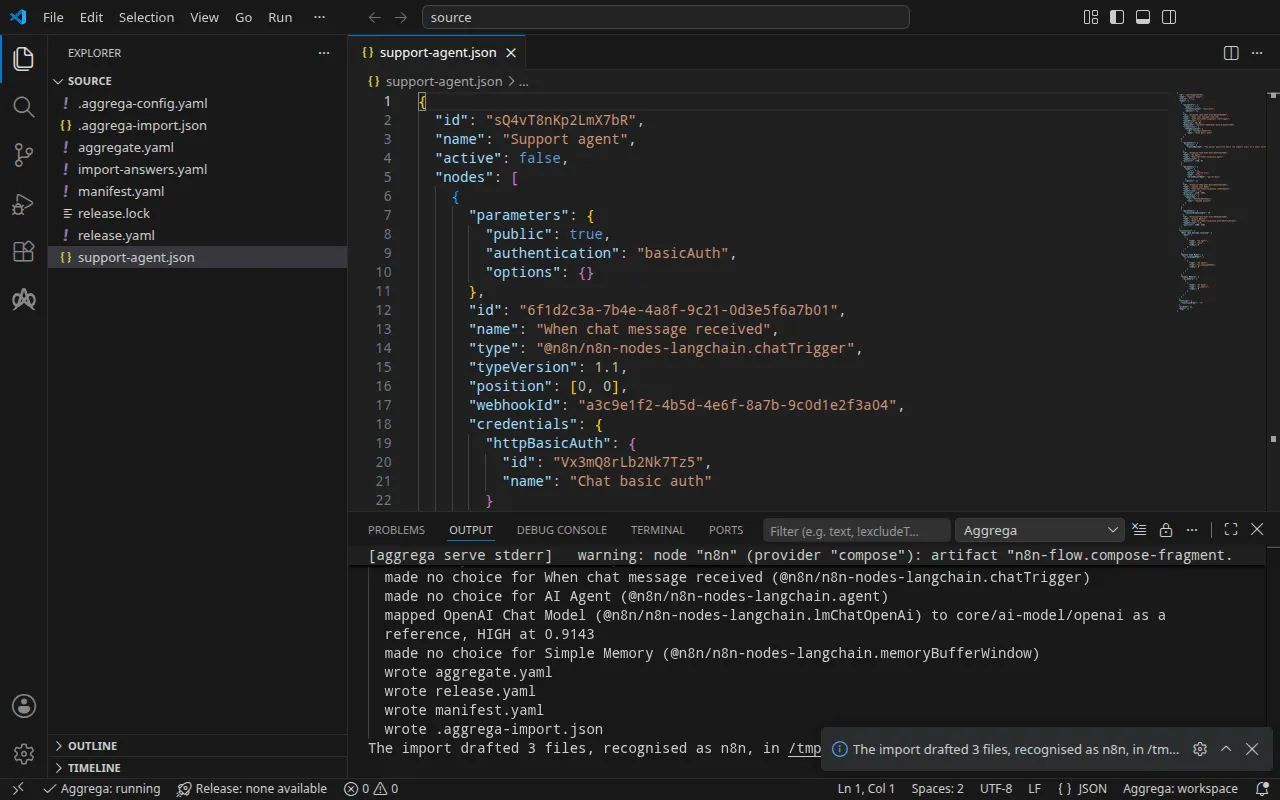
mapped行は、OpenAI Chat Model ノードが標準ライブラリの OpenAI モデルcore/ai-model/openaiになったことを示しています。高ティアで 0.9143 の値で一致したため、下書きではなく参照されています。プラットフォームのmodelソケットに配線された独立したコンポーネントです。made no choice行は、トリガー、エージェント、メモリがワークフローの内部に留まり、n8n 自体がそれらを実行することを示しています。- 最初の 2 つの
warn行は、トリガーとモデルノードが選択する保存済み資格情報の識別子を示しています。n8n はこれらを資格情報としてマークしています。これらはシークレットではなく参照であり、書かれたとおりに引き継がれます。 - 3 番目の
warn行は注意深く読むべきものです。モデルノードは、下書きが配線する接続を通じてではなく、自身が選択する保存済み資格情報を使って OpenAI にアクセスします。プラットフォームは接続を n8n の環境に渡しますが、Aggregate がvalues.allow_env_access_in_nodesをfalseのままにしている間(下書きはそうしています)、n8n はワークフローによる環境の読み取りを拒否します。これをtrueに設定すると、すべてのワークフローと、ワークフローを編集できるすべての人が、渡されたキーを含むプラットフォームのすべての変数を読み取れるようになります。したがって、実行するで示すとおり、ワークフローが使うキーは n8n が保存しているものです。 - 最後の 2 行はプルです。回答すべきものが何も残っていなかったため、インポートは
aggrega pullと同じように下書きされた Release の依存関係をプルし、release.lockを書き込みました。以下のビルドにはそれ以上何も必要ありません。warning行はビルドも出力するもので、検証とビルドで説明しています。
回答ファイルは、このインポートが求めていない Secret を指定しています。インポートはそのために空欄を残さないため、回答を適用せず、ファイルをそのままにします。
書き出される内容
Aggregate、Release、Manifest の名前は imported/support-agent です。ワークフロー自身の名前 Support agent を support-agent に縮めたものです。名前のないワークフローには、そのファイル名から名前が付きます。名前空間は、インポーターの target_namespace 設定が定めるもので、別のものを設定しない限り imported です(設定)。
aggregate.yaml——標準ライブラリの n8n プラットフォーム core/ai-agent/n8n のインスタンスが 1 つあり、エクスポートされたとおりのワークフロー(ここではその大部分を省略しています)を保持し、モデルがその model ソケットに配線されています:
apiVersion: aggrega.ai/v1beta1kind: Aggregatemetadata: name: imported/support-agent version: 0.1.0 description: Draft Aggregate imported from a source in the n8n format.spec: components: n8n: type: core/ai-agent/n8n values: workflow_id: 'sQ4vT8nKp2LmX7bR' flow_definition: | { "id": "sQ4vT8nKp2LmX7bR", "name": "Support agent", [… omitted: the rest of the workflow, as exported] } uses: model: openai-chat-model: target: openai-chat-model # For the compose target, the lines below declare credential on openai-chat-model: a secret the Release alone attaches arrives under the key value, so each is declared with a key of its own and no two arrive under one; the Release attaches its origin, naming this type or none. features: credential: type: core/secret-value values: key: OPENAI_API_KEY # swap to core/ai-model/azure-openai (score 0.4125) by setting type: core/ai-model/azure-openai openai-chat-model: type: core/ai-model/openai values: model: |- gpt-4o-miniworkflow_id は、エクスポートがワークフローに付ける識別子です。モデルは core/ai-model/openai で、ノードが選択するモデル gpt-4o-mini を伴います。その上のコメントは、ノードが似ているカタログ内の別の Component をそのスコアとともに示します。プラットフォームがモデルに提示する OpenAI キーは、n8n の環境に届く際の変数 OPENAI_API_KEY とともに接続上で宣言されます。その出どころは Release が示します。
release.yaml — Manifest を使って Aggregate をデプロイする Release です:
apiVersion: aggrega.ai/v1beta1kind: Releasemetadata: name: imported/support-agent # environment is a drafted default, since no source names the environment this Release deploys to; change it to name the one it deploys to. environment: development version: 0.1.0 description: Draft Release imported from a source in the n8n format.spec: aggregate: imported/support-agent manifest: imported/support-agent components: n8n: infra: # The image running core/ai-agent/n8n, at the version this importer drafts, which the catalog's Recipes for it are known to run; the import does not raise or lower it to follow the source. image: "n8nio/n8n:1.110.1" # Published on this machine's loopback address, 127.0.0.1: reachable from this machine only, by any process running on it. Delete this line to keep the service internal. published_port: 5678 uses: model: openai-chat-model: features: credential: type: core/secret-value infra: # Attached by reference, never as a value: the credential n8n presents to openai-chat-model on its model connection, read from the variable OPENAI_API_KEY, which a target substituting variable references, as Docker Compose does when the stack starts, reads from the environment, so no file carries the value. origin: "${OPENAI_API_KEY}" openai-chat-model: {}environmentはdevelopmentです。これはデフォルトであり、その上のコメントは、Release のデプロイ先の環境に変更するよう指示しています。- イメージは n8n 1.110.1 で、カタログの n8n 用 Recipes が実行するバージョンです。
published_portは 5678 で、n8n が提供するポートです。そのため、エディターは手元のマシンのhttp://127.0.0.1:5678で応答します。コメントにあるとおり、このマシン上のどのプロセスもそこから到達でき、それ以外からは到達できません。n8n をスタックのネットワークだけに置くには、この行を削除します。5678 以外のpublished_portには、その横にinfra.external_base_url: http://127.0.0.1:<published_port>が必要です。そうしないと、n8n はエディターと webhook のアドレスをlocalhost:5678で報告します。- キーは変数参照
${OPENAI_API_KEY}で、スタックの起動時に Docker Compose がシェルから値を埋めます。標準ライブラリの OpenAI モデルはホスト型サービスであり、それへの接続は資格情報を持たなければならないため、ワークフローが n8n のストアからキーを読み取る場合でも、Release は資格情報をアタッチします。
manifest.yaml——プラットフォームとモデルの Compose Recipes、およびキーの変数参照を書かれたとおりに Compose ファイルへ書き込む実現:
apiVersion: aggrega.ai/v1beta1kind: Manifestmetadata: name: imported/support-agent version: 0.1.0spec: mappings: components: type: core/ai-agent/n8n: compose/n8n core/ai-model/openai: compose/openai features: type: core/secret-value: compose/dotenv-secret.aggrega-import.json はインポートが書き込んだ内容の記録で、後の aggrega import --sync がこれを読み取ります。release.lock は、Release が解決するすべてのカタログエンティティをバージョンとダイジェストで固定します。
検証とビルド
aggrega validate --release release.yamlaggrega build --release release.yaml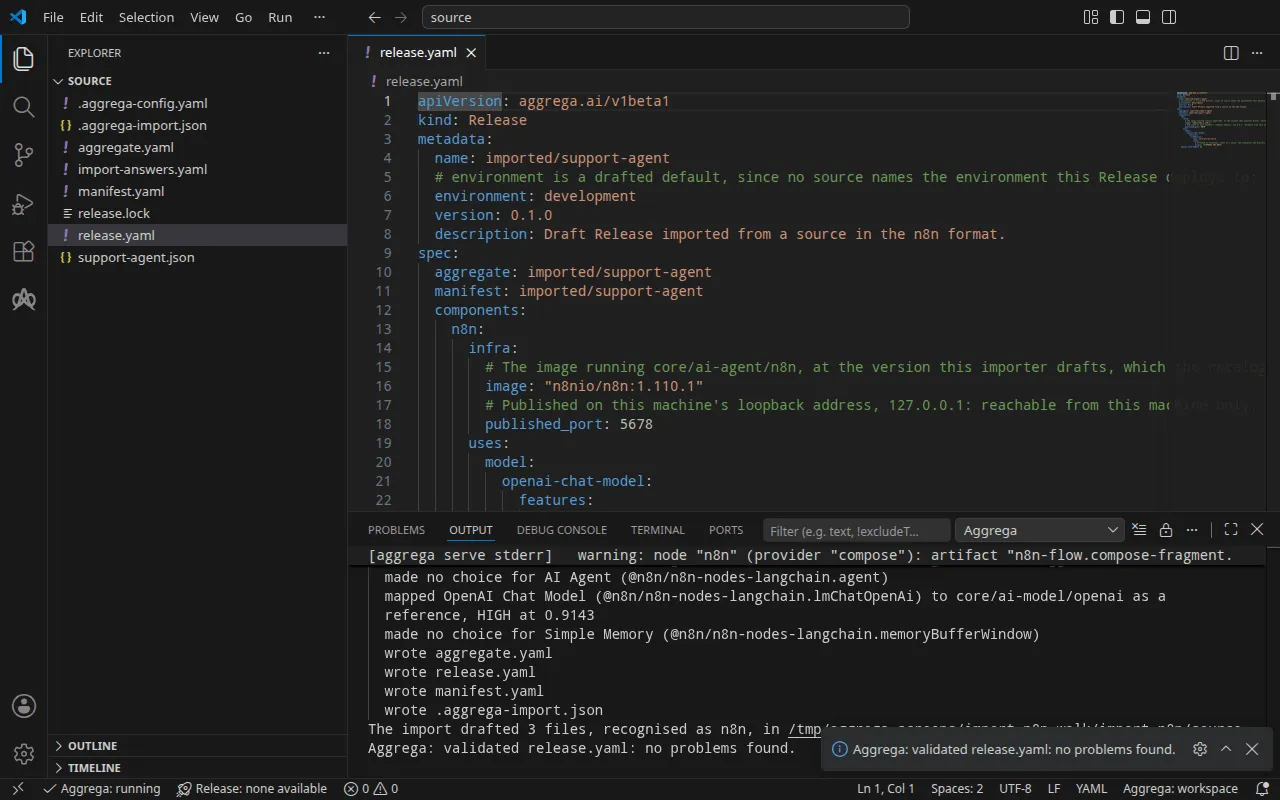
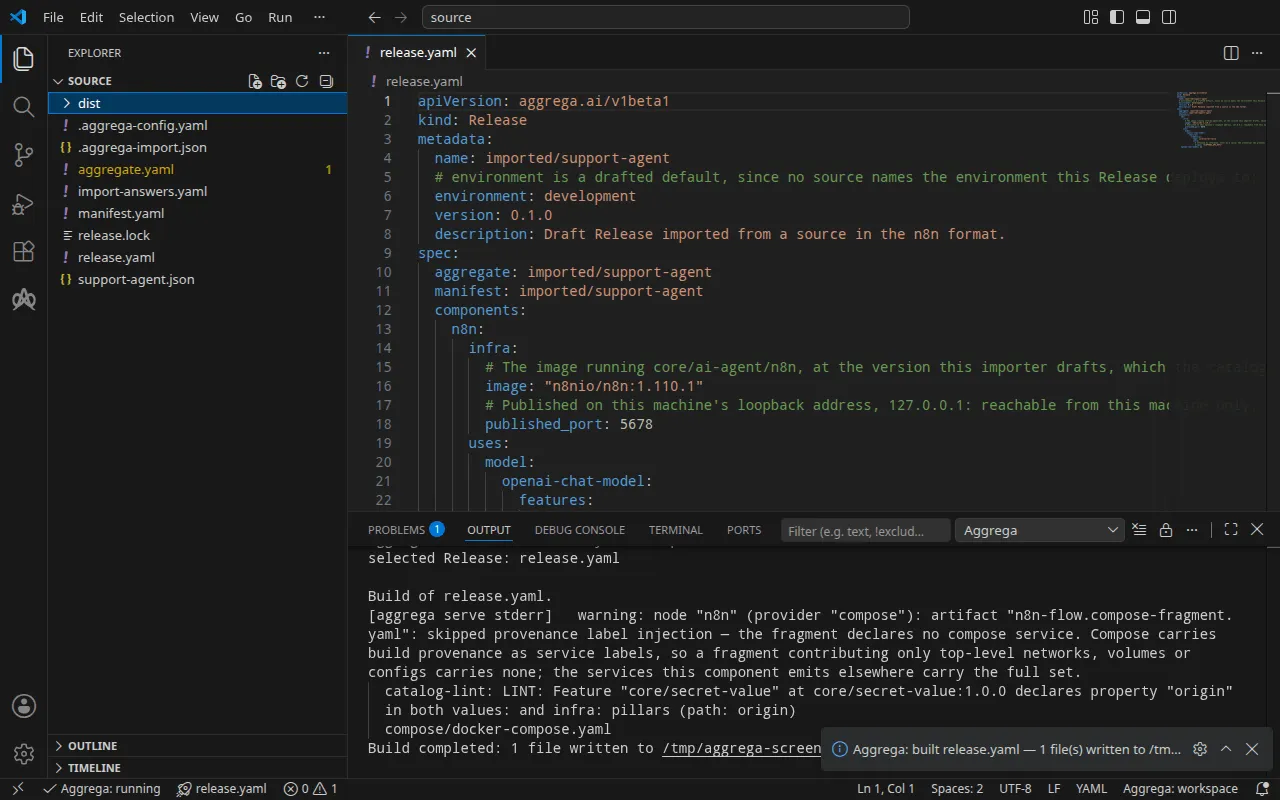
検証の出力は次のとおりです:
notice: LINT: Feature "core/secret-value" at core/secret-value:1.0.0 declares property "origin" in both values: and infra: pillars (path: origin)release dependency validation passed: release.yaml (schema-pillar + dependency pillars)そしてビルドの出力です(<workspace> は下書きがあるフォルダーを表します):
warning: node "n8n" (provider "compose"): artifact "n8n-flow.compose-fragment.yaml": skipped provenance label injection — the fragment declares no compose service. Compose carries build provenance as service labels, so a fragment contributing only top-level networks, volumes or configs carries none; the services this component emits elsewhere carry the full set. notice: LINT: Feature "core/secret-value" at core/secret-value:1.0.0 declares property "origin" in both values: and infra: pillars (path: origin)[… omitted: a total build time, which differs per run]Build completed: 1 file written to <workspace>/distwarning 行は、Compose ファイルのうちワークフローを保持する部分、つまりトップレベルの configs エントリに関するものです。このエントリには、ビルドのラベルを付けるサービスがありません。notice 行は助言的なものです。シークレットの Feature は origin を Aggregate の values または Release の infra から受け取り、この通知は 1 つのリーフが両方で宣言されていることを報告します。どちらも判定を変えません。
dist/compose/docker-compose.yaml は、n8n と、n8n の起動前にワークフローをインポートするサービスを保持しています:
services: n8n: image: n8nio/n8n:1.110.1 environment: OPENAI_BASE_URL: https://api.openai.com/v1 OPENAI_API_KEY: ${OPENAI_API_KEY} N8N_BLOCK_ENV_ACCESS_IN_NODE: "true" ports: - 127.0.0.1:5678:5678 [… omitted: the labels the build writes on every service, naming the Aggregate, the component, the environment and the compiler's version] volumes: - type: volume source: n8n--data target: /home/node/.n8n networks: - compose depends_on: n8n--import-flow: condition: service_completed_successfully [… omitted: the service's health check] n8n--import-flow: image: n8nio/n8n:1.110.1 command: - import:workflow - --input=/flows/workflow.json entrypoint: - n8n [… omitted: the labels the build writes on every service] volumes: - type: volume source: n8n--data target: /home/node/.n8n networks: - compose restart: "no" configs: - source: n8n-flow target: /flows/workflow.jsonワークフローは n8n import:workflow を通じて n8n に届きます。これはスタックが起動するたびに、n8n 本体より先に、同じデータボリューム上で実行されます。N8N_BLOCK_ENV_ACCESS_IN_NODE は "true" で、これはワークフローが環境を読み取ることに対する n8n のブロックです。Aggregate が allow_env_access_in_nodes を false のままにしているためです。そのため、OpenAI Chat Model ノードは、チャットトリガーがユーザーとパスワードを読み取るのと同様に、n8n 自身の資格情報ストアからキーを読み取ります。その両方は後述の実行手順で保存します。n8n の Compose Recipe が手元のマシンでポートを公開するのは、Release が n8n の infra で published_port を設定した場合だけで、その場合もループバックアドレス 127.0.0.1 のみで公開します。設定しなければ、サービスにはスタックのネットワークからしか到達できません。
AI アシスタントを使う
Aggrega のツールでセットアップした AI アシスタントでも同じことができます。次のプロンプトを貼り付けてください。
Aggrega のツールだけを使い、自分ではフォルダーを作成しないでください。ワークスペースフォルダーにまだ `import-n8n` フォルダーがない場合は、`example` を `import-n8n` に設定し、`dir` を指定せずに `scaffold` ツールを 1 回呼び出してください。これは新しい `import-n8n` フォルダーに例を書き込み、その `source` フォルダーにこのページがインポートするものが入ります。次に、`workspace_root` を `import-n8n/source`、`source` を `support-agent.json`、`target` を `compose` に設定して `import` ツールを呼び出してください。これは必要な回答を `support-agent.json` の横にある `import-answers.yaml` から読み取り、下書きを `import-n8n/source` に書き込み、それらに必要なものをプルします。次に、`workspace_root` を `import-n8n/source`、`release` を `release.yaml` に設定して `validate` ツールを呼び出し、`workspace_root` を `import-n8n/source`、`release` を `release.yaml`、`write` を true に設定して `build` ツールを呼び出してください。ビルドが書き込んだファイルを教えてください。それらは `import-n8n/source/dist/` の下にあります。VS Code で開く
Visual Studio Code 用の Aggrega 拡張機能 をインストールしたら、インポートが下書きを書き込んだフォルダー import-n8n/source を VS Code で開きます。このフォルダーには Release が 1 つ、つまり下書きされた release.yaml があるため、エディターがそれを自動的に選択し、下書きを編集するたびにその Release に照らしてチェックし、見つかったものをファイル内と「問題」パネルに表示します。コマンドパレットの Aggrega: Show topology graph は、Release のコンポーネントとそれらの間の接続を描画します。Aggrega: Build、Aggrega: Preview build、Aggrega: Pull は同じ Release に対して動作し、それぞれアクティビティバーの Aggrega ビューにある Commands パネルのボタンとしても使えます。Build はフォルダーの dist/ にファイルを書き込みます。それ以外については Visual Studio Code で Aggrega を使う を参照してください。
実行する
n8n は、ワークフローが選択する 2 つの資格情報を、その識別子によって自身のストアから読み取ります。OpenAI のキーは Rb7nW2xQ9kT4mZ1c の下に、チャットのユーザーとパスワードは Vx3mQ8rLb2Nk7Tz5 の下にあります。n8n 自身のコマンドラインが、ファイルからそれらをこれらの識別子の下に保存します。独自の値を入れて、credentials.json に書き込みます:
[ {"id": "Rb7nW2xQ9kT4mZ1c", "name": "OpenAI account", "type": "openAiApi", "data": {"apiKey": "your OpenAI key"}}, {"id": "Vx3mQ8rLb2Nk7Tz5", "name": "Chat basic auth", "type": "httpBasicAuth", "data": {"user": "a user of your own", "password": "a password of your own"}}]下書きされた Release が読み取るとおりにシェルでキーを設定し、スタックを起動します:
export OPENAI_API_KEY='your OpenAI key'docker compose -p support-agent -f dist/compose/docker-compose.yaml up -d --wait-p はプロジェクトに名前を付けます。これはインポートの実行方法の実行ステップで説明しているとおりです。--wait は、ワークフローをインポートするサービスが実行されて終了した後、n8n が正常と報告した時点で戻ります。資格情報を n8n のコンテナーにコピーし、インポートしてから、コピーを削除します:
docker compose -p support-agent -f dist/compose/docker-compose.yaml exec -T n8n sh -c 'umask 077; cat > /tmp/credentials.json' < credentials.jsondocker compose -p support-agent -f dist/compose/docker-compose.yaml exec n8n n8n import:credentials --input=/tmp/credentials.jsondocker compose -p support-agent -f dist/compose/docker-compose.yaml exec n8n rm /tmp/credentials.json[… omitted: n8n's notices about its settings file's permissions, error tracking and deprecated settings]Successfully imported 2 credentials.これで n8n が両方の資格情報を保持しているため、credentials.json を削除します:
rm credentials.json次にワークフローを有効化し、有効化が反映されるように n8n を再起動します:
docker compose -p support-agent -f dist/compose/docker-compose.yaml exec n8n n8n update:workflow --id=sQ4vT8nKp2LmX7bR --active=truedocker compose -p support-agent -f dist/compose/docker-compose.yaml restart n8ndocker compose -p support-agent -f dist/compose/docker-compose.yaml ps n8n で n8n が再び (healthy) と表示されたら、docker compose -p support-agent -f dist/compose/docker-compose.yaml logs n8n に Activated workflow "Support agent" (ID: sQ4vT8nKp2LmX7bR) と出力されます。
テストする
published_port が公開するアドレス http://127.0.0.1:5678 を開きます。n8n のエディターは初回アクセス時にオーナーアカウントを求め、その後 Support agent を表示します。
チャットトリガーは、上で保存したユーザーとパスワードがある場合にのみメッセージを受け付けます。それらがなければ HTTP/1.1 401 Unauthorized と Authorization is required! を返し、パスワードが誤っていれば HTTP/1.1 403 Forbidden を返します。2 つを CHAT_USER と CHAT_PASSWORD に入れておくと、curl はそれらを標準入力から読み取るため、どのコマンドラインにも現れません:
printf 'user = "%s:%s"\n' "$CHAT_USER" "$CHAT_PASSWORD" | curl --config - -sS -i -X POST \ http://127.0.0.1:5678/webhook/a3c9e1f2-4b5d-4e6f-8a7b-9c0d1e2f3a04/chat -H 'Content-Type: application/json' \ -d '{"action": "sendMessage", "sessionId": "s1", "chatInput": "In one short sentence: what does a support plan cover?"}'HTTP/1.1 500 Internal Server Error[… omitted: the response's other headers]
{"message":"Error in workflow"}この実行では OpenAI のキーにプレースホルダーを保存したため、ワークフローはモデルの呼び出しで停止しました。n8n はその実行を保持しており、エディターはワークフローの実行一覧に、OpenAI の拒否とともに表示します:Incorrect API key provided: sk-place*****************-key. 自分のキーを使えば、応答は HTTP/1.1 200 OK とエージェントの回答で、{"output": "…"} の形になります。
Kubernetes では、Kubernetes の場合 で説明しているビルドを適用すると、n8n は Pod と同じ期間だけ存続するボリュームにデータを保持するため、新しい Pod は保存した内容なしで起動します。代わりに、実行中のインスタンス上で資格情報を保存し、ワークフローを有効化します。実行する と同様に credentials.json を書き、適用先の名前空間で kubectl exec を通じて標準入力からインポートし、その後削除します:
kubectl exec -i -n <namespace> deploy/n8n -- n8n import:credentials --input=/dev/stdin < credentials.jsonDefaulted container "main" out of: main, import-flow (init)[… omitted: n8n's notices about its settings file's permissions, error tracking and deprecated settings]Successfully imported 2 credentials.ローカルポートを n8n の Service n8n-default へフォワードし、コマンドは実行したままにします:
kubectl port-forward -n <namespace> svc/n8n-default 5678:5678別のターミナルから、n8n の API を通じてオーナーアカウントを設定します。これによりサインインし、セッションが cookies.txt に保存されます。その後、ワークフローを有効化します:
curl -sS -c cookies.txt -X POST http://127.0.0.1:5678/rest/owner/setup -H 'Content-Type: application/json' \ -d '{"email": "owner@example.com", "firstName": "Your", "lastName": "Name", "password": "a password of your own"}'curl -sS -b cookies.txt -X PATCH http://127.0.0.1:5678/rest/workflows/sQ4vT8nKp2LmX7bR \ -H 'Content-Type: application/json' -d '{"active": true}'2 番目の応答は "active":true を含むワークフローです。その後、上のチャットメッセージは同じアドレスで変更なしにワークフローに届きます。この実行では同じ {"message":"Error in workflow"} が返り、実行記録にも同じ拒否が残りました。
以下のコマンドでスタックを停止します。-v は n8n のデータボリュームも削除し、それとともに保存された資格情報と有効化も削除されます:
docker compose -p support-agent -f dist/compose/docker-compose.yaml down -vKubernetes の場合
同じワークフローは、helm ターゲットを使って Kubernetes 向けにインポートできます。Docker Compose 向けの下書きはすでに source にあり、インポートはそこにある Aggregate を上書きしないため、--output-dir を使ってこれらを専用のフォルダーに下書きし、そこから検証してビルドします:
aggrega import support-agent.json --target helm --output-dir helmcd helmaggrega validate --release release.yamlaggrega build --release release.yaml下書きは、ターゲットが異なる箇所で異なります。Manifest はプラットフォームを helm/n8n に、モデルを helm/openai に、キーを helm/k8s-existing-secret にマッピングします。後者は、名前空間にすでにある Secret からキーを読み取ります。Release はキーを core/referenced-secret としてアタッチし、回答ファイルからその Secret、openai-api-key を指定します。
ビルドは、ワークスペースのルート source の dist/helm/ の下にプレーンな Kubernetes マニフェストを書き込みます。これは helm から見ると ../dist/helm/ です。適用先の名前空間に Secret を作成し、データキー value の下にキーを保持させてから、インポートの実行方法の実行ステップの説明に従ってフォルダーを適用します。ワークフローは引き続き n8n 自身のストアから資格情報を読み取ります。Kubernetes では、このストアはテストするで設定します。