

LangGraph アプリケーションをインポートする
このウォークスルーでは、LangGraph アプリケーション——注文に関する顧客の質問に答える 1 つのグラフ——の構成をインポートし、Docker Compose 向けにアプリケーションをビルドします。インポートは、ビルドが読み込むすべてのファイルを下書きします。グラフ、そのチェックポインターが状態を保持する PostgreSQL データベース、グラフが呼び出すモデル、変数参照としてのパスワードとキー、そしてそれぞれの実現です。どの構成にも含まれない 2 つの値、つまりグラフのコードが呼び出すモデルと、アプリケーションが実行されるイメージについては、一度だけ尋ねます。以下のすべてのファイルと出力ブロックは実際の実行から得たものです。構成とウォークスルーの各段階は import-langgraph サンプルにあり、そこではチェックスクリプトがインポートを再実行し、書き出した内容、表示した内容、このページが引用するブロックを、そこに保存されたファイルと比較し、インポートが書き出したものを検証してビルドします。
サンプルを生成する
このインポートは、このページのコマンドで実行することも、AI アシスタントに実行させることもできます。
例の名前を付けた新しいフォルダーに例を書き出します。
aggrega scaffold --example import-langgraphその後、次に実行するコマンドを表示します。最初のコマンドは新しいフォルダーに移動します。それに続く以下のコマンドは、新しいフォルダーの source フォルダーに移動します。このフォルダーには、このページがインポートするものが入っており、インポートはここで実行します:
cd import-langgraph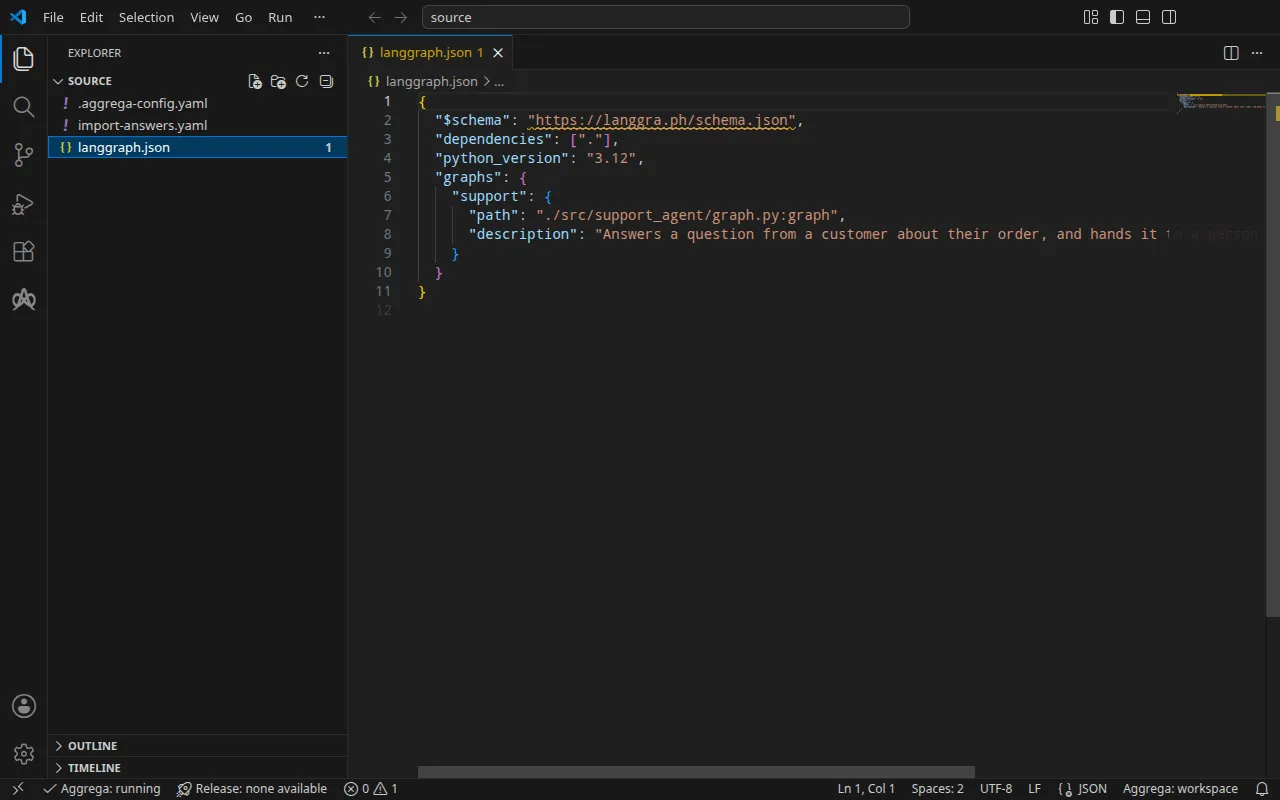
プロジェクト
LangGraph アプリケーションはグラフをコード内に保持し、langgraph.json で宣言します。これは LangGraph のコマンドラインツールの構成ファイルです。このウォークスルー用に書かれたこのアプリケーションは、1 つのグラフ support を、アプリケーションのコード内でのグラフのインポートパスと説明によって宣言します:
{ "$schema": "https://langgra.ph/schema.json", "dependencies": ["."], "python_version": "3.12", "graphs": { "support": { "path": "./src/support_agent/graph.py:graph", "description": "Answers a question from a customer about their order, and hands it to a person when it cannot." } }}インポートは langgraph.json を読み込み、アプリケーションのコードは一切読み込まないため、このサンプルには構成だけが含まれます。その横にある .aggrega-config.yaml によって、このフォルダはワークスペースになります:
# The workspace key marks this directory as the workspace root, so an import run# here writes its drafts beside langgraph.json.workspace: {}# The registry the importer is fetched from the first time an import needs it.default_registry: hub.aggrega.aiインポートはカタログの LangGraph エージェント、PostgreSQL、OpenAI モデルの Components を参照し、--target はカタログの Recipes から Manifest を下書きします。ワークスペースはカタログフォルダーを指定していないため、インポートはインポーターの取得元であるレジストリから標準ライブラリのカタログを読み込みます。これは公開されたカタログの署名付きスナップショットで、最初のインポートが取得・検証してワークスペースのコンテンツキャッシュに保持し、インポートが下書きの隣に書き込む記録の中でそのダイジェストによって示されます。AGGREGA_CATALOG_DIRS または workspace.catalog_dirs で独自のカタログフォルダーを指定しているワークスペースは、代わりにそれらに対してインポートします。
インポートが尋ねる内容
LangGraph の構成はモデルを指定しません。モデルはグラフのコードが選ぶためです。また、イメージも指定しません。そのイメージはプロジェクトからビルドするものだからです。そのため、インポートはその両方を尋ねます。つまり、下書きする OpenAI モデルのためにグラフが呼び出すモデルの名前と、アプリケーションが実行されるイメージです。ターミナルでは質問を行い、回答を下書きと、インポート対象のディレクトリ(ここではプロジェクトのルート .)内にある回答ファイル import-answers.yaml に書き込みます。これにより、次回のインポートはそこから回答を読み込み、何も尋ねません。ターミナルがない場合(継続的インテグレーションの中や、パイプ経由の場合)は何も尋ねず、キーが空のファイルを書き込んで停止します。
2 values the drafts leave empty are still owed, listed in the answers file <workspace>/import-answers.yaml: write each beside its key there, then run the import againこの例にはすでに回答済みのファイルが含まれています。グラフは OpenAI の gpt-4o-mini を呼び出し、ghcr.io/example/support-agent:1.0.0 はビルドするイメージを表します。
# Values the import could not draft from the source, keyed by the drafted file and the key path inside# it. Write each one beside its key; an import of the same source, and a sync, read them from here and# ask nothing. A secret is never written here: its key asks where the secret comes from — a variable# name, ${NAME}, or the name of a Kubernetes Secret.aggregate.yaml: # Left for the author, since the configuration names no model: values.model, the name of the model # core/ai-model/openai serves. spec.components.model.values.model: "gpt-4o-mini"release.yaml: # Container image running the LangGraph application code. The Docker Compose Recipe runs the catalog's # quickstart agent when it is unset. spec.components.support.infra.image: "ghcr.io/example/support-agent:1.0.0" # The origin of the secret value, written by the operator in the Release. Read exactly as # values.origin is. Write it here or in values.origin, never in both. A secret: name where it comes # from, never the value. spec.components.support.uses.checkpointer_db.postgres.features.credential.infra.origin: "support-db-password" # The origin of the secret value, written by the operator in the Release. Read exactly as # values.origin is. Write it here or in values.origin, never in both. A secret: name where it comes # from, never the value. spec.components.support.uses.model.model.features.credential.infra.origin: "openai-api-key" # The origin of the secret value, written by the operator in the Release. Read exactly as # values.origin is. Write it here or in values.origin, never in both. A secret: name where it comes # from, never the value. spec.components.postgres.features.password.infra.origin: "support-db-password"3 つの origin の回答は、--target helm を指定した Kubernetes 向けのビルドのためのものです。その場合、データベースのパスワードと OpenAI のキーは Kubernetes の Secret から読み込まれ、各回答は Secret の名前です。データベースのパスワードは両端とも support-db-password から、キーは openai-api-key から読み込まれ、パスワードやキーそのものが回答になることはありません。Docker Compose 向けのビルドは代わりにシェルからそれらを読み込むため、このインポートではそれらの回答を使用しません。インポート回答ファイルでは、ファイル、質問、およびシークレットの回答に関するルールを説明しています。
aggrega import には、別の場所に保存された回答ファイルを指定する --answers を含め、このコマンドが受け付けるすべてのフラグが記載されています。
source に移動します:
cd sourceインポートを実行する
アプリケーションのディレクトリを指定します。インポートはその中の langgraph.json だけを読み込み、それ以外のファイルは読み込みません:
aggrega import . --target compose標準出力には書き出したものが一覧表示されます:
wrote aggregate.yamlwrote release.yamlwrote manifest.yamlwrote .aggrega-import.json標準エラーには次のように出力されます(<workspace> は実行したフォルダーを表します):
[… omitted: a warning that the importer runs unverified, printed where its module is read from beside its Plugin entity in a catalog folder rather than fetched]read as the langgraph format, with drafted paths relative to <workspace>info: the answers file <workspace>/import-answers.yaml also answers spec.components.postgres.features.password.infra.origin in release.yaml, spec.components.support.uses.checkpointer_db.postgres.features.credential.infra.origin in release.yaml, spec.components.support.uses.model.model.features.credential.infra.origin in release.yaml, which these drafts do not leave empty; those answers are kept there and not appliedmapped support (graph) to core/ai-agent/langgraph as a reference, NONEmapped checkpointer (checkpointer) to core/datastore/postgres as a reference, NONEmapped model (model) to core/ai-model/openai as a reference, NONEPull complete: <workspace>/release.lock (entities=10, source_artifacts=0, external_inputs=0)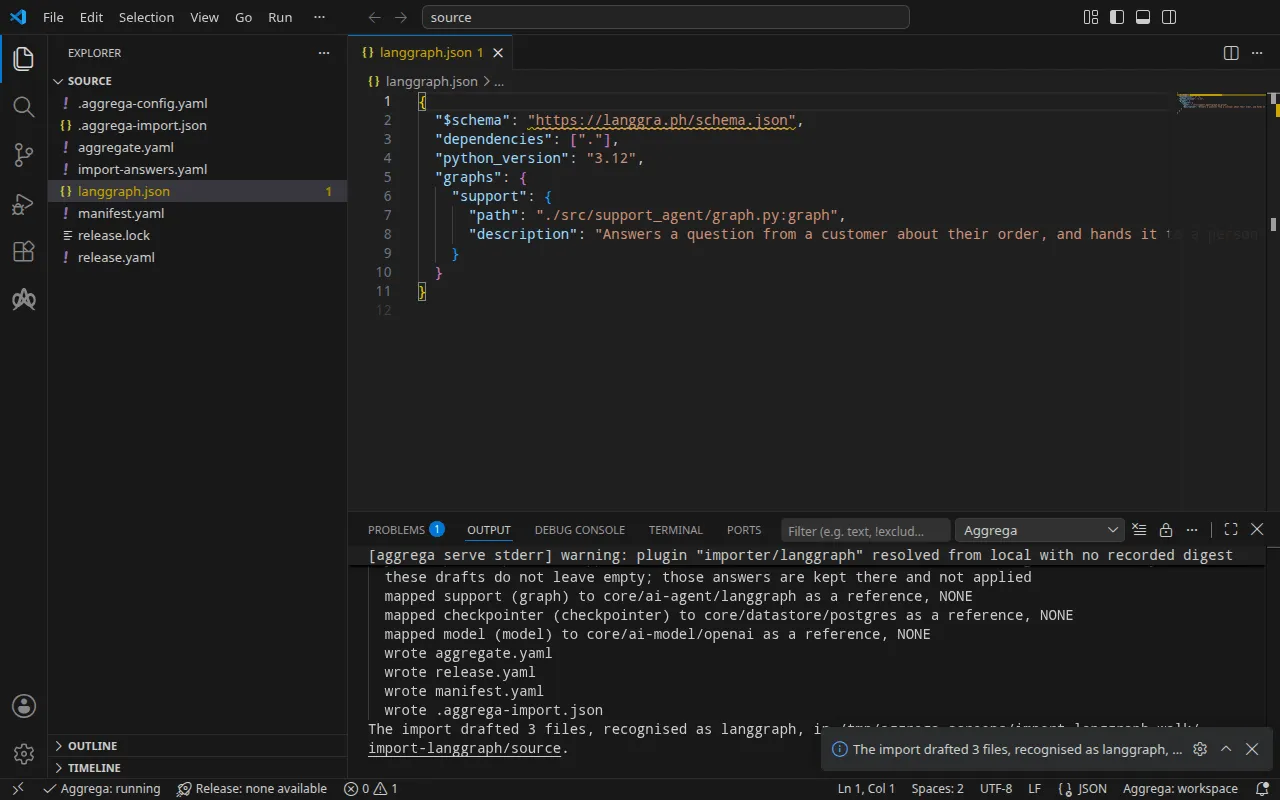
info行は、Docker Compose の下書きでは使われず、Kubernetes 向けのビルドのために回答ファイルに保持されている回答を示します。mapped行は、グラフが標準ライブラリの LangGraph エージェントcore/ai-agent/langgraphのインスタンスであること、そのチェックポインター(LangGraph が各グラフの状態を保持する場所)がcore/datastore/postgresのインスタンスであること(構成はチェックポインターを指定しておらず、その場合 LangGraph は状態を PostgreSQL に保持するため)、そしてすべてのグラフが呼び出すモデルがcore/ai-model/openaiのインスタンスであることを示しています。ティアはNONEと表示されます。LangGraph のインポートは、それぞれをカタログと照らし合わせて評価するのではなく、構成が宣言している内容によってこれらの Components を参照するためです。checkpointer.backendがmongoである構成は、MongoDB のプロトコルを話すcore/datastore/ferretdbをcore/datastore/documentdbの上に置いて下書きされ、両者はカタログの FerretDB Aggregate と同じように接続され、両方に 1 つのパスワードが使われます。Pull completeの行は、インポートが、ドラフトされた Release の依存先をaggrega pullと同じようにrelease.lockへ取得していることを示します。これにより、ドラフトはすぐに検証とビルドができます。--offlineの場合、インポートは何も取得せず、実行すべきaggrega pullを示します。
書き出される内容
Aggregate、Release、Manifest の名前は imported/support です。設定ファイルには独自の名前がないため、langgraph.json が提供する唯一のグラフ support から名前が付きます。複数のグラフを提供する設定ファイルには、そのファイル名から、またはここでのようにインポートにディレクトリを渡した場合はそのディレクトリ名から名前が付きます。名前空間は、インポーターの target_namespace 設定が定めるもので、別のものを設定しない限り imported です(設定)。
aggregate.yaml——グラフ、その状態を保持するデータベース、そしてグラフが呼び出すモデルです。各接続は提示する認証情報を宣言しています。冒頭のコメントが、何を読み込み、何を読み込まなかったかを示しています:
# LangGraph configurations read:# - langgraph.json# Not read: the application's code, which defines each graph; it runs in the image the Release names for each graph.# Not carried, since they configure the server image langgraph build builds, and the image the Release names is the application's own: dependencies, python_version.apiVersion: aggrega.ai/v1beta1kind: Aggregatemetadata: name: imported/support version: 0.1.0 description: Draft Aggregate imported from a source in the langgraph format.spec: components: support: type: core/ai-agent/langgraph values: graph_entrypoint: "./src/support_agent/graph.py:graph" description: "Answers a question from a customer about their order, and hands it to a person when it cannot." uses: checkpointer_db: postgres: target: postgres # For the compose target, the lines below declare credential on postgres: a secret the Release alone attaches arrives under the key value, so each is declared with a key of its own and no two arrive under one; the Release attaches its origin, naming this type or none. features: credential: type: core/secret-value values: key: POSTGRES_PASSWORD model: model: target: model # For the compose target, the lines below declare credential on model: a secret the Release alone attaches arrives under the key value, so each is declared with a key of its own and no two arrive under one; the Release attaches its origin, naming this type or none. features: credential: type: core/secret-value values: key: OPENAI_API_KEY # The database the configuration's checkpointer keeps each graph's state in, PostgreSQL. postgres: type: core/datastore/postgres features: # For the compose target, the lines below declare password on postgres: a secret the Release alone attaches arrives under the key value, so each is declared with a key of its own and no two arrive under one; the Release attaches its origin, naming this type or none. password: type: core/secret-value values: key: POSTGRES_PASSWORD # The model every graph calls, which the configuration does not name. model: type: core/ai-model/openai values: # Left for the author, since the configuration names no model: values.model, the name of the model core/ai-model/openai serves. model: "gpt-4o-mini"graph_entrypoint は構成に書かれたとおりのグラフのインポートパスです。その checkpointer_db 接続はデータベースに、model 接続はモデルに配線されており、モデルの名前はインポートが import-answers.yaml から読み取った回答です。recursion_limit は書かれていないため、Component のデフォルト値である 25 がそのまま使われます。データベースにはパスワードが与えられるため、PostgreSQL の Recipe は独自のパスワードを書かず、グラフはデータベースへの接続で同じパスワードを提示します。
release.yaml——環境、イメージ、公開ポート、そしてキーとパスワードの取得元です。グラフの上には、そのイメージが何であり何が渡されるかを述べるコメントがあります:
apiVersion: aggrega.ai/v1beta1kind: Releasemetadata: name: imported/support # environment is a drafted default, since no source names the environment this Release deploys to; change it to name the one it deploys to. environment: development version: 0.1.0 description: Draft Release imported from a source in the langgraph format.spec: aggregate: imported/support manifest: imported/support components: # Each graph's image is the application's own, not the server image langgraph build builds: its code, with LangGraph installed. # It is handed, for its code to read, the graph to run as LANGGRAPH_GRAPH_ENTRYPOINT, the model's name as OPENAI_MODEL, the checkpointer store's host and port as LANGGRAPH_CHECKPOINTER_HOST and LANGGRAPH_CHECKPOINTER_PORT, its user and database, where the store publishes them, as LANGGRAPH_CHECKPOINTER_USER and LANGGRAPH_CHECKPOINTER_DATABASE, and a password attached on the checkpointer_db connection as LANGGRAPH_CHECKPOINTER_PASSWORD. # It is also handed the model's address as OPENAI_BASE_URL and a key attached on the model connection as OPENAI_API_KEY, which the OpenAI client library reads, and recursion_limit as LANGGRAPH_DEFAULT_RECURSION_LIMIT, which LangGraph reads. # An inject: block on the graph's own instance, through an entry reading graph_entrypoint alone, replaces LANGGRAPH_GRAPH_ENTRYPOINT with the name it writes; one on the model connection replaces OPENAI_MODEL, and one on the checkpointer_db connection the store's host, port, user and database, with the names it writes. support: infra: # Left for the Release, since the source cannot supply it: infra.image, the container image running the application image: "ghcr.io/example/support-agent:1.0.0" # Published on this machine's loopback address, 127.0.0.1: reachable from this machine only, by any process running on it. Delete this line to keep the service internal. published_port: 8000 uses: checkpointer_db: postgres: features: credential: type: core/secret-value infra: # Attached by reference, never as a value: the credential support presents to postgres on its checkpointer_db connection, the password of postgres (the configuration names no variable for it), read from the variable POSTGRES_PASSWORD, which a target substituting variable references, as Docker Compose does when the stack starts, reads from the environment, so no file carries the value. origin: "${POSTGRES_PASSWORD}" model: model: features: credential: type: core/secret-value infra: # Attached by reference, never as a value: the credential support presents to model on its model connection (the source names no variable for it, so it is read from the one OpenAI's client libraries read the API key from), read from the variable OPENAI_API_KEY, which a target substituting variable references, as Docker Compose does when the stack starts, reads from the environment, so no file carries the value. origin: "${OPENAI_API_KEY}" postgres: features: password: type: core/secret-value infra: # Attached by reference, never as a value: the password of postgres (the configuration names no variable for it), read from the variable POSTGRES_PASSWORD, which a target substituting variable references, as Docker Compose does when the stack starts, reads from the environment, so no file carries the value. origin: "${POSTGRES_PASSWORD}" model: {}環境 development は、どの構成も環境を指定していないためにインポートが書くデフォルト値です。Release を別の場所にデプロイする場合は変更してください。イメージは、インポートが import-answers.yaml から読み取った回答です。グラフはマシンのループバックアドレスの 8000 で公開され、そのプログラムがリッスンするポート infra.port に転送されます。このポートは設定しない限り 8000 です。キーとパスワードは変数参照 ${OPENAI_API_KEY} と ${POSTGRES_PASSWORD} であり、値ではありません。
manifest.yaml——各タイプの Compose 用 Recipe と、各変数参照を書かれたとおりに Compose ファイルへ書き込む実現です:
apiVersion: aggrega.ai/v1beta1kind: Manifestmetadata: name: imported/support version: 0.1.0spec: mappings: components: type: core/ai-agent/langgraph: compose/langgraph core/datastore/postgres: compose/postgres core/ai-model/openai: compose/openai features: type: core/secret-value: compose/dotenv-secretrelease.lock は Release が解決されたカタログエンティティをダイジェストで記録し、.aggrega-import.json はインポートが書き出した内容の記録で、後の aggrega import --sync がこれを読み取ります。
検証とビルド
aggrega validate --release release.yamlaggrega build --release release.yaml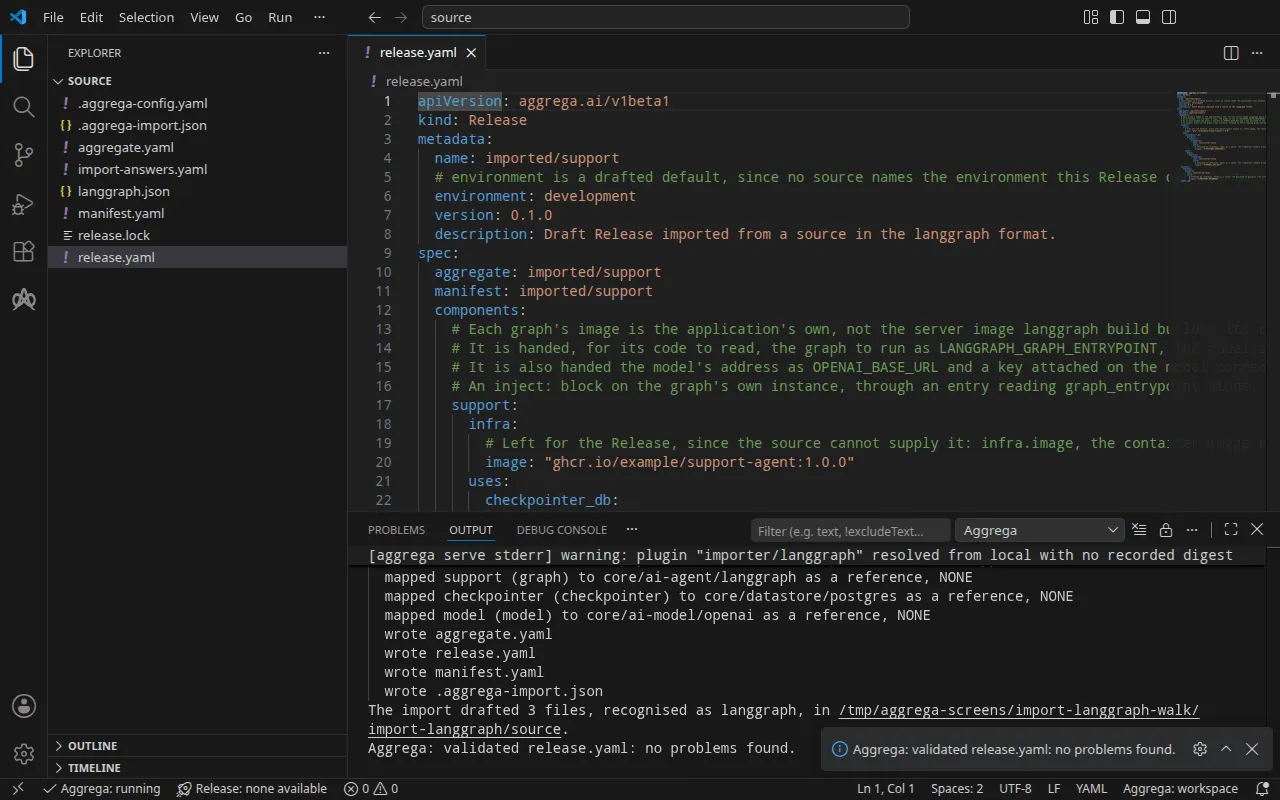
検証の出力は次のとおりです:
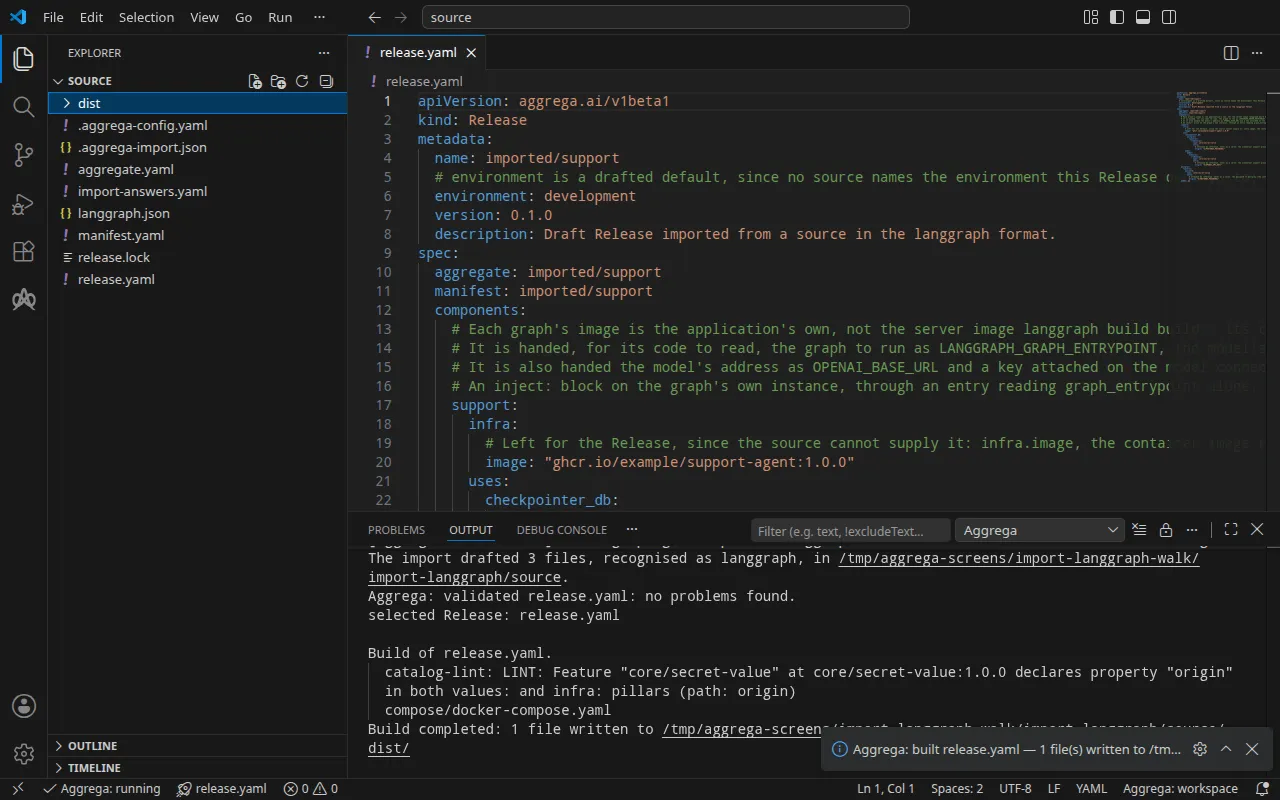
notice: LINT: Feature "core/secret-value" at core/secret-value:1.0.0 declares property "origin" in both values: and infra: pillars (path: origin)release dependency validation passed: release.yaml (schema-pillar + dependency pillars)そしてビルドは次のとおりです(<workspace> は実行したフォルダーを表します):
notice: LINT: Feature "core/secret-value" at core/secret-value:1.0.0 declares property "origin" in both values: and infra: pillars (path: origin)[… omitted: a total build time, which differs per run]Build completed: 1 file written to <workspace>/distnotice 行は助言です。シークレット Feature は origin を Aggregate の values または Release の infra から受け付け、この通知は 1 つのリーフが両方で宣言されていることを報告しています。判定は何も変わりません。
ビルドは dist/compose/docker-compose.yaml を書き出し、グラフ用のサービス、データベース用のサービス、そしてデータベースを待つサービスを含めます。グラフのサービスは次のとおりです:
support: image: ghcr.io/example/support-agent:1.0.0 environment: LANGGRAPH_DEFAULT_RECURSION_LIMIT: "25" OPENAI_BASE_URL: https://api.openai.com/v1 OPENAI_MODEL: gpt-4o-mini LANGGRAPH_CHECKPOINTER_HOST: postgres LANGGRAPH_CHECKPOINTER_PORT: "5432" LANGGRAPH_CHECKPOINTER_USER: appuser LANGGRAPH_CHECKPOINTER_DATABASE: appdb LANGGRAPH_GRAPH_ENTRYPOINT: ./src/support_agent/graph.py:graph OPENAI_API_KEY: ${OPENAI_API_KEY} LANGGRAPH_CHECKPOINTER_PASSWORD: ${POSTGRES_PASSWORD} ports: - 127.0.0.1:8000:8000 [… omitted: the labels the build writes on every service, naming the Aggregate, the component, the environment and the compiler's version] networks: - compose depends_on: support--wait-for-store: condition: service_completed_successfully postgres: condition: service_startedグラフは、モデルのアドレス、名前、キー、データベースのホスト、ポート、ユーザー、データベース名、パスワード、そしてグラフ自身のエントリポイントを受け取ります。ユーザーとデータベース名は PostgreSQL Component のデフォルトである appuser と appdb で、後述のデータベースのサービスはこれらで作成されます。グラフがこれらを受け取るのは PostgreSQL Recipe が両方を公開するためで、Valkey のようにどちらも公開しないストアの場合は、どちらも受け取りません。モデルの名前、データベースのホスト、ポート、ユーザー、データベース名、グラフのエントリポイントは、LangGraph Component がデフォルトで渡す名前で届きます。接続に、あるいは自身の値についてはコンポーネント自体に inject: ブロックを付けると、それらの名前はコードが読み取る名前に置き換わります。モデルのアドレス、キー、データベースのパスワードはブロックに書かれた名前のままであり、LANGGRAPH_DEFAULT_RECURSION_LIMIT も同様です。これは、構成でステップ上限が設定されていない実行のステップ上限として LangGraph が自ら読み取る変数です。データベース自身のサービスも同じパスワードを受け取ります:
postgres: image: postgres:16 environment: POSTGRES_USER: appuser POSTGRES_PASSWORD: ${POSTGRES_PASSWORD} POSTGRES_DB: appdb [… omitted: the labels the build writes on every service, the network, and a health check running PostgreSQL's pg_isready]グラフのサービスは、3 つ目のサービスが完了してから起動します。3 つ目のサービスは、グラフ自身のイメージではなくカタログの quickstart エージェントのイメージで 1 回だけ実行され、データベースのアドレスが TCP 接続を受け付けるまで、2 秒ごとに最大 300 秒試行しながら待機します。それまでに接続できなければ、アドレスを示して終了し、グラフは起動されません。このサービスに渡されるのは、データベースのホストとポートだけです:
support--wait-for-store: image: hub.aggrega.ai/tools/quickstart-agent:1.0.1@sha256:a5f8dcfbb670d86a0cae0aadd2844bec93221a651238f8be3863873e261ee168 [… omitted: the command and the entrypoint, a bash loop that opens a connection to the address] environment: STORE_HOST: postgres STORE_PORT: "5432" [… omitted: the labels the build writes on every service, and the network] restart: "no"キーとパスワードは変数参照であり、スタックの起動時にシェルから埋められます。モデルには独自のサービスはありません。グラフは OpenAI API にその API 自身のアドレスで到達します。グラフのサービスは 127.0.0.1 だけでポートを公開し、データベース自身のポートにはスタックのネットワーク上で到達し、何も公開されません。
AI アシスタントを使う
Aggrega のツールでセットアップした AI アシスタントでも同じことができます。次のプロンプトを貼り付けてください。
Aggrega のツールだけを使い、フォルダは自分で作成しないでください。Workspace フォルダにまだ `import-langgraph` フォルダがない場合は、`scaffold` ツールを `example` を `import-langgraph` に設定し、`dir` を指定せずに 1 回呼び出してください。これにより例が新しい `import-langgraph` フォルダに書き込まれ、その `source` フォルダにこのページでインポートするものが入ります。次に、`import` ツールを `workspace_root` を `import-langgraph/source`、`source` を `.`、`target` を `compose` に設定して呼び出してください。これは必要な回答を `langgraph.json` の横にある `import-answers.yaml` から読み取り、ドラフトを `import-langgraph/source` に書き込み、ドラフトが必要とするものをプルします。次に、`validate` ツールを `workspace_root` を `import-langgraph/source`、`release` を `release.yaml` に設定して呼び出し、`build` ツールを `workspace_root` を `import-langgraph/source`、`release` を `release.yaml`、`write` を true に設定して呼び出してください。ビルドが書き出したファイルを教えてください。それらは `import-langgraph/source/dist/` の下にあります。VS Code で開く
Visual Studio Code 用の Aggrega 拡張機能をインストールした状態で、インポートがドラフトを書き込んだフォルダ import-langgraph/source を VS Code で開きます。このフォルダには Release が 1 つ、ドラフトされた release.yaml だけがあるため、エディタはそれを自動で選択し、ドラフトを編集するたびにその Release に照らしてチェックし、見つかった内容をファイル内と問題パネルに表示します。コマンドパレットの Aggrega: Show topology graph は、Release のコンポーネントとそれらの間の接続を描画します。Aggrega: Build、Aggrega: Preview build、Aggrega: Pull は同じ Release に対して動作し、それぞれアクティビティバーの Aggrega ビューにある Commands パネルのボタンとしても使えます。Build はフォルダの dist/ にファイルを書き出します。その他については Visual Studio Code で Aggrega を使う を参照してください。
実行する
イメージは、独自の Dockerfile を使ってプロジェクトからビルドします。中身はグラフのコードで、LangGraph がインストールされています。Recipe がコマンドを設定しないため、Docker Compose はイメージ自身のコマンドをグラフのサービスとして実行します。そのため、そのコマンドは実行を続ける必要があり、グラフにアクセスしたい場合はリクエストを処理する必要があります。コマンドは上記の変数を通じてグラフ、モデル、データベースを見つけます。アドレス、ルート、応答はプログラムが決めます。
以下の実行では、そのようなイメージを使用しました。langgraph.json が指定するパス src/support_agent/graph.py にあるグラフ、OPENAI_MODEL が指定するモデルを通じて応答する 1 つのノード、そしてイメージのコマンドとして、ポート 8000 で動作するプログラム独自の小さな HTTP サーバーです。イメージは作業ディレクトリにプロジェクトの構成を保持しているため、LANGGRAPH_GRAPH_ENTRYPOINT が指定する、そこからの相対パスでグラフが見つかります。サーバーはそのグラフを読み込み、LangGraph の PostgreSQL チェックポインターを通じて各会話の状態をデータベースに保持し、POST /threads/<thread>/runs ごとにグラフを 1 回実行します。このチェックポインターはデータベースのホスト、ポート、ユーザー、データベース名、パスワードで開かれ、それぞれの値はそれが届く LANGGRAPH_CHECKPOINTER_ 変数から読み取られるため、プログラム自身はそのどれも書きません。グラフのサービスはデータベースが接続を受け付けるようになった時点で起動するため、起動時にチェックポインターを開くサーバーは、接続を受け付けているデータベースを見つけます。プロジェクトのルートでイメージをビルドし、import-answers.yaml の ghcr.io/example/support-agent:1.0.0 をその名前に書き換え、--sync を付けて再度インポートします。これにより新しい回答が下書きに書き込まれ、再度プルされます。その後ビルドします:
docker build -t order-support:local .aggrega import . --syncaggrega build --release release.yaml次に、シェルでキーとデータベースのパスワードを設定し、スタックを起動します:
export OPENAI_API_KEY='your OpenAI key'export POSTGRES_PASSWORD='a password of your own'docker compose -p order-support -f dist/compose/docker-compose.yaml up -d --wait-p はプロジェクト名を指定します。これは インポートの実行方法 の実行ステップで説明しているとおりです。--wait は、データベースが正常と報告し、その待機が完了し、グラフのサービスが実行された時点で戻ります。
テストする
以下のリクエストは、このウォークスルーのイメージが実行するプログラムに届きます。それは、ポート 8000 の小さな HTTP サーバーの背後にあるグラフで、POST /threads/<thread>/runs に応答します。独自のプログラムでは、ルートと応答はそのプログラム自身が決めます。published_port が公開するアドレス http://127.0.0.1:8000 に送ります:
curl -sS -X POST http://127.0.0.1:8000/threads/order-1234/runs -H 'Content-Type: application/json' \ -d '{"message": "Where is my order 1234? It has not arrived yet."}'{ "thread": "order-1234", "error": "the run failed: OpenAIAuthenticationError: Error code: 401 - Incorrect API key provided: sk-place************-key. [… omitted: where to find an API key]"}この実行では OPENAI_API_KEY にプレースホルダーを設定したため、応答はそのキーに対する OpenAI の拒否であり、プログラムがそれを中継しています。グラフのリクエストは、ビルドが渡したキーを使って OpenAI API に届きました。送信元のプログラムは、ビルドが渡した資格情報を使ってデータベースにチェックポインターを開いていました。
スタックを停止するには次のコマンドを使います:
docker compose -p order-support -f dist/compose/docker-compose.yaml down -v-v は、データベースがデータを保持しているボリュームを削除し、それとともに会話も削除します。
Kubernetes では、--target helm でインポートし、クラスターがプルできるレジストリにイメージをプッシュして、その名前を import-answers.yaml に記述します。次に Secret openai-api-key と support-db-password を作成し、インポートの実行方法 の実行手順に記載のとおりビルドを適用します。グラフの Deployment には Service がありません。プログラムが起動時にチェックポインターを開くため、その Pod はデータベースが接続を受け付けるまで再起動を繰り返します。ローカルポートをそこへフォワードします。コマンドは停止するまで実行され続けます:
kubectl port-forward deploy/support 8000:8000Forwarding from 127.0.0.1:8000 -> 8000Forwarding from [::1]:8000 -> 8000別のターミナルから、転送したポートに同じリクエストを送ります。
curl -sS -X POST http://127.0.0.1:8000/threads/order-1234/runs -H 'Content-Type: application/json' \ -d '{"message": "Where is my order 1234? It has not arrived yet."}'{ "thread": "order-1234", "error": "the run failed: OpenAIAuthenticationError: Error code: 401 - Incorrect API key provided: sk-place************-key. [… omitted: where to find an API key]"}