

Google ADK エージェントをインポートする
このウォークスルーでは、Google の Agent Development Kit(ADK)で構築されたアプリケーションの Agent Config(注文に関する顧客の質問に答える 1 つのエージェント)をインポートし、アプリケーションを Docker Compose 向けにビルドします。インポートは、ビルドが読み込むすべてのファイルを下書きします。エージェントとその Gemini モデル、エージェントが変数参照としてモデルに提示するキー、そしてそれぞれの実現です。どの設定にも含まれない唯一の値、つまりアプリケーションを実行するイメージについては、一度だけ尋ねます。以下のすべてのファイルと出力ブロックは実際の実行から得たものです。設定とウォークスルーの各段階は import-google-adk の例にあり、そこではチェックスクリプトがインポートを再実行し、書き出す内容、出力する内容、およびこのページが引用するブロックを、そこに保管されたファイルと比較し、インポートが書き出したものを検証してビルドします。
サンプルを生成する
このインポートは、このページのコマンドで実行することも、AI アシスタントに実行させることもできます。
例の名前を付けた新しいフォルダーに例を書き出します。
aggrega scaffold --example import-google-adkその後、次に実行するコマンドを表示します。最初のコマンドは新しいフォルダーに移動します。それに続く以下のコマンドは、新しいフォルダーの source フォルダーに移動します。このフォルダーには、このページがインポートするものが入っており、インポートはここで実行します:
cd import-google-adk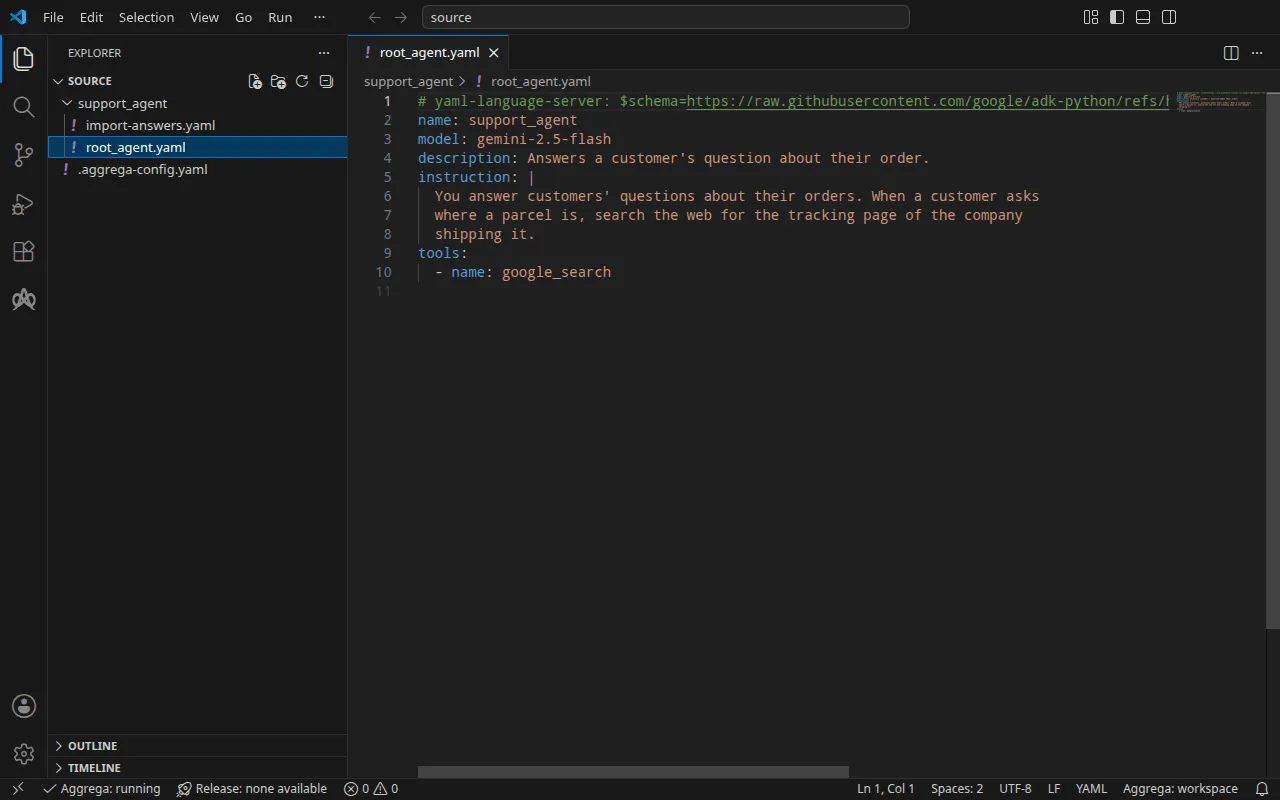
プロジェクト
ADK では、アプリケーションのエージェントをコードの代わりに Agent Config ファイルで宣言できます。adk create --type=config は、ルートエージェントの設定である root_agent.yaml と、その隣に環境ファイルを書き出します。このウォークスルー用に書かれたこのファイルは、Gemini の gemini-2.5-flash 上で動く 1 つのエージェントを、ADK に同梱の Google Search ツールとともに宣言します:
# yaml-language-server: $schema=https://raw.githubusercontent.com/google/adk-python/refs/heads/main/src/google/adk/agents/config_schemas/AgentConfig.jsonname: support_agentmodel: gemini-2.5-flashdescription: Answers a customer's question about their order.instruction: | You answer customers' questions about their orders. When a customer asks where a parcel is, search the web for the tracking page of the company shipping it.tools: - name: google_searchインポートは環境ファイルを一切読み込みません。このファイルには通常、アプリケーションが Gemini に送るキーが入っているため、例には含めていません。プロジェクトのルートでは、.aggrega-config.yaml がフォルダをワークスペースにします:
# The workspace key marks this directory as the workspace root, so an import run# here writes its drafts beside support_agent/.workspace: {}# The registry the importer is fetched from the first time an import needs it.default_registry: hub.aggrega.aiインポートはカタログの ADK エージェントと Gemini モデルの Components を参照し、--target はそのカタログの Recipes から Manifest を下書きします。ワークスペースはカタログフォルダーを指定していないため、インポートはインポーターの取得元であるレジストリから標準ライブラリのカタログを読み込みます。これは公開されたカタログの署名付きスナップショットで、最初のインポートが取得・検証してワークスペースのコンテンツキャッシュに保持し、インポートが下書きの隣に書き込む記録の中でそのダイジェストによって示されます。AGGREGA_CATALOG_DIRS または workspace.catalog_dirs で独自のカタログフォルダーを指定しているワークスペースは、代わりにそれらに対してインポートします。
インポートが尋ねる内容
Agent Config はエージェントのモデルを指定しますが、アプリケーションを実行するイメージは指定しません。そのイメージはプロジェクトからビルドします。カタログには ADK で構築されたアプリケーション用のデフォルトイメージがないため、インポートはそれを尋ねます。ターミナルでは尋ねたうえで、その回答を下書きと、インポート対象のディレクトリ support_agent/ 内の回答ファイル import-answers.yaml に書き込みます。そのため、次回のインポートはそこから回答を読み込み、何も尋ねません。ターミナルがない場合(継続的インテグレーションやパイプ経由など)は何も尋ねず、キーを空にしたファイルを書き込んで、そのファイルを示して停止します。この例にはすでにファイルがあり、イメージには ghcr.io/example/support-agent:1.0.0 が回答されています。これはビルドするイメージを表します:
# Values the import could not draft from the source, keyed by the drafted file and the key path inside# it. Write each one beside its key; an import of the same source, and a sync, read them from here and# ask nothing. A secret is never written here: its key asks where the secret comes from — a variable# name, ${NAME}, or the name of a Kubernetes Secret.release.yaml: # Container image running the application built on ADK, serving its API on infra.port on every # interface. spec.components.support-agent.infra.image: "ghcr.io/example/support-agent:1.0.0" # The origin of the secret value, written by the operator in the Release. Read exactly as # values.origin is. Write it here or in values.origin, never in both. A secret: name where it comes # from, never the value. spec.components.support-agent.uses.model.gemini-2-5-flash.features.credential.infra.origin: "google-api-key"2 つ目の回答は、--target helm による Kubernetes 向けビルドのためのものです。そこではエージェントが Gemini API キーを Kubernetes の Secret から読み取り、回答はキーそのものではなく Secret の名前 google-api-key です。Docker Compose 向けのビルドは代わりにシェルからキーを読み取るため、このインポートはその回答を使用しません。インポート回答ファイル では、このファイル、質問、およびシークレットの回答に関するルールを説明しています。
aggrega import には、別の場所に保存された回答ファイルを指定する --answers を含め、このコマンドが受け付けるすべてのフラグが記載されています。
source に移動します:
cd sourceインポートを実行する
エージェントのディレクトリを指定します。インポートはその root_agent.yaml を読み込みます:
aggrega import support_agent --target compose標準出力には書き出したものが一覧表示されます:
wrote aggregate.yamlwrote release.yamlwrote manifest.yamlwrote .aggrega-import.json標準エラーには次のように出力されます(<workspace> は実行したフォルダーを表します):
[… omitted: a warning that the importer runs unverified, printed where its module is read from beside its Plugin entity in a catalog folder rather than fetched]read as the google-adk format, with drafted paths relative to <workspace>info: the answers file <workspace>/support_agent/import-answers.yaml also answers spec.components.support-agent.uses.model.gemini-2-5-flash.features.credential.infra.origin in release.yaml, which these drafts do not leave empty; those answers are kept there and not appliedmapped support_agent (agent) to core/ai-agent/google-adk as a reference, NONEmapped gemini-2.5-flash (model) to core/ai-model/gemini as a reference, NONEmade no choice for google_search (tool)Pull complete: <workspace>/release.lock (entities=8, source_artifacts=0, external_inputs=0)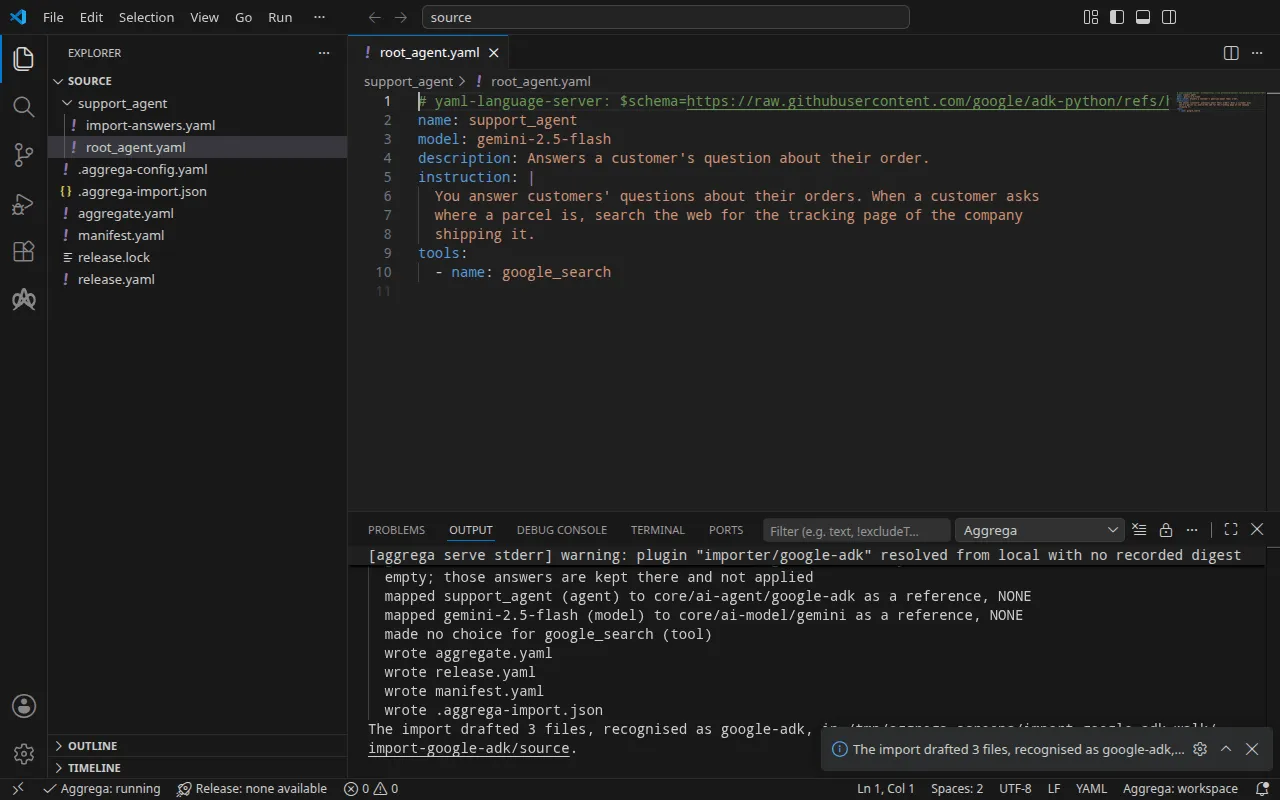
info行は、Docker Compose のドラフトが使用しない回答を示します。この回答は Kubernetes 向けビルドのために回答ファイルに保持されます。mapped行は、エージェントが標準ライブラリの ADK エージェントcore/ai-agent/google-adkのインスタンスであり、エージェントが指定するモデルがcore/ai-model/geminiのインスタンスであることを示します。ティアはNONEとなっています。ADK インポートは、それぞれをカタログと照らし合わせて評価するのではなく、設定が指定する名前によってこれらの Components を参照するためです。made no choice行は、Google Search ツールについては何も下書きされないことを示します。これは ADK に同梱のツールで、アプリケーション内部で実行されます。Pull completeの行は、インポートが、ドラフトされた Release の依存先をaggrega pullと同じようにrelease.lockへ取得していることを示します。これにより、ドラフトはすぐに検証とビルドができます。--offlineの場合、インポートは何も取得せず、実行すべきaggrega pullを示します。
書き出される内容
Aggregate、Release、Manifest の名前は imported/support-agent です。ルートエージェントの name である support_agent を support-agent に縮めたものです。名前空間は、インポーターの target_namespace 設定が定めるもので、別のものを設定しない限り imported です(設定)。
aggregate.yaml — モデルに接続されたエージェント(提示するキーは接続上で宣言されています)とそのモデル。冒頭のコメントが、何を読み込み何を読み込まなかったかを示します:
# Google ADK agent configurations read:# - root_agent.yaml# Not read: the application's code, which defines the tools, callbacks and agents a configuration names by their code, nor the environment file ADK's scaffold writes beside root_agent.yaml; the application runs in the image the Release names for each instance, and loads its configurations itself.# ADK states that its Agent Config is experimental. An agent's model is a Gemini model by default; ADK serves some other providers' models by name through classes of its own, such as claude-sonnet-4-5 and gpt-4o, and others through a LiteLLM model string.apiVersion: aggrega.ai/v1beta1kind: Aggregatemetadata: name: imported/support-agent version: 0.1.0 description: Draft Aggregate imported from a source in the google-adk format.spec: components: # The agent tree of root_agent.yaml, served from its root agent support_agent. # Tools ADK ships, which run inside the application, drafted as no Component: google_search. support-agent: type: core/ai-agent/google-adk values: description: "Answers a customer's question about their order." uses: model: gemini-2-5-flash: target: gemini-2-5-flash # For the compose target, the lines below declare credential on gemini-2-5-flash: a secret the Release alone attaches arrives under the key value, so each is declared with a key of its own and no two arrive under one; the Release attaches its origin, naming this type or none. features: credential: type: core/secret-value values: key: GOOGLE_API_KEY # The model gemini-2.5-flash. gemini-2-5-flash: type: core/ai-model/gemini values: model: "gemini-2.5-flash"ADK はアプリケーションをそのルートエージェントから提供するため、下書きはエージェントツリーごとに 1 つのインスタンスを持ち、ルートエージェントにちなんで名前を付けます。エージェントの instruction は引き継がれません。アプリケーションはそれを自身の設定から読み込み、その設定はイメージ内にあります。
ADK は Gemini クラスを通じて gemini-2.5-flash を提供し、このクラスはリクエストを Gemini API に送ります。そのため下書きは、モデルをエージェントの model ソケットに接続します。このソケットは Gemini API だけを受け入れます。Gemini はホスト型サービスであるため、エージェントの Component は、資格情報を持たない Gemini への接続を拒否します。接続はキー GOOGLE_API_KEY の下で資格情報を 1 つ宣言します。ADK がそれ以外の方法で提供するモデル — ADK が独自のクラスを通じて提供する gpt-4o のような名前や、openai/gpt-4o のような LiteLLM のモデル文字列 — は、どこにも接続されません。インスタンスの上のコメントがそれを示し、接続は エージェントツリーが何になるか で説明しているとおり、利用者に委ねられます。
release.yaml — 環境、イメージ、公開ポート、キーの取得元:
apiVersion: aggrega.ai/v1beta1kind: Releasemetadata: name: imported/support-agent # environment is a drafted default, since no source names the environment this Release deploys to; change it to name the one it deploys to. environment: development version: 0.1.0 description: Draft Release imported from a source in the google-adk format.spec: aggregate: imported/support-agent manifest: imported/support-agent components: support-agent: infra: # Left for the Release, since the source cannot supply it: infra.image, the container image running the application built on ADK, holding its configurations image: "ghcr.io/example/support-agent:1.0.0" # Published on this machine's loopback address, 127.0.0.1: reachable from this machine only, by any process running on it. Delete this line to keep the service internal. published_port: 8000 uses: model: gemini-2-5-flash: features: credential: type: core/secret-value infra: # Attached by reference, never as a value: the credential support-agent presents to gemini-2-5-flash on its model connection (the source names no variable for it, so it is read from the one Google's Gemini API's client libraries read the API key from), read from the variable GOOGLE_API_KEY, which a target substituting variable references, as Docker Compose does when the stack starts, reads from the environment, so no file carries the value. origin: "${GOOGLE_API_KEY}" gemini-2-5-flash: {}環境 development は、どの設定も環境を指定していないためにインポートが書き込む既定値です。Release を別の場所にデプロイする場合は変更してください。イメージは、インポートが support_agent/import-answers.yaml から読み取った回答です。published_port はアプリケーションが待ち受けるポートである 8000 なので、アプリケーションはマシン上の http://127.0.0.1:8000 で応答します。コメントにあるとおり、このマシン上のどのプロセスもそこからアクセスでき、それ以外からはアクセスできません。この行を削除すると、アプリケーションはスタックのネットワーク上だけに留まります。設定はキーの変数を指定していないため、接続はキーを ${GOOGLE_API_KEY} から読み取ります。これは Gemini API のクライアントライブラリが読み取る変数で、値としてではなく常に変数参照として読み取られます。
manifest.yaml — 各タイプの Compose Recipe と、キーの変数参照をそのまま Compose ファイルに書き込む実現:
apiVersion: aggrega.ai/v1beta1kind: Manifestmetadata: name: imported/support-agent version: 0.1.0spec: mappings: components: type: core/ai-agent/google-adk: compose/google-adk core/ai-model/gemini: compose/gemini features: type: core/secret-value: compose/dotenv-secretrelease.lock は Release が解決されたカタログエンティティをダイジェストで記録し、.aggrega-import.json はインポートが書き出した内容の記録で、後の aggrega import --sync がこれを読み取ります。
検証とビルド
aggrega validate --release release.yamlaggrega build --release release.yaml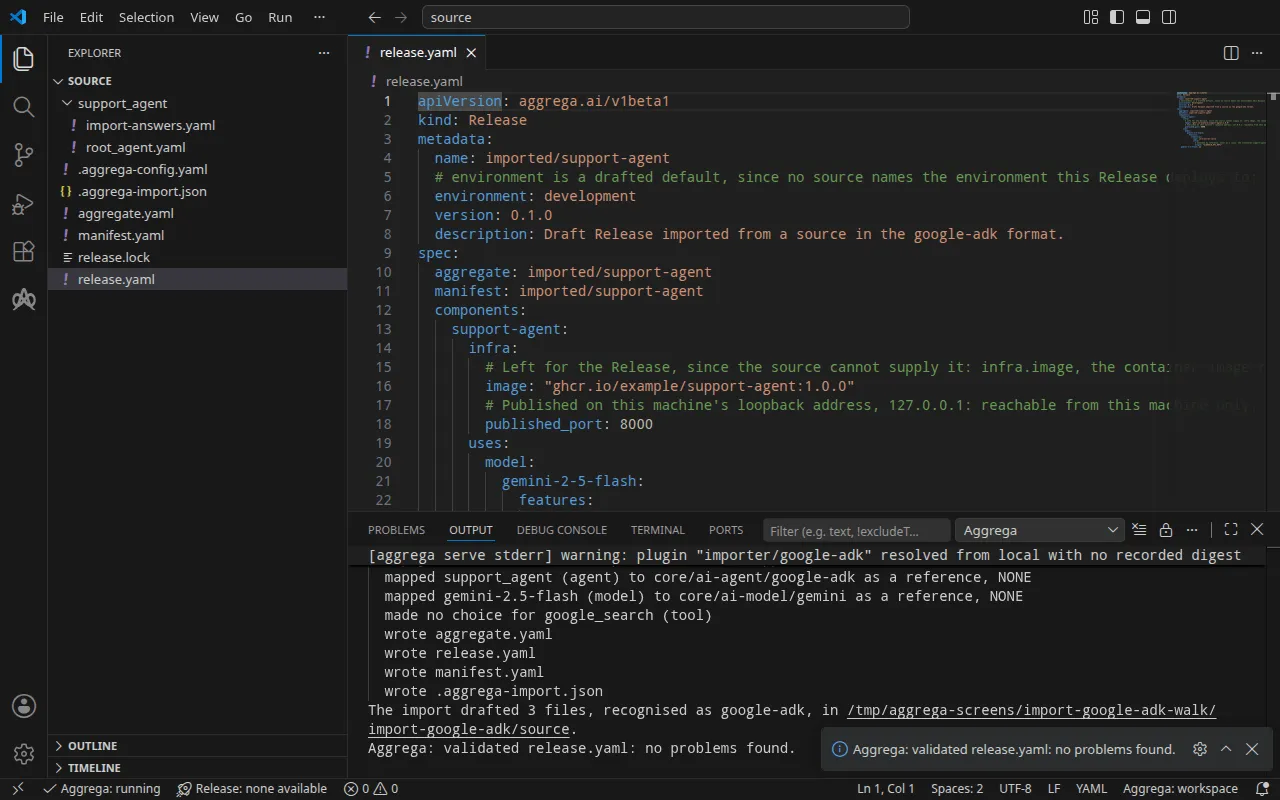
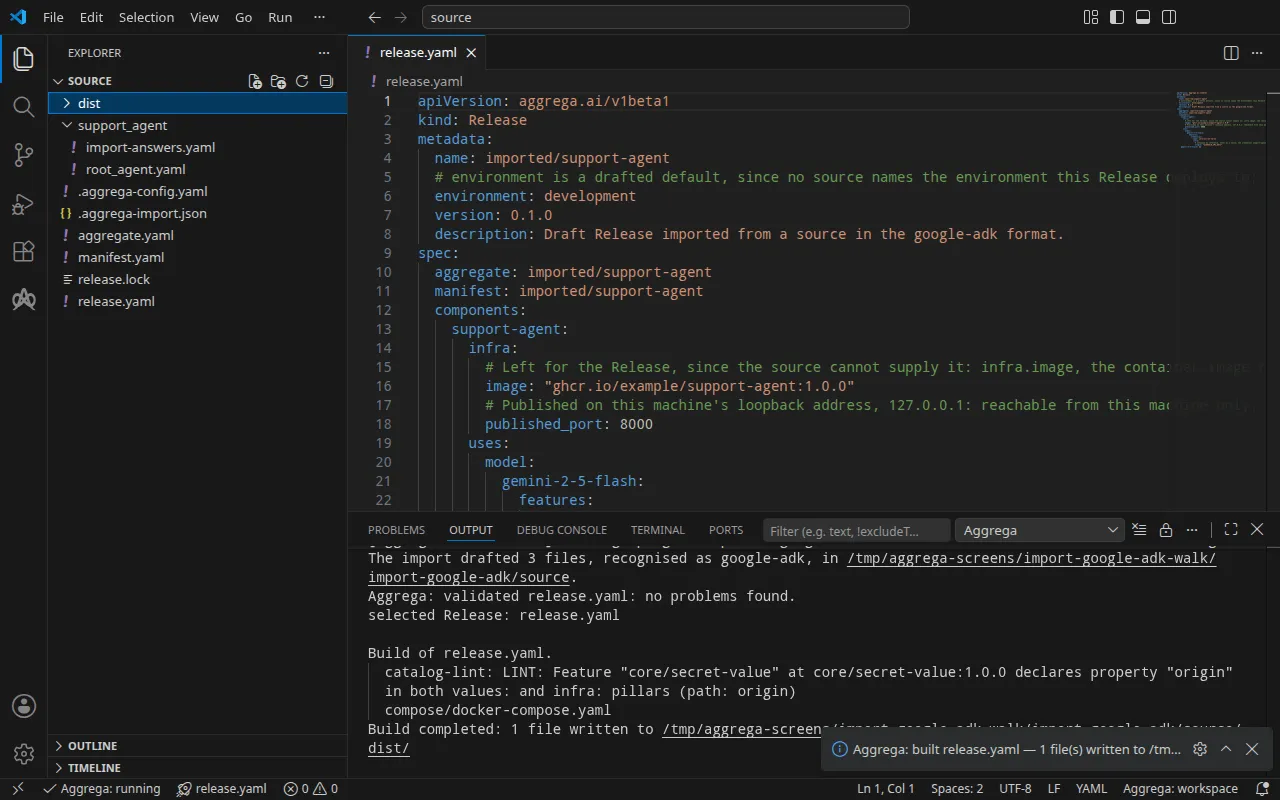
検証の出力は次のとおりです:
notice: LINT: Feature "core/secret-value" at core/secret-value:1.0.0 declares property "origin" in both values: and infra: pillars (path: origin)release dependency validation passed: release.yaml (schema-pillar + dependency pillars)そしてビルドは次のとおりです(<workspace> は実行したフォルダーを表します):
notice: LINT: Feature "core/secret-value" at core/secret-value:1.0.0 declares property "origin" in both values: and infra: pillars (path: origin)[… omitted: a total build time, which differs per run]Build completed: 1 file written to <workspace>/distnotice 行は助言です。シークレット Feature は origin を Aggregate の values または Release の infra から受け付け、この通知は 1 つのリーフが両方で宣言されていることを報告しています。判定は何も変わりません。
dist/compose/docker-compose.yaml 内のエージェントのサービス:
services: support-agent: image: ghcr.io/example/support-agent:1.0.0 environment: PORT: "8000" GOOGLE_API_KEY: ${GOOGLE_API_KEY} ports: - 127.0.0.1:8000:8000 [… omitted: the labels the build writes on every service, naming the Aggregate, the component, the environment and the compiler's version] networks: - composeアプリケーションは、サーバーが待ち受けるポートを PORT として、キーを GOOGLE_API_KEY として受け取り、ADK の Gemini クライアントはそのキーを Gemini API に送信します。モデルには独自のサービスがありません。クライアントは Gemini API 自身のアドレスにリクエストを送り、環境から他のアドレスを読み取りません。キーは変数参照で、スタックの起動時にシェルから値が埋められます。ADK エージェントの Compose Recipe がマシン上にポートを公開するのは、Release がエージェントの infra で published_port を設定している場合だけで、その場合もループバックアドレス 127.0.0.1 のみに公開します。設定がなければ、サービスにはスタックのネットワーク上からしか到達できません。
AI アシスタントを使う
Aggrega のツールでセットアップした AI アシスタントでも同じことができます。次のプロンプトを貼り付けてください。
Aggrega のツールだけを使い、フォルダーは自分で作成しないでください。Workspace フォルダーにまだ `import-google-adk` フォルダーがない場合は、`example` を `import-google-adk` に設定し、`dir` を指定せずに `scaffold` ツールを 1 回呼び出してください。これにより、例が新しい `import-google-adk` フォルダーに書き込まれ、その `source` フォルダーにこのページでインポートするものが入ります。次に、`workspace_root` を `import-google-adk/source`、`source` を `support_agent`、`target` を `compose` に設定して `import` ツールを呼び出してください。このツールは、必要な回答を `support_agent` フォルダー内の `import-answers.yaml` から読み取り、下書きを `import-google-adk/source` に書き込み、下書きに必要なものをプルします。次に、`workspace_root` を `import-google-adk/source`、`release` を `release.yaml` に設定して `validate` ツールを呼び出し、`workspace_root` を `import-google-adk/source`、`release` を `release.yaml`、`write` を true に設定して `build` ツールを呼び出してください。ビルドが書き込んだファイルを教えてください。ファイルは `import-google-adk/source/dist/` の下にあります。VS Code で開く
Visual Studio Code 用の Aggrega 拡張機能 をインストールした状態で、インポートが下書きを書き込んだフォルダー import-google-adk/source を VS Code で開きます。このフォルダーには Release が 1 つ、下書きの release.yaml だけがあるため、エディターがそれを自動的に選択し、編集中の下書きをその Release に照らしてチェックし、見つかった内容をファイル内と「問題」パネルに表示します。コマンド パレットの Aggrega: Show topology graph は、Release のコンポーネントとそれらの間の接続を描画します。Aggrega: Build、Aggrega: Preview build、Aggrega: Pull は同じ Release に対して動作し、それぞれアクティビティ バーの Aggrega ビューにある Commands パネルのボタンとしても使えます。Build はファイルをフォルダーの dist/ に書き込みます。残りの内容は Visual Studio Code で Aggrega を使う で説明しています。
実行する
Docker Compose は、PORT を含め、上でレンダリングされたサービスとしてイメージを実行します。イメージは、ADK の API サーバーのデフォルトアドレスである 127.0.0.1 ではなく、すべてのインターフェイスでそのポートを待ち受ける必要があります。ADK 自身の API サーバーである adk api_server は設定ディレクトリをそのまま提供するため、イメージに独自のコードは必要ありません。プロジェクトのルートに support_agent/ と並べて置く Dockerfile:
FROM python:3.12-slimRUN pip install --no-cache-dir google-adk==2.13.0COPY support_agent/ /app/agents/support_agent/CMD ["sh", "-c", "exec adk api_server --host 0.0.0.0 --port \"$PORT\" --auto_create_session /app/agents"]adk api_server は指定されたフォルダー内のエージェントディレクトリを提供し、コマンドはそれに PORT を渡します。--auto_create_session は、/run へのリクエストがセッションを初めて指定したときにそのセッションを開くため、1 回のリクエストでエージェントに届きます。イメージをビルドし、support_agent/import-answers.yaml の ghcr.io/example/support-agent:1.0.0 をその名前に書き換えて、--sync を付けて再度インポートします。これにより新しい回答が下書きに書き込まれ、再度プルが行われます。その後ビルドします:
docker build -t support-agent:local .aggrega import support_agent --syncaggrega build --release release.yaml次に、シェルでキーを設定してスタックを起動します:
export GOOGLE_API_KEY='your Gemini API key'docker compose -p support-agent -f dist/compose/docker-compose.yaml up -d --wait-p はプロジェクトに名前を付けます。これは インポートの実行方法 の実行ステップで説明しています。ビルドはサービスにヘルスチェックを設定しないため、--wait はコンテナーが起動するとすぐに戻り、サーバーはその少し後に応答します。そのため、拒否されたリクエストは再試行してください。
テストする
published_port が公開するアドレス http://127.0.0.1:8000 でエージェントにメッセージを送ります。リクエストはユーザーとセッションを指定し、/run は最初のメッセージでそのセッションを開きます:
curl -sS -X POST http://127.0.0.1:8000/run -H 'Content-Type: application/json' \ -d '{"app_name": "support_agent", "user_id": "u1", "session_id": "s1", "new_message": {"role": "user", "parts": [{"text": "Where is my order 1234? Answer in one short sentence."}]}}'Gemini による応答は、そのターンがセッションに追加したイベントのリストとして返されます。この実行ではキーにプレースホルダーを使ったため、Gemini はそれを拒否しました。リクエストは HTTP 500、Internal Server Error を返し、サービスのログ docker compose -p support-agent -f dist/compose/docker-compose.yaml logs support-agent がその理由を示します:
google.genai.errors.ClientError: 400 INVALID_ARGUMENT. {'error': {'code': 400, 'message': 'API key not valid. Please pass a valid API key.', 'status': 'INVALID_ARGUMENT', [… omitted: the error's details]}}curl -sS http://127.0.0.1:8000/list-apps は、サーバーが保持するエージェントである ["support_agent"] を返します。
スタックを停止するには次のコマンドを使います:
docker compose -p support-agent -f dist/compose/docker-compose.yaml downKubernetes の場合
同じエージェントは --target helm で Kubernetes 向けにインポートできます。クラスターはイメージをレジストリから取得するため、ビルドしたイメージをクラスターが読み取れるレジストリにプッシュし、support_agent/import-answers.yaml で回答されたイメージの代わりにその名前を書きます。この実行では、クラスター自身のマシン上のレジストリに localhost:5000/support-agent:1.0.0 としてプッシュしました。そのファイルの 2 つ目の回答は、エージェントが Gemini API キーを読み取る Secret である google-api-key を指定します。Docker Compose 向けのドラフトはすでに source にあるため、これらは専用のフォルダにドラフトし、そこからビルドします:
aggrega import support_agent --target helm --output-dir helmcd helmaggrega build --release release.yamlビルドは、ワークスペースのルート source の dist/helm/ の下にプレーンな Kubernetes マニフェストを書き出します。これは helm から見ると ../dist/helm/ です。適用先の名前空間に Secret google-api-key を作成してデータキー value にキーを格納し、インポートの実行方法 の実行ステップの説明どおりにフォルダを適用します。エージェントの Service は support-agent-default です。ローカルポートをそこに転送し、コマンドを実行したままにします:
kubectl port-forward -n <namespace> svc/support-agent-default 8000:8000別のターミナルから、上記のメッセージはそのまま同じアドレスでエージェントに届きます。この実行でも同じ Internal Server Error が返り、kubectl logs -n <namespace> deploy/support-agent はプレースホルダーのキーに対する同じ拒否を示します。