

导入 Google ADK 智能体
本演练导入一个基于 Google 的 Agent Development Kit(ADK)构建的应用的 Agent Config——一个回答客户订单问题的智能体——并为 Docker Compose 构建该应用。导入会起草构建所读取的每个文件:智能体及其 Gemini 模型、智能体以变量引用形式提供给模型的密钥,以及它们各自的实现。它只询问一次唯一一个任何配置都不包含的值,即应用运行所在的镜像。下文的每个文件和每段输出都来自一次真实运行;配置和演练的每个阶段都位于 import-google-adk 示例中,那里的检查脚本会再次运行导入,将它写入的内容、打印的内容以及本页引用的代码块与保存在那里的文件进行比较,并验证和构建导入所写的内容。
生成示例
你可以使用本页的命令运行此导入,也可以让你的 AI 助手替你运行。
将示例写入一个以其命名的新文件夹:
aggrega scaffold --example import-google-adk然后它会打印接下来要运行的命令。第一条命令进入新文件夹;其后的那条命令见下文,它进入新文件夹的 source 文件夹,该文件夹包含本页导入的内容,也是运行导入的位置:
cd import-google-adk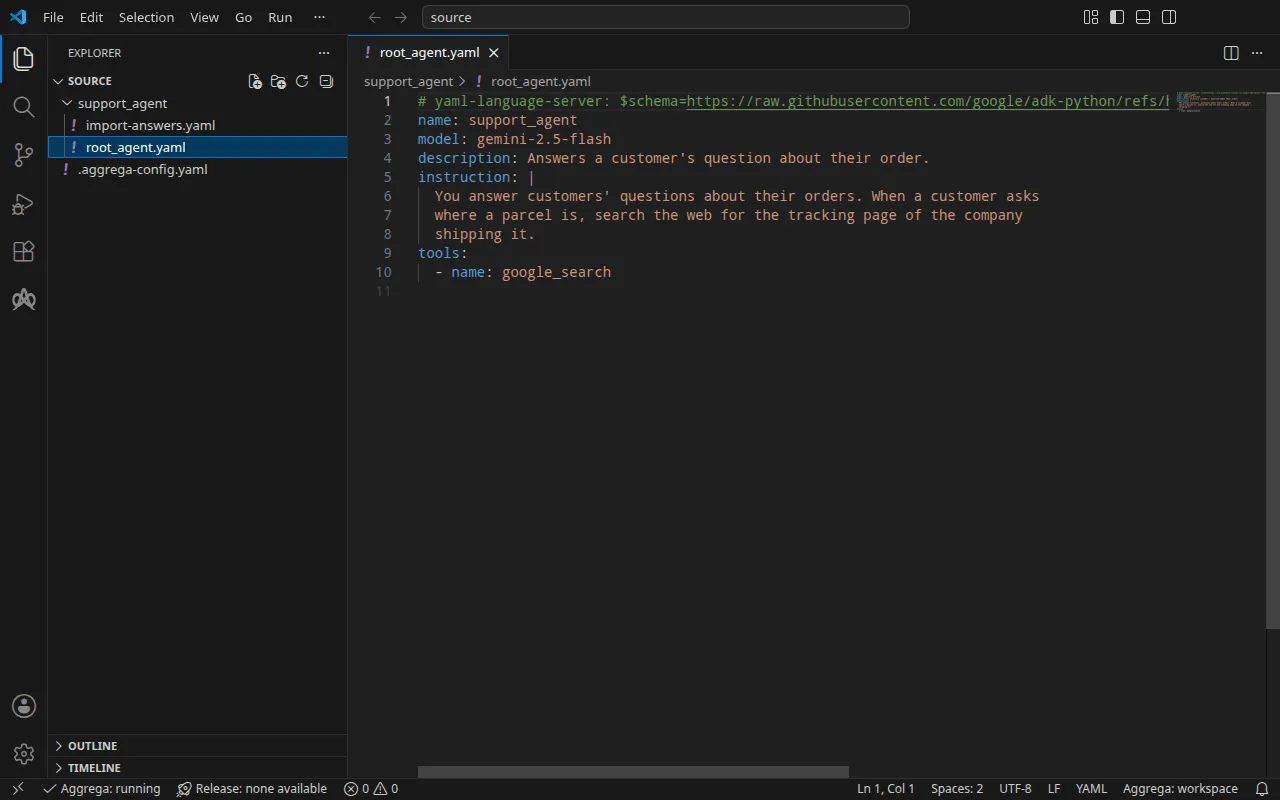
项目
ADK 可以在 Agent Config 文件而非代码中声明应用的智能体:adk create --type=config 会写入根智能体的配置 root_agent.yaml,并在其旁边写入一个环境文件。为本演练编写的这个文件声明了一个基于 Gemini 的 gemini-2.5-flash 的智能体,并带有 ADK 自带的 Google Search 工具:
# yaml-language-server: $schema=https://raw.githubusercontent.com/google/adk-python/refs/heads/main/src/google/adk/agents/config_schemas/AgentConfig.jsonname: support_agentmodel: gemini-2.5-flashdescription: Answers a customer's question about their order.instruction: | You answer customers' questions about their orders. When a customer asks where a parcel is, search the web for the tracking page of the company shipping it.tools: - name: google_search导入从不读取环境文件,该文件通常保存应用发送给 Gemini 的密钥,因此示例中不包含环境文件。在项目根目录下,一个 .aggrega-config.yaml 使该文件夹成为工作区:
# The workspace key marks this directory as the workspace root, so an import run# here writes its drafts beside support_agent/.workspace: {}# The registry the importer is fetched from the first time an import needs it.default_registry: hub.aggrega.ai导入会引用目录中的 ADK 智能体和 Gemini 模型 Components,而 --target 会根据该目录的 Recipes 起草一个 Manifest。工作区没有指定目录文件夹,因此导入会从获取其导入器的注册表中读取标准库目录:这是已发布目录的一个签名快照,由第一次导入获取、验证并保存在工作区的内容缓存中,并在导入写在其草稿旁的记录中以其摘要标明。指定了自己的目录文件夹的工作区——在 AGGREGA_CATALOG_DIRS 中,或在 workspace.catalog_dirs 下——则改为针对这些文件夹进行导入。
导入会询问什么
Agent Config 指明智能体的模型,但从不指明应用运行所在的镜像:该镜像由你从自己的项目构建。目录中没有为基于 ADK 构建的应用提供默认镜像,因此导入会询问它。在终端中,导入会询问,并将答案写入草稿以及其所导入目录 support_agent/ 中的答案文件 import-answers.yaml,这样下一次导入会从那里读取答案而不再询问。没有终端时——在持续集成中或通过管道——它不询问任何内容:它写出键为空的文件,然后停止,并指明该文件。示例中已经包含该文件,其中已回答了镜像 ghcr.io/example/support-agent:1.0.0,它代表你构建的镜像:
# Values the import could not draft from the source, keyed by the drafted file and the key path inside# it. Write each one beside its key; an import of the same source, and a sync, read them from here and# ask nothing. A secret is never written here: its key asks where the secret comes from — a variable# name, ${NAME}, or the name of a Kubernetes Secret.release.yaml: # Container image running the application built on ADK, serving its API on infra.port on every # interface. spec.components.support-agent.infra.image: "ghcr.io/example/support-agent:1.0.0" # The origin of the secret value, written by the operator in the Release. Read exactly as # values.origin is. Write it here or in values.origin, never in both. A secret: name where it comes # from, never the value. spec.components.support-agent.uses.model.gemini-2-5-flash.features.credential.infra.origin: "google-api-key"第二个答案用于以 --target helm 为 Kubernetes 进行的构建:在那里,智能体从 Kubernetes Secret 中读取 Gemini API 密钥,答案是该 Secret 的名称 google-api-key,而绝不是密钥本身。为 Docker Compose 进行的构建则从你的 shell 中读取密钥,因此本次导入不使用该答案。导入答案文件 介绍了该文件、其中的问题以及密钥答案的规则。
aggrega import 列出了该命令接受的每个标志,其中包括 --answers,它指定保存在其他位置的应答文件。
进入 source:
cd source运行导入
指定智能体所在的目录。导入会读取其中的 root_agent.yaml:
aggrega import support_agent --target compose它在标准输出上列出所写的内容:
wrote aggregate.yamlwrote release.yamlwrote manifest.yamlwrote .aggrega-import.json在标准错误上,其中 <workspace> 代表你运行它的文件夹:
[… omitted: a warning that the importer runs unverified, printed where its module is read from beside its Plugin entity in a catalog folder rather than fetched]read as the google-adk format, with drafted paths relative to <workspace>info: the answers file <workspace>/support_agent/import-answers.yaml also answers spec.components.support-agent.uses.model.gemini-2-5-flash.features.credential.infra.origin in release.yaml, which these drafts do not leave empty; those answers are kept there and not appliedmapped support_agent (agent) to core/ai-agent/google-adk as a reference, NONEmapped gemini-2.5-flash (model) to core/ai-model/gemini as a reference, NONEmade no choice for google_search (tool)Pull complete: <workspace>/release.lock (entities=8, source_artifacts=0, external_inputs=0)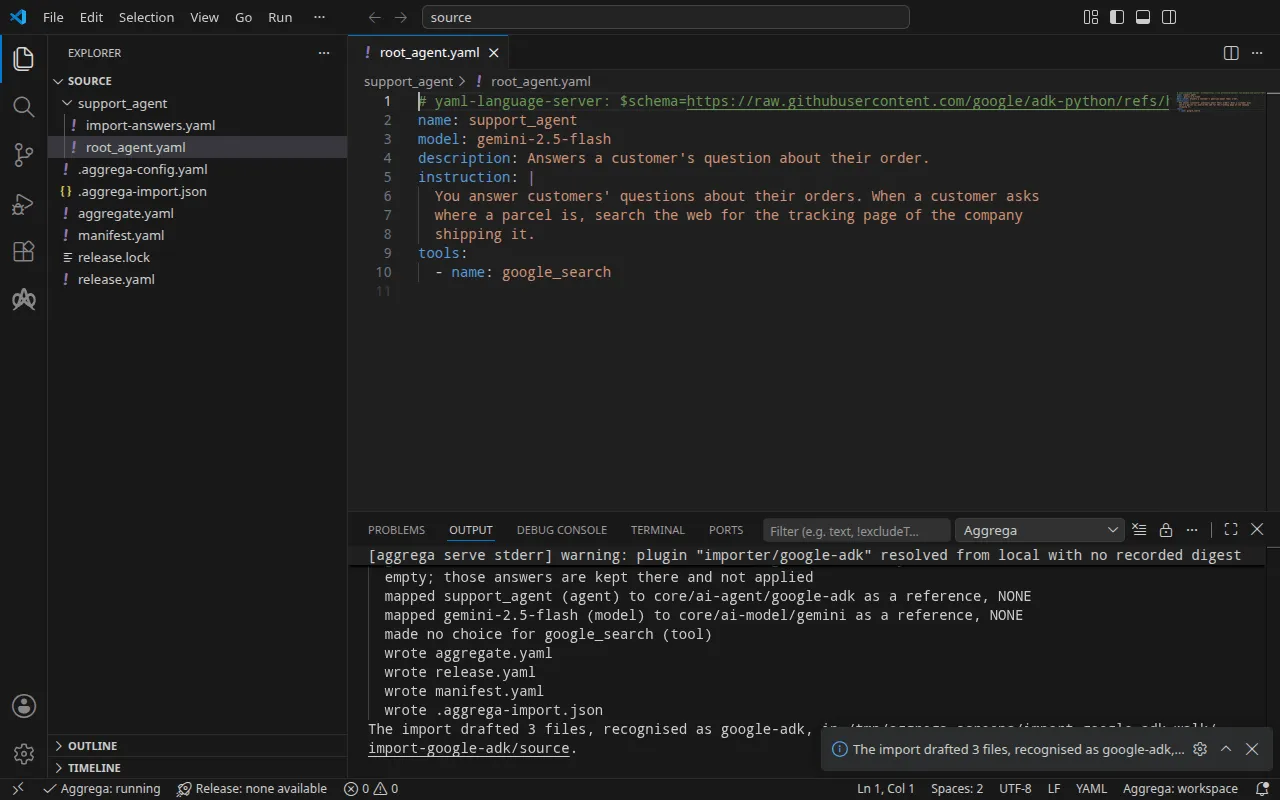
info行指明 Docker Compose 草稿不使用的应答,该应答保留在应答文件中,供针对 Kubernetes 的构建使用。mapped行表示该智能体是标准库 ADK 智能体core/ai-agent/google-adk的一个实例,而它所指定的模型是core/ai-model/gemini的一个实例。它们的档位显示为NONE:ADK 导入根据配置中指定的名称引用这些 Components,而不是将每一个与目录进行比对评估。made no choice行表示 Google Search 工具不会被起草为任何内容:它是 ADK 自带的工具,在应用内部运行。Pull complete这一行表示导入正在像aggrega pull那样,将草拟的 Release 所依赖的内容获取到release.lock中,使草稿可以立即通过验证并构建。在--offline下,导入不拉取任何内容,并给出需要运行的aggrega pull。
它写出的内容
该 Aggregate、Release 和 Manifest 命名为 imported/support-agent,取自根智能体的 name,即 support_agent,缩减为 support-agent,位于导入器的 target_namespace 设置所设定的命名空间下,除非你另行设置,否则该命名空间为 imported(设置)。
aggregate.yaml——连接到模型的智能体(其出示的密钥声明在该连接上)以及该模型,开头的注释说明了哪些内容被读取、哪些没有:
# Google ADK agent configurations read:# - root_agent.yaml# Not read: the application's code, which defines the tools, callbacks and agents a configuration names by their code, nor the environment file ADK's scaffold writes beside root_agent.yaml; the application runs in the image the Release names for each instance, and loads its configurations itself.# ADK states that its Agent Config is experimental. An agent's model is a Gemini model by default; ADK serves some other providers' models by name through classes of its own, such as claude-sonnet-4-5 and gpt-4o, and others through a LiteLLM model string.apiVersion: aggrega.ai/v1beta1kind: Aggregatemetadata: name: imported/support-agent version: 0.1.0 description: Draft Aggregate imported from a source in the google-adk format.spec: components: # The agent tree of root_agent.yaml, served from its root agent support_agent. # Tools ADK ships, which run inside the application, drafted as no Component: google_search. support-agent: type: core/ai-agent/google-adk values: description: "Answers a customer's question about their order." uses: model: gemini-2-5-flash: target: gemini-2-5-flash # For the compose target, the lines below declare credential on gemini-2-5-flash: a secret the Release alone attaches arrives under the key value, so each is declared with a key of its own and no two arrive under one; the Release attaches its origin, naming this type or none. features: credential: type: core/secret-value values: key: GOOGLE_API_KEY # The model gemini-2.5-flash. gemini-2-5-flash: type: core/ai-model/gemini values: model: "gemini-2.5-flash"ADK 从根智能体提供应用服务,因此草稿为每棵智能体树保留一个实例,并以其根智能体命名。智能体的 instruction 不会被带入:应用从其自身的配置中读取它,而该配置位于镜像中。
ADK 通过其 Gemini 类提供 gemini-2.5-flash,该类将请求发送到 Gemini API,因此草稿将模型连接到智能体的 model 插槽,该插槽仅接受 Gemini API。Gemini 是托管服务,因此智能体的 Component 会拒绝指向它但不携带任何凭据的连接;该连接在键 GOOGLE_API_KEY 下声明了一个凭据。ADK 以任何其他方式提供的模型——例如 ADK 通过其专属类提供的 gpt-4o 这样的名称,或 openai/gpt-4o 这样的 LiteLLM 模型字符串——不会连接到任何对象:实例上方的注释会指出它,连接则留给你完成,如 智能体树会变成什么 所述。
release.yaml — 环境、镜像、发布的端口,以及密钥的来源:
apiVersion: aggrega.ai/v1beta1kind: Releasemetadata: name: imported/support-agent # environment is a drafted default, since no source names the environment this Release deploys to; change it to name the one it deploys to. environment: development version: 0.1.0 description: Draft Release imported from a source in the google-adk format.spec: aggregate: imported/support-agent manifest: imported/support-agent components: support-agent: infra: # Left for the Release, since the source cannot supply it: infra.image, the container image running the application built on ADK, holding its configurations image: "ghcr.io/example/support-agent:1.0.0" # Published on this machine's loopback address, 127.0.0.1: reachable from this machine only, by any process running on it. Delete this line to keep the service internal. published_port: 8000 uses: model: gemini-2-5-flash: features: credential: type: core/secret-value infra: # Attached by reference, never as a value: the credential support-agent presents to gemini-2-5-flash on its model connection (the source names no variable for it, so it is read from the one Google's Gemini API's client libraries read the API key from), read from the variable GOOGLE_API_KEY, which a target substituting variable references, as Docker Compose does when the stack starts, reads from the environment, so no file carries the value. origin: "${GOOGLE_API_KEY}" gemini-2-5-flash: {}环境 development 是导入写入的默认值,因为没有任何配置指定环境;当该 Release 部署到其他位置时,请修改它。镜像是导入从 support_agent/import-answers.yaml 读取的答案。published_port 为 8000,即应用监听的端口,因此它在你的机器上通过 http://127.0.0.1:8000 响应;正如其注释所说,这台机器上的任何进程都可以在那里访问它,而其他任何东西都不能;删除该行则会让应用只留在栈的网络上。配置没有为密钥指定变量,因此连接从 ${GOOGLE_API_KEY} 读取密钥——这是 Gemini API 客户端库读取的变量——并且始终以变量引用的形式读取,而绝不是值。
manifest.yaml——每种类型的 Compose Recipe,以及将密钥的变量引用原样写入 Compose 文件的实现:
apiVersion: aggrega.ai/v1beta1kind: Manifestmetadata: name: imported/support-agent version: 0.1.0spec: mappings: components: type: core/ai-agent/google-adk: compose/google-adk core/ai-model/gemini: compose/gemini features: type: core/secret-value: compose/dotenv-secretrelease.lock 按摘要记录该 Release 解析到的目录实体,.aggrega-import.json 则是导入所写内容的记录,之后的 aggrega import --sync 会读取它。
验证并构建
aggrega validate --release release.yamlaggrega build --release release.yaml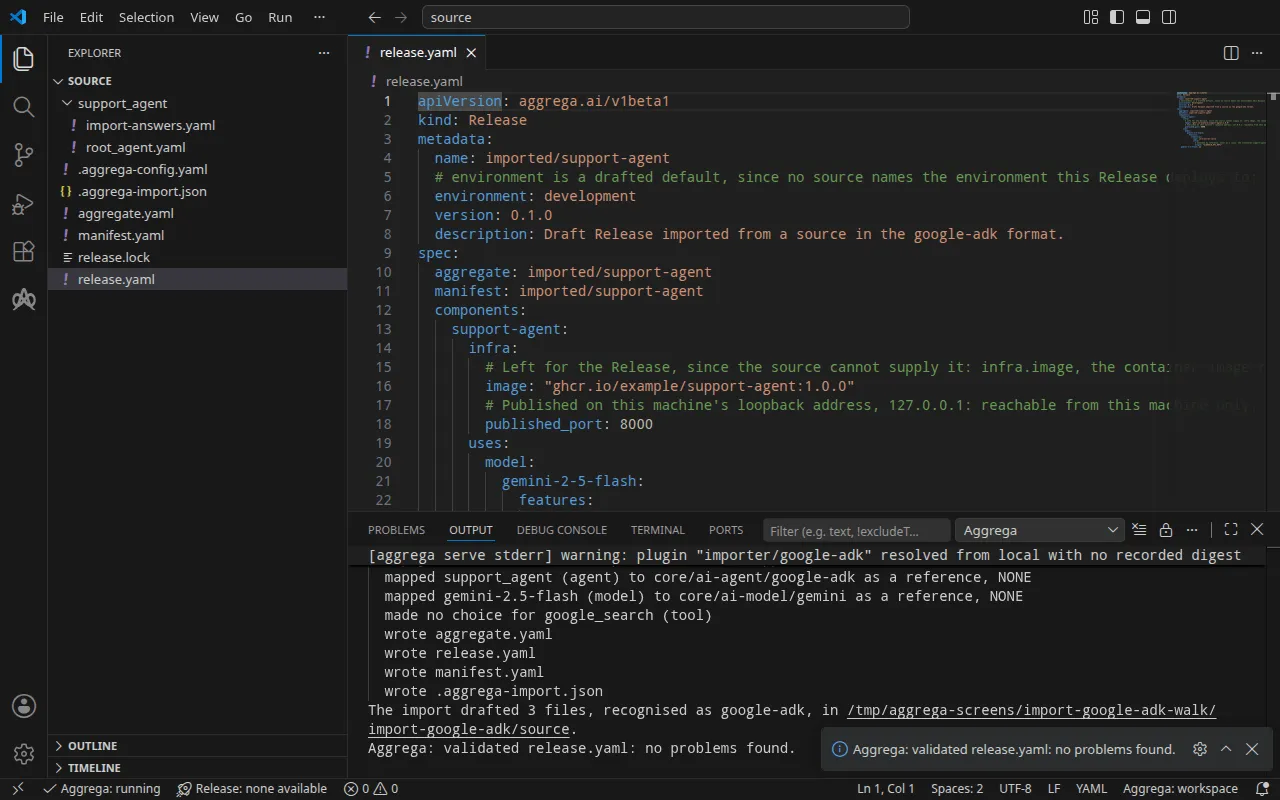
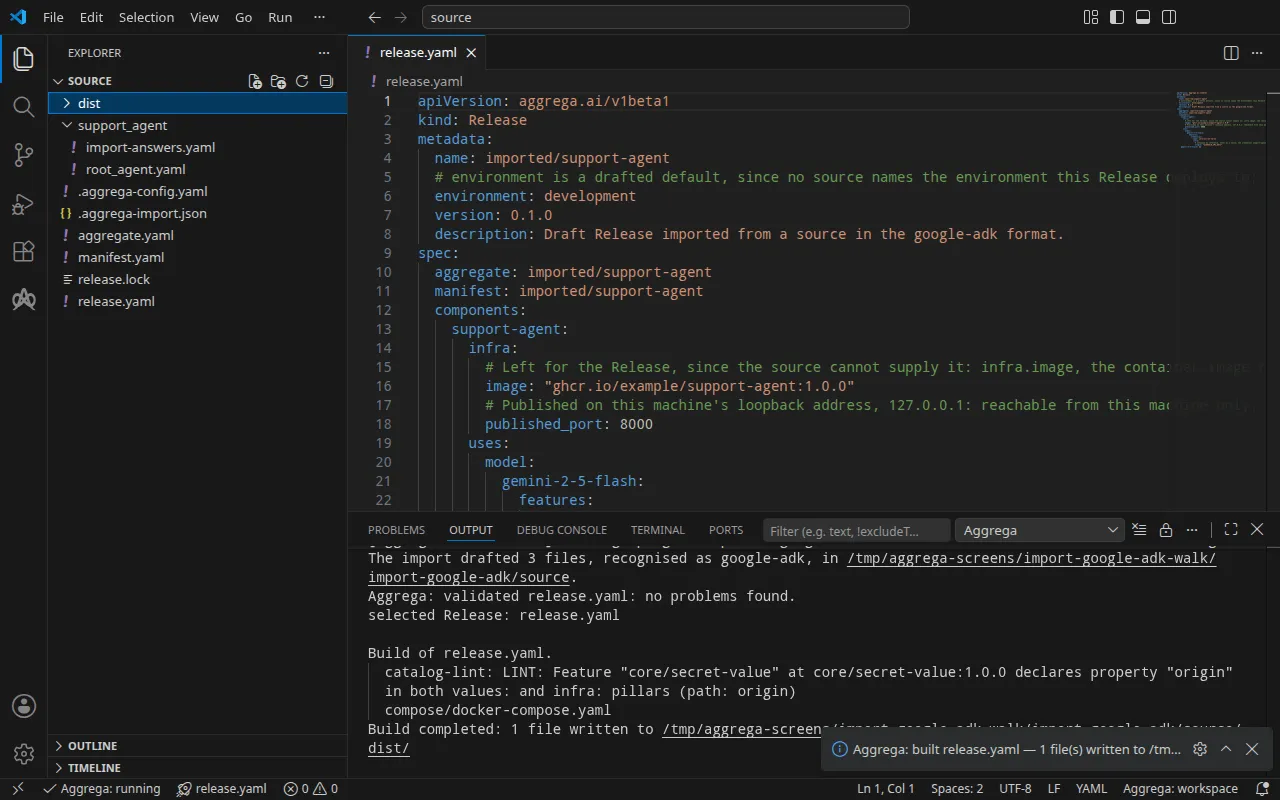
验证打印:
notice: LINT: Feature "core/secret-value" at core/secret-value:1.0.0 declares property "origin" in both values: and infra: pillars (path: origin)release dependency validation passed: release.yaml (schema-pillar + dependency pillars)以及构建,其中 <workspace> 代表你运行它的文件夹:
notice: LINT: Feature "core/secret-value" at core/secret-value:1.0.0 declares property "origin" in both values: and infra: pillars (path: origin)[… omitted: a total build time, which differs per run]Build completed: 1 file written to <workspace>/distnotice 行仅供参考:机密 Feature 从 Aggregate 的 values 或 Release 的 infra 接受其 origin,该通知报告有一个叶节点在两者中都有声明。它不会改变任何判定结果。
dist/compose/docker-compose.yaml 中智能体的服务:
services: support-agent: image: ghcr.io/example/support-agent:1.0.0 environment: PORT: "8000" GOOGLE_API_KEY: ${GOOGLE_API_KEY} ports: - 127.0.0.1:8000:8000 [… omitted: the labels the build writes on every service, naming the Aggregate, the component, the environment and the compiler's version] networks: - compose应用以 PORT 接收其服务器监听的端口,以 GOOGLE_API_KEY 接收密钥,ADK 的 Gemini 客户端会将该密钥发送给 Gemini API。模型没有自己的服务:客户端将请求发送到 Gemini API 自身的地址,并且不会从环境中读取其他地址。密钥是一个变量引用,在栈启动时从你的 shell 中填入。只有当 Release 在智能体的 infra 中设置了 published_port 时,ADK 智能体的 Compose Recipe 才会在你的机器上发布端口,并且只发布在环回地址 127.0.0.1 上;没有该设置时,只能在栈的网络上访问该服务。
借助 AI 助手
配置了 Aggrega 工具的 AI 助手也可以完成同样的操作:将下面的提示词粘贴给它。
只使用 Aggrega 工具,不要自己创建任何文件夹。如果 Workspace 文件夹中还没有 `import-google-adk` 文件夹,请调用一次 `scaffold` 工具,将 `example` 设置为 `import-google-adk`,且不设置 `dir`:它会将示例写入一个新的 `import-google-adk` 文件夹,其中的 `source` 文件夹包含本页导入的内容。然后调用 `import` 工具,将 `workspace_root` 设置为 `import-google-adk/source`,`source` 设置为 `support_agent`,`target` 设置为 `compose`:它会从 `support_agent` 文件夹内的 `import-answers.yaml` 中读取所需的答案,将草稿写入 `import-google-adk/source`,并拉取草稿所需的内容。然后调用 `validate` 工具,将 `workspace_root` 设置为 `import-google-adk/source`,`release` 设置为 `release.yaml`;再调用 `build` 工具,将 `workspace_root` 设置为 `import-google-adk/source`,`release` 设置为 `release.yaml`,`write` 设置为 true。告诉我构建写入了哪些文件;它们位于 `import-google-adk/source/dist/` 下。在 VS Code 中打开
安装 适用于 Visual Studio Code 的 Aggrega 扩展 后,在 VS Code 中打开导入写入草稿的文件夹 import-google-adk/source。该文件夹只包含一个 Release,即草拟的 release.yaml,因此编辑器会为你选中它,并在你编辑草稿时根据该 Release 检查草稿,将发现的问题标记在文件中和“问题”面板中。命令面板中的 Aggrega: Show topology graph 会绘制该 Release 的组件及其之间的连接。Aggrega: Build、Aggrega: Preview build 和 Aggrega: Pull 作用于同一个 Release,并且每个命令也是活动栏中 Aggrega 视图的 Commands 面板上的一个按钮;Build 会将文件写入该文件夹的 dist/。在 Visual Studio Code 中使用 Aggrega 介绍了其余内容。
运行
Docker Compose 将你的镜像作为上文渲染出的服务运行,包括 PORT。镜像必须在所有网络接口上监听该端口,而不是在 ADK API 服务器的默认地址 127.0.0.1 上监听。ADK 自带的 API 服务器 adk api_server 会原样提供配置目录,因此镜像不需要你编写任何代码。位于项目根目录、support_agent/ 旁边的 Dockerfile:
FROM python:3.12-slimRUN pip install --no-cache-dir google-adk==2.13.0COPY support_agent/ /app/agents/support_agent/CMD ["sh", "-c", "exec adk api_server --host 0.0.0.0 --port \"$PORT\" --auto_create_session /app/agents"]adk api_server 提供其所指定文件夹中的各个智能体目录,该命令会将 PORT 传递给它。--auto_create_session 会在发往 /run 的请求首次指定某个会话时打开该会话,因此一个请求即可到达智能体。构建镜像,在 support_agent/import-answers.yaml 中用镜像名称替换 ghcr.io/example/support-agent:1.0.0,然后使用 --sync 再次导入,它会将新答案写入草稿并再次拉取;然后构建:
docker build -t support-agent:local .aggrega import support_agent --syncaggrega build --release release.yaml然后在你的 shell 中设置密钥并启动栈:
export GOOGLE_API_KEY='your Gemini API key'docker compose -p support-agent -f dist/compose/docker-compose.yaml up -d --wait-p 用于命名项目,导入如何运行中的运行步骤对此有说明。由于构建没有为该服务设置健康检查,--wait 会在容器开始运行后立即返回,而服务器要稍后才会响应,因此请重试被它拒绝的请求。
测试
向 http://127.0.0.1:8000 处的代理发送一条消息,该地址由 published_port 发布。请求指定一个用户和一个会话,/run 会在会话的第一条消息时打开该会话:
curl -sS -X POST http://127.0.0.1:8000/run -H 'Content-Type: application/json' \ -d '{"app_name": "support_agent", "user_id": "u1", "session_id": "s1", "new_message": {"role": "user", "parts": [{"text": "Where is my order 1234? Answer in one short sentence."}]}}'回复(即 Gemini 的回复)以本轮对话添加到会话中的事件列表形式返回。本次运行为密钥使用了占位符,因此 Gemini 拒绝了它:请求返回 HTTP 500,即 Internal Server Error,而服务日志 docker compose -p support-agent -f dist/compose/docker-compose.yaml logs support-agent 给出了原因:
google.genai.errors.ClientError: 400 INVALID_ARGUMENT. {'error': {'code': 400, 'message': 'API key not valid. Please pass a valid API key.', 'status': 'INVALID_ARGUMENT', [… omitted: the error's details]}}curl -sS http://127.0.0.1:8000/list-apps 返回 ["support_agent"],即服务器所承载的代理。
使用以下命令停止该栈:
docker compose -p support-agent -f dist/compose/docker-compose.yaml down在 Kubernetes 上
同一个代理可以使用 --target helm 为 Kubernetes 导入。集群从镜像仓库拉取镜像,因此请将你构建的镜像推送到集群能够读取的仓库,并在 support_agent/import-answers.yaml 中用该镜像的名称替换作为回答的镜像;本次运行将其推送到了集群所在机器上的一个仓库,名称为 localhost:5000/support-agent:1.0.0。该文件中的第二个回答指定了代理从中读取 Gemini API 密钥的 Secret,即 google-api-key。面向 Docker Compose 的草稿已经位于 source 中,因此请将这些草稿生成到单独的文件夹中,并从该文件夹构建:
aggrega import support_agent --target helm --output-dir helmcd helmaggrega build --release release.yaml构建会在工作区根目录 source 下的 dist/helm/ 中写出普通的 Kubernetes 清单,从 helm 来看即 ../dist/helm/。在你要应用到的命名空间中创建 Secret google-api-key,在数据键 value 下保存密钥,然后按照 导入如何运行 中运行步骤的说明应用该文件夹。代理的 Service 是 support-agent-default:将一个本地端口转发到它,并让该命令保持运行:
kubectl port-forward -n <namespace> svc/support-agent-default 8000:8000在另一个终端中,上面的消息原样通过同一地址到达代理。本次运行得到了相同的 Internal Server Error,而 kubectl logs -n <namespace> deploy/support-agent 给出了对占位符密钥的同样拒绝。