

Flowise チャットフローをインポートする
このウォークスルーでは、Flowise からエクスポートしたチャットフロー(チャットモデルとメモリを備えた会話チェーン)を、書かれたままでチャットフローを載せた Flowise を Docker Compose 向けにビルドする Aggregate、Release、Manifest にインポートし、それらをビルドして結果を実行します。以下のすべてのファイルと出力ブロックは実際の実行から得たものです。チャットフローとウォークスルーの各段階は import-flowise の例にあり、そこではチェックスクリプトがインポートを再実行し、書き出す内容、出力する内容、およびこのページが引用するブロックを、そこに保管されたファイルと比較し、インポートが書き出したものを検証してビルドします。
サンプルを生成する
このインポートは、このページのコマンドで実行することも、AI アシスタントに実行させることもできます。
例の名前を付けた新しいフォルダーに例を書き出します。
aggrega scaffold --example import-flowiseその後、次に実行するコマンドを表示します。最初のコマンドは新しいフォルダーに移動します。それに続く以下のコマンドは、新しいフォルダーの source フォルダーに移動します。インポートはここで実行します。このフォルダーにはチャットフローのファイル support-chat.json が入っており、このページではその内容を引用せずに説明します:
cd import-flowise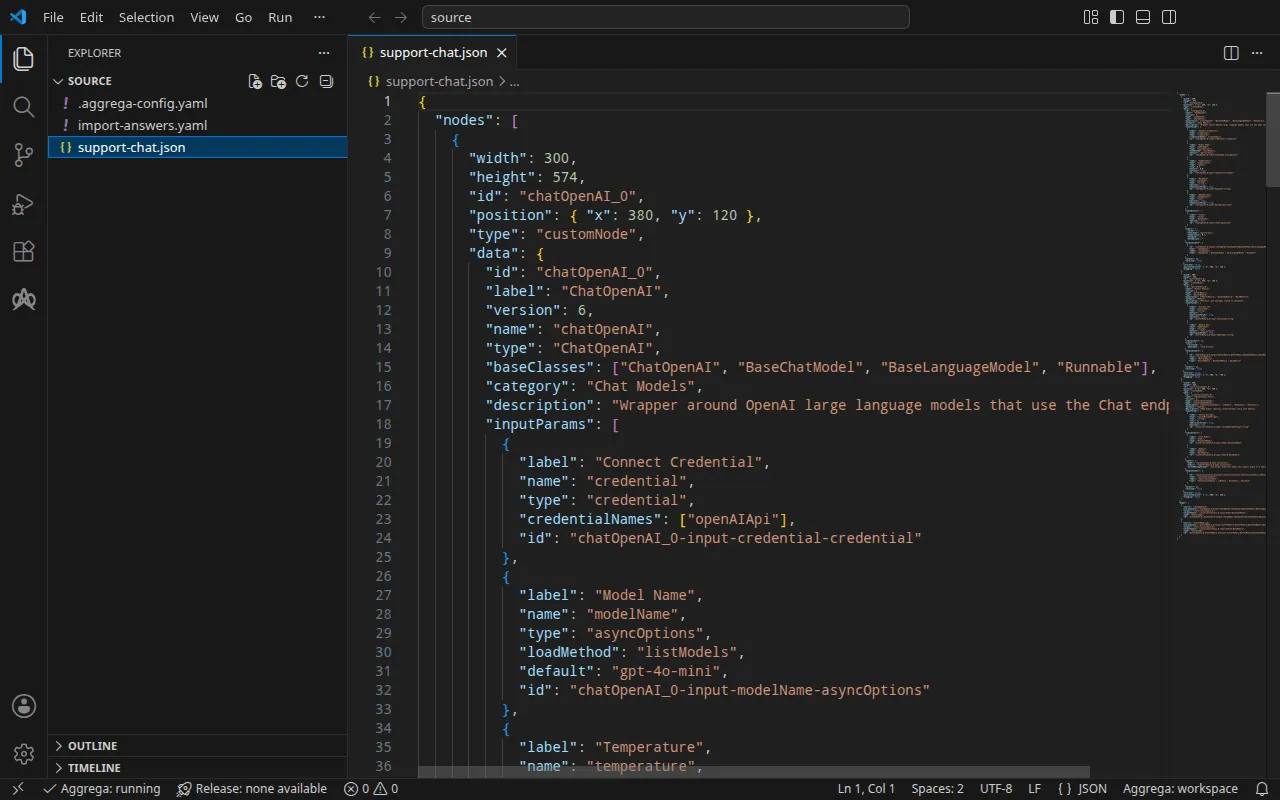
チャットフロー
support-chat.json は、Flowise のエディタがチャットフローをエクスポートする形式でこのウォークスルー用に書かれたもので、3 つのノードとその間の 2 つのエッジを持ちます。gpt-4o-mini を選択する ChatOpenAI ノード、Buffer Memory ノード、そしてその両方を受け取り短いシステムメッセージで応答する Conversation Chain ノードです。ChatOpenAI ノードは保存済みの認証情報を選択せず、Base Path も空のままなので、Flowise がこのノードを実行する OpenAI クライアントは、そのアドレスとキーを Flowise の環境から読み取ります。
チャットフローの隣にある .aggrega-config.yaml が、フォルダをワークスペースにします:
# The workspace key marks this directory as the workspace root, so an import run# here writes its drafts beside support-chat.json.workspace: {}# The registry the importer is fetched from the first time an import needs it.default_registry: hub.aggrega.aiそして import-answers.yaml には、どのチャットフローにも保持できない内容への回答が入っています。Flowise は起動時にファイルからチャットフローを読み込まないため、ビルドはオーナーアカウントで Flowise 自身の API を通じてチャットフローを投入しますが、そのアカウントを指定するエクスポートはありません。そのメールアドレスが、Docker Compose 向けのインポートに必要な唯一の回答です。Kubernetes 向けのインポートでは、各シークレット(オーナーのパスワードと OpenAI のキー)を保持する Kubernetes Secret の名前も必要になるため、ファイルはその 2 つの Secret も指定しています(Kubernetes の場合を参照):
# Values the import could not draft from the source, keyed by the drafted file and the key path inside# it. Write each one beside its key; an import of the same source, and a sync, read them from here and# ask nothing. A secret is never written here: its key asks where the secret comes from — a variable# name, ${NAME}, or the name of a Kubernetes Secret.release.yaml: # Email address of the platform's owner account, read only when values.flow_definition is set. The # step that seeds the chatflow registers this account when the instance has no owner yet, which makes # it the owner, and signs in as it; on an instance that already has one, it names an account allowed # to import chatflows, and the password attached to the owner_password slot is that account's. # Required when values.flow_definition is set: the build halts when it is empty. It has no default. spec.components.flowise.infra.owner_email: "owner@example.com" # The origin of the secret value, written by the operator in the Release. Read exactly as # values.origin is. Write it here or in values.origin, never in both. A secret: name where it comes # from, never the value. spec.components.flowise.features.owner_password.infra.origin: "flowise-owner" # The origin of the secret value, written by the operator in the Release. Read exactly as # values.origin is. Write it here or in values.origin, never in both. A secret: name where it comes # from, never the value. spec.components.flowise.uses.model.chatopenai-0.features.credential.infra.origin: "openai-api-key"owner@example.com は自分のメールアドレスを表します。ファイルがない場合、ターミナルで実行したインポートは各値を 1 問ずつ、そのキーの上にある説明に基づいた文言で尋ね、回答を新しい回答ファイルに書き込みます。何も尋ねられない場合は、キーと空の回答を含むそのファイルを書き込み、キーを一覧表示して、ステータス 1 で終了します。インポート回答ファイルでは、このファイルについて詳しく説明しています。
インポートは各ノードをワークスペースのカタログの Components と照らし合わせて評価し、--target はそのカタログの Recipes から Manifest を下書きします。ワークスペースはカタログフォルダーを指定していないため、インポートはインポーターの取得元であるレジストリから標準ライブラリのカタログを読み込みます。これは公開されたカタログの署名付きスナップショットで、最初のインポートが取得・検証してワークスペースのコンテンツキャッシュに保持し、インポートが下書きの隣に書き込む記録の中でそのダイジェストによって示されます。AGGREGA_CATALOG_DIRS または workspace.catalog_dirs で独自のカタログフォルダーを指定しているワークスペースは、代わりにそれらに対してインポートします。source に移動します:
cd sourceインポートを実行する
aggrega import support-chat.json --target compose標準出力には書き出したものが一覧表示されます:
wrote aggregate.yamlwrote release.yamlwrote manifest.yamlwrote .aggrega-import.json標準エラーには次のように出力されます(<workspace> は実行したフォルダーを表します):
[… omitted: a warning that the importer runs unverified, printed where its module is read from beside its Plugin entity in a catalog folder rather than fetched]read as the flowise format, with drafted paths relative to <workspace>warn: node chatOpenAI_0 reaches chatopenai-0 through the model connection chatopenai-0 of core/ai-agent/flowise: its Base Path is empty, so the OpenAI client Flowise runs it on reads the address the platform delivers for this connection, OPENAI_BASE_URL, and, since it selects no credential, the key delivered as OPENAI_API_KEYinfo: the answers file <workspace>/import-answers.yaml also answers spec.components.flowise.features.owner_password.infra.origin in release.yaml, spec.components.flowise.uses.model.chatopenai-0.features.credential.infra.origin in release.yaml, which these drafts do not leave empty; those answers are kept there and not appliedmapped chatOpenAI_0 (chatOpenAI) to core/ai-model/openai as a reference, HIGH at 0.9made no choice for bufferMemory_0 (bufferMemory)made no choice for conversationChain_0 (conversationChain) warning: node "flowise" (provider "compose"): artifact "flowise-flow/flowise-flow.yaml": skipped provenance label injection — the fragment declares no compose service. Compose carries build provenance as service labels, so a fragment contributing only top-level networks, volumes or configs carries none; the services this component emits elsewhere carry the full set.Pull complete: <workspace>/release.lock (entities=8, source_artifacts=0, external_inputs=0)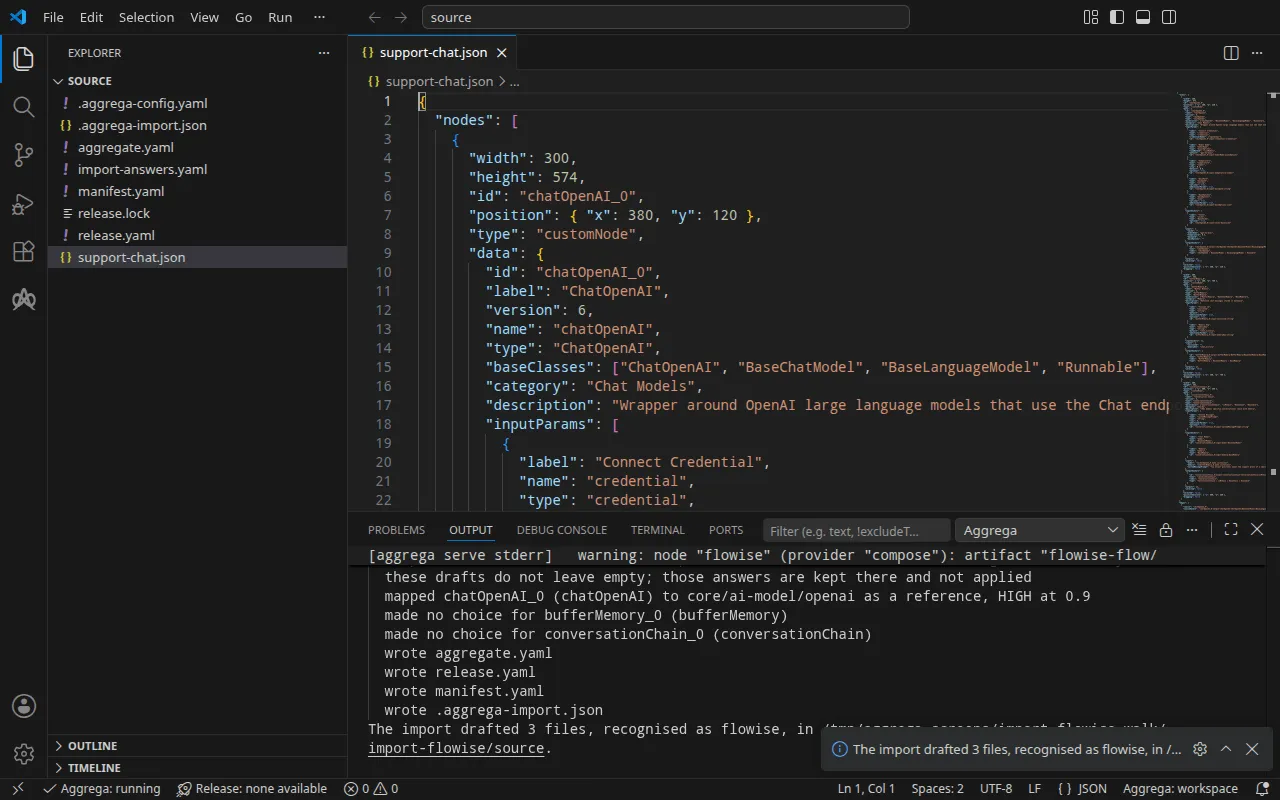
mapped行は、ChatOpenAI ノードが標準ライブラリの OpenAI モデルcore/ai-model/openaiになったことを示します。高ティアの 0.9 で一致したため、下書きではなく参照されています。つまりプラットフォームのmodelソケットに接続された独自のコンポーネントです。warn行は、チャットフローがそのモデルにどのように到達するかを示します。ノードはプラットフォームがモデル接続のために提供するアドレスとキーを読み取るため、Release が接続にアタッチしたキーがチャットフローの使用するキーになります。info行は回答ファイルに関するものです。回答ファイルは、下書きが空のままにしていたオーナーのメールアドレスに回答しました。その 2 つの Secret 名は、Kubernetes 向けのインポートだけが空のままにする内容への回答なので、ファイルに残りますが、ここでは使用されません。made no choice行は、メモリとチェーンがチャットフロー内に留まることを示します。プラットフォームのどのソケットもそれらを受け付けません。- 最後の 2 行はプルです。すべての値に回答があったため、インポートは
aggrega pullと同じように、下書きされた Release の依存関係をプルし、release.lockを書き込みました。以下のビルドにはこれ以上何も必要ありません。warning行はビルドも出力する行で、検証とビルドで説明しています。
書き出される内容
Aggregate、Release、Manifest の名前は imported/support-chat です。Flowise のエクスポートには独自の名前がないため、ファイル名 support-chat.json から名前が付きます。名前空間は、インポーターの target_namespace 設定が定めるもので、別のものを設定しない限り imported です(設定)。
aggregate.yaml — 標準ライブラリの Flowise プラットフォーム core/ai-agent/flowise のインスタンス 1 つで、エクスポートされたままのチャットフロー(ここではその大部分を省略しています)と、その model ソケットに接続されたモデルを持ちます:
apiVersion: aggrega.ai/v1beta1kind: Aggregatemetadata: name: imported/support-chat version: 0.1.0 description: Draft Aggregate imported from a source in the flowise format.spec: components: flowise: type: core/ai-agent/flowise features: # For the compose target, the lines below declare owner_password on flowise: a secret the Release alone attaches arrives under the key value, so each is declared with a key of its own and no two arrive under one; the Release attaches its origin, naming this type or none. owner_password: type: core/secret-value values: key: OWNER_PASSWORD values: # chatflow_id is derived from the exported flow, which gives no identifier of its own. chatflow_id: '40d9f5c5-5187-54c1-a9f5-a8dac92f88bb' flow_definition: | { "nodes": [ [… omitted: the chatflow's nodes, as exported, up to the Conversation Chain's inputs] "inputs": { "model": "{{"{{"}}chatOpenAI_0.data.instance}}", "memory": "{{"{{"}}bufferMemory_0.data.instance}}", [… omitted: the rest of the chatflow, as exported] } uses: model: chatopenai-0: target: chatopenai-0 # For the compose target, the lines below declare credential on chatopenai-0: a secret the Release alone attaches arrives under the key value, so each is declared with a key of its own and no two arrive under one; the Release attaches its origin, naming this type or none. features: credential: type: core/secret-value values: key: OPENAI_API_KEY # swap to core/ai-model/azure-openai (score 0.4000) by setting type: core/ai-model/azure-openai chatopenai-0: type: core/ai-model/openai values: model: |- gpt-4o-mini- モデルは
core/ai-model/openaiで、ノードが選択するモデルgpt-4o-miniを指定します。その上のコメントは、ノードが類似しているカタログの別の Component をそのスコアとともに示します。 - 2 つのシークレット(チャットフローの投入に使うオーナーアカウントのパスワードと、プラットフォームがモデルに提示する OpenAI のキー)は、それぞれが Flowise の環境に届く変数
OWNER_PASSWORDとOPENAI_API_KEYとともにここで宣言されています。Docker Compose では、Release だけがアタッチしたシークレットはキーvalueで届くため、2 つが衝突します。ここで宣言すれば、それぞれが独自のキーを持ちます。それぞれの取得元は Release が示します。 chatflow_idはチャットフローから導出されます。Flowise のエディタからのエクスポートは独自の識別子を持たないため、1 つのチャットフローは常に 1 つの識別子を生みます。Flowise のチャットフローは 2 つのノード間のすべての接続に対して{{<node id>.data.instance}}と書き、Aggregate のテキストはテンプレートとして読み込まれるため、下書きでは各{{を{{"{{"}}と書きます。ビルドはこれを 2 つの波括弧に戻します。
release.yaml — Manifest を使って Aggregate をデプロイする Release です:
apiVersion: aggrega.ai/v1beta1kind: Releasemetadata: name: imported/support-chat # environment is a drafted default, since no source names the environment this Release deploys to; change it to name the one it deploys to. environment: development version: 0.1.0 description: Draft Release imported from a source in the flowise format.spec: aggregate: imported/support-chat manifest: imported/support-chat components: flowise: infra: # The image running core/ai-agent/flowise, at the version this importer drafts, which the catalog's Recipes for it are known to run; the import does not raise or lower it to follow the source. image: "flowiseai/flowise:3.1.3" # Left for the Release, since the source cannot supply it: infra.owner_email, the email address of the platform's owner account, required while values.flow_definition is set owner_email: "owner@example.com" # Published on this machine's loopback address, 127.0.0.1: reachable from this machine only, by any process running on it. Delete this line to keep the service internal. published_port: 3000 features: owner_password: type: core/secret-value infra: # Attached by reference, never as a value: the owner account's password, required while values.flow_definition is set, read from the variable FLOWISE_OWNER_PASSWORD, which a target substituting variable references, as Docker Compose does when the stack starts, reads from the environment, so no file carries the value. origin: "${FLOWISE_OWNER_PASSWORD}" uses: model: chatopenai-0: features: credential: type: core/secret-value infra: # Attached by reference, never as a value: the credential flowise presents to chatopenai-0 on its model connection, read from the variable OPENAI_API_KEY, which a target substituting variable references, as Docker Compose does when the stack starts, reads from the environment, so no file carries the value. origin: "${OPENAI_API_KEY}" chatopenai-0: {}environmentはdevelopmentです。これはデフォルトであり、その上のコメントは、Release のデプロイ先の環境に変更するよう指示しています。- イメージは Flowise 3.1.3 で、カタログの Flowise 向け Recipes が実行するバージョンです。
published_portは 3000 で、Flowise が提供するポートです。そのため自分のマシンのhttp://127.0.0.1:3000で応答します。コメントにあるとおり、このマシン上のどのプロセスもそこで到達でき、それ以外からは到達できません。Flowise をスタックのネットワーク上だけに置くには、この行を削除します。owner_emailは回答ファイルからの回答です。その上のコメントは、インポートがそれを下書きできなかった理由を示します。- 2 つのシークレットは変数参照
${FLOWISE_OWNER_PASSWORD}と${OPENAI_API_KEY}で、スタックの起動時に Docker Compose がシェルから値を埋めるため、どちらの値もファイルには含まれません。
manifest.yaml — プラットフォームとモデルの Compose Recipes、およびシークレットの変数参照をそのまま Compose ファイルに書き込む実現です:
apiVersion: aggrega.ai/v1beta1kind: Manifestmetadata: name: imported/support-chat version: 0.1.0spec: mappings: components: type: core/ai-agent/flowise: compose/flowise core/ai-model/openai: compose/openai features: type: core/secret-value: compose/dotenv-secret.aggrega-import.json はインポートが書き込んだ内容の記録で、後の aggrega import --sync がこれを読み取ります。release.lock は、Release が解決するすべてのカタログエンティティをバージョンとダイジェストで固定します。
検証とビルド
aggrega validate --release release.yamlaggrega build --release release.yaml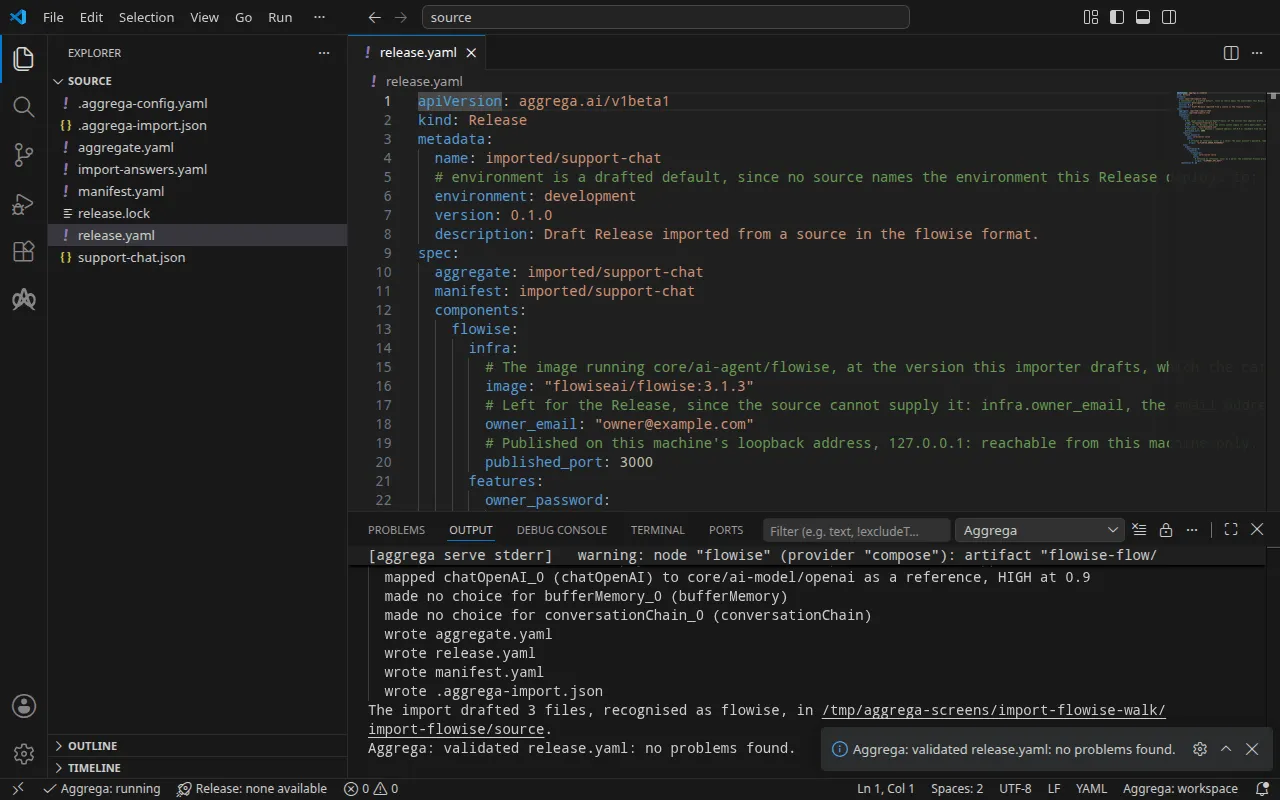
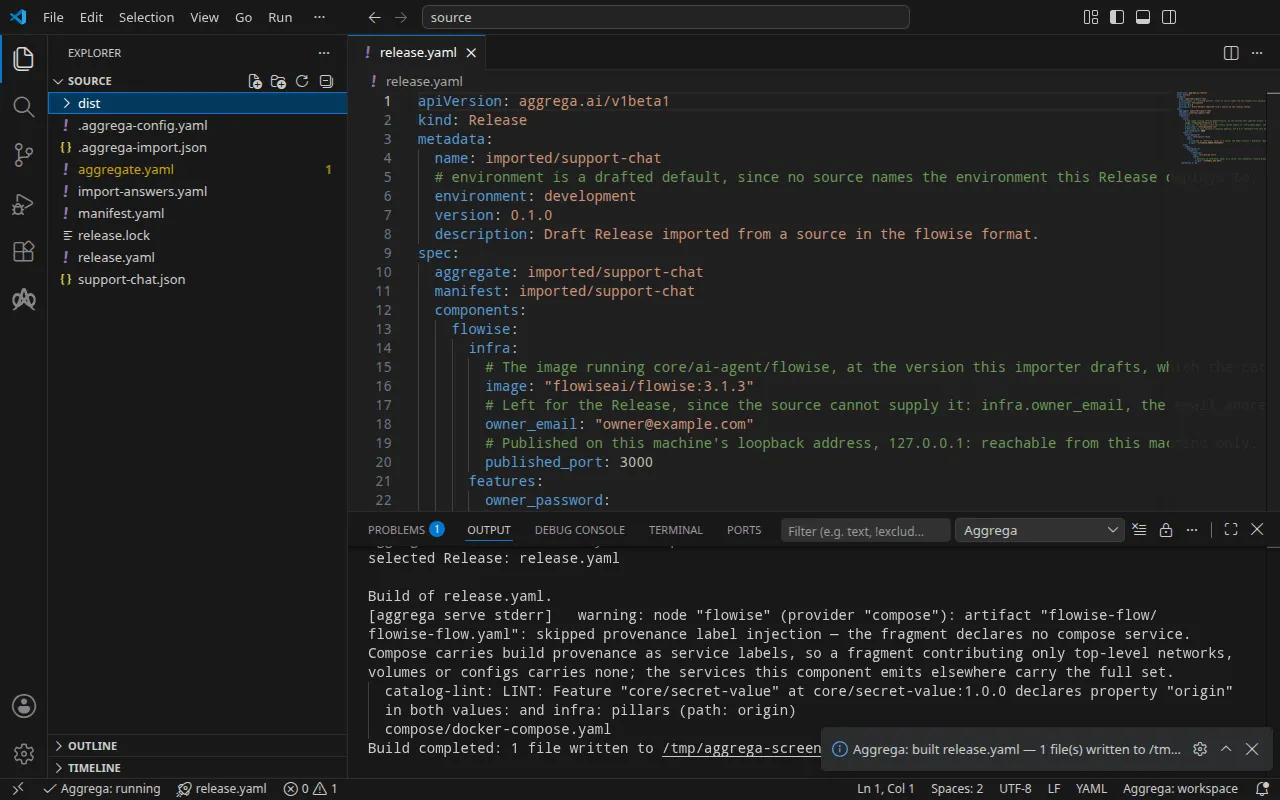
検証の出力は次のとおりです:
notice: LINT: Feature "core/secret-value" at core/secret-value:1.0.0 declares property "origin" in both values: and infra: pillars (path: origin)release dependency validation passed: release.yaml (schema-pillar + dependency pillars)そしてビルドの出力です(<workspace> は下書きがあるフォルダーを表します):
warning: node "flowise" (provider "compose"): artifact "flowise-flow/flowise-flow.yaml": skipped provenance label injection — the fragment declares no compose service. Compose carries build provenance as service labels, so a fragment contributing only top-level networks, volumes or configs carries none; the services this component emits elsewhere carry the full set. notice: LINT: Feature "core/secret-value" at core/secret-value:1.0.0 declares property "origin" in both values: and infra: pillars (path: origin)[… omitted: a total build time, which differs per run]Build completed: 1 file written to <workspace>/distwarning 行は、Compose ファイルのうちチャットフローを運ぶ部分、つまりトップレベルの configs エントリに関するもので、このエントリにはビルドのラベルを付けるサービスがありません。notice 行は参考情報です。シークレットの Feature は Aggregate の values または Release の infra から origin を受け付け、この通知は 1 つのリーフが両方で宣言されていることを報告しています。どちらも判定を変えません。
dist/compose/docker-compose.yaml には 2 つのサービスがあります。Flowise 自体:
flowise: image: flowiseai/flowise:3.1.3 environment: DATABASE_PATH: /home/node/.flowise SECRETKEY_PATH: /home/node/.flowise OPENAI_BASE_URL: https://api.openai.com/v1 OPENAI_API_KEY: ${OPENAI_API_KEY} ports: - 127.0.0.1:3000:3000 [… omitted: the labels the build writes on every service, naming the Aggregate, the component, the environment and the compiler's version] volumes: - type: volume source: flowise--data target: /home/node networks: - compose [… omitted: the service's health check]そして、Flowise が正常と報告した後にチャットフローを投入し、終了するサービス:
flowise-flow-seed: image: flowiseai/flowise:3.1.3 entrypoint: - node - /seed/seed.js environment: FLOWISE_URL: http://127.0.0.1:3000 OWNER_EMAIL: owner@example.com OWNER_PASSWORD: ${FLOWISE_OWNER_PASSWORD} CHATFLOW_ID: 40d9f5c5-5187-54c1-a9f5-a8dac92f88bb CHATFLOW_NAME: 40d9f5c5-5187-54c1-a9f5-a8dac92f88bb [… omitted: the labels the build writes on every service] network_mode: service:flowise depends_on: flowise: condition: service_healthy restart: "no" configs: - source: flowise-flow target: /seed/flow.json - source: flowise-flow-seed target: /seed/seed.jsこのサービスは、新しい Flowise にオーナーアカウントを登録するか、そのアカウントでサインインし、チャットフローを chatflow_id に書き込みます。キーとパスワードは変数参照で、スタックの起動時にシェルから値が埋められます。Flowise の Compose Recipe がマシン上にポートを公開するのは、Release が Flowise の infra で published_port を設定している場合だけで、その場合もループバックアドレス 127.0.0.1 のみに公開します。設定がなければ、サービスにはスタックのネットワーク上からしか到達できません。
AI アシスタントを使う
Aggrega のツールでセットアップした AI アシスタントでも同じことができます。次のプロンプトを貼り付けてください。
Aggrega のツールだけを使い、フォルダーは自分で作成しないでください。Workspace フォルダーにまだ `import-flowise` フォルダーがない場合は、`example` を `import-flowise` に設定し、`dir` を指定せずに `scaffold` ツールを 1 回呼び出してください。これにより、例が新しい `import-flowise` フォルダーに書き込まれ、その `source` フォルダーにこのページでインポートするものが入ります。次に、`workspace_root` を `import-flowise/source`、`source` を `support-chat.json`、`target` を `compose` に設定して `import` ツールを呼び出してください。このツールは、必要な回答を `support-chat.json` の隣にある `import-answers.yaml` から読み取り、下書きを `import-flowise/source` に書き込み、下書きに必要なものをプルします。次に、`workspace_root` を `import-flowise/source`、`release` を `release.yaml` に設定して `validate` ツールを呼び出し、`workspace_root` を `import-flowise/source`、`release` を `release.yaml`、`write` を true に設定して `build` ツールを呼び出してください。ビルドが書き込んだファイルを教えてください。ファイルは `import-flowise/source/dist/` の下にあります。VS Code で開く
Visual Studio Code 用の Aggrega 拡張機能 をインストールした状態で、インポートが下書きを書き込んだフォルダー import-flowise/source を VS Code で開きます。このフォルダーには Release が 1 つ、下書きの release.yaml だけがあるため、エディターがそれを自動的に選択し、編集中の下書きをその Release に照らしてチェックし、見つかった内容をファイル内と「問題」パネルに表示します。コマンド パレットの Aggrega: Show topology graph は、Release のコンポーネントとそれらの間の接続を描画します。Aggrega: Build、Aggrega: Preview build、Aggrega: Pull は同じ Release に対して動作し、それぞれアクティビティ バーの Aggrega ビューにある Commands パネルのボタンとしても使えます。Build はファイルをフォルダーの dist/ に書き込みます。残りの内容は Visual Studio Code で Aggrega を使う で説明しています。
実行する
シェルでキーとオーナーのパスワードを設定し、Flowise を起動してから、シードサービスを実行します:
export OPENAI_API_KEY='your OpenAI key'export FLOWISE_OWNER_PASSWORD='a password of your own'docker compose -p support-chat -f dist/compose/docker-compose.yaml up -d --wait flowisedocker compose -p support-chat -f dist/compose/docker-compose.yaml up flowise-flow-seed-p は、インポートの実行方法 の実行手順で説明しているとおり、プロジェクトに名前を付けます。--wait は Flowise が正常であると報告すると戻ります。flowise だけを指定しているのは、終了したコンテナをすべて失敗として数えるためで、シードサービスは設計上終了します。2 番目のコマンドはシードサービスを実行し、そのログを出力して、終了すると戻ります:
flowise-flow-seed-1 | registered the owner account owner@example.comflowise-flow-seed-1 | imported chatflow 40d9f5c5-5187-54c1-a9f5-a8dac92f88bb as "40d9f5c5-5187-54c1-a9f5-a8dac92f88bb"flowise-flow-seed-1 exited with code 0マシン上の別のプログラムがすでに 127.0.0.1:3000 で待ち受けている場合、最初のコマンドは failed to bind host port 127.0.0.1:3000/tcp: address already in use で停止します。published_port を空いているポートに設定して、もう一度ビルドしてください。以下の実行ではそのようにして 3002 を使い、3000 の代わりにそのポートを使用しました。
テストする
published_port が公開するアドレス http://127.0.0.1:3000 を開き、オーナーのメールアドレスとパスワードでサインインします。シードのチャットフローが Flowise に入っています。
独自の API キーを設定していないチャットフローは、キーなしで予測エンドポイントに応答します。質問してみましょう:
curl -sS -X POST http://127.0.0.1:3000/api/v1/prediction/40d9f5c5-5187-54c1-a9f5-a8dac92f88bb \ -H 'Content-Type: application/json' -d '{"question": "In one short sentence: what is Docker Compose?"}'この実行では OpenAI キーにプレースホルダーを使ったため、回答は OpenAI によるその拒否です。これは、チャットフローがモデルの呼び出しまで実行されたことを示しています:
{"statusCode":500,"success":false,"message":"401 Unauthorized – check your API key and ensure it has access to the requested model.","stack":{}}実際のキーを使うと、応答の text に回答が入ります。
Kubernetes では、Kubernetes の場合 で説明しているビルドを適用し、そのシード Job が完了したら、適用先の名前空間にある Flowise の Service flowise-default にローカルポートを転送し、コマンドを実行したままにします:
kubectl port-forward -n <namespace> svc/flowise-default 3000:3000別のターミナルから、上記の質問がそのまま同じアドレスでチャットフローに届きます。この実行でも、プレースホルダーのキーに対して同じ拒否が返されました。
次のコマンドでスタックを停止します。-v を付けると Flowise のデータボリュームも削除され、それとともにオーナーアカウントと、シードサービスが書き込んだ chatflow も削除されます:
docker compose -p support-chat -f dist/compose/docker-compose.yaml down -vKubernetes の場合
同じチャットフローは、helm ターゲットで Kubernetes 向けにインポートできます。Docker Compose 用の下書きはすでに source にあり、インポートがそこにある Aggregate を上書きすることはないため、--output-dir でこれらを専用のフォルダーに下書きし、そこから検証とビルドを行います:
aggrega import support-chat.json --target helm --output-dir helmcd helmaggrega validate --release release.yamlaggrega build --release release.yaml下書きはターゲットが異なる部分で異なります。Manifest はプラットフォームを helm/flowise に、モデルを helm/openai に、各シークレットを、名前空間に既にある Secret からそれを読み取る helm/k8s-existing-secret にマッピングします。Release は、オーナーのパスワードと OpenAI キーを core/referenced-secret としてアタッチし、それぞれが自身の Secret を指定します。また、3 つの回答すべてを回答ファイルから取得します。オーナーのメールアドレス、flowise-owner、openai-api-key です。
ビルドは、ワークスペースのルート source にある dist/helm/(helm から見ると ../dist/helm/)の下にプレーンな Kubernetes マニフェストを書き出し、その中には chatflow のシードが Job として含まれます。適用先の名前空間に 2 つの Secret を作成し、それぞれのデータキー value の下に値を格納してから、インポートの実行方法 の実行ステップの説明に従ってフォルダーを適用します。