

Mengimpor chatflow Flowise
Panduan langkah demi langkah ini mengimpor chatflow yang diekspor dari Flowise — rantai percakapan dengan model chat dan memori — ke dalam sebuah Aggregate, sebuah Release, dan sebuah Manifest yang, sebagaimana tertulis, membangun Flowise yang membawa chatflow tersebut untuk Docker Compose, lalu membangunnya dan menjalankan hasilnya. Setiap file dan setiap blok keluaran di bawah ini berasal dari eksekusi nyata; chatflow dan setiap tahap panduan ini ada dalam contoh import-flowise, tempat skrip pemeriksa menjalankan impor lagi, membandingkan apa yang ditulisnya, apa yang dicetaknya, dan blok-blok yang dikutip halaman ini dengan file yang disimpan di sana, serta memvalidasi dan membangun apa yang ditulis impor.
Membuat contoh
Anda dapat menjalankan impor ini dengan perintah di halaman ini, atau meminta asisten AI Anda menjalankannya untuk Anda.
Tulis contoh ke folder baru yang dinamai sesuai contoh itu:
aggrega scaffold --example import-flowiseKemudian ia mencetak perintah yang dijalankan berikutnya. Perintah pertama berpindah ke folder baru; perintah sesudahnya, di bawah, berpindah ke folder source milik folder baru itu, tempat impor dijalankan. Folder itu memuat file chatflow, support-chat.json, yang dideskripsikan halaman ini alih-alih dikutip:
cd import-flowise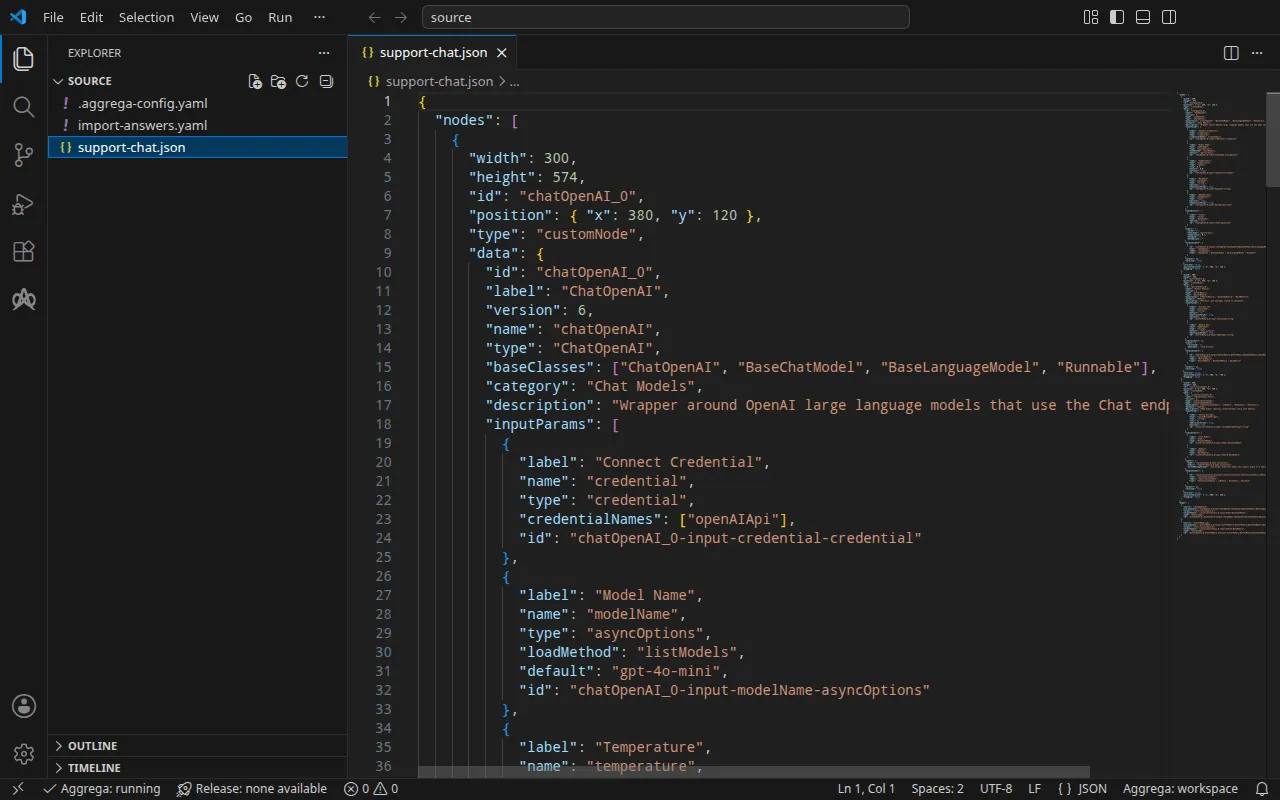
Chatflow
support-chat.json, yang ditulis untuk panduan ini dalam bentuk yang digunakan editor Flowise saat mengekspor chatflow, berisi tiga node dan dua sisi di antaranya: node ChatOpenAI yang memilih gpt-4o-mini, node Buffer Memory, dan node Conversation Chain yang menerima keduanya dan menjawab dengan pesan sistem singkat. Node ChatOpenAI tidak memilih kredensial tersimpan apa pun dan membiarkan Base Path-nya kosong, sehingga klien OpenAI tempat Flowise menjalankannya membaca alamat dan kuncinya dari lingkungan Flowise.
Di samping chatflow, sebuah .aggrega-config.yaml menjadikan folder tersebut ruang kerja:
# The workspace key marks this directory as the workspace root, so an import run# here writes its drafts beside support-chat.json.workspace: {}# The registry the importer is fetched from the first time an import needs it.default_registry: hub.aggrega.aidan import-answers.yaml menyimpan jawaban atas hal yang tidak dapat disimpan oleh chatflow mana pun. Flowise tidak memuat chatflow apa pun dari file saat dimulai, jadi build memasukkannya melalui API Flowise sendiri di bawah akun pemilik, dan tidak ada ekspor yang menyebutkan akun itu: email-nya adalah satu-satunya jawaban yang dibutuhkan impor untuk Docker Compose. Impor untuk Kubernetes juga membutuhkan nama Secret Kubernetes yang menyimpan setiap rahasia — kata sandi pemilik dan kunci OpenAI — sehingga file tersebut juga menyebutkan kedua Secret itu (lihat Di Kubernetes):
# Values the import could not draft from the source, keyed by the drafted file and the key path inside# it. Write each one beside its key; an import of the same source, and a sync, read them from here and# ask nothing. A secret is never written here: its key asks where the secret comes from — a variable# name, ${NAME}, or the name of a Kubernetes Secret.release.yaml: # Email address of the platform's owner account, read only when values.flow_definition is set. The # step that seeds the chatflow registers this account when the instance has no owner yet, which makes # it the owner, and signs in as it; on an instance that already has one, it names an account allowed # to import chatflows, and the password attached to the owner_password slot is that account's. # Required when values.flow_definition is set: the build halts when it is empty. It has no default. spec.components.flowise.infra.owner_email: "owner@example.com" # The origin of the secret value, written by the operator in the Release. Read exactly as # values.origin is. Write it here or in values.origin, never in both. A secret: name where it comes # from, never the value. spec.components.flowise.features.owner_password.infra.origin: "flowise-owner" # The origin of the secret value, written by the operator in the Release. Read exactly as # values.origin is. Write it here or in values.origin, never in both. A secret: name where it comes # from, never the value. spec.components.flowise.uses.model.chatopenai-0.features.credential.infra.origin: "openai-api-key"owner@example.com mewakili email Anda sendiri. Tanpa file tersebut, impor di terminal menanyakan setiap nilai, satu pertanyaan setiap kali, yang dirumuskan dari deskripsi di atas kuncinya, dan menulis jawaban Anda ke file jawaban baru; jika tidak ada yang dapat ditanyakan, impor menulis file itu dengan kunci-kunci dan jawaban kosong, mencantumkannya, lalu keluar dengan status 1. File jawaban impor menjelaskan file tersebut secara lengkap.
Impor menimbang setiap node terhadap Components di katalog ruang kerja, dan --target menyusun draf Manifest dari Recipes katalog tersebut. Ruang kerja tidak menyebutkan folder katalog apa pun, jadi impor membaca katalog pustaka standar dari registry tempat impor mengambil importer-nya: snapshot bertanda tangan dari katalog yang diterbitkan, yang diambil, diverifikasi, dan disimpan di cache konten ruang kerja oleh impor pertama, serta disebutkan melalui digest-nya dalam catatan yang ditulis impor di samping draf-drafnya. Ruang kerja yang menyebutkan folder katalognya sendiri — di AGGREGA_CATALOG_DIRS, atau di bawah workspace.catalog_dirs — mengimpor terhadap folder-folder itu sebagai gantinya. Pindah ke source:
cd sourceMenjalankan impor
aggrega import support-chat.json --target composePada keluaran standar, impor mencantumkan apa yang ditulisnya:
wrote aggregate.yamlwrote release.yamlwrote manifest.yamlwrote .aggrega-import.jsonPada galat standar, dengan <workspace> mewakili folder tempat Anda menjalankannya:
[… omitted: a warning that the importer runs unverified, printed where its module is read from beside its Plugin entity in a catalog folder rather than fetched]read as the flowise format, with drafted paths relative to <workspace>warn: node chatOpenAI_0 reaches chatopenai-0 through the model connection chatopenai-0 of core/ai-agent/flowise: its Base Path is empty, so the OpenAI client Flowise runs it on reads the address the platform delivers for this connection, OPENAI_BASE_URL, and, since it selects no credential, the key delivered as OPENAI_API_KEYinfo: the answers file <workspace>/import-answers.yaml also answers spec.components.flowise.features.owner_password.infra.origin in release.yaml, spec.components.flowise.uses.model.chatopenai-0.features.credential.infra.origin in release.yaml, which these drafts do not leave empty; those answers are kept there and not appliedmapped chatOpenAI_0 (chatOpenAI) to core/ai-model/openai as a reference, HIGH at 0.9made no choice for bufferMemory_0 (bufferMemory)made no choice for conversationChain_0 (conversationChain) warning: node "flowise" (provider "compose"): artifact "flowise-flow/flowise-flow.yaml": skipped provenance label injection — the fragment declares no compose service. Compose carries build provenance as service labels, so a fragment contributing only top-level networks, volumes or configs carries none; the services this component emits elsewhere carry the full set.Pull complete: <workspace>/release.lock (entities=8, source_artifacts=0, external_inputs=0)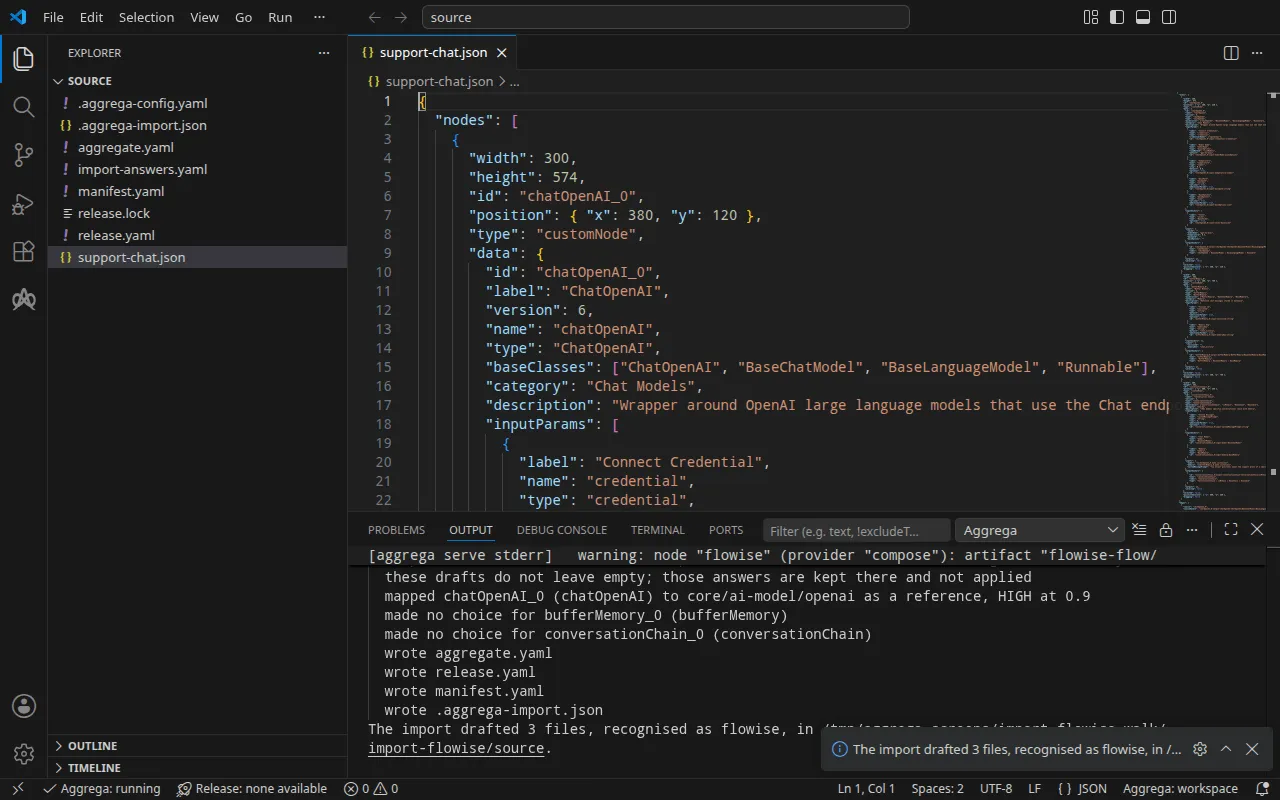
- Baris
mappedmenyatakan bahwa node ChatOpenAI menjadi model OpenAI dari pustaka standar,core/ai-model/openai, yang direferensikan alih-alih disusun sebagai draf, karena node itu cocok pada tingkat tinggi, dengan nilai 0,9: sebuah komponen tersendiri, yang terhubung ke soketmodelmilik platform. - Baris
warnmenyatakan bagaimana chatflow menjangkau model itu: node membaca alamat dan kunci yang dikirimkan platform untuk koneksi model, sehingga kunci yang dilampirkan Release ke koneksi adalah kunci yang digunakan chatflow. - Baris
infoberkaitan dengan file jawaban. File itu menjawab email pemilik, yang dibiarkan kosong oleh draf; dua nama Secret di dalamnya menjawab hal yang hanya dibiarkan kosong oleh impor untuk Kubernetes, sehingga keduanya tetap ada di file, tidak digunakan di sini. - Baris
made no choicemenyatakan bahwa memori dan rantai tetap berada di dalam chatflow: tidak ada soket platform yang menerimanya. - Dua baris terakhir adalah pull. Karena setiap nilai sudah dijawab, impor menarik dependensi Release hasil draf, seperti yang dilakukan
aggrega pull, dan menulisrelease.lock; build di bawah tidak membutuhkan apa pun lagi. Bariswarningadalah baris yang juga dicetak oleh build, dan Validasi dan build menjelaskannya.
Apa yang ditulisnya
Aggregate, Release, dan Manifest diberi nama imported/support-chat, berdasarkan file, support-chat.json, karena ekspor Flowise tidak membawa nama sendiri, di bawah namespace yang ditetapkan oleh pengaturan target_namespace milik pengimpor, yaitu imported kecuali Anda menetapkan yang lain (Pengaturan).
aggregate.yaml — satu instans platform Flowise dari pustaka standar, core/ai-agent/flowise, yang membawa chatflow seperti saat diekspor, sebagian besar dihilangkan di sini, dan model yang terhubung ke soket model miliknya:
apiVersion: aggrega.ai/v1beta1kind: Aggregatemetadata: name: imported/support-chat version: 0.1.0 description: Draft Aggregate imported from a source in the flowise format.spec: components: flowise: type: core/ai-agent/flowise features: # For the compose target, the lines below declare owner_password on flowise: a secret the Release alone attaches arrives under the key value, so each is declared with a key of its own and no two arrive under one; the Release attaches its origin, naming this type or none. owner_password: type: core/secret-value values: key: OWNER_PASSWORD values: # chatflow_id is derived from the exported flow, which gives no identifier of its own. chatflow_id: '40d9f5c5-5187-54c1-a9f5-a8dac92f88bb' flow_definition: | { "nodes": [ [… omitted: the chatflow's nodes, as exported, up to the Conversation Chain's inputs] "inputs": { "model": "{{"{{"}}chatOpenAI_0.data.instance}}", "memory": "{{"{{"}}bufferMemory_0.data.instance}}", [… omitted: the rest of the chatflow, as exported] } uses: model: chatopenai-0: target: chatopenai-0 # For the compose target, the lines below declare credential on chatopenai-0: a secret the Release alone attaches arrives under the key value, so each is declared with a key of its own and no two arrive under one; the Release attaches its origin, naming this type or none. features: credential: type: core/secret-value values: key: OPENAI_API_KEY # swap to core/ai-model/azure-openai (score 0.4000) by setting type: core/ai-model/azure-openai chatopenai-0: type: core/ai-model/openai values: model: |- gpt-4o-mini- Model-nya adalah
core/ai-model/openai, dengan model yang dipilih node,gpt-4o-mini. Komentar di atasnya menyebutkan Component lain dari katalog yang mirip dengan node tersebut, beserta nilainya. - Dua rahasia — kata sandi akun pemilik yang digunakan untuk memasukkan chatflow, dan kunci OpenAI yang diberikan platform kepada model — dideklarasikan di sini bersama variabel tempat masing-masing tiba di lingkungan Flowise,
OWNER_PASSWORDdanOPENAI_API_KEY. Di Docker Compose, rahasia yang hanya dilampirkan oleh Release akan tiba di bawah kuncivalue, dan keduanya akan bertabrakan; jika dideklarasikan di sini, masing-masing memiliki kuncinya sendiri. Release menyatakan dari mana masing-masing berasal. chatflow_idditurunkan dari chatflow, karena ekspor dari editor Flowise tidak membawa pengenal sendiri, sehingga satu chatflow selalu menghasilkan pengenal yang sama. Chatflow Flowise menulis{{<node id>.data.instance}}untuk setiap koneksi antara dua node, dan teks Aggregate dibaca sebagai templat, jadi draf menulis setiap{{sebagai{{"{{"}}, yang diubah kembali oleh build menjadi dua kurung kurawal.
release.yaml — Release, yang men-deploy Aggregate dengan Manifest:
apiVersion: aggrega.ai/v1beta1kind: Releasemetadata: name: imported/support-chat # environment is a drafted default, since no source names the environment this Release deploys to; change it to name the one it deploys to. environment: development version: 0.1.0 description: Draft Release imported from a source in the flowise format.spec: aggregate: imported/support-chat manifest: imported/support-chat components: flowise: infra: # The image running core/ai-agent/flowise, at the version this importer drafts, which the catalog's Recipes for it are known to run; the import does not raise or lower it to follow the source. image: "flowiseai/flowise:3.1.3" # Left for the Release, since the source cannot supply it: infra.owner_email, the email address of the platform's owner account, required while values.flow_definition is set owner_email: "owner@example.com" # Published on this machine's loopback address, 127.0.0.1: reachable from this machine only, by any process running on it. Delete this line to keep the service internal. published_port: 3000 features: owner_password: type: core/secret-value infra: # Attached by reference, never as a value: the owner account's password, required while values.flow_definition is set, read from the variable FLOWISE_OWNER_PASSWORD, which a target substituting variable references, as Docker Compose does when the stack starts, reads from the environment, so no file carries the value. origin: "${FLOWISE_OWNER_PASSWORD}" uses: model: chatopenai-0: features: credential: type: core/secret-value infra: # Attached by reference, never as a value: the credential flowise presents to chatopenai-0 on its model connection, read from the variable OPENAI_API_KEY, which a target substituting variable references, as Docker Compose does when the stack starts, reads from the environment, so no file carries the value. origin: "${OPENAI_API_KEY}" chatopenai-0: {}environmentbernilaidevelopment, nilai bawaan yang menurut komentar di atasnya harus diubah ke lingkungan tempat Release di-deploy.- Image-nya adalah Flowise 3.1.3, versi yang dijalankan oleh Recipes katalog untuk Flowise.
published_portbernilai 3000, port tempat Flowise melayani, sehingga Flowise menjawab dihttp://127.0.0.1:3000di mesin Anda. Seperti yang dinyatakan komentarnya, proses apa pun di mesin ini dapat menjangkaunya di sana dan tidak ada yang lain yang bisa; hapus baris itu agar Flowise hanya berada di jaringan stack.owner_emailadalah jawaban dari file jawaban. Komentar di atasnya menjelaskan mengapa impor tidak dapat menyusunnya sebagai draf.- Dua rahasia tersebut adalah referensi variabel,
${FLOWISE_OWNER_PASSWORD}dan${OPENAI_API_KEY}, yang diisi Docker Compose dari shell Anda saat stack dimulai, sehingga tidak ada file yang membawa salah satu nilainya.
manifest.yaml — Recipes Compose untuk platform dan model, serta realisasi yang menulis referensi variabel sebuah rahasia ke dalam file Compose apa adanya:
apiVersion: aggrega.ai/v1beta1kind: Manifestmetadata: name: imported/support-chat version: 0.1.0spec: mappings: components: type: core/ai-agent/flowise: compose/flowise core/ai-model/openai: compose/openai features: type: core/secret-value: compose/dotenv-secret.aggrega-import.json adalah catatan tentang apa yang ditulis oleh impor, yang dibaca oleh aggrega import --sync berikutnya, dan release.lock menyematkan setiap entitas katalog yang menjadi hasil resolusi Release, berdasarkan versi dan digest.
Validasi dan build
aggrega validate --release release.yamlaggrega build --release release.yaml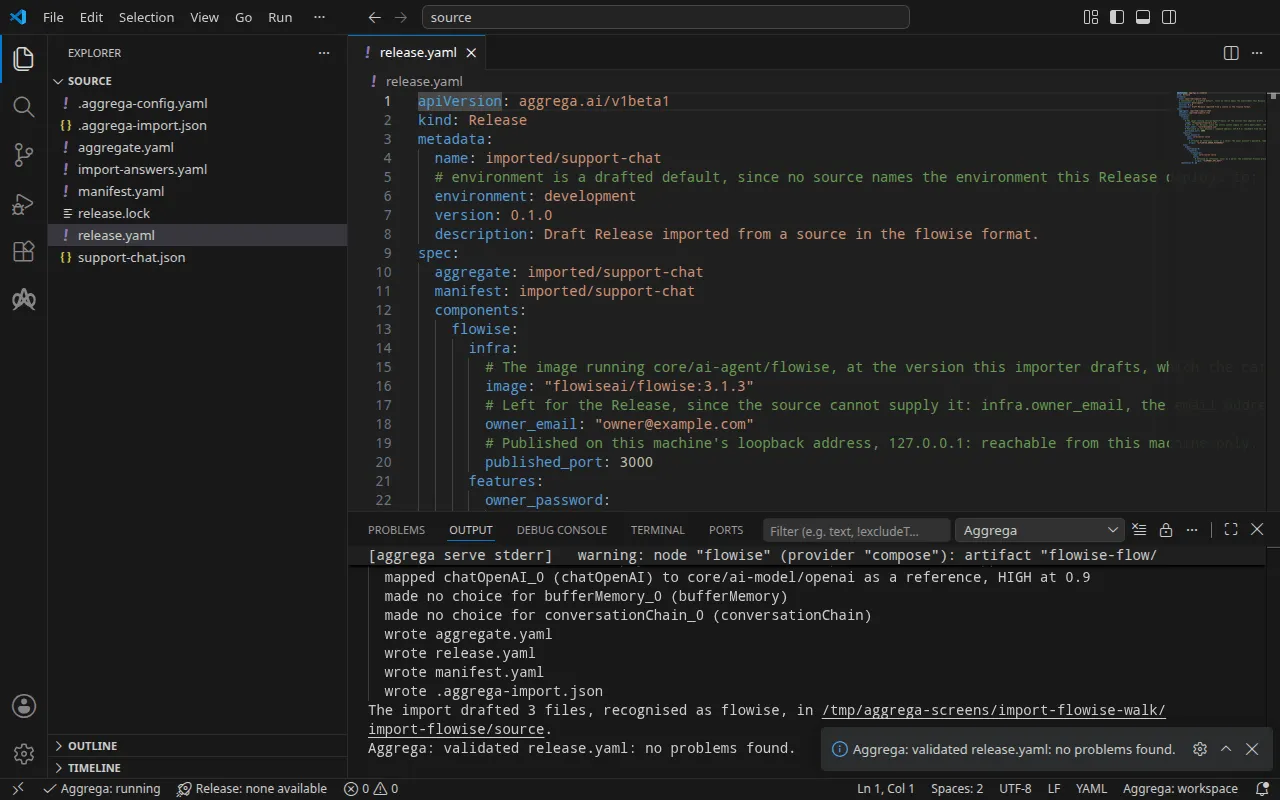
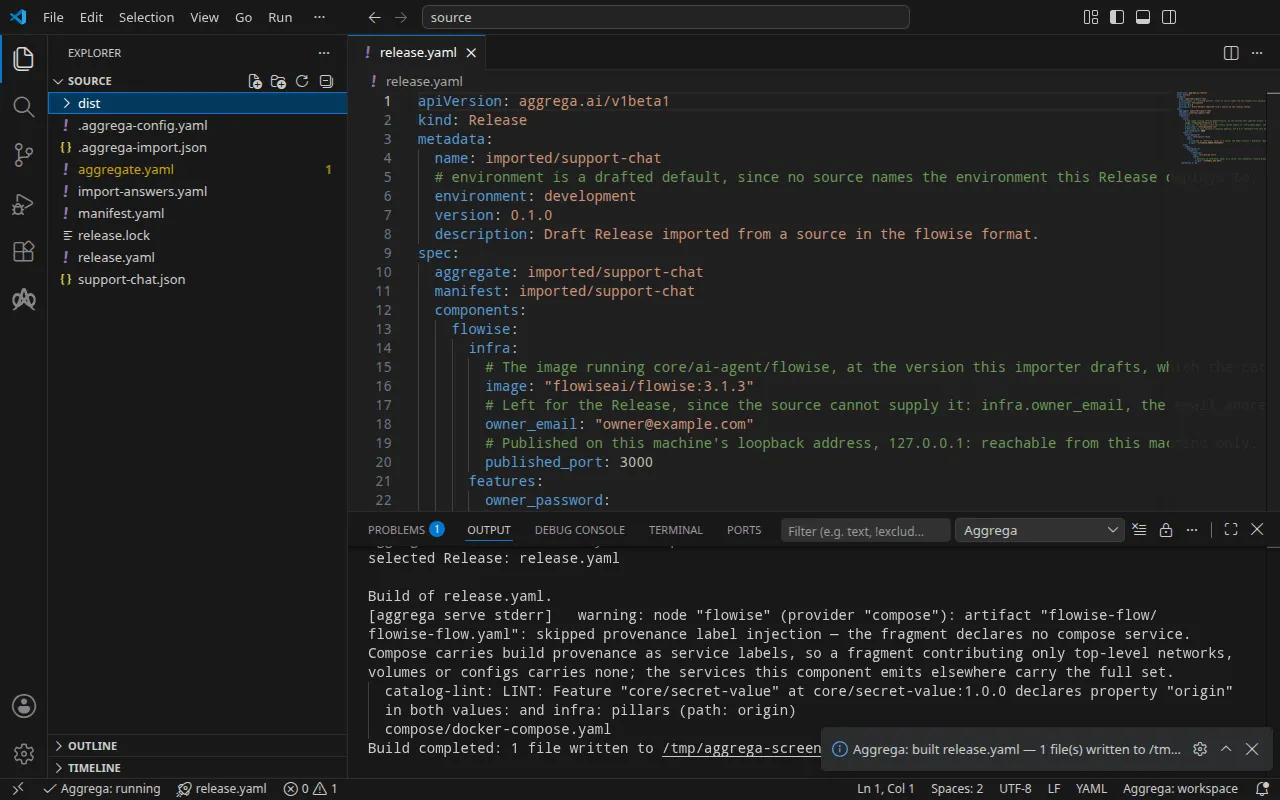
Validasi mencetak:
notice: LINT: Feature "core/secret-value" at core/secret-value:1.0.0 declares property "origin" in both values: and infra: pillars (path: origin)release dependency validation passed: release.yaml (schema-pillar + dependency pillars)dan build, dengan <workspace> mewakili folder yang berisi draf:
warning: node "flowise" (provider "compose"): artifact "flowise-flow/flowise-flow.yaml": skipped provenance label injection — the fragment declares no compose service. Compose carries build provenance as service labels, so a fragment contributing only top-level networks, volumes or configs carries none; the services this component emits elsewhere carry the full set. notice: LINT: Feature "core/secret-value" at core/secret-value:1.0.0 declares property "origin" in both values: and infra: pillars (path: origin)[… omitted: a total build time, which differs per run]Build completed: 1 file written to <workspace>/distBaris warning berkaitan dengan bagian file Compose yang membawa chatflow, sebuah entri configs tingkat atas, yang tidak memiliki layanan untuk menempatkan label build. Baris notice bersifat informatif: Feature rahasia menerima origin miliknya dari values milik Aggregate atau infra milik Release, dan pemberitahuan itu melaporkan bahwa satu daun dideklarasikan di keduanya. Tidak satu pun mengubah putusan.
dist/compose/docker-compose.yaml berisi dua layanan. Flowise itu sendiri:
flowise: image: flowiseai/flowise:3.1.3 environment: DATABASE_PATH: /home/node/.flowise SECRETKEY_PATH: /home/node/.flowise OPENAI_BASE_URL: https://api.openai.com/v1 OPENAI_API_KEY: ${OPENAI_API_KEY} ports: - 127.0.0.1:3000:3000 [… omitted: the labels the build writes on every service, naming the Aggregate, the component, the environment and the compiler's version] volumes: - type: volume source: flowise--data target: /home/node networks: - compose [… omitted: the service's health check]dan layanan yang memasukkan chatflow begitu Flowise melaporkan dirinya sehat, lalu keluar:
flowise-flow-seed: image: flowiseai/flowise:3.1.3 entrypoint: - node - /seed/seed.js environment: FLOWISE_URL: http://127.0.0.1:3000 OWNER_EMAIL: owner@example.com OWNER_PASSWORD: ${FLOWISE_OWNER_PASSWORD} CHATFLOW_ID: 40d9f5c5-5187-54c1-a9f5-a8dac92f88bb CHATFLOW_NAME: 40d9f5c5-5187-54c1-a9f5-a8dac92f88bb [… omitted: the labels the build writes on every service] network_mode: service:flowise depends_on: flowise: condition: service_healthy restart: "no" configs: - source: flowise-flow target: /seed/flow.json - source: flowise-flow-seed target: /seed/seed.jsLayanan ini mendaftarkan akun pemilik pada Flowise yang baru, atau masuk sebagai akun itu, lalu menulis chatflow pada chatflow_id. Kunci dan kata sandi adalah referensi variabel, yang diisi dari shell Anda saat stack dimulai. Recipe Compose milik Flowise memublikasikan port di mesin Anda hanya jika Release menetapkan published_port di infra milik Flowise, dan itu pun hanya pada alamat loopback, 127.0.0.1; tanpa itu, layanan hanya dapat dijangkau di jaringan stack.
Dengan asisten AI
Asisten AI yang disiapkan dengan alat-alat Aggrega dapat melakukan hal yang sama: tempelkan prompt ini ke dalamnya.
Gunakan hanya alat Aggrega, dan jangan membuat folder sendiri. Jika folder Workspace belum berisi folder `import-flowise`, panggil alat `scaffold` sekali dengan `example` diatur ke `import-flowise` dan tanpa `dir`: alat ini menulis contoh ke folder `import-flowise` baru, yang folder `source`-nya berisi apa yang diimpor halaman ini. Lalu panggil alat `import` dengan `workspace_root` diatur ke `import-flowise/source`, `source` diatur ke `support-chat.json`, dan `target` diatur ke `compose`: alat ini membaca jawaban yang dibutuhkannya dari `import-answers.yaml` di samping `support-chat.json`, menulis drafnya ke `import-flowise/source`, dan menarik apa yang dibutuhkan draf tersebut. Lalu panggil alat `validate` dengan `workspace_root` diatur ke `import-flowise/source` dan `release` diatur ke `release.yaml`, serta alat `build` dengan `workspace_root` diatur ke `import-flowise/source`, `release` diatur ke `release.yaml`, dan `write` diatur ke true. Beri tahu saya file mana saja yang ditulis build; file-file itu ada di bawah `import-flowise/source/dist/`.Membukanya di VS Code
Dengan ekstensi Aggrega untuk Visual Studio Code terpasang, buka folder import-flowise/source di VS Code, tempat impor menulis drafnya. Folder itu berisi satu Release, release.yaml hasil draf, sehingga editor memilihnya untuk Anda, dan editor memeriksa draf terhadap Release tersebut saat Anda mengeditnya, menandai apa yang ditemukannya di file dan di panel Problems. Aggrega: Show topology graph, di Command Palette, menggambar komponen Release dan koneksi di antara komponen-komponen itu. Aggrega: Build, Aggrega: Preview build, dan Aggrega: Pull bekerja pada Release yang sama, dan masing-masing juga merupakan tombol di panel Commands pada tampilan Aggrega di activity bar; Build menulis file-filenya ke dist/ di folder itu. Menggunakan Aggrega di Visual Studio Code membahas sisanya.
Menjalankannya
Atur kunci dan kata sandi pemilik di shell Anda, mulai Flowise, lalu jalankan layanan seed:
export OPENAI_API_KEY='your OpenAI key'export FLOWISE_OWNER_PASSWORD='a password of your own'docker compose -p support-chat -f dist/compose/docker-compose.yaml up -d --wait flowisedocker compose -p support-chat -f dist/compose/docker-compose.yaml up flowise-flow-seed-p menamai proyek, seperti yang dijelaskan langkah eksekusi di Cara impor berjalan. --wait kembali begitu Flowise melaporkan sehat; perintah ini hanya menyebut flowise karena menganggap setiap kontainer yang telah keluar sebagai kegagalan, dan layanan seed memang dirancang untuk keluar. Perintah kedua menjalankan layanan seed, mencetak log-nya, dan kembali saat layanan itu keluar:
flowise-flow-seed-1 | registered the owner account owner@example.comflowise-flow-seed-1 | imported chatflow 40d9f5c5-5187-54c1-a9f5-a8dac92f88bb as "40d9f5c5-5187-54c1-a9f5-a8dac92f88bb"flowise-flow-seed-1 exited with code 0Jika program lain di mesin Anda sudah mendengarkan di 127.0.0.1:3000, perintah pertama berhenti dengan failed to bind host port 127.0.0.1:3000/tcp: address already in use: atur published_port ke port yang bebas dan build lagi. Eksekusi di bawah melakukannya, dengan 3002, dan menggunakan port itu sebagai pengganti 3000.
Mengujinya
Buka http://127.0.0.1:3000, alamat yang dipublikasikan published_port, dan masuk dengan email dan kata sandi pemilik: chatflow dari seed ada di Flowise.
Chatflow yang tidak menetapkan kunci API sendiri menjawab di endpoint prediksinya tanpa kunci. Ajukan pertanyaan kepadanya:
curl -sS -X POST http://127.0.0.1:3000/api/v1/prediction/40d9f5c5-5187-54c1-a9f5-a8dac92f88bb \ -H 'Content-Type: application/json' -d '{"question": "In one short sentence: what is Docker Compose?"}'Eksekusi ini menggunakan placeholder untuk kunci OpenAI, sehingga jawabannya adalah penolakan OpenAI terhadap kunci itu, yang menunjukkan bahwa chatflow berjalan hingga panggilannya ke model:
{"statusCode":500,"success":false,"message":"401 Unauthorized – check your API key and ensure it has access to the requested model.","stack":{}}Dengan kunci Anda, balasan membawa jawaban di text.
Di Kubernetes, setelah build yang dijelaskan di Di Kubernetes diterapkan dan Job seed-nya selesai, teruskan port lokal ke Service Flowise, flowise-default, di namespace tempat Anda menerapkannya, dan biarkan perintah tetap berjalan:
kubectl port-forward -n <namespace> svc/flowise-default 3000:3000Dari terminal lain, pertanyaan di atas mencapai chatflow di alamat yang sama, tanpa perubahan; eksekusi mendapatkan penolakan yang sama terhadap kunci placeholder.
Hentikan stack dengan perintah di bawah. -v juga menghapus volume data Flowise, dan bersamanya akun pemilik serta chatflow yang ditulis oleh layanan seed:
docker compose -p support-chat -f dist/compose/docker-compose.yaml down -vDi Kubernetes
Chatflow yang sama diimpor untuk Kubernetes dengan target helm. Draf untuk Docker Compose sudah ada di source, dan impor tidak pernah menimpa Aggregate di sana, jadi buat draf ini ke folder tersendiri dengan --output-dir, lalu validasi dan build dari folder itu:
aggrega import support-chat.json --target helm --output-dir helmcd helmaggrega validate --release release.yamlaggrega build --release release.yamlDraf-draf berbeda di bagian yang targetnya berbeda. Manifest memetakan platform ke helm/flowise, model ke helm/openai, dan setiap rahasia ke helm/k8s-existing-secret, yang membacanya dari Secret yang sudah ada di namespace. Release melampirkan kata sandi pemilik dan kunci OpenAI sebagai core/referenced-secret, masing-masing menyebutkan Secret-nya, dan mengambil ketiga jawaban dari file jawaban: email pemilik, flowise-owner, dan openai-api-key.
Build menulis manifest Kubernetes biasa di bawah dist/helm/ pada root workspace, source, yang dari helm adalah ../dist/helm/, termasuk seed chatflow sebagai Job. Buat kedua Secret di namespace tempat Anda menerapkan, masing-masing menyimpan nilainya di bawah kunci data value, lalu terapkan folder tersebut seperti yang dijelaskan langkah eksekusi di Cara impor berjalan.