

Nhập một chatflow Flowise
Hướng dẫn từng bước này nhập một chatflow được xuất từ Flowise — một chuỗi hội thoại có một mô hình chat và một bộ nhớ — vào một Aggregate, một Release và một Manifest mà, đúng như được viết, build Flowise mang theo chatflow đó cho Docker Compose, rồi build chúng và chạy kết quả. Mọi tệp và mọi khối đầu ra bên dưới đều đến từ một lần chạy thật; chatflow và từng giai đoạn của hướng dẫn nằm trong ví dụ import-flowise, nơi một script kiểm tra chạy lại quá trình nhập, so sánh những gì nó ghi, những gì nó in ra và các khối mà trang này trích dẫn với các tệp được lưu ở đó, đồng thời xác thực và build những gì quá trình nhập đã ghi.
Tạo ví dụ
Bạn có thể chạy lần nhập này bằng các lệnh trên trang này, hoặc để trợ lý AI của bạn chạy giúp bạn.
Ghi ví dụ vào một thư mục mới đặt theo tên của nó:
aggrega scaffold --example import-flowiseSau đó nó in ra các lệnh cần chạy tiếp theo. Lệnh đầu tiên chuyển vào thư mục mới; lệnh sau đó, ở bên dưới, chuyển vào thư mục source của thư mục mới, nơi chạy lệnh nhập. Thư mục đó chứa tệp chatflow, support-chat.json, mà trang này mô tả thay vì trích dẫn:
cd import-flowise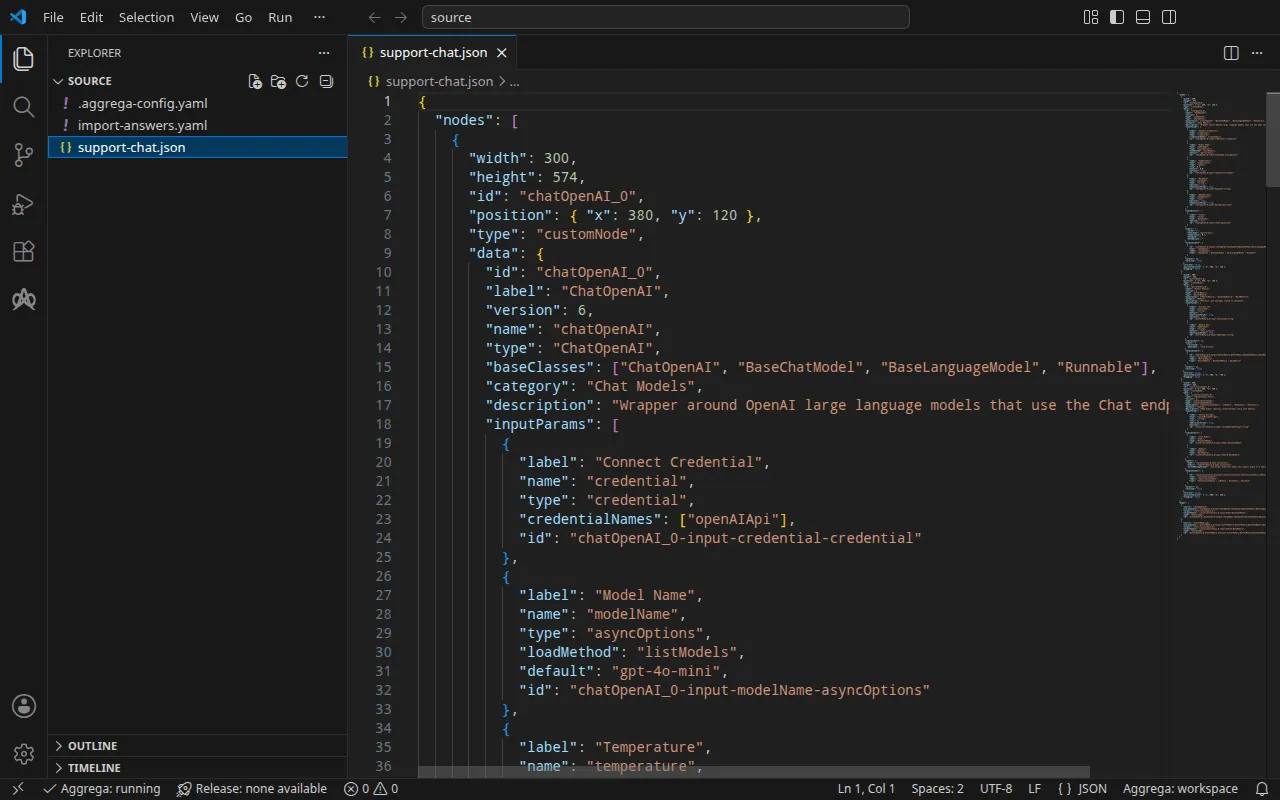
Chatflow
support-chat.json, được viết cho hướng dẫn này theo định dạng mà trình soạn thảo của Flowise dùng khi xuất một chatflow, chứa ba nút và hai cạnh giữa chúng: một nút ChatOpenAI chọn gpt-4o-mini, một nút Buffer Memory và một nút Conversation Chain nhận cả hai và trả lời bằng một thông điệp hệ thống ngắn. Nút ChatOpenAI không chọn thông tin xác thực đã lưu nào và để trống Base Path, vì vậy client OpenAI mà Flowise dùng để chạy nút này đọc địa chỉ và khóa của nó từ môi trường của Flowise.
Bên cạnh chatflow, một .aggrega-config.yaml biến thư mục thành một không gian làm việc:
# The workspace key marks this directory as the workspace root, so an import run# here writes its drafts beside support-chat.json.workspace: {}# The registry the importer is fetched from the first time an import needs it.default_registry: hub.aggrega.aivà import-answers.yaml chứa câu trả lời cho những gì không chatflow nào có thể chứa. Flowise không nạp chatflow nào từ tệp khi khởi động, vì vậy bản build nạp nó qua chính API của Flowise dưới một tài khoản chủ sở hữu, và không bản xuất nào nêu tên tài khoản đó: email của tài khoản là câu trả lời duy nhất mà một lần nhập cho Docker Compose cần. Một lần nhập cho Kubernetes còn cần tên của Kubernetes Secret chứa từng bí mật — mật khẩu của chủ sở hữu và khóa OpenAI — nên tệp cũng nêu tên hai Secret đó (xem Trên Kubernetes):
# Values the import could not draft from the source, keyed by the drafted file and the key path inside# it. Write each one beside its key; an import of the same source, and a sync, read them from here and# ask nothing. A secret is never written here: its key asks where the secret comes from — a variable# name, ${NAME}, or the name of a Kubernetes Secret.release.yaml: # Email address of the platform's owner account, read only when values.flow_definition is set. The # step that seeds the chatflow registers this account when the instance has no owner yet, which makes # it the owner, and signs in as it; on an instance that already has one, it names an account allowed # to import chatflows, and the password attached to the owner_password slot is that account's. # Required when values.flow_definition is set: the build halts when it is empty. It has no default. spec.components.flowise.infra.owner_email: "owner@example.com" # The origin of the secret value, written by the operator in the Release. Read exactly as # values.origin is. Write it here or in values.origin, never in both. A secret: name where it comes # from, never the value. spec.components.flowise.features.owner_password.infra.origin: "flowise-owner" # The origin of the secret value, written by the operator in the Release. Read exactly as # values.origin is. Write it here or in values.origin, never in both. A secret: name where it comes # from, never the value. spec.components.flowise.uses.model.chatopenai-0.features.credential.infra.origin: "openai-api-key"owner@example.com đại diện cho một email của riêng bạn. Khi không có tệp, một lần nhập tại terminal sẽ hỏi từng giá trị, mỗi lần một câu hỏi, được diễn đạt từ phần mô tả phía trên khóa của nó, và ghi các câu trả lời của bạn vào một tệp câu trả lời mới; ở nơi không thể hỏi gì, nó ghi tệp đó với các khóa và câu trả lời trống, liệt kê chúng và thoát với trạng thái 1. Tệp câu trả lời nhập mô tả đầy đủ tệp này.
Quá trình nhập đối chiếu từng nút với các Components trong danh mục của không gian làm việc, và --target soạn nháp một Manifest từ các Recipes của danh mục đó. Không gian làm việc không chỉ định thư mục danh mục nào, vì vậy quá trình nhập đọc danh mục thư viện chuẩn từ registry mà từ đó nó tải trình nhập của mình về: một bản chụp nhanh có chữ ký của danh mục đã phát hành, được lần nhập đầu tiên tải về, xác minh và lưu trong bộ nhớ đệm nội dung của không gian làm việc, và được nêu tên theo digest của nó trong bản ghi mà quá trình nhập ghi bên cạnh các bản nháp. Một không gian làm việc chỉ định các thư mục danh mục riêng — trong AGGREGA_CATALOG_DIRS, hoặc dưới workspace.catalog_dirs — thì thay vào đó nhập dựa trên các thư mục đó. Chuyển vào source:
cd sourceChạy lệnh nhập
aggrega import support-chat.json --target composeTrên đầu ra chuẩn, nó liệt kê những gì đã ghi:
wrote aggregate.yamlwrote release.yamlwrote manifest.yamlwrote .aggrega-import.jsonTrên luồng lỗi chuẩn, với <workspace> đại diện cho thư mục nơi bạn đã chạy nó:
[… omitted: a warning that the importer runs unverified, printed where its module is read from beside its Plugin entity in a catalog folder rather than fetched]read as the flowise format, with drafted paths relative to <workspace>warn: node chatOpenAI_0 reaches chatopenai-0 through the model connection chatopenai-0 of core/ai-agent/flowise: its Base Path is empty, so the OpenAI client Flowise runs it on reads the address the platform delivers for this connection, OPENAI_BASE_URL, and, since it selects no credential, the key delivered as OPENAI_API_KEYinfo: the answers file <workspace>/import-answers.yaml also answers spec.components.flowise.features.owner_password.infra.origin in release.yaml, spec.components.flowise.uses.model.chatopenai-0.features.credential.infra.origin in release.yaml, which these drafts do not leave empty; those answers are kept there and not appliedmapped chatOpenAI_0 (chatOpenAI) to core/ai-model/openai as a reference, HIGH at 0.9made no choice for bufferMemory_0 (bufferMemory)made no choice for conversationChain_0 (conversationChain) warning: node "flowise" (provider "compose"): artifact "flowise-flow/flowise-flow.yaml": skipped provenance label injection — the fragment declares no compose service. Compose carries build provenance as service labels, so a fragment contributing only top-level networks, volumes or configs carries none; the services this component emits elsewhere carry the full set.Pull complete: <workspace>/release.lock (entities=8, source_artifacts=0, external_inputs=0)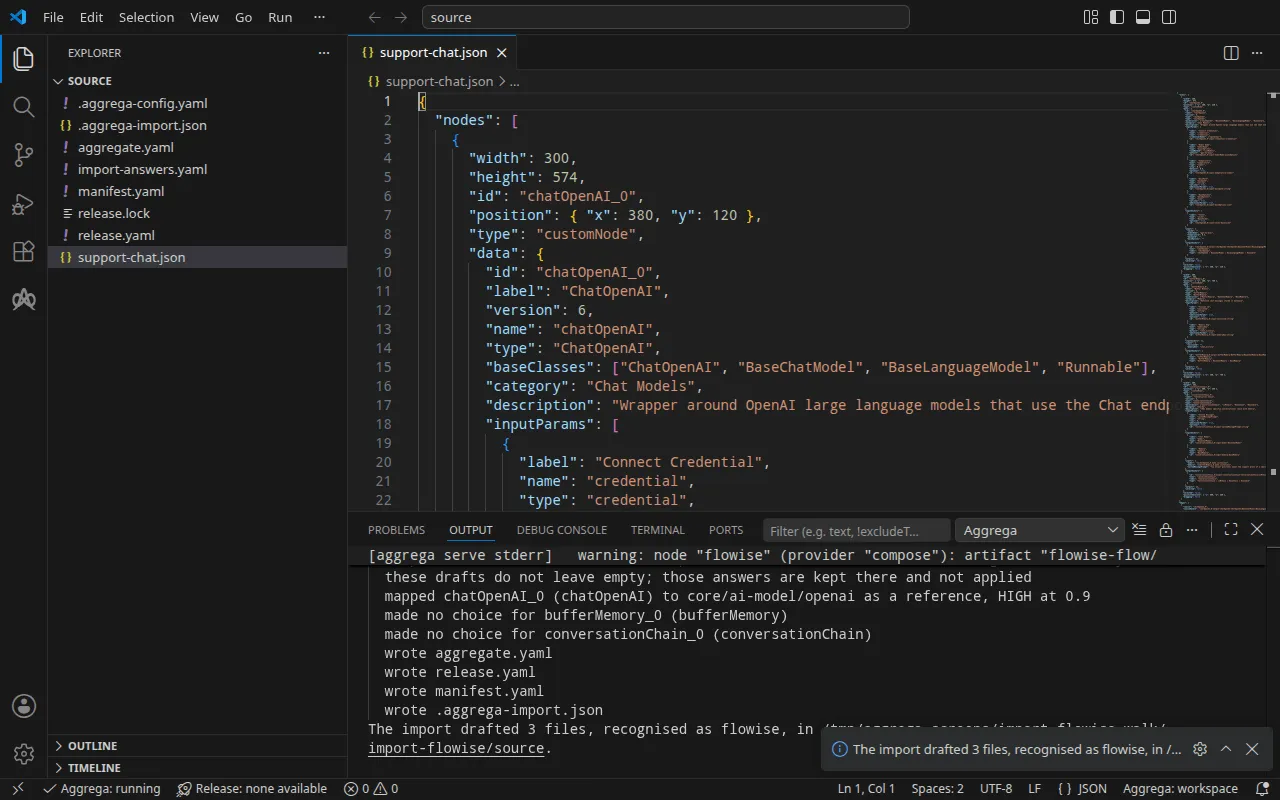
- Dòng
mappedcho biết nút ChatOpenAI đã trở thành mô hình OpenAI của thư viện chuẩn,core/ai-model/openai, được tham chiếu thay vì soạn nháp, vì nó khớp ở bậc cao, ở mức 0,9: một thành phần riêng, được nối vào socketmodelcủa nền tảng. - Dòng
warncho biết chatflow tiếp cận mô hình đó như thế nào: nút đọc địa chỉ và khóa mà nền tảng cung cấp cho kết nối mô hình, vì vậy khóa mà Release gắn vào kết nối chính là khóa mà chatflow sử dụng. - Dòng
infonói về tệp câu trả lời. Tệp đã trả lời email của chủ sở hữu, mục mà các bản nháp để trống; hai tên Secret trong tệp trả lời những gì chỉ một lần nhập cho Kubernetes để trống, nên chúng vẫn nằm trong tệp, không được dùng ở đây. - Các dòng
made no choicecho biết bộ nhớ và chuỗi vẫn nằm bên trong chatflow: không có socket nào của nền tảng nhận chúng. - Hai dòng cuối là bước pull. Khi mọi giá trị đã được trả lời, lần nhập đã kéo các phụ thuộc của Release được soạn nháp, như
aggrega pulllàm, và ghirelease.lock; bản build bên dưới không cần thêm gì nữa. Dòngwarninglà dòng mà bản build cũng in ra, và Xác thực và build giải thích nó.
Những gì được ghi
Aggregate, Release và Manifest được đặt tên imported/support-chat, theo tệp, support-chat.json, vì một bản xuất của Flowise không mang tên riêng, dưới namespace mà thiết lập target_namespace của trình nhập đặt ra, là imported trừ khi bạn đặt namespace khác (Thiết lập).
aggregate.yaml — một thể hiện của nền tảng Flowise trong thư viện chuẩn, core/ai-agent/flowise, mang chatflow như khi được xuất, phần lớn được lược bỏ ở đây, và mô hình được nối vào socket model của nó:
apiVersion: aggrega.ai/v1beta1kind: Aggregatemetadata: name: imported/support-chat version: 0.1.0 description: Draft Aggregate imported from a source in the flowise format.spec: components: flowise: type: core/ai-agent/flowise features: # For the compose target, the lines below declare owner_password on flowise: a secret the Release alone attaches arrives under the key value, so each is declared with a key of its own and no two arrive under one; the Release attaches its origin, naming this type or none. owner_password: type: core/secret-value values: key: OWNER_PASSWORD values: # chatflow_id is derived from the exported flow, which gives no identifier of its own. chatflow_id: '40d9f5c5-5187-54c1-a9f5-a8dac92f88bb' flow_definition: | { "nodes": [ [… omitted: the chatflow's nodes, as exported, up to the Conversation Chain's inputs] "inputs": { "model": "{{"{{"}}chatOpenAI_0.data.instance}}", "memory": "{{"{{"}}bufferMemory_0.data.instance}}", [… omitted: the rest of the chatflow, as exported] } uses: model: chatopenai-0: target: chatopenai-0 # For the compose target, the lines below declare credential on chatopenai-0: a secret the Release alone attaches arrives under the key value, so each is declared with a key of its own and no two arrive under one; the Release attaches its origin, naming this type or none. features: credential: type: core/secret-value values: key: OPENAI_API_KEY # swap to core/ai-model/azure-openai (score 0.4000) by setting type: core/ai-model/azure-openai chatopenai-0: type: core/ai-model/openai values: model: |- gpt-4o-mini- Mô hình là
core/ai-model/openai, với mô hình mà nút chọn,gpt-4o-mini. Chú thích phía trên nó nêu tên một Component khác trong danh mục mà nút giống, kèm điểm số của nó. - Hai bí mật — mật khẩu của tài khoản chủ sở hữu dùng để nạp chatflow, và khóa OpenAI mà nền tảng trình cho mô hình — được khai báo ở đây cùng với biến mà mỗi bí mật đến dưới tên đó trong môi trường của Flowise,
OWNER_PASSWORDvàOPENAI_API_KEY. Trên Docker Compose, một bí mật chỉ do Release gắn sẽ đến dưới khóavalue, và hai bí mật sẽ xung đột; khi được khai báo ở đây, mỗi bí mật có khóa riêng. Release cho biết mỗi bí mật đến từ đâu. chatflow_idđược suy ra từ chatflow, vì một bản xuất từ trình soạn thảo của Flowise không mang định danh riêng nào, nên một chatflow luôn cho ra cùng một định danh. Một chatflow Flowise viết{{<node id>.data.instance}}cho mỗi kết nối giữa hai nút, và văn bản của một Aggregate được đọc như một template, vì vậy bản nháp viết mỗi{{thành{{"{{"}}, rồi bản build chuyển nó trở lại thành hai dấu ngoặc nhọn.
release.yaml — Release, triển khai Aggregate với Manifest:
apiVersion: aggrega.ai/v1beta1kind: Releasemetadata: name: imported/support-chat # environment is a drafted default, since no source names the environment this Release deploys to; change it to name the one it deploys to. environment: development version: 0.1.0 description: Draft Release imported from a source in the flowise format.spec: aggregate: imported/support-chat manifest: imported/support-chat components: flowise: infra: # The image running core/ai-agent/flowise, at the version this importer drafts, which the catalog's Recipes for it are known to run; the import does not raise or lower it to follow the source. image: "flowiseai/flowise:3.1.3" # Left for the Release, since the source cannot supply it: infra.owner_email, the email address of the platform's owner account, required while values.flow_definition is set owner_email: "owner@example.com" # Published on this machine's loopback address, 127.0.0.1: reachable from this machine only, by any process running on it. Delete this line to keep the service internal. published_port: 3000 features: owner_password: type: core/secret-value infra: # Attached by reference, never as a value: the owner account's password, required while values.flow_definition is set, read from the variable FLOWISE_OWNER_PASSWORD, which a target substituting variable references, as Docker Compose does when the stack starts, reads from the environment, so no file carries the value. origin: "${FLOWISE_OWNER_PASSWORD}" uses: model: chatopenai-0: features: credential: type: core/secret-value infra: # Attached by reference, never as a value: the credential flowise presents to chatopenai-0 on its model connection, read from the variable OPENAI_API_KEY, which a target substituting variable references, as Docker Compose does when the stack starts, reads from the environment, so no file carries the value. origin: "${OPENAI_API_KEY}" chatopenai-0: {}environmentlàdevelopment, một giá trị mặc định mà chú thích phía trên nó bảo hãy đổi thành môi trường mà Release triển khai tới.- Image là Flowise 3.1.3, phiên bản mà các Recipes cho Flowise của danh mục chạy.
published_portlà 3000, cổng mà Flowise phục vụ, nên nó trả lời tạihttp://127.0.0.1:3000trên máy của bạn. Như chú thích của nó cho biết, bất kỳ tiến trình nào trên máy này đều có thể truy cập nó ở đó và không gì khác có thể; hãy xóa dòng này để giữ Flowise chỉ trên mạng của stack.owner_emaillà câu trả lời từ tệp câu trả lời. Chú thích phía trên nó cho biết vì sao lần nhập không thể soạn nháp nó.- Hai bí mật là các tham chiếu biến,
${FLOWISE_OWNER_PASSWORD}và${OPENAI_API_KEY}, mà Docker Compose điền từ shell của bạn khi stack khởi động, vì vậy không tệp nào chứa giá trị nào trong hai giá trị đó.
manifest.yaml — các Recipes Compose của nền tảng và mô hình, và phần hiện thực ghi tham chiếu biến của một bí mật vào tệp Compose đúng như đã viết:
apiVersion: aggrega.ai/v1beta1kind: Manifestmetadata: name: imported/support-chat version: 0.1.0spec: mappings: components: type: core/ai-agent/flowise: compose/flowise core/ai-model/openai: compose/openai features: type: core/secret-value: compose/dotenv-secret.aggrega-import.json là bản ghi những gì quá trình nhập đã ghi, được một lệnh aggrega import --sync sau đó đọc, và release.lock ghim mọi thực thể danh mục mà Release phân giải tới, theo phiên bản và digest.
Xác thực và dựng
aggrega validate --release release.yamlaggrega build --release release.yaml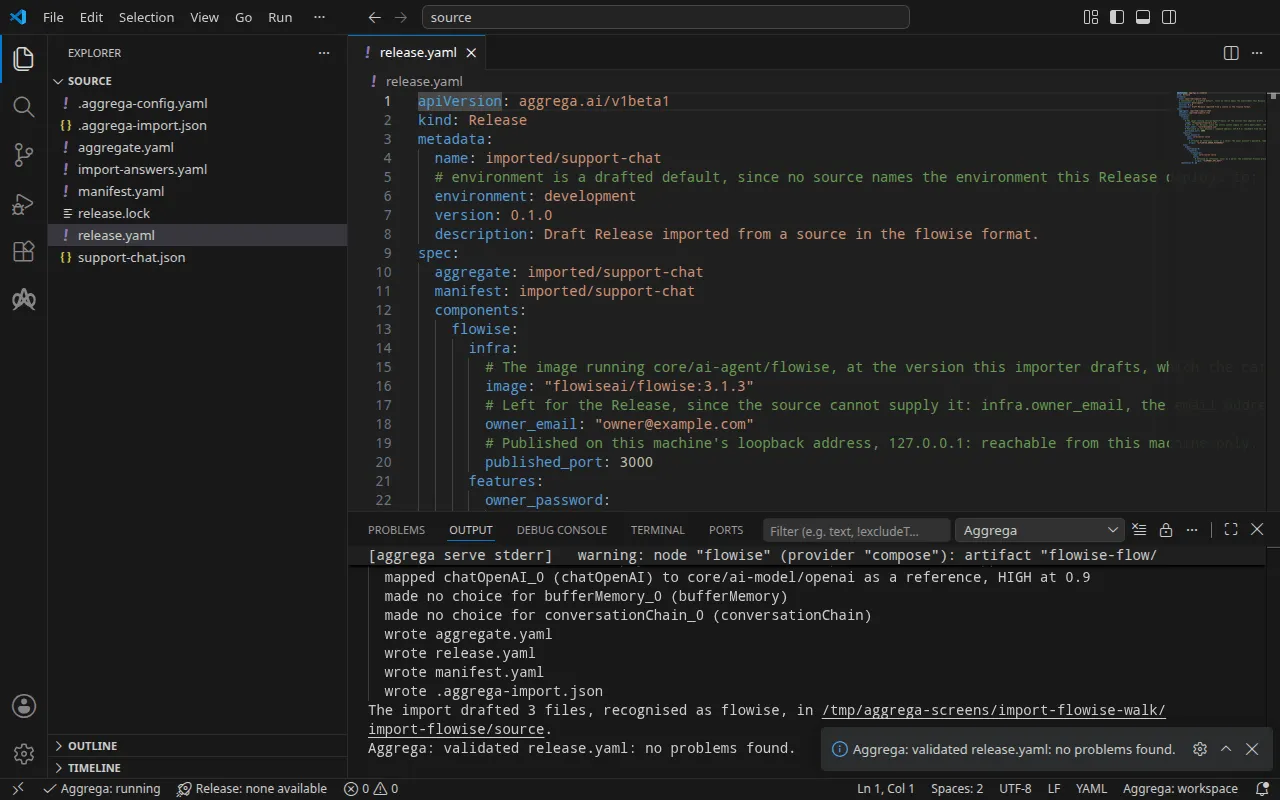
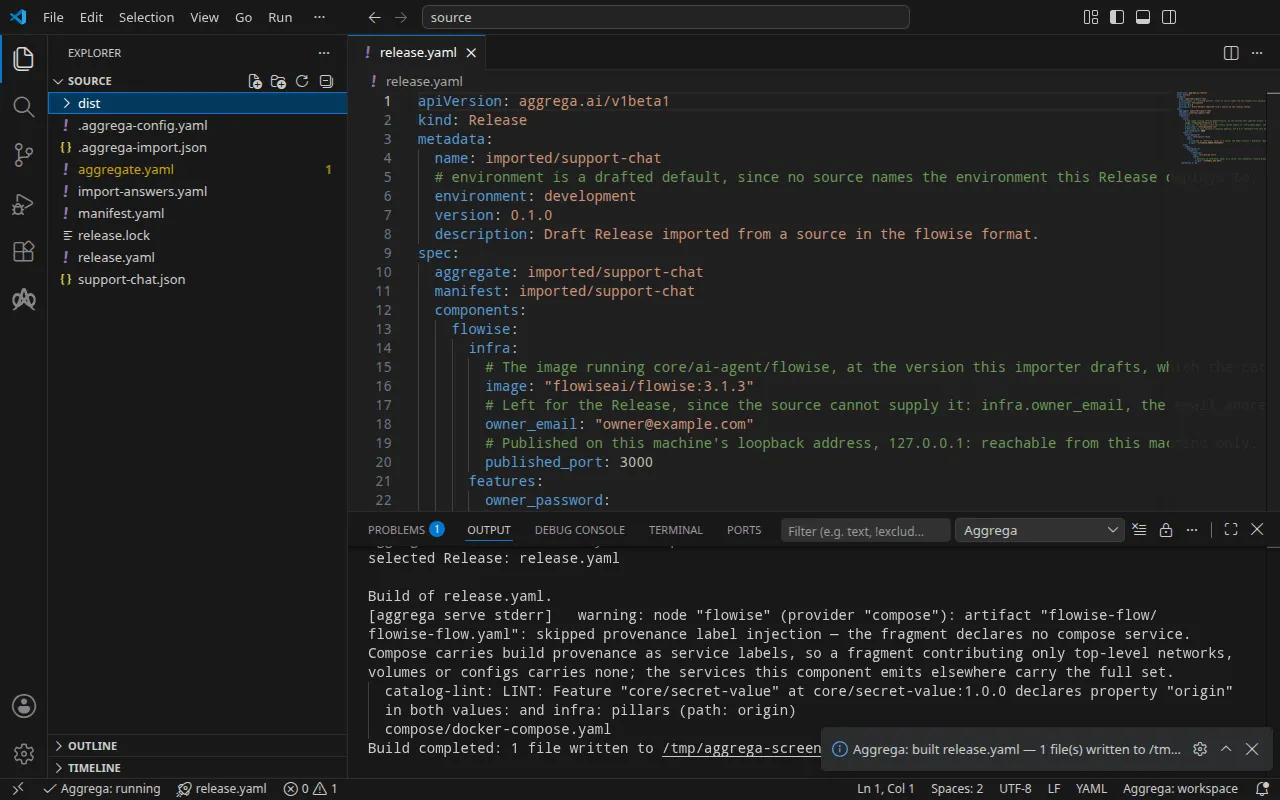
Bước xác thực in ra:
notice: LINT: Feature "core/secret-value" at core/secret-value:1.0.0 declares property "origin" in both values: and infra: pillars (path: origin)release dependency validation passed: release.yaml (schema-pillar + dependency pillars)và bản dựng, với <workspace> đại diện cho thư mục chứa các bản nháp:
warning: node "flowise" (provider "compose"): artifact "flowise-flow/flowise-flow.yaml": skipped provenance label injection — the fragment declares no compose service. Compose carries build provenance as service labels, so a fragment contributing only top-level networks, volumes or configs carries none; the services this component emits elsewhere carry the full set. notice: LINT: Feature "core/secret-value" at core/secret-value:1.0.0 declares property "origin" in both values: and infra: pillars (path: origin)[… omitted: a total build time, which differs per run]Build completed: 1 file written to <workspace>/distDòng warning nói về phần của tệp Compose mang chatflow, một mục configs ở cấp cao nhất, vốn không có dịch vụ nào để đặt các nhãn của bản build lên. Dòng notice mang tính tham khảo: Feature bí mật chấp nhận origin của nó từ values của Aggregate hoặc infra của Release, và thông báo cho biết một lá được khai báo ở cả hai nơi. Không dòng nào thay đổi kết luận.
dist/compose/docker-compose.yaml chứa hai dịch vụ. Chính Flowise:
flowise: image: flowiseai/flowise:3.1.3 environment: DATABASE_PATH: /home/node/.flowise SECRETKEY_PATH: /home/node/.flowise OPENAI_BASE_URL: https://api.openai.com/v1 OPENAI_API_KEY: ${OPENAI_API_KEY} ports: - 127.0.0.1:3000:3000 [… omitted: the labels the build writes on every service, naming the Aggregate, the component, the environment and the compiler's version] volumes: - type: volume source: flowise--data target: /home/node networks: - compose [… omitted: the service's health check]và dịch vụ nạp chatflow khi Flowise báo cáo trạng thái khỏe mạnh, rồi thoát:
flowise-flow-seed: image: flowiseai/flowise:3.1.3 entrypoint: - node - /seed/seed.js environment: FLOWISE_URL: http://127.0.0.1:3000 OWNER_EMAIL: owner@example.com OWNER_PASSWORD: ${FLOWISE_OWNER_PASSWORD} CHATFLOW_ID: 40d9f5c5-5187-54c1-a9f5-a8dac92f88bb CHATFLOW_NAME: 40d9f5c5-5187-54c1-a9f5-a8dac92f88bb [… omitted: the labels the build writes on every service] network_mode: service:flowise depends_on: flowise: condition: service_healthy restart: "no" configs: - source: flowise-flow target: /seed/flow.json - source: flowise-flow-seed target: /seed/seed.jsDịch vụ này đăng ký tài khoản chủ sở hữu trên một Flowise mới, hoặc đăng nhập bằng tài khoản đó, và ghi chatflow tại chatflow_id. Khóa và mật khẩu là các tham chiếu biến, được điền từ shell của bạn khi stack khởi động. Recipe Compose của Flowise chỉ công bố một cổng trên máy của bạn khi Release đặt published_port trong infra của Flowise, và khi đó chỉ trên địa chỉ loopback, 127.0.0.1; nếu không có thiết lập này, dịch vụ chỉ truy cập được trên mạng của stack.
Với trợ lý AI
Một trợ lý AI được thiết lập với các công cụ của Aggrega có thể làm điều tương tự: dán prompt này vào nó.
Chỉ sử dụng các công cụ Aggrega và không tự tạo thư mục nào. Nếu thư mục Workspace chưa có thư mục `import-flowise`, hãy gọi công cụ `scaffold` một lần với `example` được đặt thành `import-flowise` và không có `dir`: công cụ này ghi ví dụ vào một thư mục `import-flowise` mới, trong đó thư mục `source` chứa những gì trang này nhập. Sau đó gọi công cụ `import` với `workspace_root` được đặt thành `import-flowise/source`, `source` được đặt thành `support-chat.json` và `target` được đặt thành `compose`: công cụ này đọc các câu trả lời cần thiết từ `import-answers.yaml` bên cạnh `support-chat.json`, ghi các bản nháp vào `import-flowise/source` và pull những gì chúng cần. Sau đó gọi công cụ `validate` với `workspace_root` được đặt thành `import-flowise/source` và `release` được đặt thành `release.yaml`, và công cụ `build` với `workspace_root` được đặt thành `import-flowise/source`, `release` được đặt thành `release.yaml` và `write` được đặt thành true. Hãy cho tôi biết bản build đã ghi những tệp nào; chúng nằm trong `import-flowise/source/dist/`.Mở trong VS Code
Khi đã cài đặt tiện ích mở rộng Aggrega cho Visual Studio Code, hãy mở thư mục import-flowise/source trong VS Code, nơi quá trình nhập đã ghi các bản nháp. Thư mục chứa một Release, tệp release.yaml bản nháp, nên trình soạn thảo chọn nó cho bạn và kiểm tra các bản nháp theo Release đó khi bạn chỉnh sửa, đánh dấu những gì nó tìm thấy trong tệp và trong bảng Problems. Aggrega: Show topology graph, trong Command Palette, vẽ các thành phần của Release và các kết nối giữa chúng. Aggrega: Build, Aggrega: Preview build và Aggrega: Pull tác động lên cùng Release đó, và mỗi lệnh cũng là một nút trên bảng Commands của chế độ xem Aggrega trong thanh hoạt động; Build ghi các tệp của nó vào dist/ của thư mục. Sử dụng Aggrega trong Visual Studio Code trình bày phần còn lại.
Chạy thử
Đặt khóa và mật khẩu của chủ sở hữu trong shell của bạn, khởi động Flowise, rồi chạy dịch vụ seed:
export OPENAI_API_KEY='your OpenAI key'export FLOWISE_OWNER_PASSWORD='a password of your own'docker compose -p support-chat -f dist/compose/docker-compose.yaml up -d --wait flowisedocker compose -p support-chat -f dist/compose/docker-compose.yaml up flowise-flow-seed-p đặt tên cho dự án, như bước chạy của Cách một lần nhập diễn ra giải thích. --wait trả về ngay khi Flowise báo cáo trạng thái khỏe mạnh; nó chỉ nêu tên flowise vì nó coi mọi container đã thoát là thất bại, và dịch vụ seed thoát theo thiết kế. Lệnh thứ hai chạy dịch vụ seed, in log của nó và trả về khi dịch vụ đó thoát:
flowise-flow-seed-1 | registered the owner account owner@example.comflowise-flow-seed-1 | imported chatflow 40d9f5c5-5187-54c1-a9f5-a8dac92f88bb as "40d9f5c5-5187-54c1-a9f5-a8dac92f88bb"flowise-flow-seed-1 exited with code 0Nếu một chương trình khác trên máy của bạn đã lắng nghe trên 127.0.0.1:3000, lệnh đầu tiên dừng với failed to bind host port 127.0.0.1:3000/tcp: address already in use: hãy đặt published_port thành một cổng trống và build lại. Lần chạy dưới đây đã làm vậy, với 3002, và dùng cổng đó thay cho 3000.
Kiểm thử
Mở http://127.0.0.1:3000, địa chỉ mà published_port công bố, và đăng nhập bằng email và mật khẩu của chủ sở hữu: chatflow của seed đã có trong Flowise.
Một chatflow không đặt khóa API riêng sẽ trả lời tại endpoint dự đoán của nó mà không cần khóa. Hãy hỏi nó một câu:
curl -sS -X POST http://127.0.0.1:3000/api/v1/prediction/40d9f5c5-5187-54c1-a9f5-a8dac92f88bb \ -H 'Content-Type: application/json' -d '{"question": "In one short sentence: what is Docker Compose?"}'Lần chạy đã dùng một giá trị giữ chỗ cho khóa OpenAI, nên câu trả lời là việc OpenAI từ chối khóa đó, cho thấy chatflow đã chạy đến tận lời gọi tới mô hình:
{"statusCode":500,"success":false,"message":"401 Unauthorized – check your API key and ensure it has access to the requested model.","stack":{}}Với khóa của bạn, phản hồi mang câu trả lời tại text.
Trên Kubernetes, khi bản build mà Trên Kubernetes mô tả đã được áp dụng và Job seed của nó đã hoàn tất, hãy chuyển tiếp một cổng cục bộ tới Service của Flowise, flowise-default, trong namespace mà bạn đã áp dụng vào, và để lệnh tiếp tục chạy:
kubectl port-forward -n <namespace> svc/flowise-default 3000:3000Từ một terminal khác, câu hỏi ở trên đến được chatflow tại cùng địa chỉ, không thay đổi; lần chạy nhận được cùng sự từ chối đối với khóa giữ chỗ.
Dừng stack bằng lệnh dưới đây. -v còn xóa volume dữ liệu của Flowise, và cùng với nó là tài khoản chủ sở hữu và chatflow mà dịch vụ seed đã ghi:
docker compose -p support-chat -f dist/compose/docker-compose.yaml down -vTrên Kubernetes
Cùng chatflow đó được nhập cho Kubernetes với target helm. Các bản nháp cho Docker Compose đã nằm trong source, và quá trình nhập không bao giờ ghi đè một Aggregate ở đó, nên hãy tạo các bản nháp này vào một thư mục riêng bằng --output-dir, rồi xác thực và build từ thư mục đó:
aggrega import support-chat.json --target helm --output-dir helmcd helmaggrega validate --release release.yamlaggrega build --release release.yamlCác bản nháp khác nhau ở những chỗ target khác nhau. Manifest ánh xạ nền tảng tới helm/flowise, mô hình tới helm/openai, và mỗi bí mật tới helm/k8s-existing-secret, thành phần đọc nó từ một Secret đã có sẵn trong namespace. Release gắn mật khẩu của chủ sở hữu và khóa OpenAI dưới dạng core/referenced-secret, mỗi cái nêu tên Secret của nó, và lấy cả ba câu trả lời từ tệp câu trả lời: email của chủ sở hữu, flowise-owner và openai-api-key.
Bản build ghi các manifest Kubernetes thuần vào dist/helm/ tại thư mục gốc của workspace, source, mà từ helm là ../dist/helm/, trong đó có seed của chatflow dưới dạng một Job. Tạo hai Secret trong namespace mà bạn áp dụng vào, mỗi Secret giữ giá trị của nó dưới khóa dữ liệu value, rồi áp dụng thư mục như bước chạy của Cách một lần nhập chạy giải thích.