

Nhập một ứng dụng LangGraph
Hướng dẫn từng bước này nhập cấu hình của một ứng dụng LangGraph — một đồ thị trả lời câu hỏi của khách hàng về đơn hàng của họ — và build ứng dụng cho Docker Compose. Quá trình nhập soạn bản nháp cho mọi tệp mà bản build đọc: đồ thị, cơ sở dữ liệu PostgreSQL nơi checkpointer của nó lưu trạng thái, mô hình mà nó gọi, các mật khẩu và khóa dưới dạng tham chiếu biến, và các hiện thực hóa của từng thứ. Nó hỏi một lần hai giá trị mà không cấu hình nào chứa: mô hình mà mã của đồ thị gọi, và image mà ứng dụng chạy trong đó. Mọi tệp và mọi khối đầu ra dưới đây đều đến từ một lần chạy thực; cấu hình và từng giai đoạn của hướng dẫn nằm trong ví dụ import-langgraph, nơi một script kiểm tra chạy lại quá trình nhập, so sánh những gì nó ghi, những gì nó in ra và các khối mà trang này trích dẫn với các tệp được lưu ở đó, đồng thời xác thực và build những gì quá trình nhập đã ghi.
Tạo ví dụ
Bạn có thể chạy lần nhập này bằng các lệnh trên trang này, hoặc để trợ lý AI của bạn chạy giúp bạn.
Ghi ví dụ vào một thư mục mới đặt theo tên của nó:
aggrega scaffold --example import-langgraphSau đó nó in ra các lệnh cần chạy tiếp theo. Lệnh đầu tiên chuyển vào thư mục mới; lệnh tiếp sau đó, ở bên dưới, chuyển vào thư mục source của thư mục mới, nơi chứa những gì trang này nhập và là nơi chạy lệnh nhập:
cd import-langgraph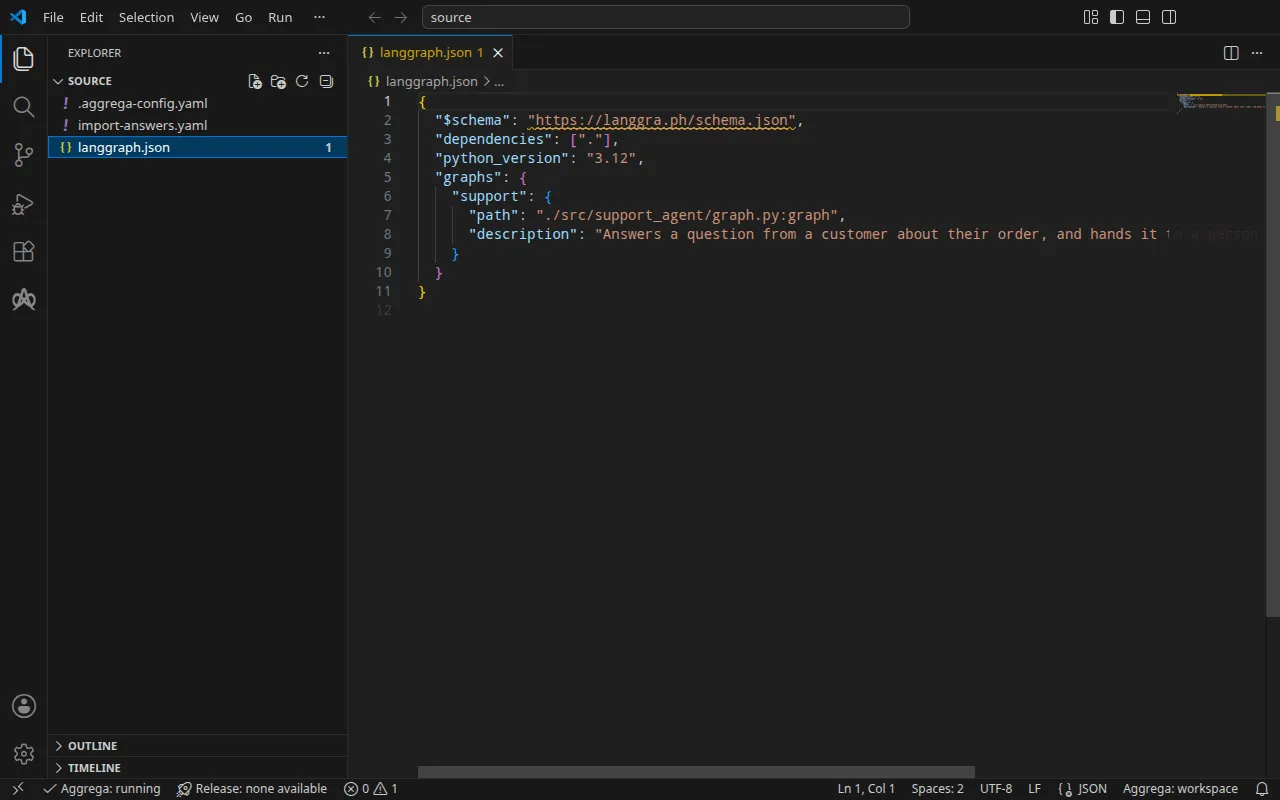
Dự án
Một ứng dụng LangGraph giữ các đồ thị của nó trong mã và khai báo chúng trong langgraph.json, tệp cấu hình của công cụ dòng lệnh của LangGraph. Ứng dụng này, được viết cho hướng dẫn này, khai báo một đồ thị, support, bằng đường dẫn import của đồ thị trong mã của ứng dụng và một mô tả:
{ "$schema": "https://langgra.ph/schema.json", "dependencies": ["."], "python_version": "3.12", "graphs": { "support": { "path": "./src/support_agent/graph.py:graph", "description": "Answers a question from a customer about their order, and hands it to a person when it cannot." } }}Quá trình nhập đọc langgraph.json và không bao giờ đọc mã của ứng dụng, vì vậy ví dụ chỉ chứa cấu hình. Bên cạnh nó, một tệp .aggrega-config.yaml biến thư mục thành một không gian làm việc:
# The workspace key marks this directory as the workspace root, so an import run# here writes its drafts beside langgraph.json.workspace: {}# The registry the importer is fetched from the first time an import needs it.default_registry: hub.aggrega.aiQuá trình nhập tham chiếu đến các Components tác tử LangGraph, PostgreSQL và mô hình OpenAI của danh mục, và --target soạn bản nháp một Manifest từ các Recipes của danh mục. Không gian làm việc không chỉ định thư mục danh mục nào, vì vậy quá trình nhập đọc danh mục thư viện chuẩn từ registry mà từ đó nó tải trình nhập của mình về: một bản chụp nhanh có chữ ký của danh mục đã phát hành, được lần nhập đầu tiên tải về, xác minh và lưu trong bộ nhớ đệm nội dung của không gian làm việc, và được nêu tên theo digest của nó trong bản ghi mà quá trình nhập ghi bên cạnh các bản nháp. Một không gian làm việc chỉ định các thư mục danh mục riêng — trong AGGREGA_CATALOG_DIRS, hoặc dưới workspace.catalog_dirs — thì thay vào đó nhập dựa trên các thư mục đó.
Quá trình nhập hỏi những gì
Cấu hình LangGraph không chỉ định mô hình nào, vì mã của đồ thị chọn mô hình, và cũng không chỉ định image nào, vì bạn build image đó từ dự án của mình. Vì vậy quá trình nhập hỏi cả hai: tên của mô hình mà đồ thị gọi, cho mô hình OpenAI mà nó soạn bản nháp, và image mà ứng dụng chạy trong đó. Tại một terminal, nó đặt câu hỏi rồi ghi các câu trả lời vào các bản nháp và vào tệp câu trả lời, import-answers.yaml, bên trong thư mục mà nó nhập — ở đây là thư mục gốc của dự án, . — để lần nhập tiếp theo đọc chúng từ đó và không hỏi gì. Khi không có terminal — trong tích hợp liên tục, hoặc qua một pipe — nó không hỏi gì: nó ghi tệp với các khóa để trống, rồi dừng lại:
2 values the drafts leave empty are still owed, listed in the answers file <workspace>/import-answers.yaml: write each beside its key there, then run the import againVí dụ đã chứa sẵn tệp này, kèm câu trả lời: đồ thị gọi gpt-4o-mini của OpenAI, và ghcr.io/example/support-agent:1.0.0 đại diện cho image mà bạn build:
# Values the import could not draft from the source, keyed by the drafted file and the key path inside# it. Write each one beside its key; an import of the same source, and a sync, read them from here and# ask nothing. A secret is never written here: its key asks where the secret comes from — a variable# name, ${NAME}, or the name of a Kubernetes Secret.aggregate.yaml: # Left for the author, since the configuration names no model: values.model, the name of the model # core/ai-model/openai serves. spec.components.model.values.model: "gpt-4o-mini"release.yaml: # Container image running the LangGraph application code. The Docker Compose Recipe runs the catalog's # quickstart agent when it is unset. spec.components.support.infra.image: "ghcr.io/example/support-agent:1.0.0" # The origin of the secret value, written by the operator in the Release. Read exactly as # values.origin is. Write it here or in values.origin, never in both. A secret: name where it comes # from, never the value. spec.components.support.uses.checkpointer_db.postgres.features.credential.infra.origin: "support-db-password" # The origin of the secret value, written by the operator in the Release. Read exactly as # values.origin is. Write it here or in values.origin, never in both. A secret: name where it comes # from, never the value. spec.components.support.uses.model.model.features.credential.infra.origin: "openai-api-key" # The origin of the secret value, written by the operator in the Release. Read exactly as # values.origin is. Write it here or in values.origin, never in both. A secret: name where it comes # from, never the value. spec.components.postgres.features.password.infra.origin: "support-db-password"Ba câu trả lời origin dành cho bản build cho Kubernetes, với --target helm: khi đó mật khẩu của cơ sở dữ liệu và khóa OpenAI được đọc từ các Secret của Kubernetes, và mỗi câu trả lời là tên của một Secret — mật khẩu của cơ sở dữ liệu từ support-db-password, ở cả hai đầu, và khóa từ openai-api-key — không bao giờ là chính mật khẩu hay khóa. Một bản build cho Docker Compose thì thay vào đó đọc chúng từ shell của bạn, vì vậy lần nhập này không dùng các câu trả lời đó. Tệp câu trả lời nhập mô tả tệp, các câu hỏi và các quy tắc cho câu trả lời của một bí mật.
aggrega import liệt kê mọi cờ mà lệnh nhận, trong đó có --answers, cờ nêu tên một tệp câu trả lời được lưu ở nơi khác.
Chuyển vào source:
cd sourceChạy lệnh nhập
Hãy chỉ định thư mục của ứng dụng. Quá trình nhập đọc tệp langgraph.json của nó và không đọc tệp nào khác trong đó:
aggrega import . --target composeTrên đầu ra chuẩn, nó liệt kê những gì đã ghi:
wrote aggregate.yamlwrote release.yamlwrote manifest.yamlwrote .aggrega-import.jsonTrên luồng lỗi chuẩn, với <workspace> đại diện cho thư mục nơi bạn đã chạy nó:
[… omitted: a warning that the importer runs unverified, printed where its module is read from beside its Plugin entity in a catalog folder rather than fetched]read as the langgraph format, with drafted paths relative to <workspace>info: the answers file <workspace>/import-answers.yaml also answers spec.components.postgres.features.password.infra.origin in release.yaml, spec.components.support.uses.checkpointer_db.postgres.features.credential.infra.origin in release.yaml, spec.components.support.uses.model.model.features.credential.infra.origin in release.yaml, which these drafts do not leave empty; those answers are kept there and not appliedmapped support (graph) to core/ai-agent/langgraph as a reference, NONEmapped checkpointer (checkpointer) to core/datastore/postgres as a reference, NONEmapped model (model) to core/ai-model/openai as a reference, NONEPull complete: <workspace>/release.lock (entities=10, source_artifacts=0, external_inputs=0)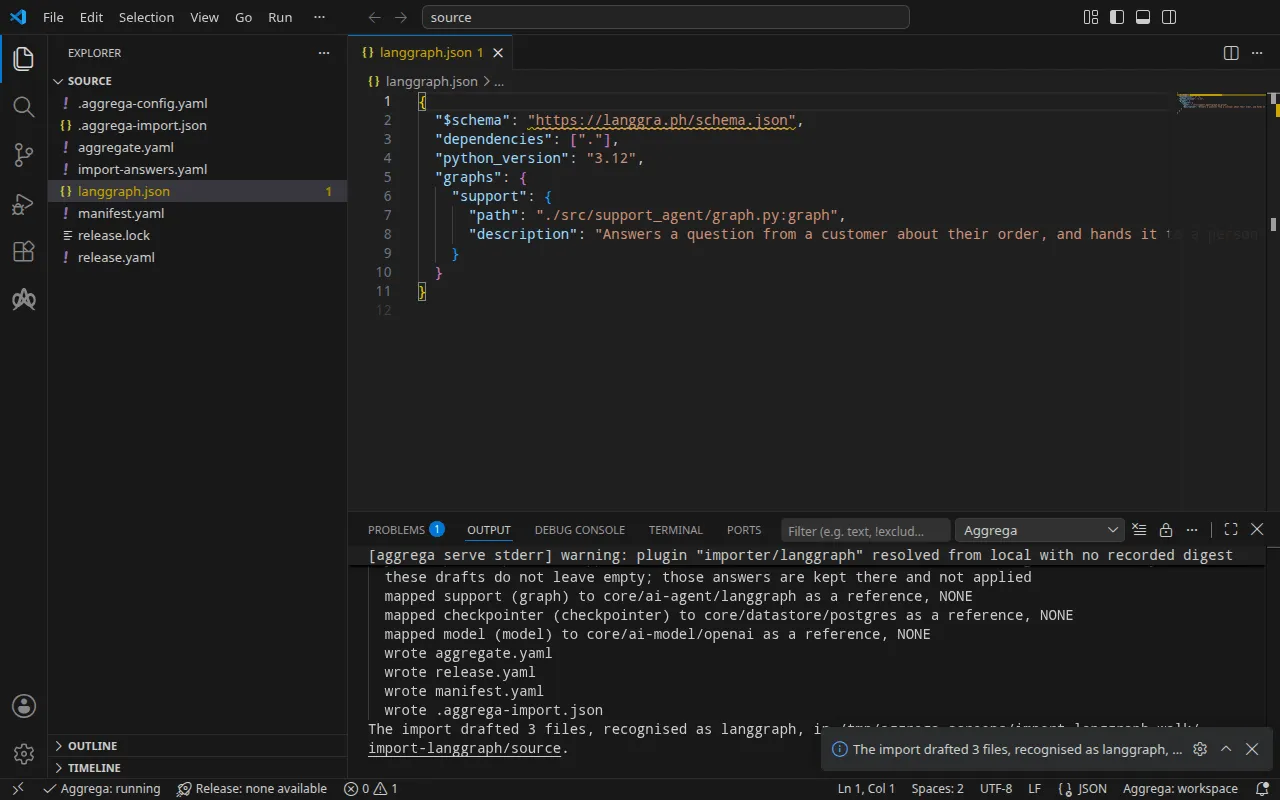
- Dòng
infonêu tên các câu trả lời mà các bản nháp Docker Compose không dùng, được giữ lại trong tệp câu trả lời cho bản dựng cho Kubernetes. - Các dòng
mappedcho biết đồ thị là một instance của tác tử LangGraph trong thư viện chuẩn,core/ai-agent/langgraph; checkpointer của nó, nơi LangGraph lưu trạng thái của mỗi đồ thị, là một instance củacore/datastore/postgres, vì cấu hình không chỉ định checkpointer nào và khi đó LangGraph lưu trạng thái trong PostgreSQL; và mô hình mà mọi đồ thị gọi là một instance củacore/ai-model/openai. Cấp của chúng ghiNONE: quá trình nhập LangGraph tham chiếu các Components này theo những gì cấu hình khai báo thay vì cân nhắc từng cái so với danh mục. Một cấu hình cócheckpointer.backendlàmongođược soạn bản nháp vớicore/datastore/ferretdb, vốn nói giao thức của MongoDB, đặt trêncore/datastore/documentdb, hai thành phần được nối với nhau như Aggregate FerretDB của danh mục nối chúng, với một mật khẩu chung cho cả hai. - Dòng
Pull completelà quá trình nhập đang tải những gì mà Release bản nháp phụ thuộc vào, nhưaggrega pulllàm, vàorelease.lock, để các bản nháp được xác thực và build ngay lập tức. Với--offline, quá trình nhập không tải gì và nêu lệnhaggrega pullcần chạy.
Những gì được ghi
Aggregate, Release và Manifest được đặt tên imported/support, theo đồ thị duy nhất mà langgraph.json phục vụ, support, vì một cấu hình không mang tên riêng — cấu hình phục vụ nhiều đồ thị được đặt tên theo tệp của nó, hoặc theo thư mục của nó khi, như ở đây, lệnh nhập được trao thư mục — dưới namespace mà thiết lập target_namespace của trình nhập đặt ra, là imported trừ khi bạn đặt namespace khác (Thiết lập).
aggregate.yaml — đồ thị, cơ sở dữ liệu nơi nó lưu trạng thái và mô hình mà nó gọi, mỗi kết nối khai báo thông tin xác thực mà nó xuất trình, mở đầu bằng các chú thích cho biết những gì đã được đọc và những gì không:
# LangGraph configurations read:# - langgraph.json# Not read: the application's code, which defines each graph; it runs in the image the Release names for each graph.# Not carried, since they configure the server image langgraph build builds, and the image the Release names is the application's own: dependencies, python_version.apiVersion: aggrega.ai/v1beta1kind: Aggregatemetadata: name: imported/support version: 0.1.0 description: Draft Aggregate imported from a source in the langgraph format.spec: components: support: type: core/ai-agent/langgraph values: graph_entrypoint: "./src/support_agent/graph.py:graph" description: "Answers a question from a customer about their order, and hands it to a person when it cannot." uses: checkpointer_db: postgres: target: postgres # For the compose target, the lines below declare credential on postgres: a secret the Release alone attaches arrives under the key value, so each is declared with a key of its own and no two arrive under one; the Release attaches its origin, naming this type or none. features: credential: type: core/secret-value values: key: POSTGRES_PASSWORD model: model: target: model # For the compose target, the lines below declare credential on model: a secret the Release alone attaches arrives under the key value, so each is declared with a key of its own and no two arrive under one; the Release attaches its origin, naming this type or none. features: credential: type: core/secret-value values: key: OPENAI_API_KEY # The database the configuration's checkpointer keeps each graph's state in, PostgreSQL. postgres: type: core/datastore/postgres features: # For the compose target, the lines below declare password on postgres: a secret the Release alone attaches arrives under the key value, so each is declared with a key of its own and no two arrive under one; the Release attaches its origin, naming this type or none. password: type: core/secret-value values: key: POSTGRES_PASSWORD # The model every graph calls, which the configuration does not name. model: type: core/ai-model/openai values: # Left for the author, since the configuration names no model: values.model, the name of the model core/ai-model/openai serves. model: "gpt-4o-mini"graph_entrypoint là đường dẫn import của đồ thị đúng như cấu hình ghi. Kết nối checkpointer_db của nó được nối tới cơ sở dữ liệu và kết nối model của nó tới mô hình, có tên là câu trả lời mà quá trình nhập đã đọc từ import-answers.yaml. recursion_limit không được ghi, nên giá trị mặc định của Component, 25, vẫn giữ nguyên. Cơ sở dữ liệu nhận một mật khẩu, nên Recipe PostgreSQL không tự ghi mật khẩu nào, và đồ thị xuất trình cùng mật khẩu đó trên kết nối của nó tới cơ sở dữ liệu.
release.yaml — môi trường, image, cổng được công bố, và nguồn gốc của khóa và các mật khẩu, với các chú thích phía trên đồ thị cho biết image của nó là gì và nó được trao những gì:
apiVersion: aggrega.ai/v1beta1kind: Releasemetadata: name: imported/support # environment is a drafted default, since no source names the environment this Release deploys to; change it to name the one it deploys to. environment: development version: 0.1.0 description: Draft Release imported from a source in the langgraph format.spec: aggregate: imported/support manifest: imported/support components: # Each graph's image is the application's own, not the server image langgraph build builds: its code, with LangGraph installed. # It is handed, for its code to read, the graph to run as LANGGRAPH_GRAPH_ENTRYPOINT, the model's name as OPENAI_MODEL, the checkpointer store's host and port as LANGGRAPH_CHECKPOINTER_HOST and LANGGRAPH_CHECKPOINTER_PORT, its user and database, where the store publishes them, as LANGGRAPH_CHECKPOINTER_USER and LANGGRAPH_CHECKPOINTER_DATABASE, and a password attached on the checkpointer_db connection as LANGGRAPH_CHECKPOINTER_PASSWORD. # It is also handed the model's address as OPENAI_BASE_URL and a key attached on the model connection as OPENAI_API_KEY, which the OpenAI client library reads, and recursion_limit as LANGGRAPH_DEFAULT_RECURSION_LIMIT, which LangGraph reads. # An inject: block on the graph's own instance, through an entry reading graph_entrypoint alone, replaces LANGGRAPH_GRAPH_ENTRYPOINT with the name it writes; one on the model connection replaces OPENAI_MODEL, and one on the checkpointer_db connection the store's host, port, user and database, with the names it writes. support: infra: # Left for the Release, since the source cannot supply it: infra.image, the container image running the application image: "ghcr.io/example/support-agent:1.0.0" # Published on this machine's loopback address, 127.0.0.1: reachable from this machine only, by any process running on it. Delete this line to keep the service internal. published_port: 8000 uses: checkpointer_db: postgres: features: credential: type: core/secret-value infra: # Attached by reference, never as a value: the credential support presents to postgres on its checkpointer_db connection, the password of postgres (the configuration names no variable for it), read from the variable POSTGRES_PASSWORD, which a target substituting variable references, as Docker Compose does when the stack starts, reads from the environment, so no file carries the value. origin: "${POSTGRES_PASSWORD}" model: model: features: credential: type: core/secret-value infra: # Attached by reference, never as a value: the credential support presents to model on its model connection (the source names no variable for it, so it is read from the one OpenAI's client libraries read the API key from), read from the variable OPENAI_API_KEY, which a target substituting variable references, as Docker Compose does when the stack starts, reads from the environment, so no file carries the value. origin: "${OPENAI_API_KEY}" postgres: features: password: type: core/secret-value infra: # Attached by reference, never as a value: the password of postgres (the configuration names no variable for it), read from the variable POSTGRES_PASSWORD, which a target substituting variable references, as Docker Compose does when the stack starts, reads from the environment, so no file carries the value. origin: "${POSTGRES_PASSWORD}" model: {}Môi trường, development, là giá trị mặc định mà quá trình nhập ghi vì không cấu hình nào chỉ định môi trường; hãy thay đổi nó khi Release được triển khai ở nơi khác. Image là câu trả lời mà quá trình nhập đã đọc từ import-answers.yaml. Đồ thị được công bố trên địa chỉ loopback của máy bạn, ở cổng 8000, chuyển tiếp tới cổng mà chương trình của nó lắng nghe, infra.port, là 8000 trừ khi bạn đặt giá trị khác. Khóa và mật khẩu là các tham chiếu biến, ${OPENAI_API_KEY} và ${POSTGRES_PASSWORD}, không bao giờ là giá trị.
manifest.yaml — Recipe Compose của từng loại, và phần hiện thực hóa ghi mỗi tham chiếu biến vào tệp Compose đúng như được viết:
apiVersion: aggrega.ai/v1beta1kind: Manifestmetadata: name: imported/support version: 0.1.0spec: mappings: components: type: core/ai-agent/langgraph: compose/langgraph core/datastore/postgres: compose/postgres core/ai-model/openai: compose/openai features: type: core/secret-value: compose/dotenv-secretrelease.lock ghi lại, theo digest, các thực thể danh mục mà Release đã được phân giải tới, và .aggrega-import.json là bản ghi về những gì quá trình nhập đã ghi, được một lệnh aggrega import --sync sau đó đọc.
Xác thực và dựng
aggrega validate --release release.yamlaggrega build --release release.yaml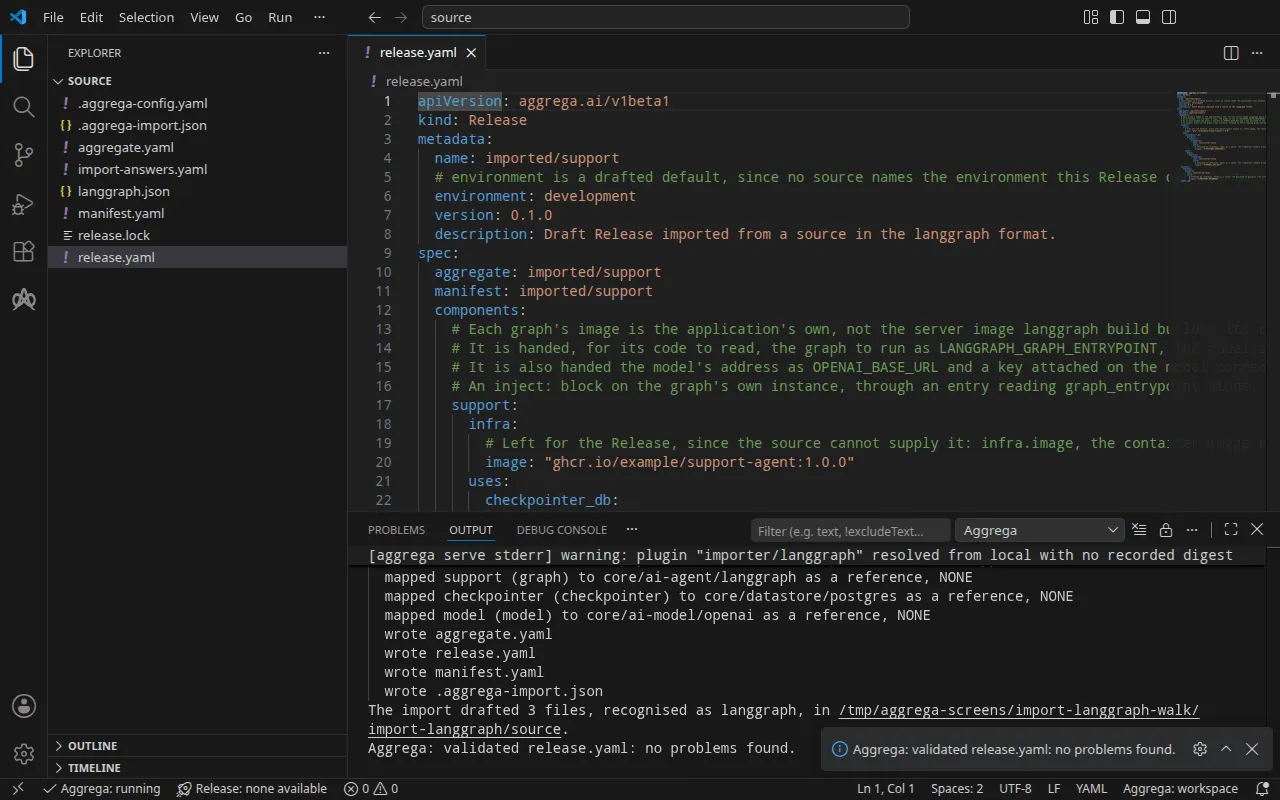
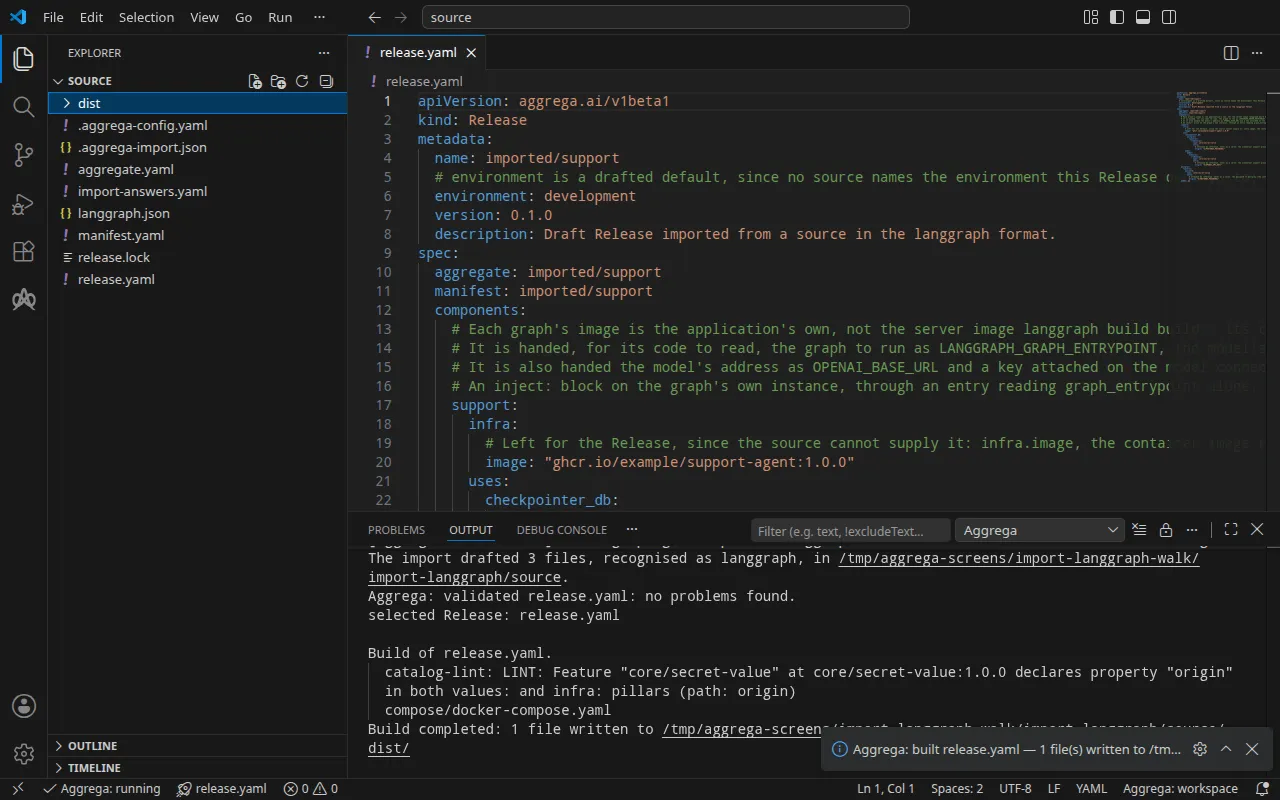
Bước xác thực in ra:
notice: LINT: Feature "core/secret-value" at core/secret-value:1.0.0 declares property "origin" in both values: and infra: pillars (path: origin)release dependency validation passed: release.yaml (schema-pillar + dependency pillars)và bản dựng, với <workspace> đại diện cho thư mục mà bạn đã chạy nó:
notice: LINT: Feature "core/secret-value" at core/secret-value:1.0.0 declares property "origin" in both values: and infra: pillars (path: origin)[… omitted: a total build time, which differs per run]Build completed: 1 file written to <workspace>/distDòng notice chỉ mang tính tham khảo: Feature bí mật chấp nhận origin của nó từ values của Aggregate hoặc infra của Release, và thông báo cho biết có một lá được khai báo ở cả hai. Nó không thay đổi phán quyết nào.
Bản build ghi dist/compose/docker-compose.yaml, với một dịch vụ cho đồ thị, một cho cơ sở dữ liệu và một dịch vụ chờ cơ sở dữ liệu. Dịch vụ của đồ thị:
support: image: ghcr.io/example/support-agent:1.0.0 environment: LANGGRAPH_DEFAULT_RECURSION_LIMIT: "25" OPENAI_BASE_URL: https://api.openai.com/v1 OPENAI_MODEL: gpt-4o-mini LANGGRAPH_CHECKPOINTER_HOST: postgres LANGGRAPH_CHECKPOINTER_PORT: "5432" LANGGRAPH_CHECKPOINTER_USER: appuser LANGGRAPH_CHECKPOINTER_DATABASE: appdb LANGGRAPH_GRAPH_ENTRYPOINT: ./src/support_agent/graph.py:graph OPENAI_API_KEY: ${OPENAI_API_KEY} LANGGRAPH_CHECKPOINTER_PASSWORD: ${POSTGRES_PASSWORD} ports: - 127.0.0.1:8000:8000 [… omitted: the labels the build writes on every service, naming the Aggregate, the component, the environment and the compiler's version] networks: - compose depends_on: support--wait-for-store: condition: service_completed_successfully postgres: condition: service_startedĐồ thị nhận địa chỉ của mô hình, tên và khóa của nó, host, cổng, người dùng, tên và mật khẩu của cơ sở dữ liệu, cùng điểm vào đồ thị của chính nó. Người dùng và tên cơ sở dữ liệu là các giá trị mặc định của Component PostgreSQL, appuser và appdb, vốn được dùng để tạo dịch vụ cơ sở dữ liệu bên dưới; đồ thị nhận được chúng vì Recipe PostgreSQL công bố cả hai, còn với một kho lưu trữ không công bố cái nào trong hai, như Valkey, đồ thị không nhận được cái nào. Tên của mô hình, host, cổng, người dùng và tên của cơ sở dữ liệu cùng điểm vào đồ thị đến dưới các tên mà Component LangGraph cung cấp theo mặc định, mà một khối inject: trên kết nối, hoặc trên chính thành phần đối với các giá trị của riêng nó, thay bằng các tên mà mã của bạn đọc. Địa chỉ của mô hình, khóa của nó và mật khẩu của cơ sở dữ liệu giữ nguyên các tên mà các khối nêu ra, và LANGGRAPH_DEFAULT_RECURSION_LIMIT cũng vậy, biến mà LangGraph tự đọc làm giới hạn bước của một lần chạy có cấu hình không đặt giới hạn nào. Chính dịch vụ của cơ sở dữ liệu nhận cùng mật khẩu đó:
postgres: image: postgres:16 environment: POSTGRES_USER: appuser POSTGRES_PASSWORD: ${POSTGRES_PASSWORD} POSTGRES_DB: appdb [… omitted: the labels the build writes on every service, the network, and a health check running PostgreSQL's pg_isready]Dịch vụ của đồ thị chỉ khởi động sau khi dịch vụ thứ ba đã hoàn tất. Dịch vụ thứ ba chạy một lần, trong image của agent quickstart thuộc danh mục thay vì trong image của chính đồ thị, và chờ cho đến khi địa chỉ của cơ sở dữ liệu chấp nhận một kết nối TCP, thử lại mỗi 2 giây trong tối đa 300 giây; nếu đến lúc đó vẫn chưa có kết nối, nó thoát và nêu địa chỉ đó, và đồ thị không được khởi động. Nó nhận host và cổng của cơ sở dữ liệu, ngoài ra không gì khác:
support--wait-for-store: image: hub.aggrega.ai/tools/quickstart-agent:1.0.1@sha256:a5f8dcfbb670d86a0cae0aadd2844bec93221a651238f8be3863873e261ee168 [… omitted: the command and the entrypoint, a bash loop that opens a connection to the address] environment: STORE_HOST: postgres STORE_PORT: "5432" [… omitted: the labels the build writes on every service, and the network] restart: "no"Khóa và mật khẩu là các tham chiếu biến, được điền từ shell của bạn khi stack khởi động. Mô hình không có dịch vụ riêng: đồ thị tiếp cận API OpenAI tại chính địa chỉ của API đó. Dịch vụ của đồ thị chỉ công bố cổng của nó trên 127.0.0.1, và cổng riêng của cơ sở dữ liệu được tiếp cận trên mạng của stack, không công bố gì cả.
Với trợ lý AI
Một trợ lý AI được thiết lập với các công cụ của Aggrega có thể làm điều tương tự: dán prompt này vào nó.
Chỉ dùng các công cụ Aggrega, và không tự tạo thư mục nào. Nếu thư mục Workspace chưa có thư mục `import-langgraph`, hãy gọi công cụ `scaffold` một lần với `example` đặt thành `import-langgraph` và không có `dir`: nó ghi ví dụ vào một thư mục `import-langgraph` mới, mà thư mục `source` của nó chứa những gì trang này nhập. Sau đó gọi công cụ `import` với `workspace_root` đặt thành `import-langgraph/source`, `source` đặt thành `.` và `target` đặt thành `compose`: nó đọc các câu trả lời cần thiết từ `import-answers.yaml` bên cạnh `langgraph.json`, ghi các bản nháp vào `import-langgraph/source` và kéo những gì chúng cần. Sau đó gọi công cụ `validate` với `workspace_root` đặt thành `import-langgraph/source` và `release` đặt thành `release.yaml`, và công cụ `build` với `workspace_root` đặt thành `import-langgraph/source`, `release` đặt thành `release.yaml` và `write` đặt thành true. Cho tôi biết bản build đã ghi những tệp nào; chúng nằm trong `import-langgraph/source/dist/`.Mở trong VS Code
Khi đã cài tiện ích mở rộng Aggrega cho Visual Studio Code, hãy mở thư mục import-langgraph/source trong VS Code, nơi lần nhập đã ghi các bản nháp. Thư mục chứa một Release, tức release.yaml được tạo nháp, vì vậy trình soạn thảo chọn nó cho bạn, và kiểm tra các bản nháp theo Release đó khi bạn chỉnh sửa, đánh dấu những gì nó tìm thấy trong tệp và trong bảng Problems. Aggrega: Show topology graph, trong Command Palette, vẽ các thành phần của Release và các kết nối giữa chúng. Aggrega: Build, Aggrega: Preview build và Aggrega: Pull hoạt động trên cùng Release đó, và mỗi lệnh cũng là một nút trên bảng Commands của chế độ xem Aggrega trong thanh hoạt động; Build ghi các tệp của nó vào dist/ của thư mục. Dùng Aggrega trong Visual Studio Code trình bày phần còn lại.
Chạy thử
Bạn build image từ dự án, bằng một Dockerfile của riêng bạn: mã của đồ thị, với LangGraph được cài đặt. Docker Compose chạy lệnh riêng của image làm dịch vụ của đồ thị, vì Recipe không đặt lệnh nào, nên lệnh đó phải tiếp tục chạy, và phải phục vụ các yêu cầu nếu bạn muốn truy cập đồ thị. Lệnh đó tìm đồ thị, mô hình và cơ sở dữ liệu thông qua các biến ở trên. Chương trình của bạn quyết định địa chỉ, route và câu trả lời.
Lần chạy dưới đây đã dùng một image như vậy: đồ thị ở đường dẫn mà langgraph.json chỉ định, src/support_agent/graph.py, một node trả lời thông qua mô hình mà OPENAI_MODEL chỉ định, và, làm lệnh của image, một máy chủ HTTP nhỏ của riêng chương trình trên cổng 8000. Image giữ nguyên cấu trúc của dự án tại thư mục làm việc của nó, nên đường dẫn mà LANGGRAPH_GRAPH_ENTRYPOINT chỉ định, tương đối với thư mục đó, tìm thấy đồ thị. Máy chủ tải đồ thị đó, lưu trạng thái của mỗi cuộc hội thoại trong cơ sở dữ liệu thông qua checkpointer PostgreSQL của LangGraph, được mở bằng host, cổng, người dùng, tên và mật khẩu của cơ sở dữ liệu, mỗi giá trị được đọc từ biến LANGGRAPH_CHECKPOINTER_ mà nó đến dưới đó, nên chương trình tự nó không ghi giá trị nào, và chạy đồ thị một lần cho mỗi POST /threads/<thread>/runs. Dịch vụ của đồ thị khởi động ngay khi cơ sở dữ liệu chấp nhận kết nối, nên một máy chủ mở checkpointer khi khởi động sẽ thấy cơ sở dữ liệu đang chấp nhận kết nối. Hãy build image của bạn tại thư mục gốc của dự án, ghi tên của nó vào chỗ ghcr.io/example/support-agent:1.0.0 trong import-answers.yaml, rồi nhập lại với --sync, lệnh này ghi câu trả lời mới vào các bản nháp và pull lại; sau đó build:
docker build -t order-support:local .aggrega import . --syncaggrega build --release release.yamlSau đó, đặt khóa và mật khẩu của cơ sở dữ liệu trong shell của bạn rồi khởi động stack:
export OPENAI_API_KEY='your OpenAI key'export POSTGRES_PASSWORD='a password of your own'docker compose -p order-support -f dist/compose/docker-compose.yaml up -d --wait-p đặt tên cho dự án, như bước chạy của Cách một lần nhập diễn ra giải thích. --wait trả về khi cơ sở dữ liệu báo cáo trạng thái khỏe, việc chờ nó đã hoàn tất và dịch vụ của đồ thị đang chạy.
Kiểm thử
Yêu cầu dưới đây đến được chương trình mà image của hướng dẫn này chạy: đồ thị phía sau một máy chủ HTTP nhỏ trên cổng 8000, trả lời POST /threads/<thread>/runs. Chương trình của riêng bạn tự quyết định route và câu trả lời của nó. Hãy gửi yêu cầu tới http://127.0.0.1:8000, địa chỉ mà published_port công bố:
curl -sS -X POST http://127.0.0.1:8000/threads/order-1234/runs -H 'Content-Type: application/json' \ -d '{"message": "Where is my order 1234? It has not arrived yet."}'{ "thread": "order-1234", "error": "the run failed: OpenAIAuthenticationError: Error code: 401 - Incorrect API key provided: sk-place************-key. [… omitted: where to find an API key]"}Lần chạy đã đặt OPENAI_API_KEY thành một giá trị giữ chỗ, nên câu trả lời là lời từ chối của OpenAI đối với khóa đó, được chương trình chuyển tiếp. Yêu cầu của đồ thị đã đến API của OpenAI với khóa mà bản build cung cấp, từ một chương trình đã mở checkpointer của nó trong cơ sở dữ liệu bằng thông tin xác thực mà bản build cung cấp.
Dừng stack bằng:
docker compose -p order-support -f dist/compose/docker-compose.yaml down -v-v xóa volume nơi cơ sở dữ liệu lưu dữ liệu của nó, và cùng với đó là các cuộc hội thoại.
Trên Kubernetes, hãy nhập với --target helm và đẩy image lên một registry mà cluster của bạn kéo image từ đó, ghi tên image trong import-answers.yaml. Sau đó tạo các Secret openai-api-key và support-db-password rồi áp dụng bản build, như bước chạy của Cách một lần nhập diễn ra mô tả. Deployment của đồ thị không có Service. Pod của nó khởi động lại cho đến khi cơ sở dữ liệu chấp nhận kết nối, vì chương trình mở checkpointer của nó khi khởi động. Chuyển tiếp một cổng cục bộ tới đó; lệnh chạy cho đến khi bạn dừng nó:
kubectl port-forward deploy/support 8000:8000Forwarding from 127.0.0.1:8000 -> 8000Forwarding from [::1]:8000 -> 8000Từ một terminal khác, gửi cùng yêu cầu đó tới cổng đã chuyển tiếp:
curl -sS -X POST http://127.0.0.1:8000/threads/order-1234/runs -H 'Content-Type: application/json' \ -d '{"message": "Where is my order 1234? It has not arrived yet."}'{ "thread": "order-1234", "error": "the run failed: OpenAIAuthenticationError: Error code: 401 - Incorrect API key provided: sk-place************-key. [… omitted: where to find an API key]"}