

Compose プロジェクトをインポートする
このウォークスルーでは、小さな Compose プロジェクト(API、その API がメモを保存する PostgreSQL データベース、Redis キャッシュ)をインポートし、その結果を Docker Compose 向けにビルドします。インポートは、ビルドが読み取るすべてのファイルの下書きを作成し、Compose ファイルに記述された内容を引き継ぎます。つまり、API からデータベースとキャッシュへの接続、データベースのユーザーと名前、変数参照としてのパスワード、各イメージのタグです。以下のすべてのファイルとすべての出力ブロックは実際の実行から得たものです。プロジェクトとウォークスルーの各段階は import-compose の例にあり、そこではチェックスクリプトがインポートを再度実行し、書き込んだ内容、出力した内容、およびこのページが引用するブロックを、そこに保存されたファイルと比較し、インポートが書き出したものを検証してビルドします。
サンプルを生成する
このインポートは、このページのコマンドで実行することも、AI アシスタントに実行させることもできます。
例の名前を付けた新しいフォルダーに例を書き出します。
aggrega scaffold --example import-composeその後、次に実行するコマンドを表示します。最初のコマンドは新しいフォルダーに移動します。それに続く以下のコマンドは、新しいフォルダーの source フォルダーに移動します。このフォルダーには、このページがインポートするものが入っており、インポートはここで実行します:
cd import-compose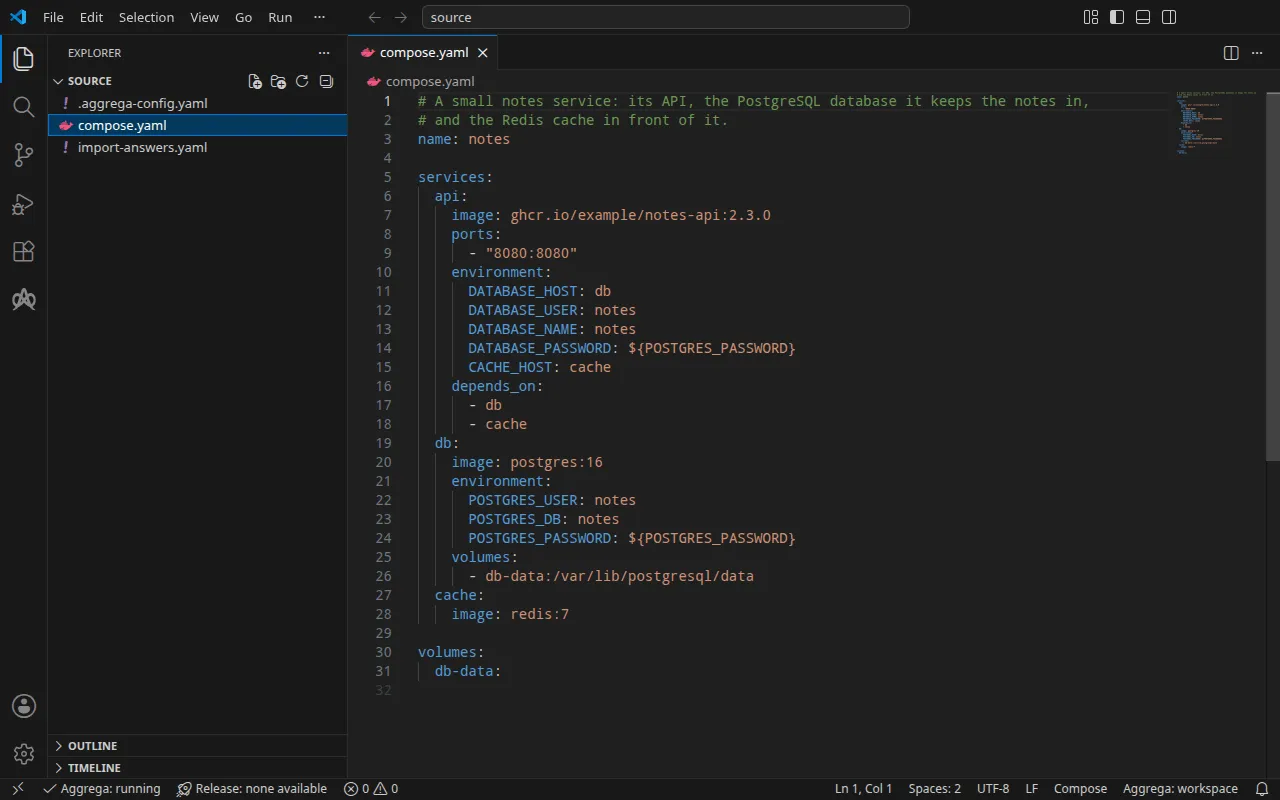
プロジェクト
compose.yaml:
# A small notes service: its API, the PostgreSQL database it keeps the notes in,# and the Redis cache in front of it.name: notes
services:  api:    image: ghcr.io/example/notes-api:2.3.0    ports:      - "8080:8080"    environment:      DATABASE_HOST: db      DATABASE_USER: notes      DATABASE_NAME: notes      DATABASE_PASSWORD: ${POSTGRES_PASSWORD}      CACHE_HOST: cache    depends_on:      - db      - cache  db:    image: postgres:16    environment:      POSTGRES_USER: notes      POSTGRES_DB: notes      POSTGRES_PASSWORD: ${POSTGRES_PASSWORD}    volumes:      - db-data:/var/lib/postgresql/data  cache:    image: redis:7
volumes:  db-data:
その横にある .aggrega-config.yaml によってフォルダーがワークスペースになるため、インポートは下書きをそこに書き込みます:
# The workspace key marks this directory as the workspace root, so an import run# here writes its drafts beside compose.yaml.workspace: {}# The registry the importer is fetched from the first time an import needs it.default_registry: hub.aggrega.aiインポートは各サービスをワークスペースのカタログの Components と照合し、--target はカタログの Recipes から Manifest を下書きします。ワークスペースはカタログフォルダーを指定していないため、インポートは、インポーターの取得元と同じレジストリから標準ライブラリカタログを読み取ります。これは公開済みカタログの署名付きスナップショットで、最初のインポートが取得し、検証してワークスペースのコンテンツキャッシュに保持し、インポートが下書きの隣に書き込む記録の中でそのダイジェストによって示されます。独自のカタログフォルダーを — AGGREGA_CATALOG_DIRS で、または workspace.catalog_dirs の下で — 指定しているワークスペースは、代わりにそれらに対してインポートします。
回答ファイル
Docker Compose 向けのビルドには Compose ファイルに記述されていないものは何も必要ないため、このインポートは何も尋ねません。同じプロジェクトを --target helm で Kubernetes 向けにビルドする場合は、どの Compose ファイルにも含まれない値が 1 つ必要です。データベースのパスワードの読み取り元となる Kubernetes Secret の名前です。Kubernetes のビルドはパスワードをシェルからではなく Secret から読み取るためです。この例では、その回答を compose.yaml の隣の import-answers.yaml に保持しており、インポートはそこを探します:
# Values the import could not draft from the source, keyed by the drafted file and the key path inside# it. Write each one beside its key; an import of the same source, and a sync, read them from here and# ask nothing. A secret is never written here: its key asks where the secret comes from — a variable# name, ${NAME}, or the name of a Kubernetes Secret.release.yaml: # The origin of the secret value, written by the operator in the Release. Read exactly as # values.origin is. Write it here or in values.origin, never in both. A secret: name where it comes # from, never the value. spec.components.db.features.password.infra.origin: "notes-db-password"このファイルは、--target helm を指定して初めて実行したときにインポート自身が書き込みました。下書きできなかった値をキーを空にして一覧表示し、停止しました。回答は Secret の名前であり、パスワードではありません。Docker Compose 向けのインポートはそのような値を必要とせず、回答をファイルに残したまま使用しません。インポート回答ファイルでは、このファイル、インポートが代わりにターミナルで尋ねる質問、そしてどちらもない場合の動作について説明しています。
aggrega import には、別の場所に保存された回答ファイルを指定する --answers を含め、このコマンドが受け付けるすべてのフラグが記載されています。
source に移動します:
cd sourceインポートを実行する
aggrega import compose.yaml --target compose標準出力には書き出したものが一覧表示されます:
wrote aggregate.yamlwrote release.yamlwrote manifest.yamlwrote .aggrega-import.json標準エラーには次のように出力されます(<workspace> は実行したフォルダーを表します):
[… omitted: a warning that the importer runs unverified, printed where its module is read from beside its Plugin entity in a catalog folder rather than fetched]read as the compose format, with drafted paths relative to <workspace>warn: the value of environment.POSTGRES_USER of node db is carried as written in the drafts: its format marks the field as no credential, though it can carry one, and setting empty_credentials to all writes it emptywarn: the value of environment.POSTGRES_DB of node db is carried as written in the drafts: its format marks the field as no credential, though it can carry one, and setting empty_credentials to all writes it emptymapped api (ghcr.io/example/notes-api) to core/compute/server as a reference, NONEmapped db (postgres) to core/datastore/postgres as a reference, HIGH at 0.9mapped cache (redis) to core/datastore/redis as a reference, HIGH at 0.9Pull complete: <workspace>/release.lock (entities=10, source_artifacts=0, external_inputs=0)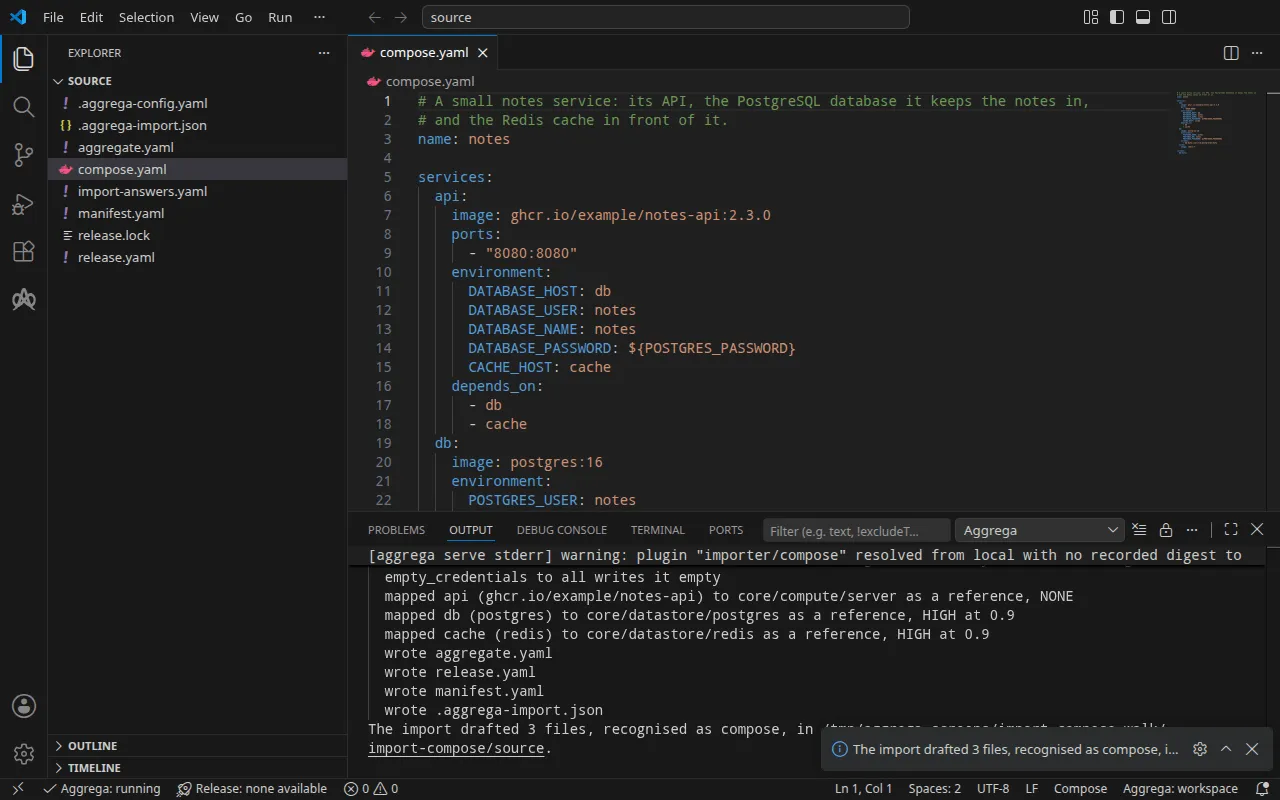
warn行は、下書きが記述どおりに保持する各値を、値そのものではなく、サービスと変数によって示します。Compose はどの値も資格情報としてマークしないため、どの値にも資格情報が含まれている可能性があります。ここでは、どちらにも含まれていません。API が別のサービスから読み取る変数は値としてはまったく保持されず、接続がそれらを渡します。また、${POSTGRES_PASSWORD}と書かれた 2 つは変数参照にすぎないため、どの警告にも挙げられません。mapped行は、各サービスが何になったかを示します。apiは独自のイメージを実行するため、標準ライブラリの汎用サーバーcore/compute/serverのインスタンスになります。dbとcacheは、標準ライブラリの Compose Recipes がcore/datastore/postgresとcore/datastore/redisのために実行するイメージを実行します。それぞれ高いティアで 0.9 としてその Component に一致し、下書きはその Component を参照します。Pull completeの行は、インポートが、ドラフトされた Release の依存先をaggrega pullと同じようにrelease.lockへ取得していることを示します。これにより、ドラフトはすぐに検証とビルドができます。--offlineの場合、インポートは何も取得せず、実行すべきaggrega pullを示します。
書き出される内容
Aggregate、Release、Manifest の名前は imported/notes で、Compose プロジェクトの name: に由来します。name: のない Compose ファイルにはそのファイル名 compose から、それを含むディレクトリをディレクトリとしてインポートした場合にはそのディレクトリ名から名前が付きます。これは Compose がプロジェクトに名前を付ける方法と同じです。名前空間は、インポーターの target_namespace 設定が定めるもので、別のものを設定しない限り imported です(設定)。
aggregate.yaml — サービスごとに 1 つのエントリ、API の環境が値を引き出す接続、そして Compose ファイルが設定する値とパスワード:
# Not carried, since the draft reads the services and the models alone: volumes.apiVersion: aggrega.ai/v1beta1kind: Aggregatemetadata: name: imported/notes version: 0.1.0 description: Draft Aggregate imported from a source in the compose format.spec: components: api: type: core/compute/server features: # For the compose target, the lines below declare database_password on api: a secret the Release alone attaches arrives under the key value, so each is declared with a key of its own and no two arrive under one; the Release attaches its origin, naming this type or none. database_password: type: core/secret-value values: key: DATABASE_PASSWORD uses: cache: cache: target: cache # The variables the source sets to what cache publishes, delivered from it under the names the source gives them. inject: env: - in: "CACHE_HOST" from: host db: db: target: db # The variables the source sets to what db publishes, delivered from it under the names the source gives them. inject: env: - in: "DATABASE_HOST" from: host - in: "DATABASE_USER" from: user - in: "DATABASE_NAME" from: database db: type: core/datastore/postgres # The values of core/datastore/postgres the source sets as POSTGRES_USER, POSTGRES_DB, the variables its Compose Recipes set from them. values: user: "notes" database: "notes" features: # For the compose target, the lines below declare password on db: a secret the Release alone attaches arrives under the key value, so each is declared with a key of its own and no two arrive under one; the Release attaches its origin, naming this type or none. password: type: core/secret-value values: key: POSTGRES_PASSWORD cache: type: core/datastore/redis別のサービスを指す API の各変数は、その接続の inject ブロックになります。Compose ファイルは DATABASE_HOST を db に設定しており、接続はデータベースが公開する host をその名前で渡すため、コピーされるのではなく、どのターゲットでもデータベースに追従します。DATABASE_USER と DATABASE_NAME は PostgreSQL サービスの作成時のユーザーとデータベースに一致したため、これらもそのサービスが公開する内容から渡され、この 2 つの値はデータベース自身の values になります。各パスワードは core/secret-value アタッチメントになり、その変数が読み取られるキーで宣言されます。
release.yaml — 環境、API のイメージとポート、各データストアのエンジンバージョン、そして各パスワードの取得元:
apiVersion: aggrega.ai/v1beta1kind: Releasemetadata: name: imported/notes # environment is a drafted default, since no source names the environment this Release deploys to; change it to name the one it deploys to. environment: development version: 0.1.0 description: Draft Release imported from a source in the compose format.spec: aggregate: imported/notes manifest: imported/notes components: # The source also states, for the Release to carry where core/compute/server takes it: # ports: # - "8080:8080" api: infra: image: "ghcr.io/example/notes-api:2.3.0" port: 8080 # Published on this machine's loopback address, 127.0.0.1: reachable from this machine only, by any process running on it. Delete this line to keep the service internal. published_port: 8080 features: database_password: type: core/secret-value infra: # Attached by reference, never as a value: the value api reads as DATABASE_PASSWORD, read from the variable POSTGRES_PASSWORD, which a target substituting variable references, as Docker Compose does when the stack starts, reads from the environment, so no file carries the value. origin: "${POSTGRES_PASSWORD}" # The source states, for the Release to carry where core/datastore/postgres takes it: # volumes: # - "db-data:/var/lib/postgresql/data" db: infra: # The tag of the image the source runs, postgres:16, the engine_version of core/datastore/postgres its Compose Recipes run. engine_version: "16" features: password: type: core/secret-value infra: # Attached by reference, never as a value: the password of db, which the source sets as POSTGRES_PASSWORD, read from the variable POSTGRES_PASSWORD, which a target substituting variable references, as Docker Compose does when the stack starts, reads from the environment, so no file carries the value. origin: "${POSTGRES_PASSWORD}" cache: infra: # The tag of the image the source runs, redis:7, the engine_version of core/datastore/redis its Compose Recipes run. engine_version: "7"環境 development は、どの Compose ファイルも環境を指定しないためにインポートが書き込むデフォルトです。Release を別の場所にデプロイする場合は変更してください。イメージタグは、標準ライブラリの Components が受け取るエンジンバージョンになります。API の port はそのコンテナーが待ち受けるポート、published_port はその ports エントリが公開するホストポートで、どちらも Compose ファイルに記述されているとおり 8080 です。コメントにあるとおり、このマシン上のどのプロセスも http://127.0.0.1:8080 で API に到達でき、それ以外は到達できません。この行を削除すると、API はスタックのネットワーク上だけに留まります。どのキーも受け取らないものは、そのエントリの上にコメントとして残ります。port と published_port がすでに保持しているソースの ports エントリと、データベースの名前付きボリュームです。
manifest.yaml — 各コンポーネントタイプの Compose Recipe と、パスワードの変数参照を記述どおりに Compose ファイルに書き込む実現:
apiVersion: aggrega.ai/v1beta1kind: Manifestmetadata: name: imported/notes version: 0.1.0spec: mappings: components: type: core/compute/server: compose/server core/datastore/postgres: compose/postgres core/datastore/redis: compose/redis features: type: core/secret-value: compose/dotenv-secretrelease.lock は Release が解決されたカタログエンティティをダイジェストで記録し、.aggrega-import.json はインポートが書き出した内容の記録で、後の aggrega import --sync がこれを読み取ります。
検証とビルド
aggrega validate --release release.yamlaggrega build --release release.yaml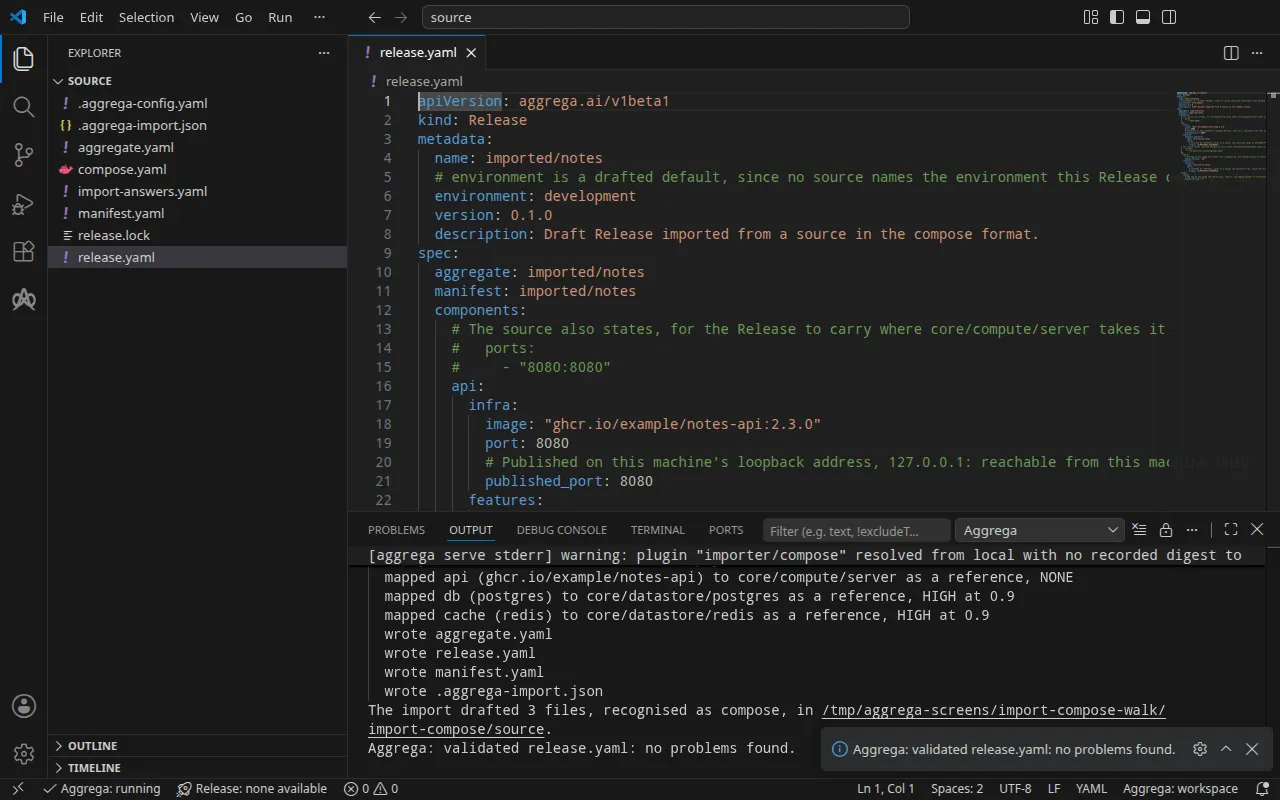
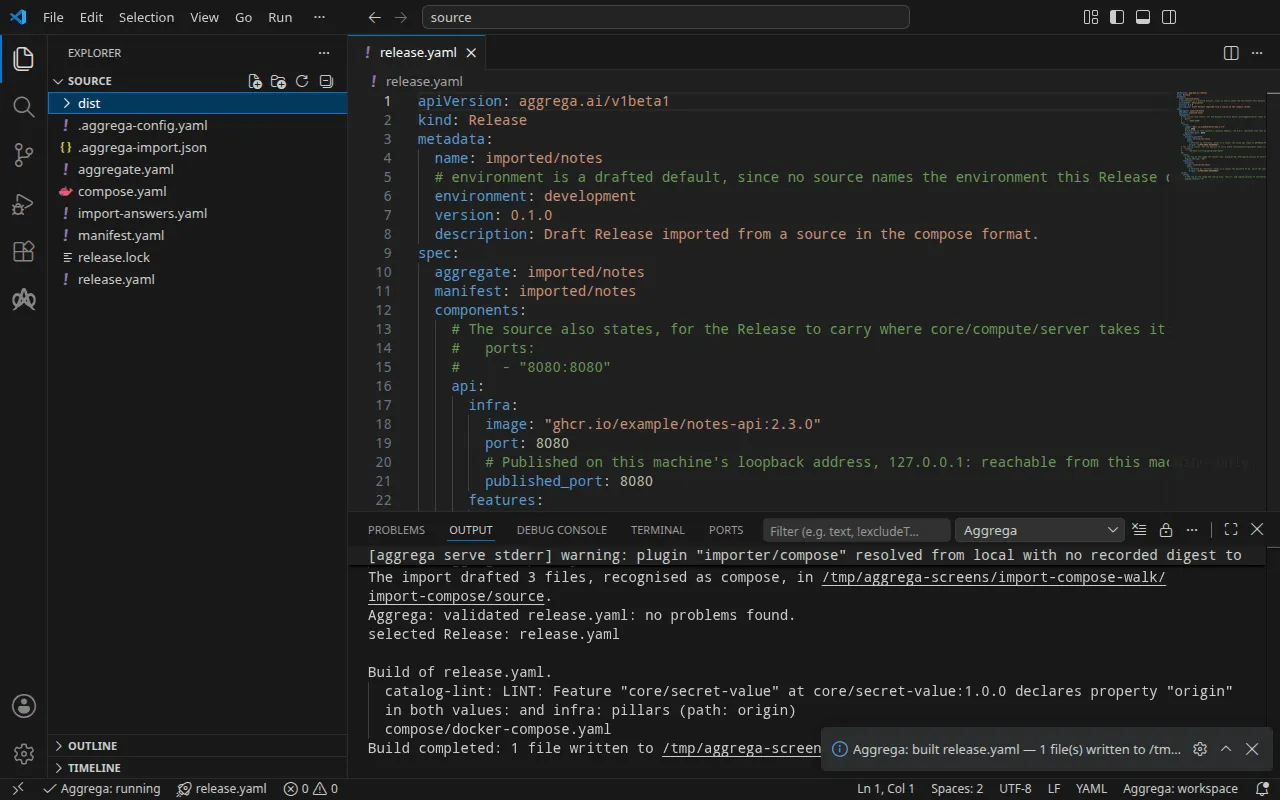
検証の出力は次のとおりです:
notice: LINT: Feature "core/secret-value" at core/secret-value:1.0.0 declares property "origin" in both values: and infra: pillars (path: origin)release dependency validation passed: release.yaml (schema-pillar + dependency pillars)そしてビルドは次のとおりです(<workspace> は実行したフォルダーを表します):
notice: LINT: Feature "core/secret-value" at core/secret-value:1.0.0 declares property "origin" in both values: and infra: pillars (path: origin)[… omitted: a total build time, which differs per run]Build completed: 1 file written to <workspace>/distnotice 行は参考情報です。パスワードの Feature は origin を Aggregate の values または Release の infra から受け付け、通知は 1 つのリーフが両方で宣言されていることを報告します。判定は何も変わりません。
dist/compose/docker-compose.yaml の api サービスは、Compose プロジェクトが与えていた環境を読み取ります。その環境は、接続とパスワードのアタッチメントによって渡されます:
api: image: ghcr.io/example/notes-api:2.3.0 environment: CACHE_HOST: cache DATABASE_HOST: db DATABASE_NAME: notes DATABASE_PASSWORD: ${POSTGRES_PASSWORD} DATABASE_USER: notes ports: - 127.0.0.1:8080:8080 [… omitted: the labels the build writes on every service, naming the Aggregate, the component, the environment and the compiler's version] networks: - compose depends_on: - cache - db [… omitted: the CPU and memory the server's defaults reserve]また、データベースとキャッシュは Compose ファイルが指定したイメージを実行します:
db: image: postgres:16 environment: POSTGRES_USER: notes POSTGRES_PASSWORD: ${POSTGRES_PASSWORD} POSTGRES_DB: notes [… omitted: the labels, the network and a health check running PostgreSQL's pg_isready] cache: image: redis:7 [… omitted: the labels, the network and a health check running redis-cli ping]最初のプロジェクトとの違いが 2 つ、レンダリングされたファイルに現れます。ポートはループバックアドレスでのみ公開されます。これは汎用サーバーの Compose Recipe が公開するとおりです。また、Compose ファイルがデータベースのデータ用にマウントしていた名前付きボリュームはどこにも現れません。下書きではデータベースのエントリの上のコメントに記載されていますが、PostgreSQL の Component にはそれを受け取るキーがなく、レンダリングされたデータベースサービスはボリュームをマウントしません。
AI アシスタントを使う
Aggrega のツールでセットアップした AI アシスタントでも同じことができます。次のプロンプトを貼り付けてください。
Aggrega のツールだけを使い、フォルダーは自分で作成しないでください。Workspace フォルダーにまだ `import-compose` フォルダーがない場合は、`example` を `import-compose` に設定し、`dir` を指定せずに、`scaffold` ツールを 1 回呼び出してください。これは例を新しい `import-compose` フォルダーに書き込み、その `source` フォルダーにこのページでインポートするものが入ります。次に、`workspace_root` を `import-compose/source`、`source` を `compose.yaml`、`target` を `compose` に設定して `import` ツールを呼び出してください。これは必要な回答を `compose.yaml` の隣にある `import-answers.yaml` から読み取り、下書きを `import-compose/source` に書き込み、下書きが必要とするものをプルします。次に、`workspace_root` を `import-compose/source`、`release` を `release.yaml` に設定して `validate` ツールを呼び出し、`workspace_root` を `import-compose/source`、`release` を `release.yaml`、`write` を true に設定して `build` ツールを呼び出してください。ビルドが書き込んだファイルを教えてください。それらは `import-compose/source/dist/` の下にあります。VS Code で開く
Visual Studio Code 用の Aggrega 拡張機能をインストールした状態で、インポートが下書きを書き込んだフォルダー import-compose/source を VS Code で開きます。このフォルダーには Release が 1 つ、下書きの release.yaml だけがあるため、エディターがそれを自動的に選択し、下書きを編集するたびにその Release に照らしてチェックし、見つけたものをファイル内と「問題」パネルに表示します。コマンドパレットの Aggrega: Show topology graph は、Release のコンポーネントとそれらの間の接続を描画します。Aggrega: Build、Aggrega: Preview build、Aggrega: Pull は同じ Release に対して動作し、それぞれアクティビティバーの Aggrega ビューにある Commands パネルのボタンでもあります。Build はファイルをフォルダーの dist/ に書き込みます。その他については Visual Studio Code で Aggrega を使う を参照してください。
実行する
ghcr.io/example/notes-api:2.3.0 は独自の API のイメージを表します。これはプレースホルダーであり、Docker Compose はこれに対して Error Head "https://ghcr.io/v2/example/notes-api/manifests/2.3.0": denied を出して停止します。release.yaml の api の infra.image に、独自の API のイメージを指定してください。API の準備ができるまでは、ポート 8080 で HTTP に応答するイメージで代用できます。以下の実行では mendhak/http-https-echo:39 を使用しました。これは、すべてのリクエストに対して、受け取ったリクエストの説明を返します:
api: infra: image: "mendhak/http-https-echo:39" port: 8080変更を加えてもう一度ビルドします。Release はインポートが書き込んだ release.lock と一致しなくなっているため、ビルドには再解決を行う --auto-pull が必要です。これを指定しないとビルドは停止し、aggrega pull を示します。Docker Compose は 2 つの ${POSTGRES_PASSWORD} 参照をシェルから埋めるため、スタックを起動する前にパスワードを設定してください。設定しないままにすると、Compose は The "POSTGRES_PASSWORD" variable is not set. Defaulting to a blank string. と警告し、その位置に空の値を書き込みます。
aggrega build --release release.yaml --auto-pullexport POSTGRES_PASSWORD='a password of your own'docker compose -p notes -f dist/compose/docker-compose.yaml up -d --wait-p はプロジェクト名を指定します。これは インポートの実行方法 の実行ステップで説明しているとおりです。--wait は、データベースとキャッシュがビルドの設定したヘルスチェックに合格し、API のコンテナーが実行中になった時点で戻ります。ビルドは API にはヘルスチェックを設定しません。
テストする
published_port が公開するアドレス http://127.0.0.1:8080 で API に問い合わせます。
curl -sS http://127.0.0.1:8080/notes{ "path": "/notes", "headers": { "host": "127.0.0.1:8080", [… omitted: the user agent and the media types the client sent] }, "method": "GET", [… omitted: the rest of the request as the stand-in received it, the client's address and the container's host name]}接続が渡す内容は、API サービスの環境に、API が読み取る名前で入っています:
docker compose -p notes -f dist/compose/docker-compose.yaml exec api printenv DATABASE_HOST DATABASE_USER DATABASE_NAME CACHE_HOSTdbnotesnotescacheスタックを停止するには次のコマンドを使います:
docker compose -p notes -f dist/compose/docker-compose.yaml downKubernetes の場合
同じプロジェクトは --target helm で Kubernetes 向けにインポートでき、インポートは Secret の名前 notes-db-password を上の回答ファイルから読み取ります。Docker Compose 向けの下書きはすでに source にあるため、こちらは専用のフォルダーに下書きし、Docker Compose の場合と同様にその release.yaml に API のイメージを書き、そこからビルドします。
aggrega import compose.yaml --target helm --output-dir helmcd helmaggrega build --release release.yaml --auto-pullビルドは、ワークスペースのルート source にある dist/helm/ の下に、プレーンな Kubernetes マニフェストを書き込みます。helm から見ると ../dist/helm/ です。適用先の namespace に、データキー value の下にパスワードを保持する Secret notes-db-password を作成し、インポートの実行方法 の実行ステップで説明しているとおりにフォルダーを適用します。API の Service は api-default です。ローカルポートをそこへ転送し、コマンドを実行したままにします。
kubectl port-forward -n <namespace> svc/api-default 8080:8080別のターミナルから、上のリクエストはそのまま同じアドレスで API に届き、代わりのイメージも同じように "host": "127.0.0.1:8080" と応答します。接続は Service の名前を渡します。kubectl exec -n <namespace> deploy/api -- printenv DATABASE_HOST DATABASE_USER DATABASE_NAME CACHE_HOST は db-default、notes、notes、cache-default を出力します。Kubernetes では、API はまだデータベースのパスワードを受け取りません。Secret notes-db-password はデータベースにしか届かないため、api コンテナーには DATABASE_PASSWORD が設定されません。
Compose ファイルが変更されたとき
.aggrega-import.json を下書きの横に保持し、Compose ファイルが変更された後に次を実行します:
aggrega import compose.yaml --sync変更するのはインポートが書き込んだものだけで、同じ回答ファイルを読み込みます。ソースが変更しなかった部分は、編集されているかどうかにかかわらずディスク上のまま残ります。編集済みの部分をソースが変更した場合は、停止してその部分を示し、何も書き込まないため、手作業で調整します。aggrega import にルールとすべてのフラグの詳細が説明されています。