

n8n 워크플로 가져오기
이 단계별 안내에서는 n8n에서 내보낸 워크플로, 즉 OpenAI 채팅 모델과 메모리로 채팅 메시지에 답하는 AI 에이전트를, 작성된 그대로 워크플로를 담은 n8n을 Docker Compose용으로 빌드하는 Aggregate, Release, Manifest로 가져온 다음, 이를 빌드하고 결과를 실행합니다. 아래의 모든 파일과 출력 블록은 실제 실행에서 나온 것입니다. 워크플로와 단계별 안내의 각 단계는 import-n8n 예제에 있으며, 그곳의 검사 스크립트가 가져오기를 다시 실행하여 작성한 내용, 출력한 내용, 이 페이지가 인용하는 블록을 그곳에 보관된 파일과 비교하고, 가져오기가 작성한 것을 검증하고 빌드합니다.
예제 생성하기
이 페이지의 명령으로 이 가져오기를 실행하거나, AI 어시스턴트가 대신 실행하게 할 수 있습니다.
예제 이름을 딴 새 폴더에 예제를 씁니다:
aggrega scaffold --example import-n8n그런 다음 이어서 실행할 명령을 출력합니다. 첫 번째 명령은 새 폴더로 이동합니다. 그 뒤의 명령은 아래와 같으며, 새 폴더 안의 source 폴더로 이동합니다. 이 폴더에는 이 페이지가 가져오는 내용이 들어 있으며, 가져오기는 여기서 실행됩니다:
cd import-n8n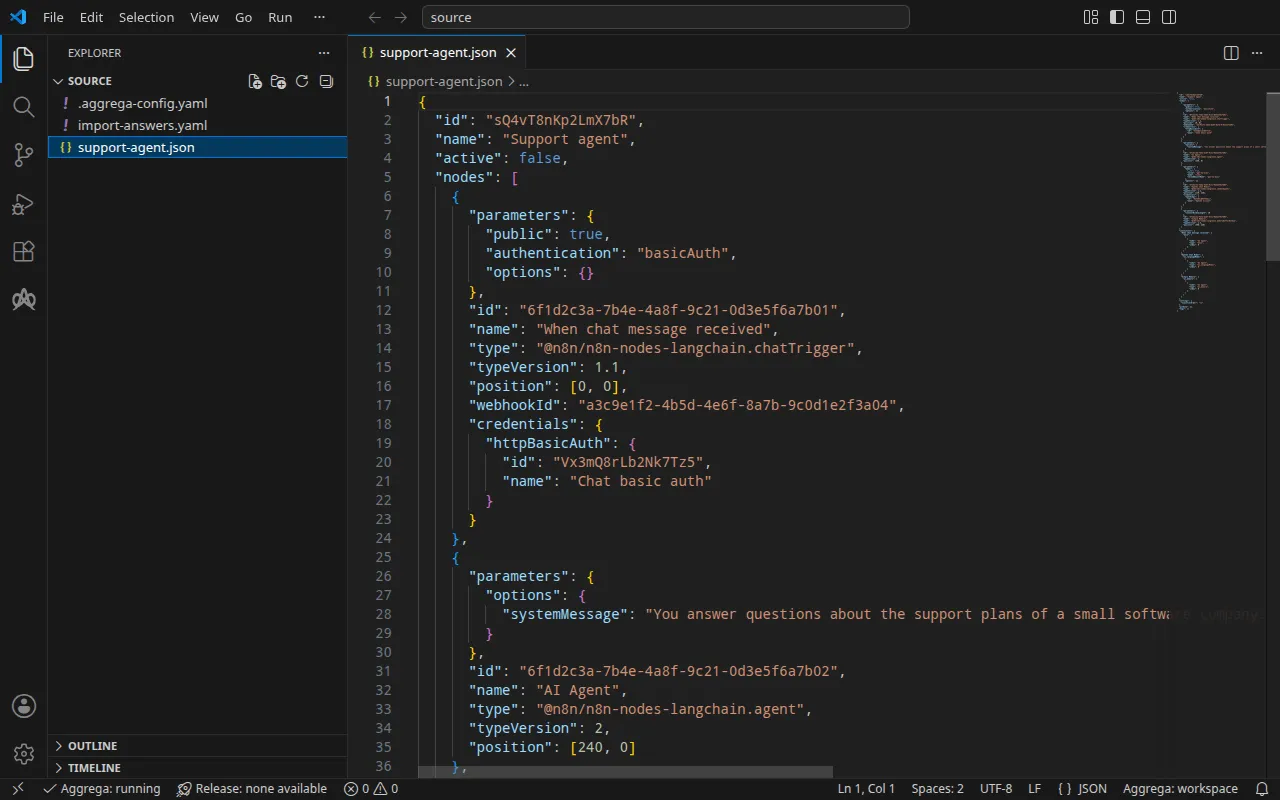
워크플로
이 단계별 안내를 위해 n8n이 워크플로를 내보내는 형태로 작성된 support-agent.json에는 네 개의 노드가 있습니다. 채팅 트리거, 짧은 시스템 메시지가 있는 AI Agent, gpt-4o-mini를 선택하는 OpenAI Chat Model 노드, 그리고 Simple Memory 노드이며, 이들은 n8n이 각 연결이 출발하는 노드의 이름별로 나열하는 연결로 이어져 있습니다. 채팅 트리거는 공개되어 있으므로 그 URL로 보낸 채팅 메시지가 워크플로를 시작하며, 트리거는 보낸 사람에게 사용자와 비밀번호를 요구하고 이를 n8n이 저장한 기본 인증 자격 증명과 대조합니다:
"parameters": { "public": true, "authentication": "basicAuth", "options": {} }, [… omitted: the node's identifier, name, type, version, position and webhook identifier] "credentials": { "httpBasicAuth": { "id": "Vx3mQ8rLb2Nk7Tz5", "name": "Chat basic auth" } }모델 노드도 같은 방식으로 참조를 통해 자격 증명을 선택합니다 — 내보낸 파일에는 각 자격 증명의 식별자와 이름이 담기며, 사용자, 비밀번호, 키는 절대 담기지 않습니다:
"parameters": { "model": { "__rl": true, "value": "gpt-4o-mini", "mode": "list", "cachedResultName": "gpt-4o-mini" }, "options": {} }, "id": "6f1d2c3a-7b4e-4a8f-9c21-0d3e5f6a7b03", "name": "OpenAI Chat Model", "type": "@n8n/n8n-nodes-langchain.lmChatOpenAi", "typeVersion": 1.2, "position": [120, 220], "credentials": { "openAiApi": { "id": "Rb7nW2xQ9kT4mZ1c", "name": "OpenAI account" } }워크플로 옆의 .aggrega-config.yaml이 폴더를 워크스페이스로 만듭니다:
# The workspace key marks this directory as the workspace root, so an import run# here writes its drafts beside support-agent.json.workspace: {}# The registry the importer is fetched from the first time an import needs it.default_registry: hub.aggrega.ai그리고 import-answers.yaml은 어떤 워크플로도 담을 수 없는 것에 대한 답변을 담습니다. Docker Compose용 가져오기에는 답변이 필요 없습니다. Docker Compose가 셸에서 채우는 변수 참조로 OpenAI 키를 첨부하기 때문입니다. Kubernetes용 가져오기는 Kubernetes Secret의 이름으로 키를 첨부하는데, 이 이름은 사용자만 지정할 수 있으므로 파일이 그 Secret을 지정합니다(Kubernetes에서 참조):
# Values the import could not draft from the source, keyed by the drafted file and the key path inside# it. Write each one beside its key; an import of the same source, and a sync, read them from here and# ask nothing. A secret is never written here: its key asks where the secret comes from — a variable# name, ${NAME}, or the name of a Kubernetes Secret.release.yaml: # The origin of the secret value, written by the operator in the Release. Read exactly as # values.origin is. Write it here or in values.origin, never in both. A secret: name where it comes # from, never the value. spec.components.n8n.uses.model.openai-chat-model.features.credential.infra.origin: "openai-api-key"가져오기 답변 파일에서 이 파일을 자세히 설명합니다.
가져오기는 각 노드를 작업 공간 카탈로그의 Components와 비교하여 평가하고, --target은 그 카탈로그의 Recipes로부터 Manifest 초안을 작성합니다. 작업 공간이 카탈로그 폴더를 지정하지 않으므로, 가져오기는 임포터를 받아 오는 레지스트리에서 표준 라이브러리 카탈로그를 읽습니다. 이는 게시된 카탈로그의 서명된 스냅샷으로, 첫 번째 가져오기가 받아 와서 검증한 뒤 작업 공간의 콘텐츠 캐시에 보관하며, 가져오기가 초안 옆에 작성하는 기록에 그 다이제스트로 지정됩니다. AGGREGA_CATALOG_DIRS에서 또는 workspace.catalog_dirs 아래에서 자체 카탈로그 폴더를 지정하는 작업 공간은 대신 그 폴더들을 기준으로 가져옵니다. source로 이동합니다:
cd source가져오기 실행
aggrega import support-agent.json --target compose표준 출력에는 작성한 것을 나열합니다:
wrote aggregate.yamlwrote release.yamlwrote manifest.yamlwrote .aggrega-import.json표준 오류에는 다음과 같이 출력합니다. 여기서 <workspace>는 명령을 실행한 폴더를 나타냅니다:
[… omitted: a warning that the importer runs unverified, printed where its module is read from beside its Plugin entity in a catalog folder rather than fetched]read as the n8n format, with drafted paths relative to <workspace>warn: the value of credentials.httpBasicAuth.id of node When chat message received is carried as written in the flow the draft carries: its format marks the field as a credential, and setting empty_credentials to marked or all writes it emptywarn: the value of credentials.openAiApi.id of node OpenAI Chat Model is carried as written in the flow the draft carries: its format marks the field as a credential, and setting empty_credentials to marked or all writes it emptywarn: node OpenAI Chat Model reaches openai-chat-model, wired to the model socket of core/ai-agent/n8n as openai-chat-model, other than through that connection: an n8n @n8n/n8n-nodes-langchain.lmChatOpenAi node reaches the part at the address the stored credential it selects, or its own parameters, give; the platform delivers this connection as OPENAI_BASE_URL and OPENAI_API_KEY, but an n8n workflow reads a variable of the platform's environment only through an expression reading $env, which the platform refuses while values.allow_env_access_in_nodes is false, the value the draft leaves it at; setting it true lets every workflow, and every user who can edit one, read every variable of the platform's environment, the delivered credentials includedmade no choice for When chat message received (@n8n/n8n-nodes-langchain.chatTrigger)made no choice for AI Agent (@n8n/n8n-nodes-langchain.agent)mapped OpenAI Chat Model (@n8n/n8n-nodes-langchain.lmChatOpenAi) to core/ai-model/openai as a reference, HIGH at 0.9143made no choice for Simple Memory (@n8n/n8n-nodes-langchain.memoryBufferWindow) warning: node "n8n" (provider "compose"): artifact "n8n-flow.compose-fragment.yaml": skipped provenance label injection — the fragment declares no compose service. Compose carries build provenance as service labels, so a fragment contributing only top-level networks, volumes or configs carries none; the services this component emits elsewhere carry the full set.Pull complete: <workspace>/release.lock (entities=8, source_artifacts=0, external_inputs=0)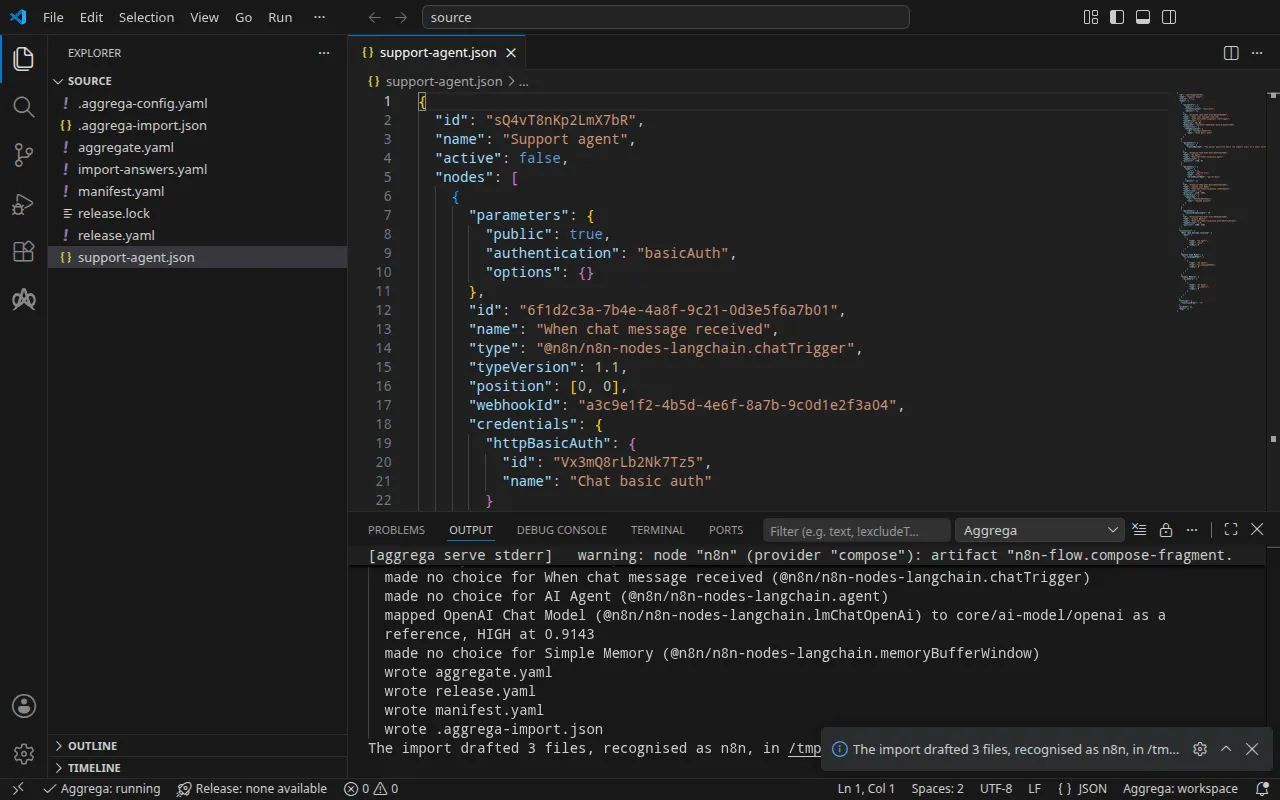
mapped줄은 OpenAI Chat Model 노드가 표준 라이브러리의 OpenAI 모델core/ai-model/openai가 되었음을 나타냅니다. 높은 티어에서 0.9143으로 일치했기 때문에 초안으로 작성되지 않고 참조되었으며, 플랫폼의model소켓에 배선된 독립적인 컴포넌트입니다.made no choice줄은 트리거, 에이전트, 메모리가 n8n이 직접 실행하는 워크플로 안에 남아 있음을 나타냅니다.- 처음 두 개의
warn줄은 트리거와 모델 노드가 선택하는 저장된 자격 증명의 식별자를 지목하며, n8n은 이를 자격 증명으로 표시합니다. 이것들은 비밀이 아니라 참조이며, 작성된 그대로 유지됩니다. - 세 번째
warn줄은 주의 깊게 읽어야 합니다. 모델 노드는 초안이 배선하는 연결을 통하지 않고, 자신이 선택한 저장된 자격 증명으로 OpenAI에 접근합니다. 플랫폼은 연결을 n8n의 환경으로 전달하는데, Aggregate가 초안처럼values.allow_env_access_in_nodes를false로 두는 동안 n8n은 워크플로가 환경을 읽는 것을 거부합니다. 이를true로 설정하면 모든 워크플로와 워크플로를 편집할 수 있는 모든 사람이, 전달된 키를 포함한 플랫폼의 모든 변수를 읽을 수 있게 됩니다. 따라서 워크플로가 사용하는 키는 실행하기에서 보여 주듯이 n8n이 저장하는 키입니다. - 마지막 두 줄은 풀입니다. 답할 것이 남지 않았으므로 가져오기는
aggrega pull과 같은 방식으로 초안 Release의 종속성을 가져오고release.lock을 작성했습니다. 아래의 빌드에는 더 이상 필요한 것이 없습니다.warning줄은 빌드도 출력하는 줄이며, 검증 및 빌드에서 설명합니다.
답변 파일은 이 가져오기가 요청하지 않는 Secret을 지정합니다. 가져오기는 이를 위해 비워 두는 항목이 없으므로 어떤 답변도 적용하지 않고 파일을 그대로 둡니다.
작성하는 내용
Aggregate, Release, Manifest의 이름은 imported/support-agent입니다. 워크플로 자체의 이름 Support agent를 support-agent로 줄인 것이며, 이름이 없는 워크플로는 파일 이름을 따릅니다. 네임스페이스는 임포터의 target_namespace 설정이 정하며, 다른 값을 설정하지 않으면 imported입니다(설정).
aggregate.yaml — 표준 라이브러리의 n8n 플랫폼 core/ai-agent/n8n의 인스턴스 하나로, 내보낸 그대로의 워크플로(여기서는 대부분 생략)를 담고 있으며, 모델이 그 model 소켓에 배선되어 있습니다:
apiVersion: aggrega.ai/v1beta1kind: Aggregatemetadata: name: imported/support-agent version: 0.1.0 description: Draft Aggregate imported from a source in the n8n format.spec: components: n8n: type: core/ai-agent/n8n values: workflow_id: 'sQ4vT8nKp2LmX7bR' flow_definition: | { "id": "sQ4vT8nKp2LmX7bR", "name": "Support agent", [… omitted: the rest of the workflow, as exported] } uses: model: openai-chat-model: target: openai-chat-model # For the compose target, the lines below declare credential on openai-chat-model: a secret the Release alone attaches arrives under the key value, so each is declared with a key of its own and no two arrive under one; the Release attaches its origin, naming this type or none. features: credential: type: core/secret-value values: key: OPENAI_API_KEY # swap to core/ai-model/azure-openai (score 0.4125) by setting type: core/ai-model/azure-openai openai-chat-model: type: core/ai-model/openai values: model: |- gpt-4o-miniworkflow_id는 내보내기가 워크플로에 부여하는 식별자입니다. 모델은 core/ai-model/openai이며, 노드가 선택하는 모델 gpt-4o-mini를 사용합니다. 그 위의 주석은 노드와 닮은 카탈로그의 다른 Component를 점수와 함께 지목합니다. 플랫폼이 모델에 제시하는 OpenAI 키는 n8n의 환경에 도착할 때의 변수 OPENAI_API_KEY와 함께 연결에 선언되며, 그 출처는 Release가 정합니다.
release.yaml — Manifest로 Aggregate를 배포하는 Release입니다:
apiVersion: aggrega.ai/v1beta1kind: Releasemetadata: name: imported/support-agent # environment is a drafted default, since no source names the environment this Release deploys to; change it to name the one it deploys to. environment: development version: 0.1.0 description: Draft Release imported from a source in the n8n format.spec: aggregate: imported/support-agent manifest: imported/support-agent components: n8n: infra: # The image running core/ai-agent/n8n, at the version this importer drafts, which the catalog's Recipes for it are known to run; the import does not raise or lower it to follow the source. image: "n8nio/n8n:1.110.1" # Published on this machine's loopback address, 127.0.0.1: reachable from this machine only, by any process running on it. Delete this line to keep the service internal. published_port: 5678 uses: model: openai-chat-model: features: credential: type: core/secret-value infra: # Attached by reference, never as a value: the credential n8n presents to openai-chat-model on its model connection, read from the variable OPENAI_API_KEY, which a target substituting variable references, as Docker Compose does when the stack starts, reads from the environment, so no file carries the value. origin: "${OPENAI_API_KEY}" openai-chat-model: {}environment값은development입니다. 이는 기본값이며, 그 위의 주석은 Release가 배포되는 환경으로 바꾸라고 안내합니다.- 이미지는 n8n 1.110.1로, 카탈로그의 n8n용 Recipes가 실행하는 버전입니다.
- **
published_port**는 n8n이 서비스하는 포트인 5678이므로, 편집기는 사용자의 머신에서http://127.0.0.1:5678로 응답합니다. 주석에 적힌 대로 이 머신의 모든 프로세스는 그곳에서 접근할 수 있고 그 밖의 어떤 것도 접근할 수 없습니다. n8n을 스택의 네트워크에만 두려면 이 줄을 삭제합니다. 5678이 아닌published_port에는 옆에infra.external_base_url: http://127.0.0.1:<published_port>가 필요하며, 그렇지 않으면 n8n은 편집기와 웹훅 주소를localhost:5678로 보고합니다. - 키는 변수 참조
${OPENAI_API_KEY}이며, 스택이 시작될 때 Docker Compose가 셸에서 값을 채웁니다. 표준 라이브러리의 OpenAI 모델은 호스팅 서비스이고 그에 대한 연결은 자격 증명을 지녀야 하므로, 워크플로가 n8n의 저장소에서 키를 읽더라도 Release는 자격 증명을 첨부합니다.
manifest.yaml — 플랫폼과 모델의 Compose Recipes, 그리고 키의 변수 참조를 Compose 파일에 적힌 그대로 쓰는 실현:
apiVersion: aggrega.ai/v1beta1kind: Manifestmetadata: name: imported/support-agent version: 0.1.0spec: mappings: components: type: core/ai-agent/n8n: compose/n8n core/ai-model/openai: compose/openai features: type: core/secret-value: compose/dotenv-secret.aggrega-import.json은 가져오기가 작성한 내용의 기록으로, 이후의 aggrega import --sync가 이를 읽습니다. release.lock은 Release가 해석되는 모든 카탈로그 엔터티를 버전과 다이제스트로 고정합니다.
검증 및 빌드
aggrega validate --release release.yamlaggrega build --release release.yaml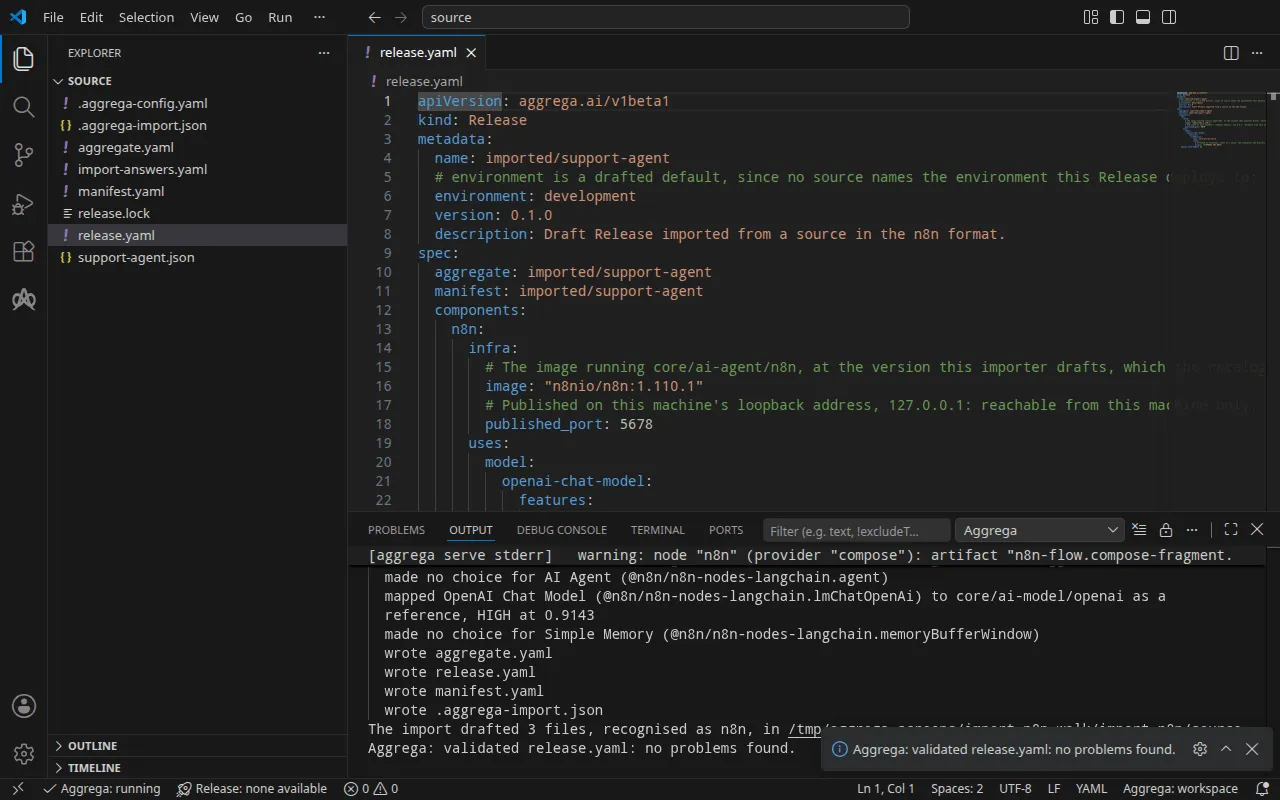
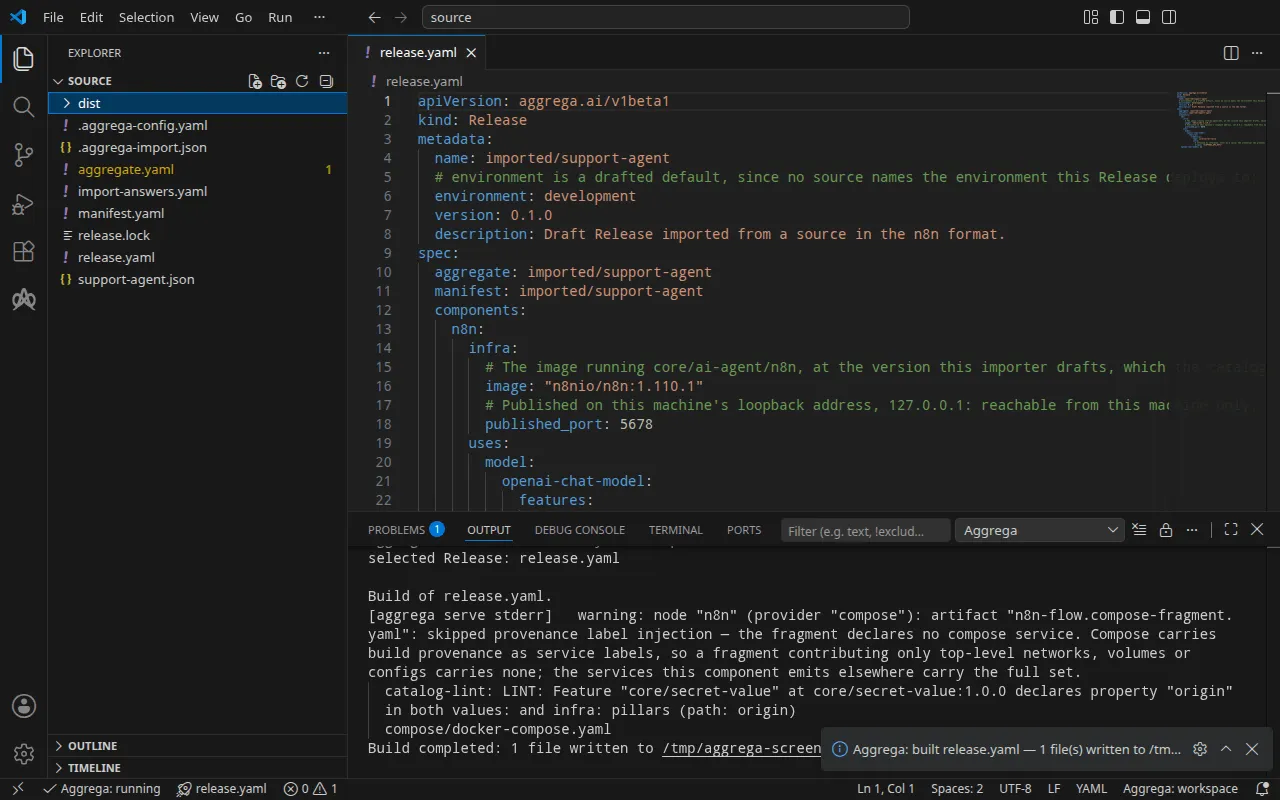
검증 결과는 다음과 같습니다:
notice: LINT: Feature "core/secret-value" at core/secret-value:1.0.0 declares property "origin" in both values: and infra: pillars (path: origin)release dependency validation passed: release.yaml (schema-pillar + dependency pillars)그리고 빌드 결과입니다. 여기서 <workspace>는 초안이 있는 폴더를 나타냅니다:
warning: node "n8n" (provider "compose"): artifact "n8n-flow.compose-fragment.yaml": skipped provenance label injection — the fragment declares no compose service. Compose carries build provenance as service labels, so a fragment contributing only top-level networks, volumes or configs carries none; the services this component emits elsewhere carry the full set. notice: LINT: Feature "core/secret-value" at core/secret-value:1.0.0 declares property "origin" in both values: and infra: pillars (path: origin)[… omitted: a total build time, which differs per run]Build completed: 1 file written to <workspace>/distwarning 줄은 Compose 파일에서 워크플로를 담는 부분, 즉 최상위 configs 항목에 관한 것으로, 이 항목에는 빌드의 레이블을 붙일 서비스가 없습니다. notice 줄은 권고 사항입니다. 시크릿 Feature는 origin을 Aggregate의 values 또는 Release의 infra에서 받아들이며, 이 알림은 하나의 리프가 양쪽 모두에 선언되어 있음을 보고합니다. 둘 다 판정을 바꾸지 않습니다.
dist/compose/docker-compose.yaml에는 n8n과, n8n이 시작되기 전에 워크플로를 가져오는 서비스가 들어 있습니다:
services: n8n: image: n8nio/n8n:1.110.1 environment: OPENAI_BASE_URL: https://api.openai.com/v1 OPENAI_API_KEY: ${OPENAI_API_KEY} N8N_BLOCK_ENV_ACCESS_IN_NODE: "true" ports: - 127.0.0.1:5678:5678 [… omitted: the labels the build writes on every service, naming the Aggregate, the component, the environment and the compiler's version] volumes: - type: volume source: n8n--data target: /home/node/.n8n networks: - compose depends_on: n8n--import-flow: condition: service_completed_successfully [… omitted: the service's health check] n8n--import-flow: image: n8nio/n8n:1.110.1 command: - import:workflow - --input=/flows/workflow.json entrypoint: - n8n [… omitted: the labels the build writes on every service] volumes: - type: volume source: n8n--data target: /home/node/.n8n networks: - compose restart: "no" configs: - source: n8n-flow target: /flows/workflow.json워크플로는 n8n import:workflow를 통해 n8n에 도달하며, 이는 스택이 시작될 때마다 n8n 자체보다 먼저 같은 데이터 볼륨에서 실행됩니다. N8N_BLOCK_ENV_ACCESS_IN_NODE는 "true"이며, 이는 워크플로가 환경을 읽는 것에 대한 n8n의 차단입니다. Aggregate가 allow_env_access_in_nodes를 false로 두기 때문입니다. 따라서 OpenAI Chat Model 노드는 채팅 트리거가 사용자와 비밀번호를 읽는 것과 마찬가지로 n8n 자체의 자격 증명 저장소에서 키를 읽으며, 아래의 실행 단계에서 이 둘을 모두 저장합니다. n8n의 Compose Recipe는 Release가 n8n의 infra에 published_port를 설정한 경우에만 사용자의 머신에 포트를 게시하며, 그 경우에도 루프백 주소 127.0.0.1에만 게시합니다. 설정이 없으면 서비스는 스택의 네트워크에서만 접근할 수 있습니다.
AI 어시스턴트 사용
Aggrega의 도구로 설정된 AI 어시스턴트도 같은 일을 할 수 있습니다. 다음 프롬프트를 붙여 넣으십시오.
Aggrega 도구만 사용하고, 직접 폴더를 만들지 마세요. Workspace 폴더에 아직 `import-n8n` 폴더가 없으면 `example`을 `import-n8n`으로 설정하고 `dir` 없이 `scaffold` 도구를 한 번 호출하세요. 이 도구는 새 `import-n8n` 폴더에 예제를 작성하며, 그 `source` 폴더에는 이 페이지가 가져오는 내용이 들어 있습니다. 그런 다음 `workspace_root`를 `import-n8n/source`로, `source`를 `support-agent.json`으로, `target`을 `compose`로 설정하여 `import` 도구를 호출하세요. 이 도구는 필요한 답을 `support-agent.json` 옆의 `import-answers.yaml`에서 읽고, 초안을 `import-n8n/source`에 작성하며, 초안에 필요한 것을 풀합니다. 그런 다음 `workspace_root`를 `import-n8n/source`로, `release`를 `release.yaml`로 설정하여 `validate` 도구를 호출하고, `workspace_root`를 `import-n8n/source`로, `release`를 `release.yaml`로, `write`를 true로 설정하여 `build` 도구를 호출하세요. 빌드가 작성한 파일을 알려 주세요. 파일은 `import-n8n/source/dist/` 아래에 있습니다.VS Code에서 열기
Visual Studio Code용 Aggrega 확장을 설치한 상태에서, 가져오기가 초안을 작성한 폴더 import-n8n/source를 VS Code에서 엽니다. 이 폴더에는 Release가 하나, 즉 초안으로 작성된 release.yaml이 있으므로 편집기가 이를 자동으로 선택하고, 초안을 편집하는 동안 그 Release를 기준으로 검사하여 발견한 내용을 파일과 문제 패널에 표시합니다. 명령 팔레트의 Aggrega: Show topology graph는 Release의 구성 요소와 그 사이의 연결을 그립니다. Aggrega: Build, Aggrega: Preview build, Aggrega: Pull은 같은 Release에 대해 동작하며, 각각 작업 표시줄에 있는 Aggrega 보기의 Commands 패널에서 버튼으로도 사용할 수 있습니다. Build는 폴더의 dist/에 파일을 작성합니다. 나머지 내용은 Visual Studio Code에서 Aggrega 사용하기에서 다룹니다.
실행하기
n8n은 워크플로가 선택하는 두 자격 증명을 식별자로 자체 저장소에서 읽습니다. OpenAI 키는 Rb7nW2xQ9kT4mZ1c 아래에, 채팅의 사용자와 비밀번호는 Vx3mQ8rLb2Nk7Tz5 아래에 있습니다. n8n 자체의 명령줄이 파일에서 이를 읽어 그 식별자 아래에 저장합니다. 직접 정한 값으로 credentials.json에 작성합니다:
[ {"id": "Rb7nW2xQ9kT4mZ1c", "name": "OpenAI account", "type": "openAiApi", "data": {"apiKey": "your OpenAI key"}}, {"id": "Vx3mQ8rLb2Nk7Tz5", "name": "Chat basic auth", "type": "httpBasicAuth", "data": {"user": "a user of your own", "password": "a password of your own"}}]초안으로 작성된 Release가 읽는 방식대로 셸에 키를 설정하고 스택을 시작합니다:
export OPENAI_API_KEY='your OpenAI key'docker compose -p support-agent -f dist/compose/docker-compose.yaml up -d --wait-p는 가져오기 실행 방식의 실행 단계에서 설명하는 대로 프로젝트 이름을 지정합니다. --wait는 워크플로를 가져오는 서비스가 실행되고 종료된 뒤 n8n이 정상 상태를 보고하면 반환됩니다. 자격 증명을 n8n의 컨테이너에 복사하고, 가져온 다음, 복사본을 제거합니다:
docker compose -p support-agent -f dist/compose/docker-compose.yaml exec -T n8n sh -c 'umask 077; cat > /tmp/credentials.json' < credentials.jsondocker compose -p support-agent -f dist/compose/docker-compose.yaml exec n8n n8n import:credentials --input=/tmp/credentials.jsondocker compose -p support-agent -f dist/compose/docker-compose.yaml exec n8n rm /tmp/credentials.json[… omitted: n8n's notices about its settings file's permissions, error tracking and deprecated settings]Successfully imported 2 credentials.이제 n8n이 두 자격 증명을 모두 보유하므로 credentials.json을 삭제합니다:
rm credentials.json그런 다음 워크플로를 활성화하고, 활성화가 적용되도록 n8n을 다시 시작합니다:
docker compose -p support-agent -f dist/compose/docker-compose.yaml exec n8n n8n update:workflow --id=sQ4vT8nKp2LmX7bR --active=truedocker compose -p support-agent -f dist/compose/docker-compose.yaml restart n8ndocker compose -p support-agent -f dist/compose/docker-compose.yaml ps n8n이 n8n을 다시 (healthy)로 표시하면, docker compose -p support-agent -f dist/compose/docker-compose.yaml logs n8n에 Activated workflow "Support agent" (ID: sQ4vT8nKp2LmX7bR)라고 기록됩니다.
테스트하기
published_port가 게시하는 주소인 http://127.0.0.1:5678을 엽니다. n8n의 편집기는 처음 방문할 때 소유자 계정을 요청한 다음 Support agent를 표시합니다.
채팅 트리거는 위에서 저장한 사용자와 비밀번호가 있을 때만 메시지를 받습니다. 이들이 없으면 HTTP/1.1 401 Unauthorized와 Authorization is required!로 응답하고, 비밀번호가 틀리면 HTTP/1.1 403 Forbidden으로 응답합니다. 둘을 CHAT_USER와 CHAT_PASSWORD에 넣어 두면 curl이 표준 입력에서 이를 읽으므로, 어떤 명령줄에도 나타나지 않습니다:
printf 'user = "%s:%s"\n' "$CHAT_USER" "$CHAT_PASSWORD" | curl --config - -sS -i -X POST \ http://127.0.0.1:5678/webhook/a3c9e1f2-4b5d-4e6f-8a7b-9c0d1e2f3a04/chat -H 'Content-Type: application/json' \ -d '{"action": "sendMessage", "sessionId": "s1", "chatInput": "In one short sentence: what does a support plan cover?"}'HTTP/1.1 500 Internal Server Error[… omitted: the response's other headers]
{"message":"Error in workflow"}실행에서는 OpenAI 키에 자리 표시자를 저장했으므로, 워크플로는 모델을 호출하는 지점에서 멈췄습니다. n8n은 그 실행을 보관하며, 편집기는 이를 워크플로의 실행 목록에 OpenAI의 거부와 함께 표시합니다: Incorrect API key provided: sk-place*****************-key. 자신의 키를 사용하면 응답은 HTTP/1.1 200 OK와 에이전트의 답변이며, {"output": "…"} 형태입니다.
Kubernetes에서 Kubernetes에서가 설명하는 빌드를 적용하면, n8n은 pod가 존재하는 동안만 유지되는 볼륨에 데이터를 보관하므로 새 pod는 저장한 내용 없이 시작합니다. 대신 실행 중인 인스턴스에서 자격 증명을 저장하고 워크플로를 활성화합니다. 실행하기에서처럼 credentials.json을 작성하고, 적용한 네임스페이스에서 kubectl exec를 통해 표준 입력으로 가져온 다음 삭제합니다:
kubectl exec -i -n <namespace> deploy/n8n -- n8n import:credentials --input=/dev/stdin < credentials.jsonDefaulted container "main" out of: main, import-flow (init)[… omitted: n8n's notices about its settings file's permissions, error tracking and deprecated settings]Successfully imported 2 credentials.로컬 포트를 n8n의 Service n8n-default로 포워딩하고, 명령은 실행 상태로 둡니다:
kubectl port-forward -n <namespace> svc/n8n-default 5678:5678다른 터미널에서 n8n의 API를 통해 소유자 계정을 설정합니다. 이 API는 로그인을 처리하고 세션을 cookies.txt에 보관합니다. 그런 다음 워크플로를 활성화합니다:
curl -sS -c cookies.txt -X POST http://127.0.0.1:5678/rest/owner/setup -H 'Content-Type: application/json' \ -d '{"email": "owner@example.com", "firstName": "Your", "lastName": "Name", "password": "a password of your own"}'curl -sS -b cookies.txt -X PATCH http://127.0.0.1:5678/rest/workflows/sQ4vT8nKp2LmX7bR \ -H 'Content-Type: application/json' -d '{"active": true}'두 번째 응답은 "active":true가 포함된 워크플로입니다. 그러면 위의 채팅 메시지가 같은 주소에서 변경 없이 워크플로에 도달합니다. 실행에서는 같은 {"message":"Error in workflow"}를 받았고, 실행 기록에도 같은 거부가 남았습니다.
아래 명령으로 스택을 중지합니다. -v는 n8n의 데이터 볼륨도 제거하며, 이와 함께 저장된 자격 증명과 활성화도 제거됩니다:
docker compose -p support-agent -f dist/compose/docker-compose.yaml down -vKubernetes에서
같은 워크플로는 helm 대상을 사용해 Kubernetes용으로 가져올 수 있습니다. Docker Compose용 초안은 이미 source에 있고 가져오기는 그곳의 Aggregate를 덮어쓰지 않으므로, --output-dir로 이 초안을 별도의 폴더에 작성한 다음 그 폴더에서 검증하고 빌드합니다:
aggrega import support-agent.json --target helm --output-dir helmcd helmaggrega validate --release release.yamlaggrega build --release release.yaml초안은 대상이 다른 부분에서 달라집니다. Manifest는 플랫폼을 helm/n8n에, 모델을 helm/openai에, 키를 helm/k8s-existing-secret에 매핑하며, 후자는 네임스페이스에 이미 있는 Secret에서 키를 읽습니다. Release는 키를 core/referenced-secret으로 첨부하고, 답변 파일에서 가져온 그 Secret의 이름 openai-api-key를 지정합니다.
빌드는 작업 공간 루트인 source 아래의 dist/helm/에 일반 Kubernetes 매니페스트를 씁니다. helm에서 보면 이는 ../dist/helm/입니다. 적용할 네임스페이스에 Secret을 만들고 데이터 키 value 아래에 키를 담은 다음, 가져오기 실행 방식의 실행 단계가 설명하는 대로 폴더를 적용합니다. 워크플로는 여전히 n8n 자체 저장소에서 자격 증명을 읽으며, Kubernetes에서는 테스트하기가 이 저장소를 채웁니다.