

Microsoft Agent Framework 선언적 에이전트 가져오기
이 단계별 안내에서는 Microsoft Agent Framework의 선언적 에이전트 — MCP 서버를 통해 검색한 문서로 질문에 답하는 어시스턴트 — 를 가져오고, 애플리케이션을 Docker Compose용으로 빌드합니다. 가져오기는 빌드가 읽는 모든 파일의 초안을 작성합니다. 에이전트와 그 모델, 에이전트가 모델에 제시하는 키를 나타내는 변수 참조, 그리고 각각의 구현입니다. 어떤 선언적 에이전트도 담고 있지 않은 유일한 값, 즉 애플리케이션이 실행되는 이미지를 한 번만 묻습니다. 아래의 모든 파일과 모든 출력 블록은 실제 실행에서 나온 것입니다. 선언적 에이전트와 단계별 안내의 각 단계는 import-agent-framework 예제에 있으며, 그곳의 검사 스크립트가 가져오기를 다시 실행하여 작성한 내용, 출력한 내용, 이 페이지가 인용하는 블록을 그곳에 보관된 파일과 비교하고, 가져오기가 작성한 내용을 검증하고 빌드합니다.
예제 생성하기
이 페이지의 명령으로 이 가져오기를 실행하거나, AI 어시스턴트가 대신 실행하게 할 수 있습니다.
예제 이름을 딴 새 폴더에 예제를 씁니다:
aggrega scaffold --example import-agent-framework그런 다음 이어서 실행할 명령을 출력합니다. 첫 번째 명령은 새 폴더로 이동합니다. 그 뒤의 명령은 아래와 같으며, 새 폴더 안의 source 폴더로 이동합니다. 이 폴더에는 이 페이지가 가져오는 내용이 들어 있으며, 가져오기는 여기서 실행됩니다:
cd import-agent-framework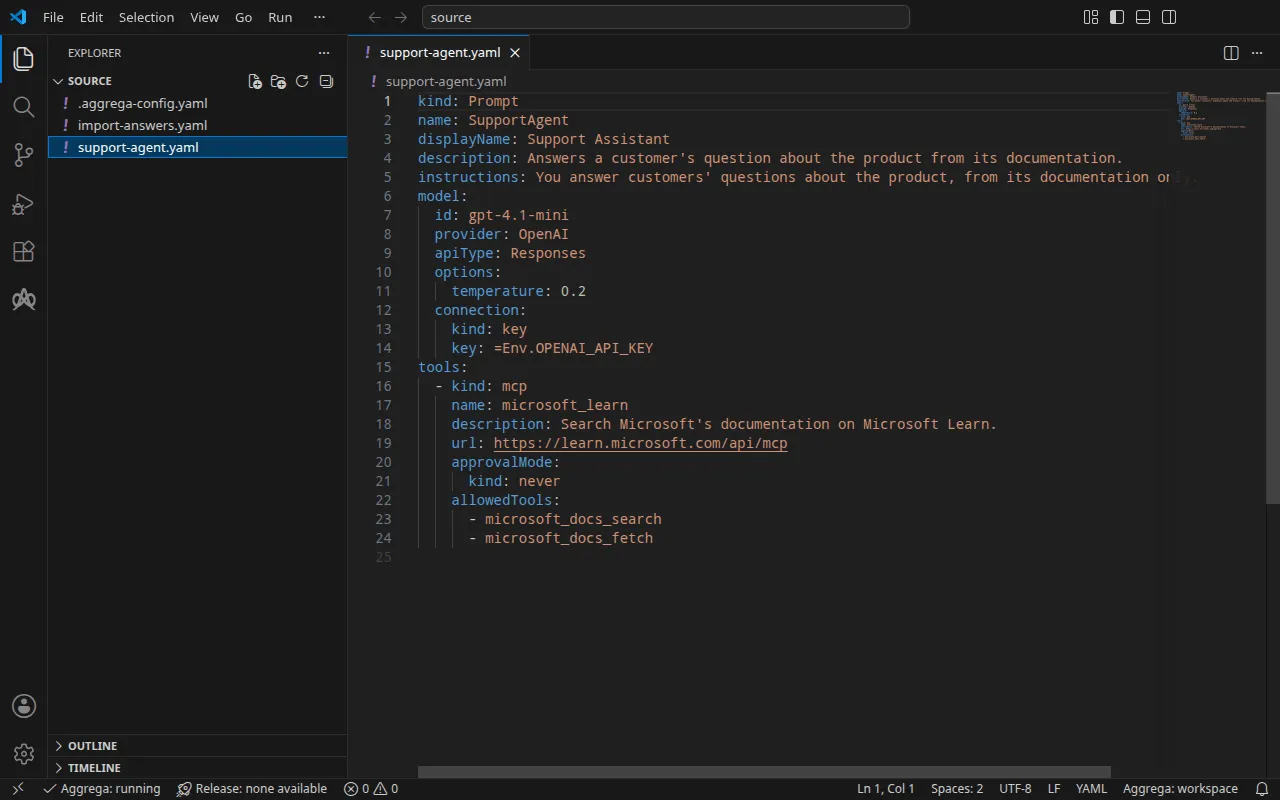
프로젝트
Agent Framework로 구축된 애플리케이션은 선언적 에이전트에서 에이전트를 로드할 수 있습니다. 선언적 에이전트는 에이전트의 모델, 지침, 도구를 지정하는 kind Prompt의 YAML 문서입니다. 이 단계별 안내를 위해 작성된 이 에이전트는 OpenAI의 gpt-4.1-mini와 Microsoft Learn이 게시하는 MCP 서버를 지정합니다:
kind: Promptname: SupportAgentdisplayName: Support Assistantdescription: Answers a customer's question about the product from its documentation.instructions: You answer customers' questions about the product, from its documentation only.model: id: gpt-4.1-mini provider: OpenAI apiType: Responses options: temperature: 0.2 connection: kind: key key: =Env.OPENAI_API_KEYtools: - kind: mcp name: microsoft_learn description: Search Microsoft's documentation on Microsoft Learn. url: https://learn.microsoft.com/api/mcp approvalMode: kind: never allowedTools: - microsoft_docs_search - microsoft_docs_fetch모델의 키는 =Env.OPENAI_API_KEY로 작성되므로 파일에는 키가 없습니다. Agent Framework는 애플리케이션이 Agent Framework 자체의 보안 설정인 AgentFactory(safe_mode=False)로 선언적 에이전트를 로드하고 .NET 런타임이 있는 경우에만 환경 변수 OPENAI_API_KEY에서 이 식을 읽으며, 그렇지 않으면 키는 작성된 그대로의 식 텍스트가 됩니다. 선언적 에이전트를 로드하는 애플리케이션 코드는 가져오기가 결코 읽지 않으며, 예제에도 포함되어 있지 않습니다. 파일 옆에 있는 .aggrega-config.yaml이 폴더를 작업 공간으로 만듭니다:
# The workspace key marks this directory as the workspace root, so an import run# here writes its drafts beside support-agent.yaml.workspace: {}# The registry the importer is fetched from the first time an import needs it.default_registry: hub.aggrega.ai가져오기는 카탈로그의 Agent Framework 에이전트 및 OpenAI 모델 Components를 참조하고, --target은 카탈로그의 Recipes에서 Manifest 초안을 작성합니다. 작업 공간이 카탈로그 폴더를 지정하지 않으므로, 가져오기는 임포터를 가져오는 레지스트리에서 표준 라이브러리 카탈로그를 읽습니다. 이는 게시된 카탈로그의 서명된 스냅샷으로, 첫 가져오기가 가져와 검증한 뒤 작업 공간의 콘텐츠 캐시에 보관하며, 가져오기가 초안 옆에 쓰는 기록에 다이제스트로 지정됩니다. 자체 카탈로그 폴더를 — AGGREGA_CATALOG_DIRS에서, 또는 workspace.catalog_dirs 아래에서 — 지정한 작업 공간은 대신 그 폴더들에 대해 가져옵니다.
가져오기가 묻는 항목
선언적 에이전트는 모델을 지정하지만 애플리케이션이 실행되는 이미지는 결코 지정하지 않습니다. 그 이미지는 프로젝트에서 빌드합니다. 카탈로그에는 Agent Framework로 구축된 애플리케이션용 기본 이미지가 없으므로 가져오기가 이를 묻습니다. 준비된 응답 없이 터미널에서 실행하면 다음과 같이 묻습니다:
The drafts leave values empty that the source cannot hold. Answer each one, or press Enter to leave it for later in the answers file:
release.yaml spec.components.supportagent.infra.image  Container image running the application built on Microsoft Agent Framework.>
그리고 응답을 초안과 support-agent.yaml 옆의 import-answers.yaml에 기록하므로, 다음 가져오기는 그곳에서 응답을 읽고 아무것도 묻지 않습니다. 터미널이 없으면 — 지속적 통합에서, 또는 파이프를 통해 실행하면 — 아무것도 묻지 않습니다. 키를 비운 채로 파일을 작성하고, 파일을 명시하며 중지합니다. 예제에는 이미지가 ghcr.io/example/support-agent:1.0.0로 응답된 파일이 이미 있으며, 이는 직접 빌드하는 이미지를 나타냅니다:
# Values the import could not draft from the source, keyed by the drafted file and the key path inside# it. Write each one beside its key; an import of the same source, and a sync, read them from here and# ask nothing. A secret is never written here: its key asks where the secret comes from — a variable# name, ${NAME}, or the name of a Kubernetes Secret.release.yaml: # Container image running the application built on Microsoft Agent Framework. spec.components.supportagent.infra.image: "ghcr.io/example/support-agent:1.0.0" # The origin of the secret value, written by the operator in the Release. Read exactly as # values.origin is. Write it here or in values.origin, never in both. A secret: name where it comes # from, never the value. spec.components.supportagent.uses.model.gpt-4-1-mini.features.credential.infra.origin: "openai-api-key"두 번째 응답은 --target helm을 사용하는 Kubernetes용 빌드를 위한 것입니다. 이 경우 에이전트는 Kubernetes Secret에서 OpenAI 키를 읽으며, 응답은 키가 아니라 Secret의 이름인 openai-api-key입니다. Docker Compose용 빌드는 대신 셸에서 키를 읽으므로, 이 가져오기는 그 응답을 사용하지 않습니다. 가져오기 응답 파일은 파일, 질문, 시크릿 응답에 대한 규칙을 설명합니다.
aggrega import에는 다른 곳에 보관된 응답 파일을 지정하는 --answers를 비롯하여 이 명령이 받는 모든 플래그가 나열되어 있습니다.
source로 이동합니다:
cd source가져오기 실행
선언적 에이전트의 파일을 지정합니다. 가져오기는 각 선언적 에이전트를 개별 파일로 읽으며 디렉터리로는 결코 읽지 않습니다:
aggrega import support-agent.yaml --target compose표준 출력에는 작성한 것을 나열합니다:
wrote aggregate.yamlwrote release.yamlwrote manifest.yamlwrote .aggrega-import.json표준 오류에는 다음과 같이 출력합니다. 여기서 <workspace>는 명령을 실행한 폴더를 나타냅니다:
[… omitted: a warning that the importer runs unverified, printed where its module is read from beside its Plugin entity in a catalog folder rather than fetched]read as the agent-framework format, with drafted paths relative to <workspace>warn: the value of tools.microsoft_learn.url of node SupportAgent is carried as written in the Release the draft writes: the field belongs to an MCP server's configuration, which can carry a key, and setting empty_credentials to marked or all writes it emptyinfo: the answers file <workspace>/import-answers.yaml also answers spec.components.supportagent.uses.model.gpt-4-1-mini.features.credential.infra.origin in release.yaml, which these drafts do not leave empty; those answers are kept there and not appliedmapped SupportAgent (agent) to core/ai-agent/agent-framework as a reference, NONEmapped gpt-4.1-mini (model) to core/ai-model/openai as a reference, NONEmade no choice for SupportAgent#microsoft_learn (tool)Pull complete: <workspace>/release.lock (entities=8, source_artifacts=0, external_inputs=0)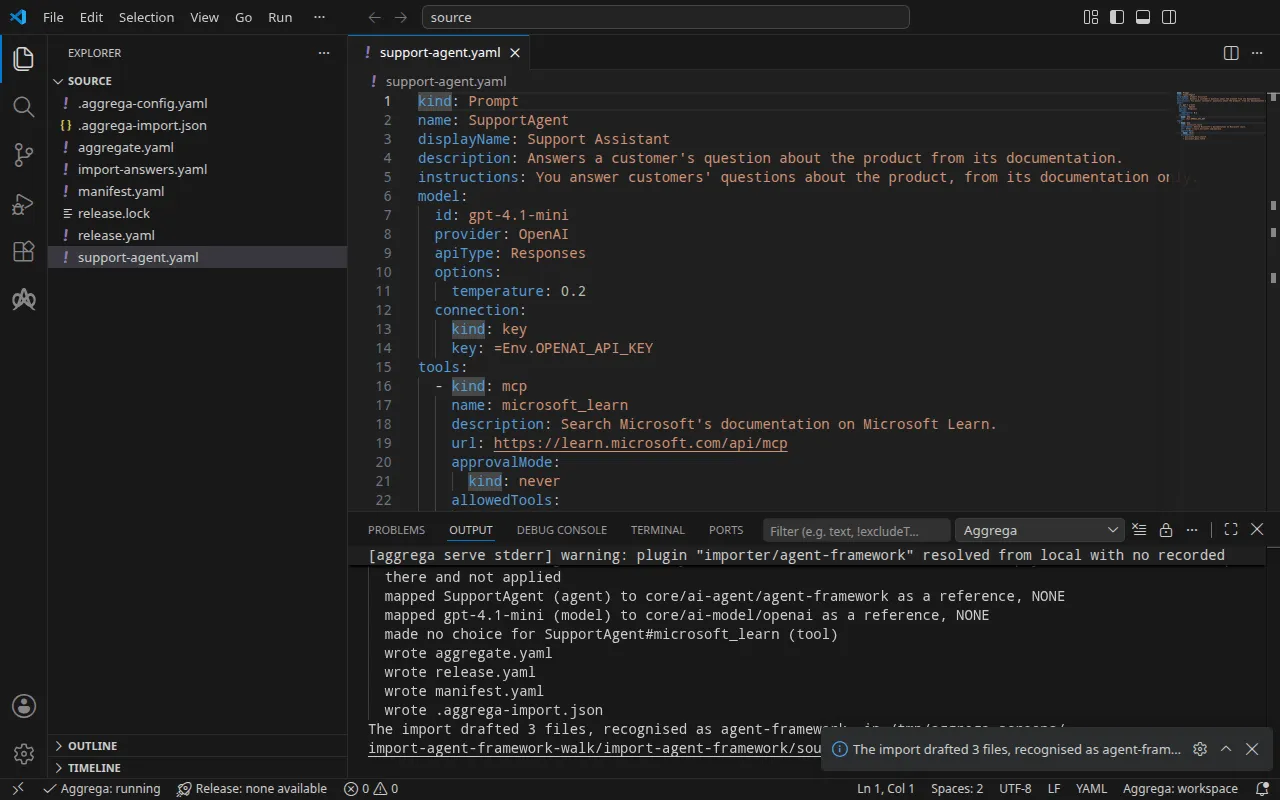
warn줄은 키를 담을 수 있는 값 — MCP 서버의 주소 — 을 지목하고, 그 값이 작성된 그대로 옮겨진다고 알립니다. 이 주소에는 키가 없습니다.info줄은 Docker Compose 초안이 사용하지 않는 응답을 나타내며, 이 응답은 Kubernetes용 빌드를 위해 응답 파일에 보관됩니다.mapped줄은 에이전트가 표준 라이브러리의 Agent Framework 에이전트인core/ai-agent/agent-framework의 인스턴스이고, 그 모델은core/ai-model/openai의 인스턴스임을 알립니다. 등급은NONE으로 표시됩니다. Agent Framework 가져오기는 각각을 카탈로그와 비교하여 평가하는 대신 선언적 에이전트가 지정하는 내용에 따라 이 Components를 참조하기 때문입니다.made no choice줄은 MCP 서버로, 가져오기는 이를 어떤 Component로도 초안 작성하지 않습니다. 그 이유는aggregate.yaml의 주석에 나와 있습니다.Pull complete줄은 가져오기가 초안으로 작성된 Release가 의존하는 것을aggrega pull처럼release.lock으로 가져오는 것으로, 초안을 즉시 검증하고 빌드할 수 있게 합니다.--offline에서는 가져오기가 아무것도 가져오지 않고 실행할aggrega pull을 알려 줍니다.
작성하는 내용
Aggregate, Release, Manifest의 이름은 imported/supportagent입니다. 에이전트의 name인 SupportAgent를 supportagent로 줄인 것이며, displayName은 읽지 않습니다. 네임스페이스는 임포터의 target_namespace 설정이 정하며, 다른 값을 설정하지 않으면 imported입니다(설정).
aggregate.yaml — 제시하는 키가 연결에 선언된 채 모델에 연결된 에이전트, 그리고 그 모델:
# Not read: the application's code, which loads each declarative agent and binds the functions of its function tools; the application runs in the image the Release names for each instance, and loads its declarative agents itself.apiVersion: aggrega.ai/v1beta1kind: Aggregatemetadata: name: imported/supportagent version: 0.1.0 description: Draft Aggregate imported from a source in the agent-framework format.spec: components: # The declarative agent SupportAgent. # Read by the application from the declarative agent, and taken by no key of core/ai-agent/agent-framework: instructions, the options of its model requests (temperature). # The MCP server microsoft_learn, drafted as no Component and no connection, since Agent Framework sends it to the model's provider as a hosted tool, and the provider, not the application, reaches it at its url, which must therefore be reachable from the provider; its url is written above supportagent's entry in the Release. # Stated by the declarative agent for microsoft_learn: its description, "Search Microsoft's documentation on Microsoft Learn."; its approval mode, never; the tools of the server it allows, microsoft_docs_search, microsoft_docs_fetch. supportagent: type: core/ai-agent/agent-framework values: display_name: "Support Assistant" description: "Answers a customer's question about the product from its documentation." uses: model: gpt-4-1-mini: target: gpt-4-1-mini # For the compose target, the lines below declare credential on gpt-4-1-mini: a secret the Release alone attaches arrives under the key value, so each is declared with a key of its own and no two arrive under one; the Release attaches its origin, naming this type or none. features: credential: type: core/secret-value values: key: OPENAI_API_KEY # The model gpt-4.1-mini, which SupportAgent names with the OpenAI provider. gpt-4-1-mini: type: core/ai-model/openai values: model: "gpt-4.1-mini"MCP 서버는 Component도 아니고 에이전트의 연결도 아닙니다. Agent Framework는 이를 호스팅된 도구로서 모델의 제공자에게 보내며, 애플리케이션이 아니라 제공자가 그 url로 서버에 도달하므로, 이 주소는 제공자에서 도달할 수 있어야 합니다. 지침, 모델 요청의 옵션, 그리고 서버의 설명, 승인 모드, 허용된 도구는 애플리케이션이 읽는 선언적 에이전트에 그대로 남으며, 주석이 각각을 지목합니다. OpenAI의 API는 호스팅된 서비스이므로, 에이전트의 Component는 자격 증명을 전혀 담지 않은 그 API로의 연결을 거부합니다. 연결은 선언적 에이전트가 키를 읽어 오는 변수인 OPENAI_API_KEY 키 아래에 자격 증명 하나를 선언합니다.
release.yaml — 환경, 이미지, 게시된 포트, 키를 가져오는 위치:
apiVersion: aggrega.ai/v1beta1kind: Releasemetadata: name: imported/supportagent # environment is a drafted default, since no source names the environment this Release deploys to; change it to name the one it deploys to. environment: development version: 0.1.0 description: Draft Release imported from a source in the agent-framework format.spec: aggregate: imported/supportagent manifest: imported/supportagent components: # The declarative agent also states these values for its model and its MCP servers, written here for review: # - model.connection.key, written as =Env.OPENAI_API_KEY, which Agent Framework reads from the environment variable OPENAI_API_KEY only where the application loads the declarative agent with AgentFactory(safe_mode=False), Agent Framework's own security setting, and a .NET runtime is present; otherwise the value is the expression's text as written # - tools.microsoft_learn.url: "https://learn.microsoft.com/api/mcp" supportagent: infra: # Left for the Release, since the source cannot supply it: infra.image, the container image running the application built on Agent Framework, holding its declarative agent image: "ghcr.io/example/support-agent:1.0.0" # Published on this machine's loopback address, 127.0.0.1: reachable from this machine only, by any process running on it. Delete this line to keep the service internal. published_port: 8000 uses: model: gpt-4-1-mini: features: credential: type: core/secret-value infra: # Attached by reference, never as a value: the credential supportagent presents to gpt-4-1-mini on its model connection, read from the variable OPENAI_API_KEY, which a target substituting variable references, as Docker Compose does when the stack starts, reads from the environment, so no file carries the value. origin: "${OPENAI_API_KEY}" gpt-4-1-mini: {}환경 development는 어떤 선언적 에이전트도 환경을 지정하지 않기 때문에 가져오기가 작성하는 기본값입니다. Release가 다른 곳에 배포되는 경우 이를 변경합니다. 이미지는 가져오기가 import-answers.yaml에서 읽은 답변입니다. 에이전트는 머신의 루프백 주소의 포트 8000에 게시되며, 프로그램이 수신 대기하는 포트인 infra.port(설정하지 않으면 8000)로 전달됩니다. 키는 선언적 에이전트가 읽는 변수의 이름을 딴 변수 참조 ${OPENAI_API_KEY}이며, 결코 값이 아닙니다. MCP 서버의 주소는 검토를 위해 선언적 에이전트가 명시한 그대로 작성되며, 다른 어디에서도 설정되지 않습니다. Agent Framework가 모델에 보내는 요청에서 이를 제공자에게 넘겨줍니다.
manifest.yaml — 에이전트와 모델의 Compose Recipe, 그리고 키의 변수 참조를 작성된 그대로 Compose 파일에 기록하는 실현:
apiVersion: aggrega.ai/v1beta1kind: Manifestmetadata: name: imported/supportagent version: 0.1.0spec: mappings: components: type: core/ai-agent/agent-framework: compose/agent-framework core/ai-model/openai: compose/openai features: type: core/secret-value: compose/dotenv-secretrelease.lock은 Release가 해석된 카탈로그 엔터티를 다이제스트로 기록하며, .aggrega-import.json은 가져오기가 작성한 내용의 기록으로, 이후의 aggrega import --sync가 이를 읽습니다.
검증 및 빌드
aggrega validate --release release.yamlaggrega build --release release.yaml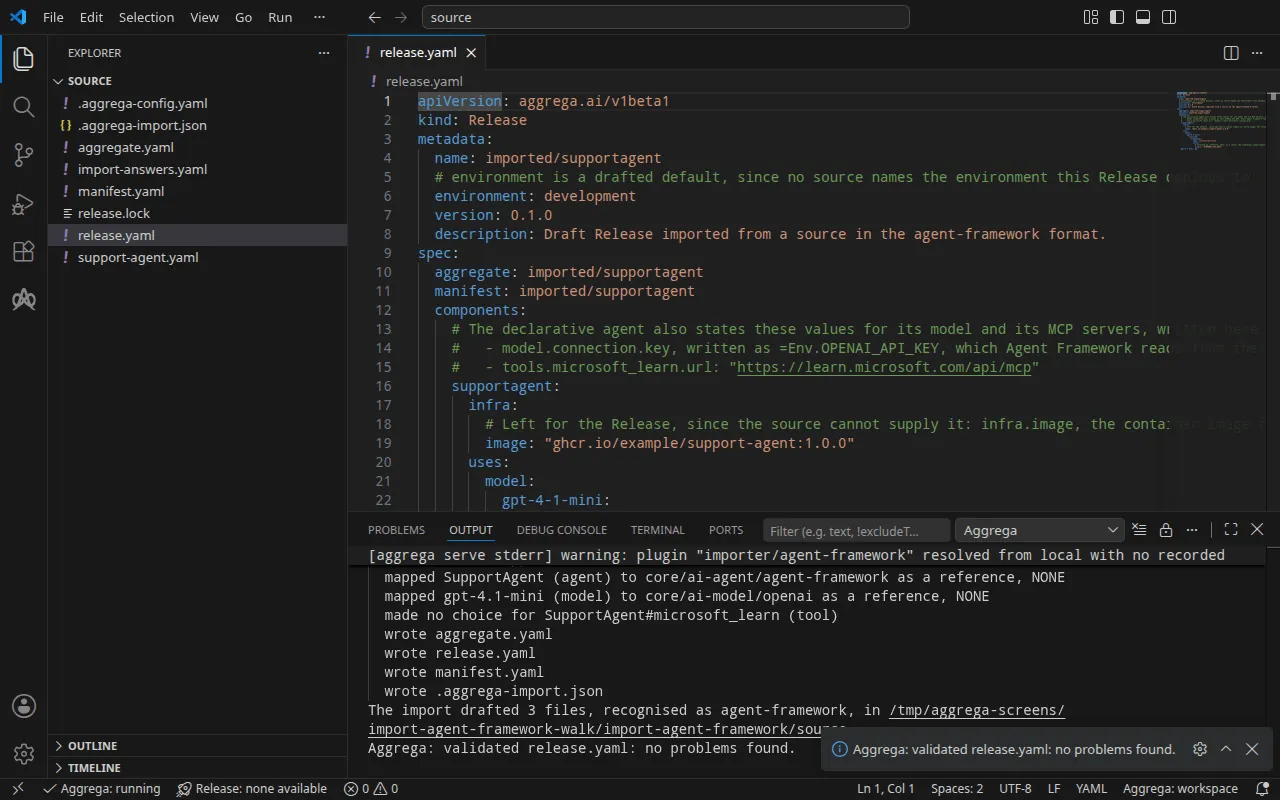
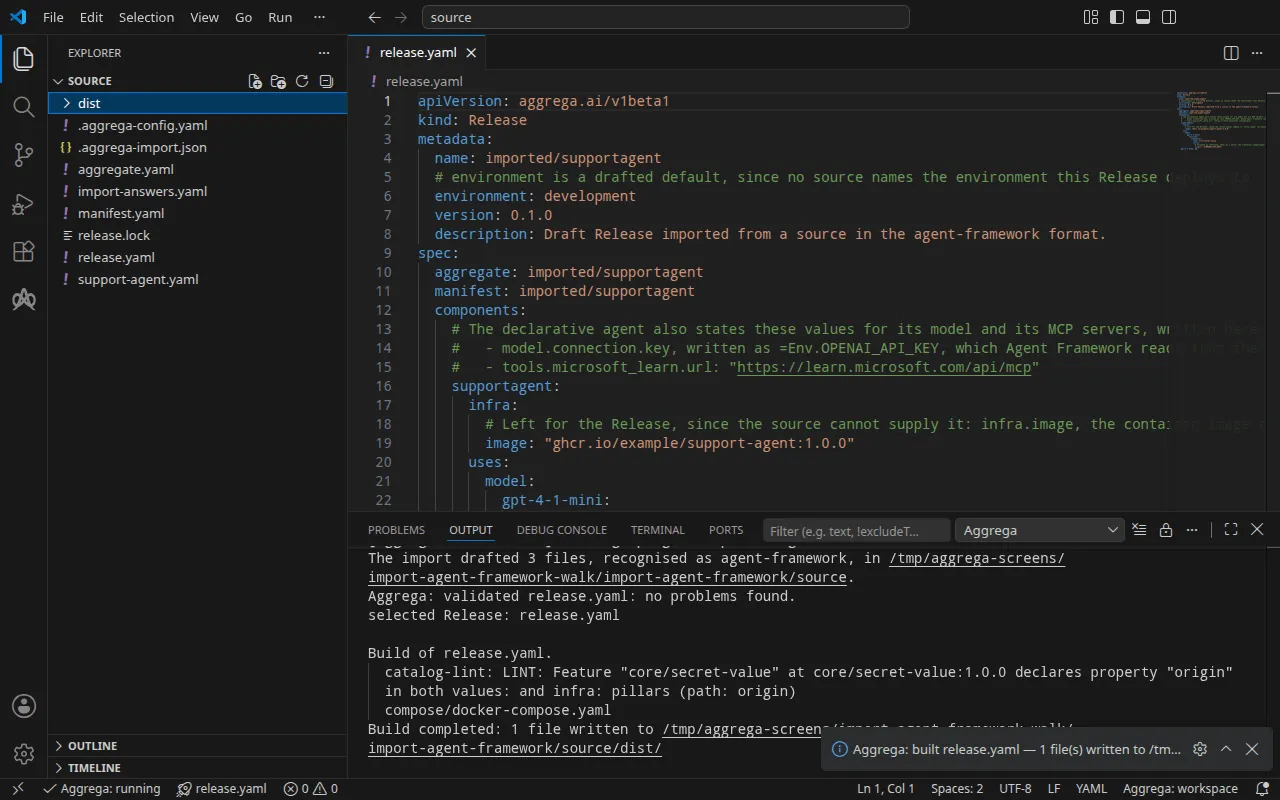
검증 결과는 다음과 같습니다:
notice: LINT: Feature "core/secret-value" at core/secret-value:1.0.0 declares property "origin" in both values: and infra: pillars (path: origin)release dependency validation passed: release.yaml (schema-pillar + dependency pillars)그리고 빌드는 다음과 같습니다. 여기서 <workspace>는 실행한 폴더를 나타냅니다:
notice: LINT: Feature "core/secret-value" at core/secret-value:1.0.0 declares property "origin" in both values: and infra: pillars (path: origin)[… omitted: a total build time, which differs per run]Build completed: 1 file written to <workspace>/distnotice 줄은 권고 사항입니다. 시크릿 Feature는 origin을 Aggregate의 values 또는 Release의 infra에서 받으며, 이 알림은 한 리프가 양쪽에 모두 선언되어 있음을 보고합니다. 어떤 판정도 바꾸지 않습니다.
dist/compose/docker-compose.yaml에 있는 에이전트의 서비스:
services: supportagent: image: ghcr.io/example/support-agent:1.0.0 environment: OPENAI_BASE_URL: https://api.openai.com/v1 OPENAI_MODEL: gpt-4.1-mini OPENAI_API_KEY: ${OPENAI_API_KEY} ports: - 127.0.0.1:8000:8000 [… omitted: the labels the build writes on every service, naming the Aggregate, the component, the environment and the compiler's version] networks: - compose애플리케이션은 Agent Framework의 OpenAI 클라이언트가 읽는 변수로 모델의 주소, 이름, 키를 받으므로, 애플리케이션이 프로젝트에서 설명한 방식으로 에이전트를 로드하는 경우 선언적 에이전트의 =Env.OPENAI_API_KEY는 Release가 첨부한 키를 읽습니다. MCP 서버의 주소를 담는 변수는 없으며, 이 서버에는 제공자가 도달합니다. 모델은 자체 서비스를 받지 않습니다. 에이전트는 OpenAI API에 그 API 자체의 주소로 도달합니다. 키는 변수 참조이며, 스택이 시작될 때 셸에서 채워집니다. 서비스는 포트를 127.0.0.1에만 게시합니다.
AI 어시스턴트 사용
Aggrega의 도구로 설정된 AI 어시스턴트도 같은 일을 할 수 있습니다. 다음 프롬프트를 붙여 넣으십시오.
Aggrega 도구만 사용하고 폴더는 직접 만들지 마십시오. Workspace 폴더에 아직 `import-agent-framework` 폴더가 없으면 `example`을 `import-agent-framework`로 설정하고 `dir` 없이 `scaffold` 도구를 한 번 호출하십시오. 이 도구는 예제를 새 `import-agent-framework` 폴더에 작성하며, 그 `source` 폴더에 이 페이지가 가져오는 내용이 들어 있습니다. 그런 다음 `workspace_root`를 `import-agent-framework/source`로, `source`를 `support-agent.yaml`로, `target`을 `compose`로 설정하여 `import` 도구를 호출하십시오. 이 도구는 필요한 답변을 `support-agent.yaml` 옆의 `import-answers.yaml`에서 읽고, 초안을 `import-agent-framework/source`에 작성하며, 초안에 필요한 것을 가져옵니다. 그런 다음 `workspace_root`를 `import-agent-framework/source`로, `release`를 `release.yaml`로 설정하여 `validate` 도구를 호출하고, `workspace_root`를 `import-agent-framework/source`로, `release`를 `release.yaml`로, `write`를 true로 설정하여 `build` 도구를 호출하십시오. 빌드가 작성한 파일이 무엇인지 알려 주십시오. 파일은 `import-agent-framework/source/dist/` 아래에 있습니다.VS Code에서 열기
Visual Studio Code용 Aggrega 확장을 설치한 상태에서, 가져오기가 초안을 작성한 폴더 import-agent-framework/source를 VS Code에서 엽니다. 이 폴더에는 Release가 하나, 즉 초안 release.yaml만 있으므로 편집기가 이를 자동으로 선택하고, 초안을 편집하는 동안 그 Release에 대해 검사하여 발견한 내용을 파일과 문제 패널에 표시합니다. 명령 팔레트의 Aggrega: Show topology graph는 Release의 구성 요소와 그 사이의 연결을 그립니다. Aggrega: Build, Aggrega: Preview build, Aggrega: Pull은 같은 Release에 대해 작동하며, 각각은 작업 표시줄에 있는 Aggrega 뷰의 Commands 패널 버튼이기도 합니다. Build는 파일을 폴더의 dist/에 작성합니다. 나머지는 Visual Studio Code에서 Aggrega 사용하기에서 다룹니다.
실행하기
이미지는 자체 Dockerfile로 프로젝트에서 빌드합니다. 이미지에는 Agent Framework가 설치되고 선언적 에이전트가 포함된 애플리케이션 코드가 들어 있습니다. Recipe가 명령을 설정하지 않으므로 Docker Compose는 이미지 자체의 명령을 에이전트의 서비스로 실행합니다. 따라서 그 명령은 계속 실행되어야 하며, 에이전트에 도달하려면 요청을 처리해야 합니다. 주소, 라우트, 응답은 프로그램이 결정합니다.
아래 실행에서는 그러한 이미지를 사용했습니다. Agent Framework의 agent-framework-core, agent-framework-openai, agent-framework-declarative 패키지가 설치된 Python, .NET 런타임 — 이미지는 DOTNET_ROOT를 그 디렉터리로 설정하고 DOTNET_SYSTEM_GLOBALIZATION_INVARIANT=1을 설정했습니다 — support-agent.yaml, 그리고 이미지의 명령으로서 포트 8000에서 동작하는 프로그램 자체의 작은 HTTP 서버입니다. 서버는 AgentFactory(safe_mode=False)로 선언적 에이전트를 로드하므로, 그 =Env.OPENAI_API_KEY는 빌드가 전달하는 키를 읽으며, 각 POST /ask마다 에이전트를 한 번 실행합니다. 프로젝트 루트에서 이미지를 빌드하고, import-answers.yaml에서 ghcr.io/example/support-agent:1.0.0 대신 그 이름을 쓴 다음, --sync로 다시 가져옵니다. 이는 새 답변을 초안에 기록하고 다시 풀합니다. 그런 다음 빌드합니다:
docker build -t docs-assistant:local .aggrega import support-agent.yaml --syncaggrega build --release release.yaml답변이 docs-assistant:local이면, 동기화는 출력하는 줄 가운데에서 변경한 하나의 값을 지목합니다:
changed spec.components.supportagent.infra.image in release.yaml그런 다음 셸에서 키를 설정하고 스택을 시작합니다:
export OPENAI_API_KEY='your OpenAI key'docker compose -p docs-assistant -f dist/compose/docker-compose.yaml up -d --wait-p는 프로젝트의 이름을 지정합니다. 자세한 내용은 가져오기 실행 방식의 실행 단계에서 설명합니다.
테스트하기
아래 요청은 이 안내의 이미지가 실행하는 프로그램에 도달합니다. 포트 8000의 작은 HTTP 서버 뒤에 있는 선언적 에이전트로, POST /ask에 응답합니다. 직접 작성한 프로그램은 자체 경로와 응답을 스스로 정합니다. 프로그램이 수신 대기를 시작하면, 즉 스택이 시작되고 몇 초 뒤에 published_port가 게시하는 주소인 http://127.0.0.1:8000으로 보내십시오.
curl -sS -X POST http://127.0.0.1:8000/ask -H 'Content-Type: application/json' \ -d '{"question": "In one short sentence: what is Azure Container Apps?"}'{"error": "the agent failed: ChatClientException: (\"<class 'agent_framework_openai._chat_client.OpenAIChatClient'> service failed to complete the prompt: Error code: 401 - Incorrect API key provided: sk-place************-key. [… omitted: where to find an API key, and the same error repeated as the exception it wraps]"}이 실행에서는 OPENAI_API_KEY를 자리 표시자로 설정했으므로, 응답은 OpenAI가 그것을 거부한 내용이며 프로그램이 이를 그대로 전달한 것입니다. OpenAI가 거부한 키는 마스킹되어 표시된 그 자리 표시자이므로, 선언적 에이전트의 =Env.OPENAI_API_KEY는 빌드가 전달하는 환경에서 그 키를 읽은 것입니다.
다음 명령으로 스택을 중지합니다:
docker compose -p docs-assistant -f dist/compose/docker-compose.yaml downKubernetes에서는 --target helm으로 가져오고, 클러스터가 이미지를 가져오는 레지스트리에 이미지를 푸시한 뒤 import-answers.yaml에 그 이름을 적습니다. 그런 다음 가져오기 실행 방식의 실행 단계에서 설명하는 대로 Secret openai-api-key를 만들고 빌드를 적용합니다. 에이전트의 Deployment에는 Service가 없으므로 로컬 포트를 그쪽으로 포워딩합니다. 이 명령은 중지할 때까지 실행됩니다.
kubectl port-forward deploy/supportagent 8000:8000Forwarding from 127.0.0.1:8000 -> 8000Forwarding from [::1]:8000 -> 8000다른 터미널에서 포워딩된 포트로 같은 요청을 보냅니다.
curl -sS -X POST http://127.0.0.1:8000/ask -H 'Content-Type: application/json' \ -d '{"question": "In one short sentence: what is Azure Container Apps?"}'{"error": "the agent failed: ChatClientException: (\"<class 'agent_framework_openai._chat_client.OpenAIChatClient'> service failed to complete the prompt: Error code: 401 - Incorrect API key provided: sk-place************-key. [… omitted: where to find an API key, and the same error repeated as the exception it wraps]"}