



นำเข้าการกำหนดค่าไคลเอนต์ MCP
บท
ร่างตัวอย่าง
คุณ
เขียน
aggrega draft --example import-mcpจากsource ซึ่ง
cd import-mcp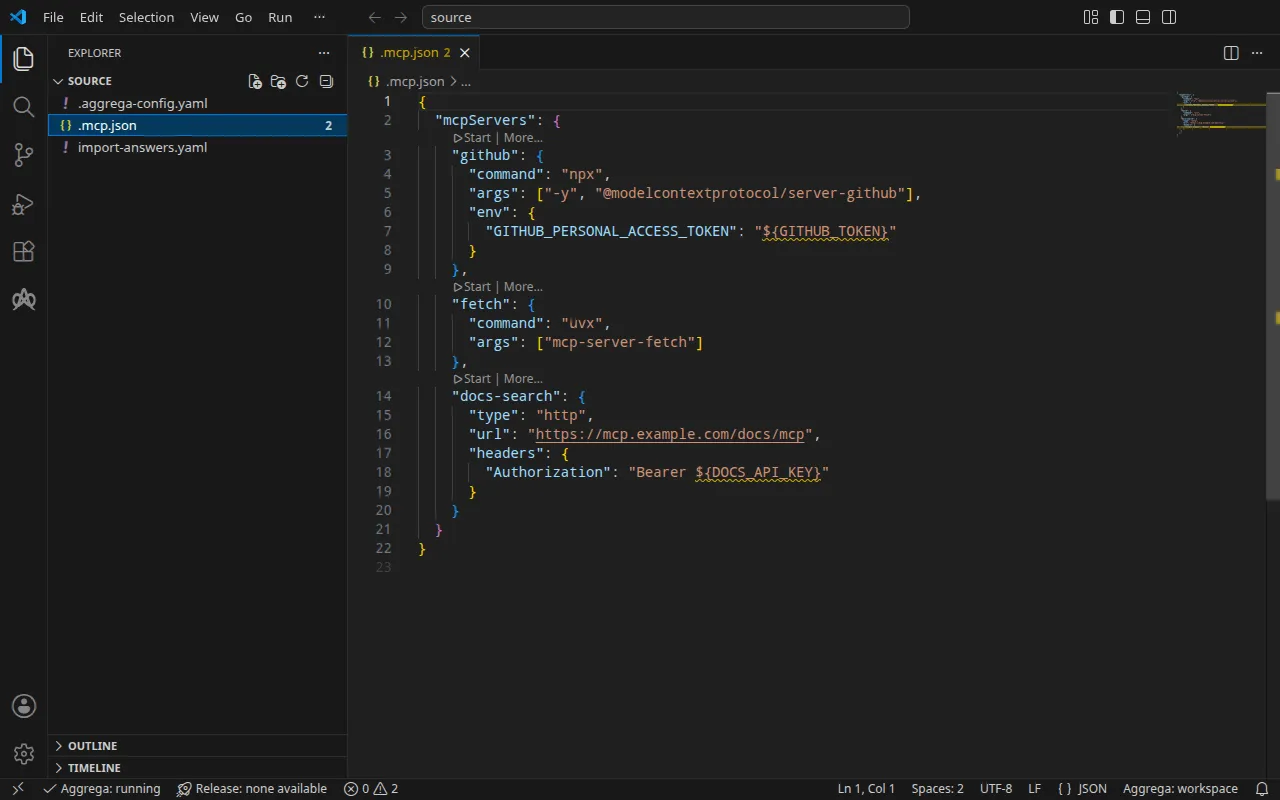
การกำหนดค่า
ไฟล์ .mcp.json ของ Claude Code ที่
{ "mcpServers": { "github": { "command": "npx", "args": ["-y", "@modelcontextprotocol/server-github"], "env": { "GITHUB_PERSONAL_ACCESS_TOKEN": "${GITHUB_TOKEN}" } }, "fetch": { "command": "uvx", "args": ["mcp-server-fetch"] }, "docs-search": { "type": "http", "url": "https://mcp.example.com/docs/mcp", "headers": { "Authorization": "Bearer ${DOCS_API_KEY}" } } }}การนำclaude_desktop_config.json ของ Claude Desktop, .cursor/mcp.json ของ Cursor, .vscode/mcp.json ของ Visual Studio Code และ server.json ของ.aggrega-config.yaml ทำให้
# The workspace key marks this directory as the workspace root, so an import run# here writes its drafts beside .mcp.json.workspace: {}# The registry the importer is fetched from the first time an import needs it.default_registry: hub.aggrega.ai--target ร่าง Manifest จาก Recipes ของAGGREGA_CATALOG_DIRS หรือworkspace.catalog_dirs จะ
ไฟล์คำตอบ
บน Kubernetes เซิร์ฟเวอร์ GitHub อ่านGITHUB_TOKEN ของ shell ของimport-answers.yaml ข้าง .mcp.json ซึ่ง
# Values the import could not draft from the source, keyed by the drafted file and the key path inside# it. Write each one beside its key; an import of the same source, and a sync, read them from here and# ask nothing. A secret is never written here: its key asks where the secret comes from — a variable# name, ${NAME}, or the name of a Kubernetes Secret.release.yaml: # The origin of the secret value, written by the operator in the Release. Read exactly as # values.origin is. Write it here or in values.origin, never in both. A secret: name where it comes # from, never the value. spec.components.github.features.server_env.infra.origin: "github-mcp-token"การนำ
1 value the drafts leave empty is still owed, listed in the answers file <workspace>/import-answers.yaml: write it beside its key there, then run the import againที่github-mcp-token ไม่ใช่
aggrega import ระบุ--answers ซึ่ง
เปลี่ยนsource:
cd sourceรันการนำเข้า
aggrega import .mcp.json --target helmที่
wrote aggregate.yamlwrote release.yamlwrote manifest.yamlwrote .aggrega-import.jsonที่<workspace> แทน
[… omitted: a warning that the importer runs unverified, printed where its module is read from beside its Plugin entity in a catalog folder rather than fetched]read as the mcp format, with drafted paths relative to <workspace>warn: the value of infra.stdio_command.0 of node github is carried as written in the Release the draft writes: the field belongs to an MCP server's configuration, which can carry a key, and setting empty_credentials to marked or all writes it emptywarn: the value of infra.stdio_command.1 of node github is carried as written in the Release the draft writes: the field belongs to an MCP server's configuration, which can carry a key, and setting empty_credentials to marked or all writes it emptywarn: the value of infra.stdio_command.2 of node github is carried as written in the Release the draft writes: the field belongs to an MCP server's configuration, which can carry a key, and setting empty_credentials to marked or all writes it emptywarn: the value of infra.stdio_command.0 of node fetch is carried as written in the Release the draft writes: the field belongs to an MCP server's configuration, which can carry a key, and setting empty_credentials to marked or all writes it emptywarn: the value of infra.stdio_command.1 of node fetch is carried as written in the Release the draft writes: the field belongs to an MCP server's configuration, which can carry a key, and setting empty_credentials to marked or all writes it emptywarn: the value of headers.Authorization of node docs-search is carried as written in the Release the draft writes: the field belongs to an MCP server's configuration, which can carry a key, and setting empty_credentials to marked or all writes it emptywarn: the value of infra.endpoint of node docs-search is carried as written in the Release the draft writes: the field belongs to an MCP server's configuration, which can carry a key, and setting empty_credentials to marked or all writes it emptyPull complete: <workspace>/release.lock (entities=7, source_artifacts=0, external_inputs=0)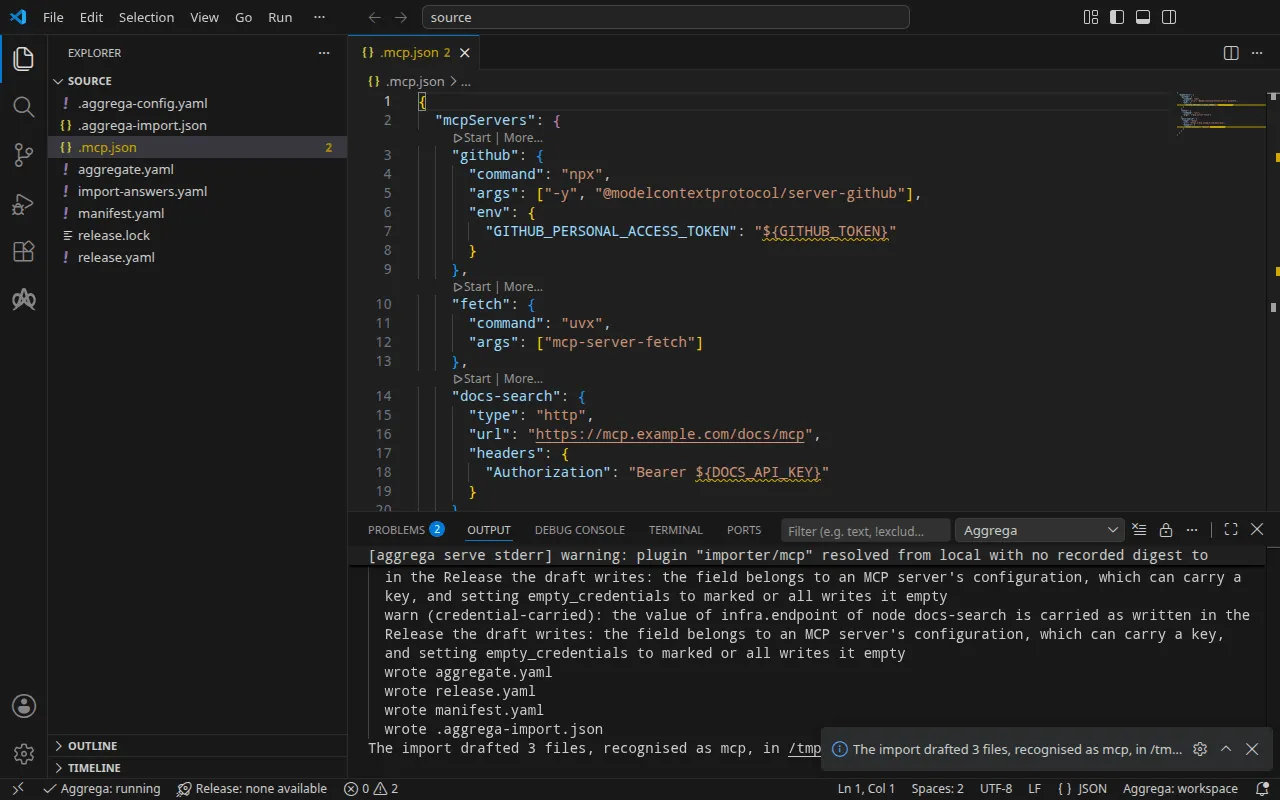
เซิร์ฟเวอร์core/ai-tool/mcp การนำmapped
- บรรทัด
warnระบุค่าที่ การ กำหนด ค่า ของ เซิร์ฟเวอร์ มี ไคลเอนต์ MCP ไม่ ทำ เครื่องหมาย ค่า ใด เลย ว่า เป็น ข้อมูล รับรอง และ ค่า ใด ค่า หนึ่ง ก็ อาจ มี ข้อมูล รับรอง อยู่ ได้ เช่น คีย์ ใน อาร์กิวเมนต์ บรรทัด คำ สั่ง หรือ โทเค็น ใน ที่ อยู่ การนำ เข้า จึง ระบุ แต่ละ รายการ ของ บรรทัด คำ สั่ง แต่ละ เฮดเดอร์ และ แต่ละ ที่ อยู่ ที่ เซิร์ฟเวอร์ มี ด้วย ชื่อ เซิร์ฟเวอร์ และ ตำแหน่ง ไม่ ระบุ ด้วย ค่า เลย อ่าน บรรทัด เหล่า นี้ ก่อน ใช้ ร่าง ร่วม กับ ผู้ อื่น ค่า ${GITHUB_TOKEN}ของenvเป็นการอ้างอิง ตัวแปร และ ไม่มี อะไร อื่น จึง ไม่มี ค่า ของ ตัว เอง และ ไม่มี คำ เตือน ใด ระบุ ค่า นี้ - บรรทัด
Pull completeคือการนำ เข้า ดึง สิ่ง ที่ Release ที่ ร่าง พึ่งพา เหมือน ที่ aggrega pullทำ ลงในrelease.lockฉบับร่าง จึง ตรวจ สอบ ความ ถูก ต้อง และ บิลด์ ได้ ทันที ภาย ใต้ --offlineการนำเข้า ไม่ pull สิ่ง ใด และ ระบุ aggrega pullที่ต้อง รัน
สิ่งที่การนำเข้าเขียน
Aggregate, Release และ Manifest ตั้งimported/mcp ตาม.mcp.json เพราะserver.json ของname ของtarget_namespace ของimported เว้น
aggregate.yaml ประกอบ
apiVersion: aggrega.ai/v1beta1kind: Aggregatemetadata: name: imported/mcp version: 0.1.0 description: Draft Aggregate imported from a source in the mcp format.spec: components: github: type: core/ai-tool/mcp fetch: type: core/ai-tool/mcp docs-search: type: core/ai-tool/mcprelease.yaml ประกอบ
apiVersion: aggrega.ai/v1beta1kind: Releasemetadata: name: imported/mcp # environment is a drafted default, since no source names the environment this Release deploys to; change it to name the one it deploys to. environment: development version: 0.1.0 description: Draft Release imported from a source in the mcp format.spec: aggregate: imported/mcp manifest: imported/mcp components: github: infra: stdio_command: - "npx" - "-y" - "@modelcontextprotocol/server-github" stdio_runtime: npm features: server_env: type: core/referenced-secret infra: # Left for the Release, since the source cannot supply it: the name of a Kubernetes Secret already in the namespace holding the environment github is started with, one data key per variable, each named as the variable it holds: GITHUB_PERSONAL_ACCESS_TOKEN. origin: "github-mcp-token" fetch: infra: stdio_command: - "uvx" - "mcp-server-fetch" stdio_runtime: pypi # The headers the source sends this server, which no infrastructure key of core/ai-tool/mcp takes, since a remote server's credential is held by each consumer, on its connection to the tool: # - Authorization: "Bearer ${DOCS_API_KEY}" docs-search: infra: endpoint: "https://mcp.example.com/docs/mcp"- สภาพ
แวดล้อม developmentเป็นค่า เริ่ม ต้น ที่ การนำ เข้า เขียน เพราะ ไม่มี การ กำหนด ค่า ใด ระบุ ไว้ เปลี่ยน ค่า นี้ ถ้า Release ปรับ ใช้ ที่ อื่น stdio_runtimeอ่านจาก แต่ละ คำ สั่ง: npxรันแพ็กเกจ npm ส่วน uvxรันแพ็กเกจ PyPI - โทเค็น GitHub สภาพ
แวดล้อม ของ เซิร์ฟเวอร์ กลาย เป็น สล็อต server_envของเซิร์ฟเวอร์ บน Kubernetes การ ทำให้ เป็น รูป ธรรม ของ core/referenced-secret-setคือhelm/k8s-secret-setเขียนค่าที่ ได้ รับ ลง ใน Secret ที่ บิลด์ เรนเดอร์ ซึ่ง จะ ทำให้ โทเค็น อยู่ ใน ไฟล์ ดัง นั้น สำหรับ --target helmการนำเข้า จึง แนบ core/referenced-secretแทน โดยระบุ Secret ที่ คลัสเตอร์ มี อยู่ แล้ว คือ คำ ตอบ github-mcp-tokenพร้อมคีย์ ข้อมูล หนึ่ง คีย์ ต่อ ตัวแปร คือ GITHUB_PERSONAL_ACCESS_TOKENบริดจ์นำ เข้า คีย์ ข้อมูล ทุก คีย์ ของ Secret นั้น เป็น ตัวแปร ชื่อ เดียวกัน เซิร์ฟเวอร์ จึง อ่าน โทเค็น เหมือน ที่ อ่าน บน เครื่อง ของ คุณ และ ไม่มี ไฟล์ ที่ เรนเดอร์ ออก มา ใด มี โทเค็น อยู่ เลย - เฮดเดอร์
Authorizationยังคง ข้อมูลเป็น ความ คิด เห็น รับรอง ของ เซิร์ฟเวอร์ ระยะ ไกล อยู่ กับ ผู้ เรียก เซิร์ฟเวอร์ นั้น บน การ เชื่อม ต่อ ของ ผู้ เรียก เอง ไป ยัง เครื่อง มือ และ พื้นที่ ทำงาน นี้ ยัง ไม่มี ผู้ เรียก เมื่อ คุณ เชื่อม โยง เอเจนต์ กับ docs-searchเฮดเดอร์จะ อยู่ บน การ เชื่อม ต่อ นั้น
manifest.yaml ประกอบ
apiVersion: aggrega.ai/v1beta1kind: Manifestmetadata: name: imported/mcp version: 0.1.0spec: mappings: components: type: {} name: github: helm/mcp-stdio-bridge fetch: helm/mcp-stdio-bridge docs-search: helm/mcp-remote features: type: core/referenced-secret: helm/k8s-existing-secretRecipes สำหรับ Kubernetes สามcore/ai-tool/mcp เป็นgithub และ fetch ซึ่งhelm/mcp-stdio-bridge ส่วน docs-search ซึ่งhelm/mcp-remote ซึ่งhelm/k8s-existing-secret ซึ่ง
release.lock บันทึก.aggrega-import.json เป็นaggrega import --sync ครั้ง
บน Docker Compose
เซิร์ฟเวอร์aggrega import .mcp.json --target compose แมป github และ fetch ไปcompose/mcp-stdio-bridge และdocs-search ไปcompose/mcp-remote และcore/referenced-secret-set ที่${GITHUB_TOKEN} ซึ่ง compose/dotenv-secret-set ทำให้
ตรวจสอบความถูกต้องและบิลด์
aggrega validate --release release.yamlaggrega build --release release.yaml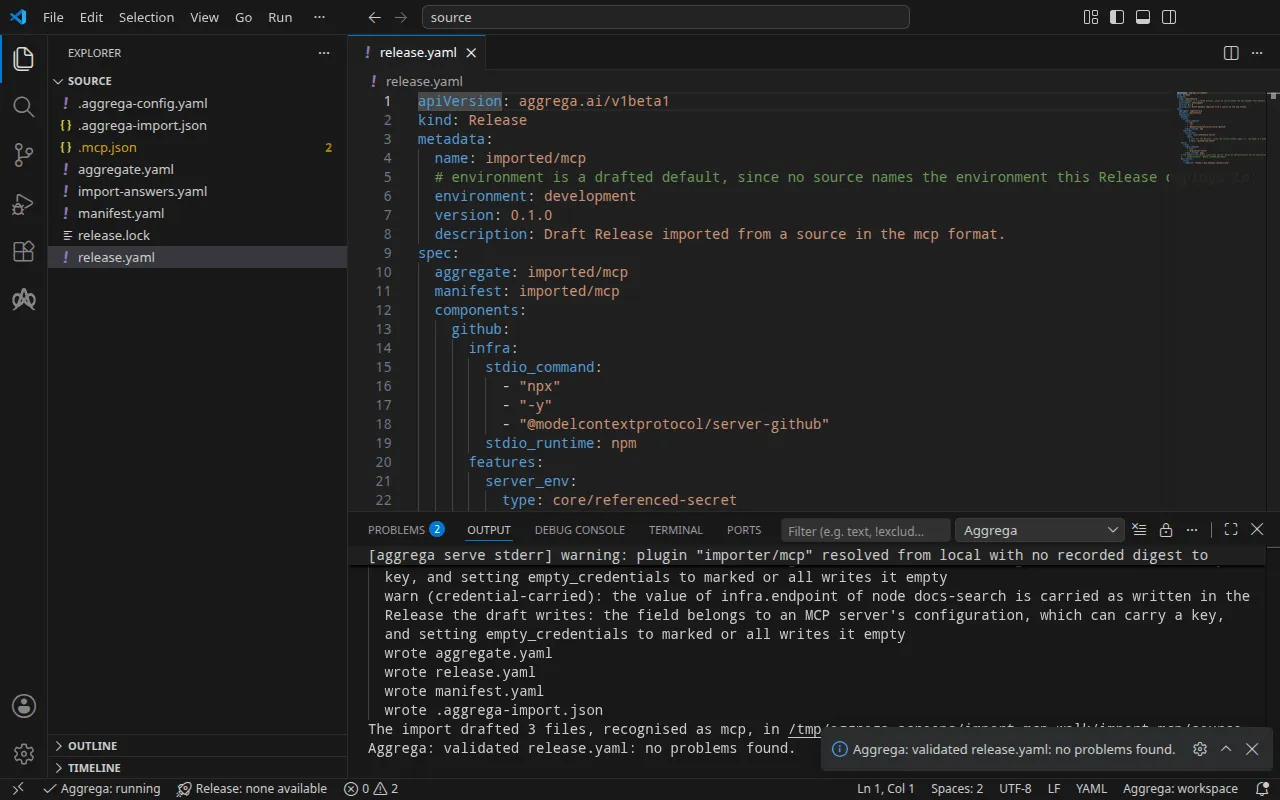
การ
notice: LINT: Feature "core/referenced-secret" at core/referenced-secret:1.0.0 declares property "origin" in both values: and infra: pillars (path: origin)release dependency validation passed: release.yaml (schema-pillar + dependency pillars)และ<workspace> แทน
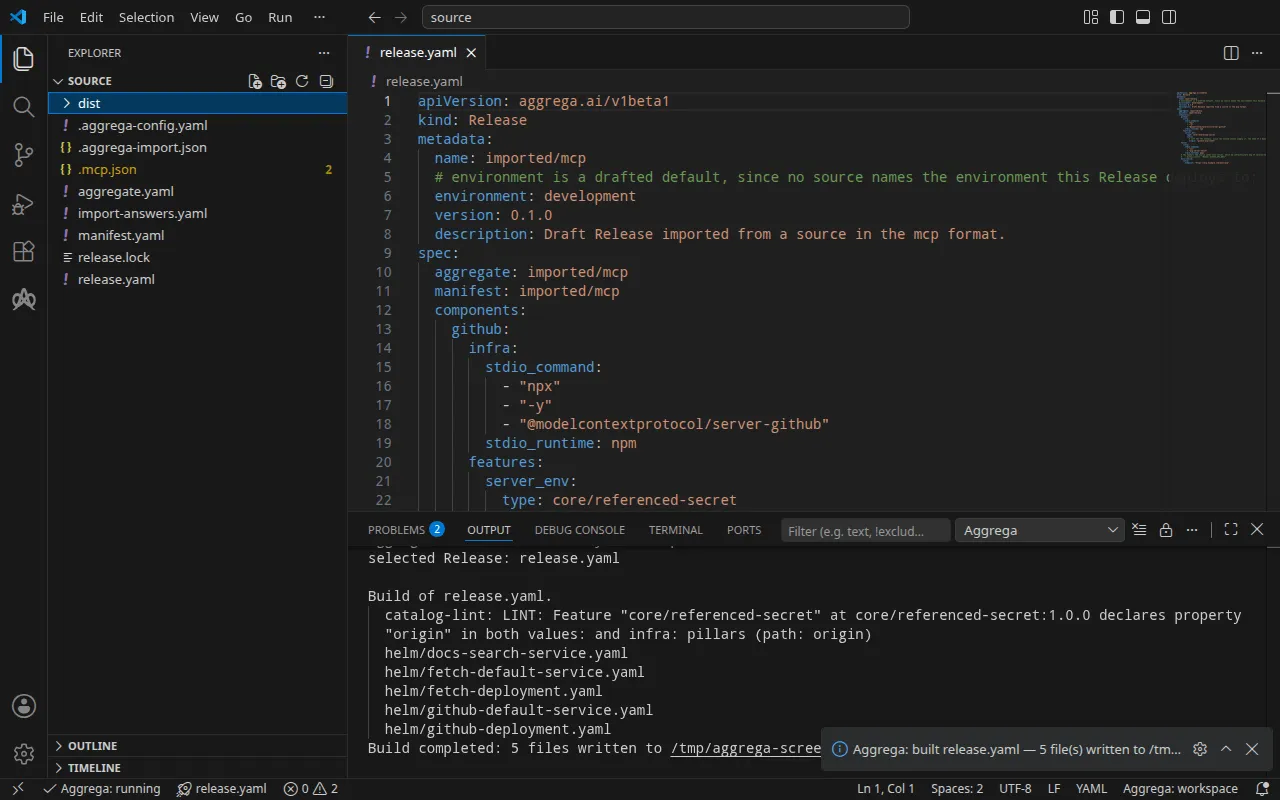
notice: LINT: Feature "core/referenced-secret" at core/referenced-secret:1.0.0 declares property "origin" in both values: and infra: pillars (path: origin)[… omitted: a total build time, which differs per run]Build completed: 5 files written to <workspace>/distบรรทัด notice เป็นorigin จาก values ของ Aggregate หรือ infra ของ Release และ
บิลด์docs-search ไว้dist/helm/ คอนเทนเนอร์dist/helm/github-deployment.yaml รัน
containers: - name: main image: ghcr.io/supercorp-ai/supergateway:4.1.0@sha256:1938c43538a5308bce07d58028e9de00b7acfecb40b39b059b2f3931800ad910 args: - --stdio - '''npx'' ''-y'' ''@modelcontextprotocol/server-github''' - --outputTransport - streamableHttp - --stateful - --port - "8080" - --streamableHttpPath - /mcp - --healthEndpoint - /healthz ports: - name: http containerPort: 8080 env: - name: MCP_TOOL_SIDE_EFFECTS value: mutating - name: MCP_TOOL_TIMEOUT_SECONDS value: "30" - name: MCP_TOOL_PORT value: "8080" envFrom: - secretRef: name: github-mcp-token [… omitted: the container's resources and its readiness probe]dist/helm/docs-search-service.yaml ไม่
apiVersion: v1kind: Servicemetadata: name: docs-search [… omitted: the labels and annotations the build writes on every resource]spec: type: ExternalName externalName: mcp.example.com ports: - port: 443กับผู้ช่วย AI
ผู้
ใช้เฉพาะเครื่องมือของ Aggrega และอย่าสร้างโฟลเดอร์เอง ถ้าโฟลเดอร์ Workspace ยังไม่มีโฟลเดอร์ `import-mcp` เรียกเครื่องมือ `draft` หนึ่งครั้ง โดยตั้ง `example` เป็น `import-mcp` และไม่ระบุ `dir`: เครื่องมือจะเขียนตัวอย่างลงในโฟลเดอร์ `import-mcp` ใหม่ ซึ่งโฟลเดอร์ `source` ของโฟลเดอร์นั้นเก็บสิ่งที่หน้านี้นำเข้า จากนั้นเรียกเครื่องมือ `import` โดยตั้ง `workspace_root` เป็น `import-mcp/source` ตั้ง `source` เป็น `.mcp.json` และตั้ง `target` เป็น `helm`: เครื่องมืออ่านคำตอบที่ต้องใช้จาก `import-answers.yaml` ข้าง `.mcp.json` เขียนร่างลงใน `import-mcp/source` และ pull สิ่งที่ร่างเหล่านั้นต้องใช้ จากนั้นเรียกเครื่องมือ `validate` โดยตั้ง `workspace_root` เป็น `import-mcp/source` และตั้ง `release` เป็น `release.yaml` และเรียกเครื่องมือ `build` โดยตั้ง `workspace_root` เป็น `import-mcp/source` ตั้ง `release` เป็น `release.yaml` และตั้ง `write` เป็น true บอกฉันว่าบิลด์เขียนไฟล์ใดบ้าง ไฟล์เหล่านั้นอยู่ใต้ `import-mcp/source/dist/`เปิดใน VS Code
เมื่อimport-mcp/source ใน VS Code ซึ่งrelease.yaml ที่dist/ ของ
วิธีรัน
ไม่มีgithub-mcp-token จึงgithub-token.env เป็นGITHUB_PERSONAL_ACCESS_TOKEN=<your token> แล้ว
kubectl create secret generic github-mcp-token --from-env-file=github-token.envrm github-token.envsecret/github-mcp-token createdนำ
kubectl apply -R -f dist/helm/kubectl wait --for=condition=Available deployment.apps/fetch deployment.apps/github --timeout=5mservice/docs-search createdservice/fetch-default createddeployment.apps/fetch createdservice/github-default createddeployment.apps/github createddeployment.apps/fetch condition metdeployment.apps/github condition metบน Docker Compose ใน--target compose และGITHUB_TOKEN ของ shell ซึ่ง Docker Compose อ่าน
docker compose -p mcp -f dist/compose/docker-compose.yaml up -d --waitทดสอบ
บริดจ์/mcp บนinitialize ของ MCP ซึ่ง
บน Docker Compose ส่งmcp_compose ซึ่งfetch:
docker run --rm --network mcp_compose curlimages/curl:8.11.1 -sS http://fetch:8080/mcp \ -H 'Content-Type: application/json' -H 'Accept: application/json, text/event-stream' \ -d '{"jsonrpc": "2.0", "id": 1, "method": "initialize", "params": {"protocolVersion": "2025-06-18", "capabilities": {}, "clientInfo": {"name": "test-it", "version": "1.0.0"}}}': keepalive
[… omitted: the same comment, repeated while the server starts]
event: messagedata: {"jsonrpc":"2.0","id":1,"result":{"capabilities":{"prompts":{"listChanged":false},"resources":{"listChanged":false,"subscribe":false},"tools":{"listChanged":false}},"protocolVersion":"2025-06-18","serverInfo":{"name":"mcp-fetch","version":"2026.11.11"}}}บน Kubernetes ส่งfetch-default และ
kubectl port-forward svc/fetch-default 8080:8080จาก
curl -sS http://127.0.0.1:8080/mcp \ -H 'Content-Type: application/json' -H 'Accept: application/json, text/event-stream' \ -d '{"jsonrpc": "2.0", "id": 1, "method": "initialize", "params": {"protocolVersion": "2025-06-18", "capabilities": {}, "clientInfo": {"name": "test-it", "version": "1.0.0"}}}': keepalive
: keepalive
event: messagedata: {"jsonrpc":"2.0","id":1,"result":{"capabilities":{"prompts":{"listChanged":false},"resources":{"listChanged":false,"subscribe":false},"tools":{"listChanged":false}},"protocolVersion":"2025-06-18","serverInfo":{"name":"mcp-fetch","version":"2026.11.11"}}}การmcp-fetch ใช้uvx mcp-server-fetch สำหรับuvx ดาวน์โหลด: keepalive คือ
เซิร์ฟเวอร์ GitHub ตอบhttp://github:8080/mcp บน Docker Compose และkubectl port-forward svc/github-default 8080:8080 บน Kubernetes initialize ไม่
[… omitted: the keepalive comments, sent while npx installs the server]event: messagedata: {"result":{"protocolVersion":"2024-11-05","capabilities":{"tools":{}},"serverInfo":{"name":"github-mcp-server","version":"0.6.2"}},"jsonrpc":"2.0","id":1}หยุด
kubectl delete -R -f dist/helm/kubectl delete secret github-mcp-tokenบน Docker Compose หยุด
docker compose -p mcp -f dist/compose/docker-compose.yaml down