



นำเข้า workflow ของ n8n
บท
ร่างตัวอย่าง
คุณ
เขียน
aggrega draft --example import-n8nจากsource ซึ่ง
cd import-n8n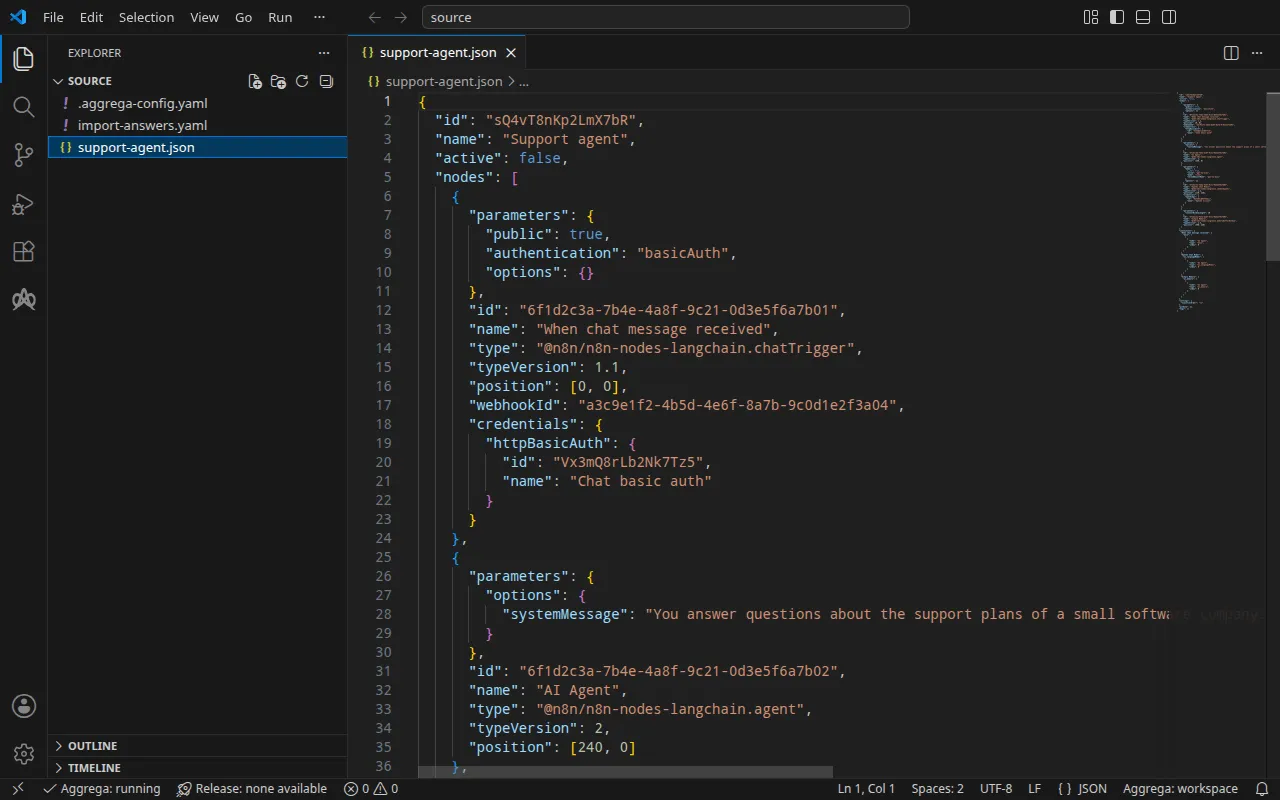
workflow
support-agent.json ซึ่งgpt-4o-mini และ
"parameters": { "public": true, "authentication": "basicAuth", "options": {} }, [… omitted: the node's identifier, name, type, version, position and webhook identifier] "credentials": { "httpBasicAuth": { "id": "Vx3mQ8rLb2Nk7Tz5", "name": "Chat basic auth" } }โหนด
"parameters": { "model": { "__rl": true, "value": "gpt-4o-mini", "mode": "list", "cachedResultName": "gpt-4o-mini" }, "options": {} }, "id": "6f1d2c3a-7b4e-4a8f-9c21-0d3e5f6a7b03", "name": "OpenAI Chat Model", "type": "@n8n/n8n-nodes-langchain.lmChatOpenAi", "typeVersion": 1.2, "position": [120, 220], "credentials": { "openAiApi": { "id": "Rb7nW2xQ9kT4mZ1c", "name": "OpenAI account" } }ข้าง workflow .aggrega-config.yaml ทำให้
# The workspace key marks this directory as the workspace root, so an import run# here writes its drafts beside support-agent.json.workspace: {}# The registry the importer is fetched from the first time an import needs it.default_registry: hub.aggrega.aiและ import-answers.yaml เก็บ
# Values the import could not draft from the source, keyed by the drafted file and the key path inside# it. Write each one beside its key; an import of the same source, and a sync, read them from here and# ask nothing. A secret is never written here: its key asks where the secret comes from — a variable# name, ${NAME}, or the name of a Kubernetes Secret.release.yaml: # The origin of the secret value, written by the operator in the Release. Read exactly as # values.origin is. Write it here or in values.origin, never in both. A secret: name where it comes # from, never the value. spec.components.n8n.uses.model.openai-chat-model.features.credential.infra.origin: "openai-api-key"ไฟล์
การนำ--target ร่าง Manifest จาก Recipes ของAGGREGA_CATALOG_DIRS หรือworkspace.catalog_dirs — จะsource:
cd sourceรันการนำเข้า
aggrega import support-agent.json --target composeที่
wrote aggregate.yamlwrote release.yamlwrote manifest.yamlwrote .aggrega-import.jsonที่<workspace> แทน
[… omitted: a warning that the importer runs unverified, printed where its module is read from beside its Plugin entity in a catalog folder rather than fetched]read as the n8n format, with drafted paths relative to <workspace>warn: the value of credentials.httpBasicAuth.id of node When chat message received is carried as written in the flow the draft carries: its format marks the field as a credential, and setting empty_credentials to marked or all writes it emptywarn: the value of credentials.openAiApi.id of node OpenAI Chat Model is carried as written in the flow the draft carries: its format marks the field as a credential, and setting empty_credentials to marked or all writes it emptywarn: node OpenAI Chat Model reaches openai-chat-model, wired to the model socket of core/ai-agent/n8n as openai-chat-model, other than through that connection: an n8n @n8n/n8n-nodes-langchain.lmChatOpenAi node reaches the part at the address the stored credential it selects, or its own parameters, give; the platform delivers this connection as OPENAI_BASE_URL and OPENAI_API_KEY, but an n8n workflow reads a variable of the platform's environment only through an expression reading $env, which the platform refuses while values.allow_env_access_in_nodes is false, the value the draft leaves it at; setting it true lets every workflow, and every user who can edit one, read every variable of the platform's environment, the delivered credentials includedmade no choice for When chat message received (@n8n/n8n-nodes-langchain.chatTrigger)made no choice for AI Agent (@n8n/n8n-nodes-langchain.agent)mapped OpenAI Chat Model (@n8n/n8n-nodes-langchain.lmChatOpenAi) to core/ai-model/openai as a reference, HIGH at 0.9143made no choice for Simple Memory (@n8n/n8n-nodes-langchain.memoryBufferWindow) warning: node "n8n" (provider "compose"): artifact "n8n-flow.compose-fragment.yaml": skipped provenance label injection — the fragment declares no compose service. Compose carries build provenance as service labels, so a fragment contributing only top-level networks, volumes or configs carries none; the services this component emits elsewhere carry the full set.Pull complete: <workspace>/release.lock (entities=8, source_artifacts=0, external_inputs=0)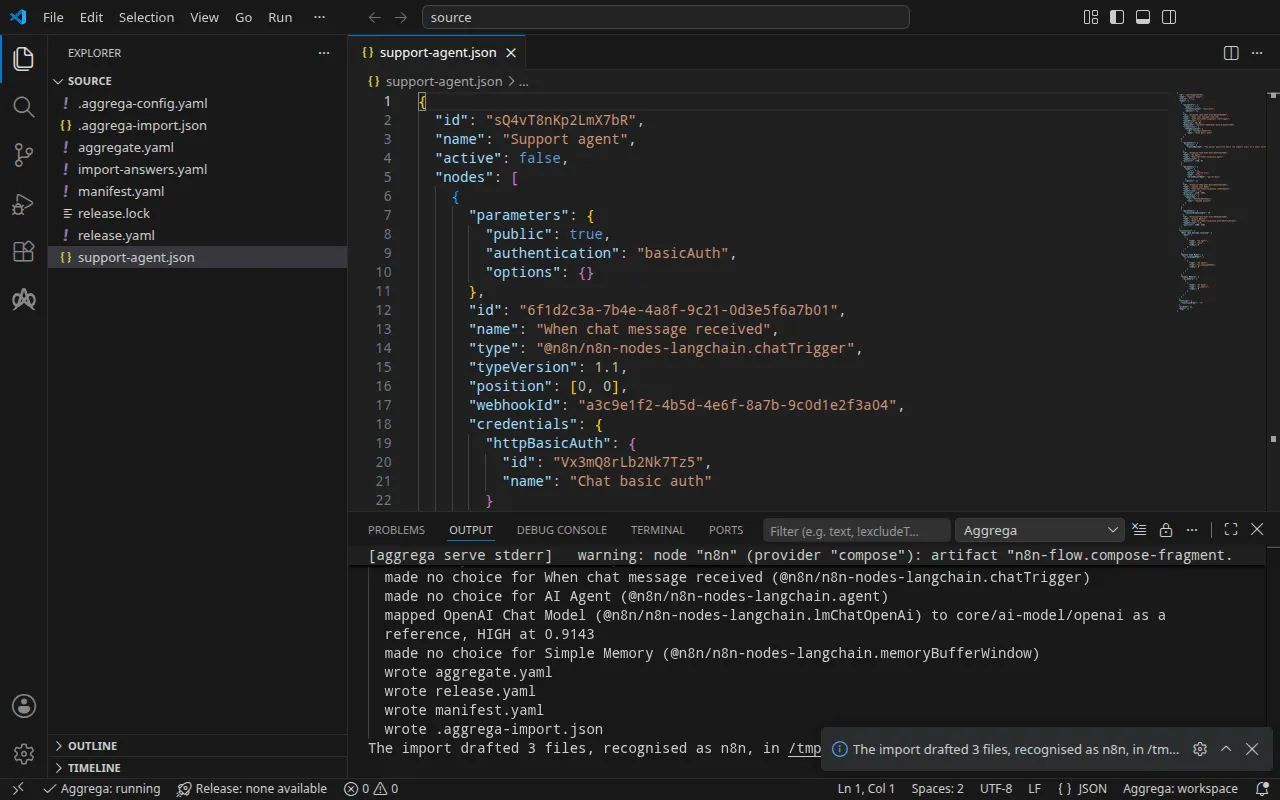
- บรรทัด
mappedบอกว่า โหนด OpenAI Chat Model กลาย เป็น โมเดล OpenAI ของ ไลบรารี มาตรฐาน core/ai-model/openaiโดยอ้างอิง แทน การ ร่าง เพราะ ตรง กัน ใน ระดับ สูง ที่ 0.9143 เป็น ส่วน ประกอบ ของ ตัว เอง ที่ เชื่อม โยง กับ ซ็อกเก็ต modelของแพลตฟอร์ม - บรรทัด
made no choiceบอกว่า ทริกเกอร์ เอเจนต์ และ หน่วย ความ จำ อยู่ ภายใน เวิร์กโฟลว์ ซึ่ง n8n รัน เอง - สอง
บรรทัด warnแรก ระบุตัว ระบุ ของ ข้อมูล รับรอง ที่ จัด เก็บ ไว้ ซึ่ง ทริกเกอร์ และ โหนด โมเดล เลือก ใช้ และ n8n ทำ เครื่องหมาย ว่า เป็น ข้อมูล รับรอง การ อ้างอิง เหล่า นี้ ไม่ใช่ ข้อมูล ลับ และ ถูก คง ไว้ ตาม ที่ เขียน - บรรทัด
warnที่สาม คือบรรทัด ที่ ควร อ่าน ให้ ละเอียด โหนด โมเดล เข้า ถึง OpenAI ด้วย ข้อมูล รับรอง ที่ จัด เก็บ ไว้ ซึ่ง โหนด เลือก ไม่ใช่ ผ่าน การ เชื่อม ต่อ ที่ ฉบับ ร่าง เชื่อม โยง ไว้ แพลตฟอร์ม ส่ง มอบ การ เชื่อม ต่อ ไป ยัง สภาพ แวดล้อม ของ n8n และ n8n ปฏิเสธ การ อ่าน สภาพ แวดล้อม ของ เวิร์กโฟลว์ ตราบ ที่ Aggregate ตั้ง values.allow_env_access_in_nodesไว้ที่ falseตามที่ ฉบับ ร่าง ทำ การ ตั้ง เป็น trueทำให้เวิร์กโฟลว์ วิธีทุก รายการ และ ทุก คน ที่ แก้ไข เวิร์กโฟลว์ ได้ อ่าน ทุก ตัวแปร ของ แพลตฟอร์ม ได้ รวม ถึง คีย์ ที่ ส่ง มอบ ดัง นั้น คีย์ ที่ เวิร์กโฟลว์ ใช้ คือ คีย์ ที่ n8n จัด เก็บ ดัง ที่ รัน แสดง - สอง
บรรทัด คือสุดท้าย ขั้น ตอน pull ไม่มี คำถาม เหลือ ให้ ตอบ การนำ เข้า จึง pull การ พึ่งพา ของ Release ที่ ร่าง ไว้ เหมือน ที่ aggrega pullทำ และเขียน release.lockบิลด์ด้าน ล่าง ไม่ ต้อง ใช้ อะไร เพิ่ม บรรทัด warningเป็นบรรทัด ตรวจที่ บิลด์ พิมพ์ เช่น กัน และ สอบ อธิบายความ ถูก ต้อง และ บิลด์ บรรทัด นั้น
ไฟล์
สิ่งที่การนำเข้าเขียน
Aggregate, Release และ Manifest ตั้งimported/support-agent ตามSupport agent ที่support-agent — เวิร์กโฟลว์target_namespace ของimported เว้น
aggregate.yaml — อินสแตนซ์core/ai-agent/n8n ที่model ของ
apiVersion: aggrega.ai/v1beta1kind: Aggregatemetadata: name: imported/support-agent version: 0.1.0 description: Draft Aggregate imported from a source in the n8n format.spec: components: n8n: type: core/ai-agent/n8n values: workflow_id: 'sQ4vT8nKp2LmX7bR' flow_definition: | { "id": "sQ4vT8nKp2LmX7bR", "name": "Support agent", [… omitted: the rest of the workflow, as exported] } uses: model: openai-chat-model: target: openai-chat-model # For the compose target, the lines below declare credential on openai-chat-model: a secret the Release alone attaches arrives under the key value, so each is declared with a key of its own and no two arrive under one; the Release attaches its origin, naming this type or none. features: credential: type: core/secret-value values: key: OPENAI_API_KEY # swap to core/ai-model/azure-openai (score 0.4125) by setting type: core/ai-model/azure-openai openai-chat-model: type: core/ai-model/openai values: model: |- gpt-4o-miniworkflow_id คือcore/ai-model/openai โดยgpt-4o-mini ความOPENAI_API_KEY ส่วน Release ระบุ
release.yaml — Release ซึ่ง
apiVersion: aggrega.ai/v1beta1kind: Releasemetadata: name: imported/support-agent # environment is a drafted default, since no source names the environment this Release deploys to; change it to name the one it deploys to. environment: development version: 0.1.0 description: Draft Release imported from a source in the n8n format.spec: aggregate: imported/support-agent manifest: imported/support-agent components: n8n: infra: # The image running core/ai-agent/n8n, at the version this importer drafts, which the catalog's Recipes for it are known to run; the import does not raise or lower it to follow the source. image: "n8nio/n8n:1.110.1" # Published on this machine's loopback address, 127.0.0.1: reachable from this machine only, by any process running on it. Delete this line to keep the service internal. published_port: 5678 uses: model: openai-chat-model: features: credential: type: core/secret-value infra: # Attached by reference, never as a value: the credential n8n presents to openai-chat-model on its model connection, read from the variable OPENAI_API_KEY, which a target substituting variable references, as Docker Compose does when the stack starts, reads from the environment, so no file carries the value. origin: "${OPENAI_API_KEY}" openai-chat-model: {}environmentคือdevelopmentซึ่งเป็น ค่า เริ่ม ต้น ที่ ความ คิด เห็น ด้าน บน บอก ให้ เปลี่ยน เป็น สภาพ แวดล้อม ที่ Release ปรับ ใช้ - อิมเมจ คือ n8n 1.110.1 ซึ่ง
เป็น เวอร์ชัน ที่ Recipes ของ แค็ตตาล็อก สำหรับ n8n รัน published_portคือ 5678 พอร์ตที่ n8n ให้ บริการ ตัว แก้ไข จึง ตอบ ที่ http://127.0.0.1:5678บนเครื่อง ของ คุณ ตาม ที่ ความ คิด เห็น ของ บรรทัด นั้น บอก ทุก กระบวนการ บน เครื่อง นี้ เข้า ถึง ได้ที่ นั่น และ ไม่มี สิ่ง อื่น เข้า ถึง ได้ ลบ บรรทัด นั้น เพื่อ ให้ n8n อยู่ บน เครือข่าย ของ สแตก เท่านั้น published_portที่ไม่ใช่ 5678 ต้อง มี infra.external_base_url: http://127.0.0.1:<published_port>อยู่ข้าง กัน มิ ฉะนั้น n8n จะ รายงาน ที่ อยู่ ของ ตัว แก้ไข และ webhook บน localhost:5678- คีย์ คือ
การ อ้างอิง ตัวแปร ${OPENAI_API_KEY}ซึ่ง Docker Compose เติมจาก shell ของ คุณ เมื่อ สแตก เริ่ม ทำงาน โมเดล OpenAI ของ ไลบรารี มาตรฐาน เป็น บริการ แบบ โฮสต์ และ การ เชื่อม ต่อ ไป ยัง โมเดล นั้น ต้อง มี ข้อมูล รับรอง Release จึง แนบ ข้อมูล รับรอง ไว้ แม้ เวิร์กโฟลว์ จะ อ่าน คีย์ จาก ที่ จัด เก็บ ของ n8n
manifest.yaml — Recipes แบบ Compose ของ
apiVersion: aggrega.ai/v1beta1kind: Manifestmetadata: name: imported/support-agent version: 0.1.0spec: mappings: components: type: core/ai-agent/n8n: compose/n8n core/ai-model/openai: compose/openai features: type: core/secret-value: compose/dotenv-secret.aggrega-import.json คือaggrega import --sync ครั้งrelease.lock ปัก
ตรวจสอบความถูกต้องและบิลด์
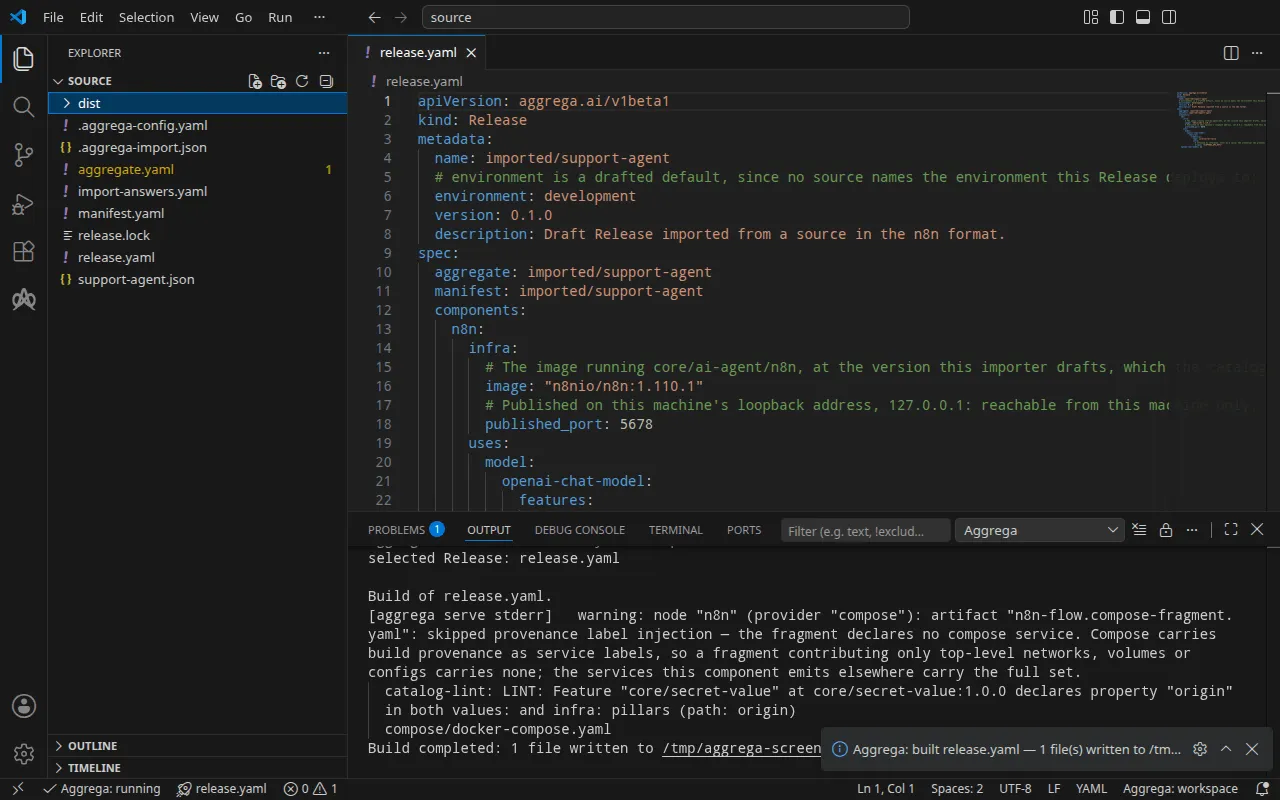
aggrega validate --release release.yamlaggrega build --release release.yaml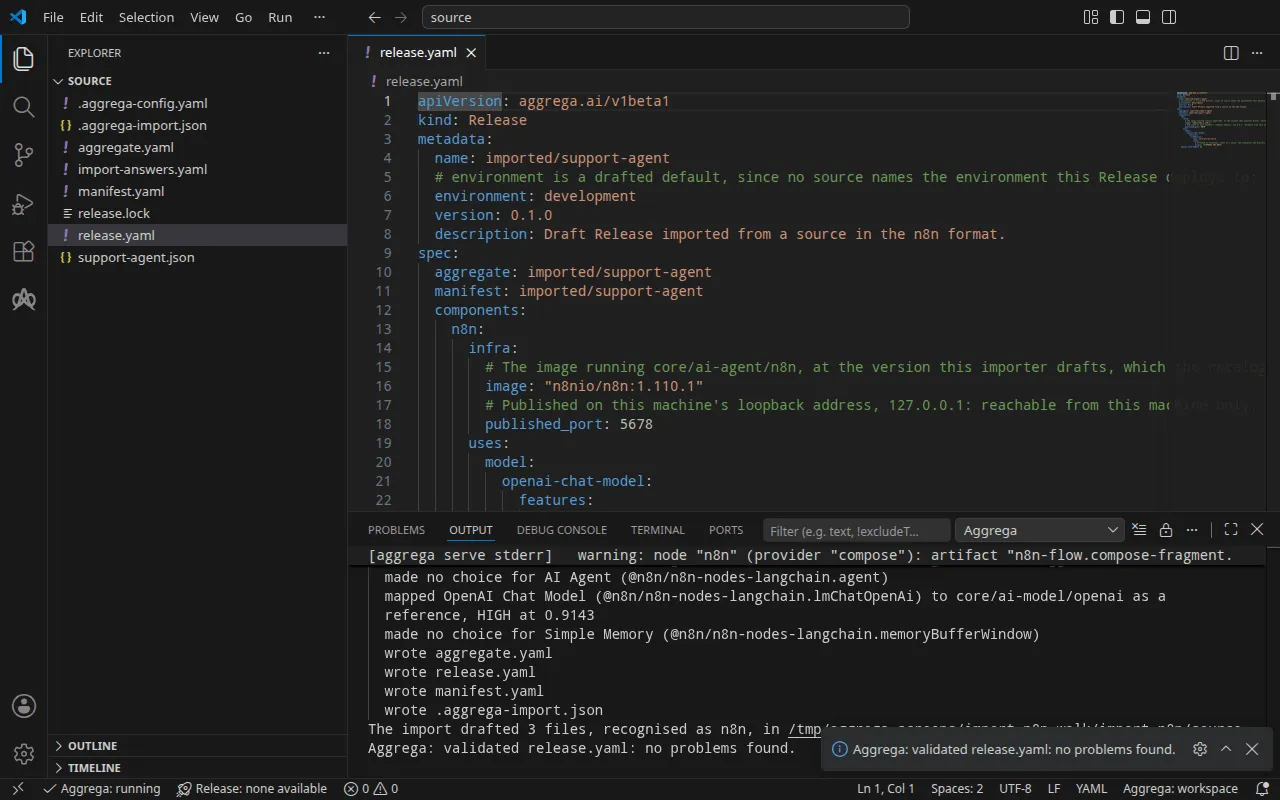
การ
notice: LINT: Feature "core/secret-value" at core/secret-value:1.0.0 declares property "origin" in both values: and infra: pillars (path: origin)release dependency validation passed: release.yaml (schema-pillar + dependency pillars)และ<workspace> แทน
warning: node "n8n" (provider "compose"): artifact "n8n-flow.compose-fragment.yaml": skipped provenance label injection — the fragment declares no compose service. Compose carries build provenance as service labels, so a fragment contributing only top-level networks, volumes or configs carries none; the services this component emits elsewhere carry the full set. notice: LINT: Feature "core/secret-value" at core/secret-value:1.0.0 declares property "origin" in both values: and infra: pillars (path: origin)[… omitted: a total build time, which differs per run]Build completed: 1 file written to <workspace>/distบรรทัด warning เกี่ยวconfigs ระดับnotice เป็นorigin ได้values ของ Aggregate หรือ infra ของ Release และ
dist/compose/docker-compose.yaml มี n8n และ
services: n8n: image: n8nio/n8n:1.110.1 environment: OPENAI_BASE_URL: https://api.openai.com/v1 OPENAI_API_KEY: ${OPENAI_API_KEY} N8N_BLOCK_ENV_ACCESS_IN_NODE: "true" ports: - 127.0.0.1:5678:5678 [… omitted: the labels the build writes on every service, naming the Aggregate, the component, the environment and the compiler's version] volumes: - type: volume source: n8n--data target: /home/node/.n8n networks: - compose depends_on: n8n--import-flow: condition: service_completed_successfully [… omitted: the service's health check] n8n--import-flow: image: n8nio/n8n:1.110.1 command: - import:workflow - --input=/flows/workflow.json entrypoint: - n8n [… omitted: the labels the build writes on every service] volumes: - type: volume source: n8n--data target: /home/node/.n8n networks: - compose restart: "no" configs: - source: n8n-flow target: /flows/workflow.jsonเวิร์กโฟลว์n8n import:workflow ที่N8N_BLOCK_ENV_ACCESS_IN_NODE เป็น "true" ซึ่งallow_env_access_in_nodes ไว้false โหนด OpenAI Chat Model จึงpublished_port ใน infra ของ n8n และ
กับผู้ช่วย AI
ผู้
ใช้เครื่องมือของ Aggrega เท่านั้น และอย่าสร้างโฟลเดอร์เอง หากโฟลเดอร์ Workspace ยังไม่มีโฟลเดอร์ `import-n8n` ให้เรียกเครื่องมือ `draft` หนึ่งครั้งโดยตั้ง `example` เป็น `import-n8n` และไม่ระบุ `dir` เครื่องมือนี้จะเขียนตัวอย่างลงในโฟลเดอร์ `import-n8n` ใหม่ ซึ่งโฟลเดอร์ `source` ของโฟลเดอร์นั้นมีสิ่งที่หน้านี้นำเข้า จากนั้นเรียกเครื่องมือ `import` โดยตั้ง `workspace_root` เป็น `import-n8n/source` ตั้ง `source` เป็น `support-agent.json` และตั้ง `target` เป็น `compose` เครื่องมือนี้จะอ่านคำตอบที่ต้องใช้จาก `import-answers.yaml` ที่อยู่ข้าง `support-agent.json` เขียนฉบับร่างลงใน `import-n8n/source` และ pull สิ่งที่ฉบับร่างต้องใช้ จากนั้นเรียกเครื่องมือ `validate` โดยตั้ง `workspace_root` เป็น `import-n8n/source` และตั้ง `release` เป็น `release.yaml` และเรียกเครื่องมือ `build` โดยตั้ง `workspace_root` เป็น `import-n8n/source` ตั้ง `release` เป็น `release.yaml` และตั้ง `write` เป็น true บอกฉันว่าการบิลด์เขียนไฟล์ใดบ้าง ไฟล์เหล่านั้นอยู่ใน `import-n8n/source/dist/`เปิดใน VS Code
เมื่อimport-n8n/source ใน VS Code ซึ่งrelease.yaml ที่dist/ ของ
วิธีรัน
n8n อ่านRb7nW2xQ9kT4mZ1c และVx3mQ8rLb2Nk7Tz5 บรรทัดcredentials.json พร้อม
[ {"id": "Rb7nW2xQ9kT4mZ1c", "name": "OpenAI account", "type": "openAiApi", "data": {"apiKey": "your OpenAI key"}}, {"id": "Vx3mQ8rLb2Nk7Tz5", "name": "Chat basic auth", "type": "httpBasicAuth", "data": {"user": "a user of your own", "password": "a password of your own"}}]ตั้ง
export OPENAI_API_KEY='your OpenAI key'docker compose -p support-agent -f dist/compose/docker-compose.yaml up -d --wait-p ระบุ--wait คืน
docker compose -p support-agent -f dist/compose/docker-compose.yaml exec -T n8n sh -c 'umask 077; cat > /tmp/credentials.json' < credentials.jsondocker compose -p support-agent -f dist/compose/docker-compose.yaml exec n8n n8n import:credentials --input=/tmp/credentials.jsondocker compose -p support-agent -f dist/compose/docker-compose.yaml exec n8n rm /tmp/credentials.json[… omitted: n8n's notices about its settings file's permissions, error tracking and deprecated settings]Successfully imported 2 credentials.ตอนcredentials.json:
rm credentials.jsonจาก
docker compose -p support-agent -f dist/compose/docker-compose.yaml exec n8n n8n update:workflow --id=sQ4vT8nKp2LmX7bR --active=truedocker compose -p support-agent -f dist/compose/docker-compose.yaml restart n8nเมื่อ docker compose -p support-agent -f dist/compose/docker-compose.yaml ps n8n แสดง n8n เป็น (healthy) อีกdocker compose -p support-agent -f dist/compose/docker-compose.yaml logs n8n จะActivated workflow "Support agent" (ID: sQ4vT8nKp2LmX7bR)
ทดสอบ
เปิด http://127.0.0.1:5678 ที่published_port เผย
ทริกเกอร์HTTP/1.1 401 Unauthorized และ Authorization is required! และHTTP/1.1 403 Forbidden เมื่อCHAT_USER และ CHAT_PASSWORD curl จะ
printf 'user = "%s:%s"\n' "$CHAT_USER" "$CHAT_PASSWORD" | curl --config - -sS -i -X POST \ http://127.0.0.1:5678/webhook/a3c9e1f2-4b5d-4e6f-8a7b-9c0d1e2f3a04/chat -H 'Content-Type: application/json' \ -d '{"action": "sendMessage", "sessionId": "s1", "chatInput": "In one short sentence: what does a support plan cover?"}'HTTP/1.1 500 Internal Server Error[… omitted: the response's other headers]
{"message":"Error in workflow"}การIncorrect API key provided: sk-place*****************-key. เมื่อHTTP/1.1 200 OK และ{"output": "…"}
บน Kubernetes เมื่อcredentials.json ตามkubectl exec จาก
kubectl exec -i -n <namespace> deploy/n8n -- n8n import:credentials --input=/dev/stdin < credentials.jsonDefaulted container "main" out of: main, import-flow (init)[… omitted: n8n's notices about its settings file's permissions, error tracking and deprecated settings]Successfully imported 2 credentials.ส่งn8n-default และ
kubectl port-forward -n <namespace> svc/n8n-default 5678:5678จากcookies.txt แล้ว
curl -sS -c cookies.txt -X POST http://127.0.0.1:5678/rest/owner/setup -H 'Content-Type: application/json' \ -d '{"email": "owner@example.com", "firstName": "Your", "lastName": "Name", "password": "a password of your own"}'curl -sS -b cookies.txt -X PATCH http://127.0.0.1:5678/rest/workflows/sQ4vT8nKp2LmX7bR \ -H 'Content-Type: application/json' -d '{"active": true}'การ"active":true ข้อความ{"message":"Error in workflow"} เหมือน
หยุด-v ลบ
docker compose -p support-agent -f dist/compose/docker-compose.yaml down -vบน Kubernetes
เวิร์กโฟลว์helm ฉบับsource แล้ว และ--output-dir แล้ว
aggrega import support-agent.json --target helm --output-dir helmcd helmaggrega validate --release release.yamlaggrega build --release release.yamlฉบับhelm/n8n โมเดลhelm/openai และhelm/k8s-existing-secret ซึ่งcore/referenced-secret โดยopenai-api-key จาก
การdist/helm/ ที่source ซึ่งhelm คือ ../dist/helm/ สร้าง Secret ในvalue แล้ว