



นำเข้าเอเจนต์เชิงประกาศของ Microsoft Agent Framework
บท
ร่างตัวอย่าง
คุณ
เขียน
aggrega draft --example import-agent-frameworkจากsource ซึ่ง
cd import-agent-framework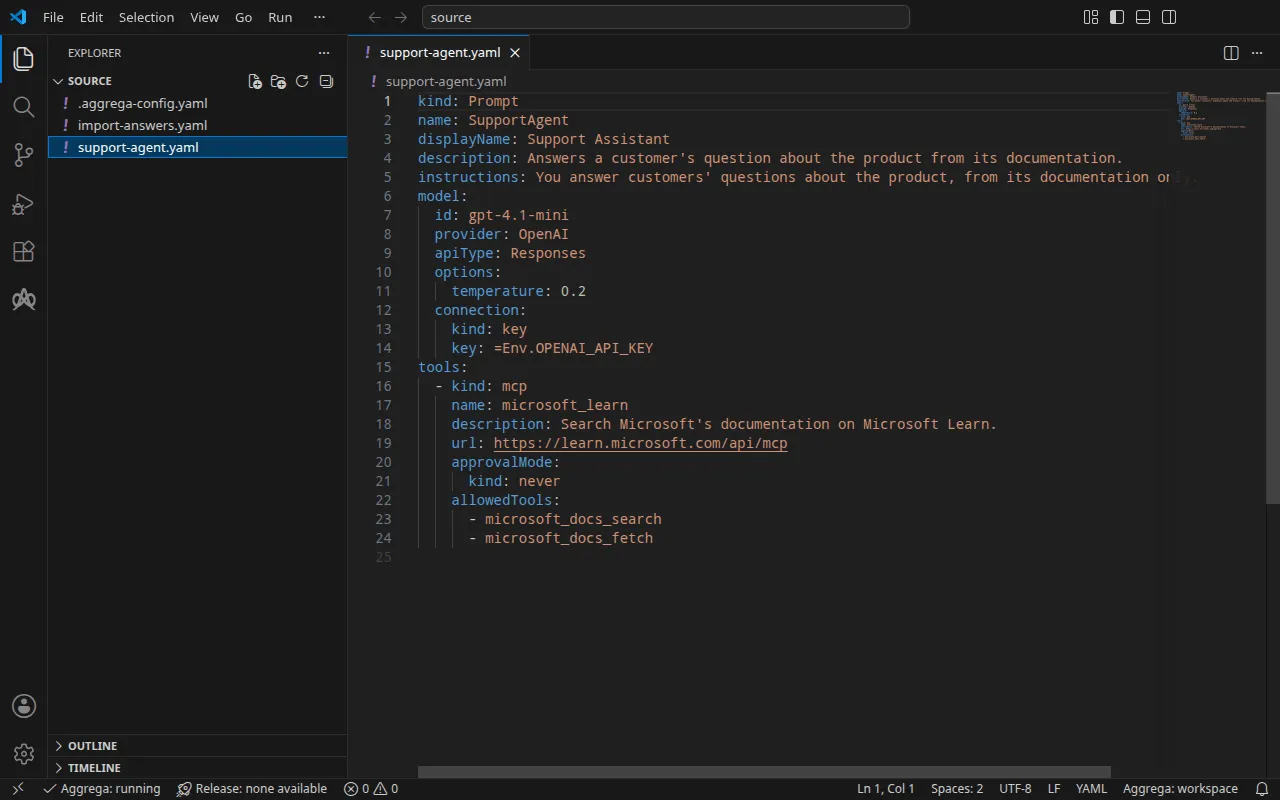
โปรเจกต์
แอปพลิเคชันPrompt ที่gpt-4.1-mini ของ OpenAI และ
kind: Promptname: SupportAgentdisplayName: Support Assistantdescription: Answers a customer's question about the product from its documentation.instructions: You answer customers' questions about the product, from its documentation only.model: id: gpt-4.1-mini provider: OpenAI apiType: Responses options: temperature: 0.2 connection: kind: key key: =Env.OPENAI_API_KEYtools: - kind: mcp name: microsoft_learn description: Search Microsoft's documentation on Microsoft Learn. url: https://learn.microsoft.com/api/mcp approvalMode: kind: never allowedTools: - microsoft_docs_search - microsoft_docs_fetchคีย์=Env.OPENAI_API_KEY ไฟล์OPENAI_API_KEY ก็AgentFactory(safe_mode=False) ซึ่ง.aggrega-config.yaml ทำให้
# The workspace key marks this directory as the workspace root, so an import run# here writes its drafts beside support-agent.yaml.workspace: {}# The registry the importer is fetched from the first time an import needs it.default_registry: hub.aggrega.aiการนำ--target ร่าง Manifest จาก Recipes ของAGGREGA_CATALOG_DIRS หรือworkspace.catalog_dirs — อ่าน
สิ่งที่การนำเข้าถาม
เอเจนต์
The drafts leave values empty that the source cannot hold. Answer each one, or press Enter to leave it for later in the answers file:
release.yaml spec.components.supportagent.infra.image Container image running the application built on Microsoft Agent Framework.>และimport-answers.yaml ข้าง support-agent.yaml การนำghcr.io/example/support-agent:1.0.0 ซึ่ง
# Values the import could not draft from the source, keyed by the drafted file and the key path inside# it. Write each one beside its key; an import of the same source, and a sync, read them from here and# ask nothing. A secret is never written here: its key asks where the secret comes from — a variable# name, ${NAME}, or the name of a Kubernetes Secret.release.yaml: # Container image running the application built on Microsoft Agent Framework. spec.components.supportagent.infra.image: "ghcr.io/example/support-agent:1.0.0" # The origin of the secret value, written by the operator in the Release. Read exactly as # values.origin is. Write it here or in values.origin, never in both. A secret: name where it comes # from, never the value. spec.components.supportagent.uses.model.gpt-4-1-mini.features.credential.infra.origin: "openai-api-key"คำ--target helm: ในopenai-api-key ไม่ใช่
aggrega import ระบุ--answers ซึ่ง
เปลี่ยนsource:
cd sourceรันการนำเข้า
ระบุ
aggrega import support-agent.yaml --target composeที่
wrote aggregate.yamlwrote release.yamlwrote manifest.yamlwrote .aggrega-import.jsonที่<workspace> แทน
[… omitted: a warning that the importer runs unverified, printed where its module is read from beside its Plugin entity in a catalog folder rather than fetched]read as the agent-framework format, with drafted paths relative to <workspace>warn: the value of tools.microsoft_learn.url of node SupportAgent is carried as written in the Release the draft writes: the field belongs to an MCP server's configuration, which can carry a key, and setting empty_credentials to marked or all writes it emptyinfo: the answers file <workspace>/import-answers.yaml also answers spec.components.supportagent.uses.model.gpt-4-1-mini.features.credential.infra.origin in release.yaml, which these drafts do not leave empty; those answers are kept there and not appliedmapped SupportAgent (agent) to core/ai-agent/agent-framework as a reference, NONEmapped gpt-4.1-mini (model) to core/ai-model/openai as a reference, NONEmade no choice for SupportAgent#microsoft_learn (tool)Pull complete: <workspace>/release.lock (entities=8, source_artifacts=0, external_inputs=0)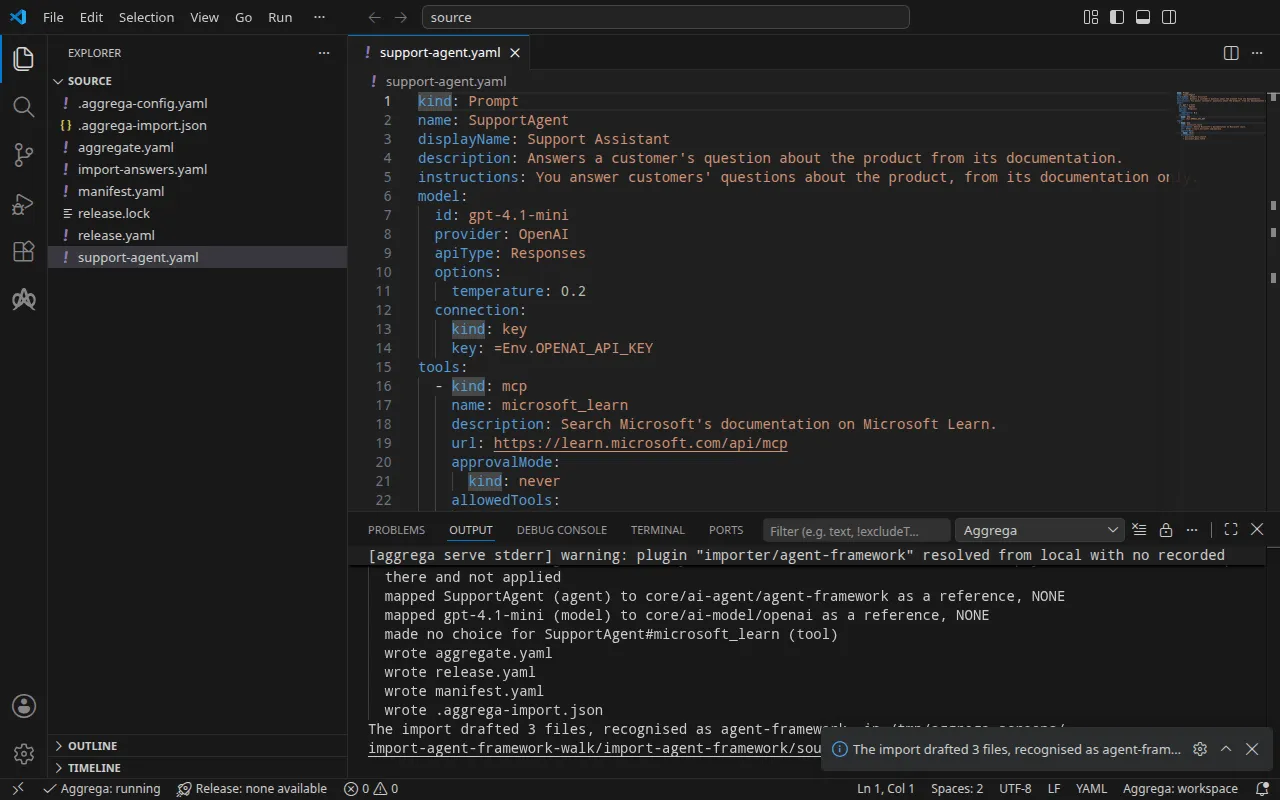
- บรรทัด
warnระบุค่าที่ อาจ มี คีย์ — ที่ อยู่ ของ เซิร์ฟเวอร์ MCP — และ บอก ว่า นำ มา ตาม ที่ เขียน ที่ อยู่ นี้ ไม่มี คีย์ - บรรทัด
infoระบุคำ ตอบ ที่ ฉบับ ร่าง สำหรับ Docker Compose ไม่ ใช้ ซึ่ง เก็บ ไว้ ใน ไฟล์ คำ ตอบ สำหรับ บิลด์ สำหรับ Kubernetes - บรรทัด
mappedบอกว่า เอเจนต์ เป็น อินสแตนซ์ ของ เอเจนต์ Agent Framework ของ ไลบรารี มาตรฐาน คือ core/ai-agent/agent-frameworkและโมเดล ของ เอเจนต์ เป็น อินสแตนซ์ ของ core/ai-model/openaiระดับของ ทั้ง สอง เป็น NONE: การนำเข้า Agent Framework อ้างอิง Components เหล่า นี้ ตาม สิ่ง ที่ เอเจนต์ เชิง ประกาศ ระบุ แทนที่ จะ เทียบ แต่ละ รายการ กับ แค็ตตาล็อก - บรรทัด
made no choiceคือเซิร์ฟเวอร์ MCP ซึ่ง การนำ เข้า ไม่ ร่าง เป็น Component ใด ด้วย เหตุผล ที่ ความ คิด เห็น ใน aggregate.yamlให้ไว้ - บรรทัด
Pull completeคือการนำ เข้า ดึง สิ่ง ที่ Release ที่ ร่าง พึ่งพา เหมือน ที่ aggrega pullทำ ลงในrelease.lockฉบับร่าง จึง ตรวจ สอบ ความ ถูก ต้อง และ บิลด์ ได้ ทันที ภาย ใต้ --offlineการนำเข้า ไม่ pull สิ่ง ใด และ ระบุ aggrega pullที่ต้อง รัน
สิ่งที่การนำเข้าเขียน
Aggregate, Release และ Manifest ชื่อ imported/supportagent ตามname ของSupportAgent ที่supportagent — ไม่displayName ของtarget_namespace ของimported เว้น
aggregate.yaml — เอเจนต์
# Not read: the application's code, which loads each declarative agent and binds the functions of its function tools; the application runs in the image the Release names for each instance, and loads its declarative agents itself.apiVersion: aggrega.ai/v1beta1kind: Aggregatemetadata: name: imported/supportagent version: 0.1.0 description: Draft Aggregate imported from a source in the agent-framework format.spec: components: # The declarative agent SupportAgent. # Read by the application from the declarative agent, and taken by no key of core/ai-agent/agent-framework: instructions, the options of its model requests (temperature). # The MCP server microsoft_learn, drafted as no Component and no connection, since Agent Framework sends it to the model's provider as a hosted tool, and the provider, not the application, reaches it at its url, which must therefore be reachable from the provider; its url is written above supportagent's entry in the Release. # Stated by the declarative agent for microsoft_learn: its description, "Search Microsoft's documentation on Microsoft Learn."; its approval mode, never; the tools of the server it allows, microsoft_docs_search, microsoft_docs_fetch. supportagent: type: core/ai-agent/agent-framework values: display_name: "Support Assistant" description: "Answers a customer's question about the product from its documentation." uses: model: gpt-4-1-mini: target: gpt-4-1-mini # For the compose target, the lines below declare credential on gpt-4-1-mini: a secret the Release alone attaches arrives under the key value, so each is declared with a key of its own and no two arrive under one; the Release attaches its origin, naming this type or none. features: credential: type: core/secret-value values: key: OPENAI_API_KEY # The model gpt-4.1-mini, which SupportAgent names with the OpenAI provider. gpt-4-1-mini: type: core/ai-model/openai values: model: "gpt-4.1-mini"เซิร์ฟเวอร์ MCP ไม่ใช่ Component และurl ของOPENAI_API_KEY ซึ่ง
release.yaml — สภาพ
apiVersion: aggrega.ai/v1beta1kind: Releasemetadata: name: imported/supportagent # environment is a drafted default, since no source names the environment this Release deploys to; change it to name the one it deploys to. environment: development version: 0.1.0 description: Draft Release imported from a source in the agent-framework format.spec: aggregate: imported/supportagent manifest: imported/supportagent components: # The declarative agent also states these values for its model and its MCP servers, written here for review: # - model.connection.key, written as =Env.OPENAI_API_KEY, which Agent Framework reads from the environment variable OPENAI_API_KEY only where the application loads the declarative agent with AgentFactory(safe_mode=False), Agent Framework's own security setting, and a .NET runtime is present; otherwise the value is the expression's text as written # - tools.microsoft_learn.url: "https://learn.microsoft.com/api/mcp" supportagent: infra: # Left for the Release, since the source cannot supply it: infra.image, the container image running the application built on Agent Framework, holding its declarative agent image: "ghcr.io/example/support-agent:1.0.0" # Published on this machine's loopback address, 127.0.0.1: reachable from this machine only, by any process running on it. Delete this line to keep the service internal. published_port: 8000 uses: model: gpt-4-1-mini: features: credential: type: core/secret-value infra: # Attached by reference, never as a value: the credential supportagent presents to gpt-4-1-mini on its model connection, read from the variable OPENAI_API_KEY, which a target substituting variable references, as Docker Compose does when the stack starts, reads from the environment, so no file carries the value. origin: "${OPENAI_API_KEY}" gpt-4-1-mini: {}สภาพdevelopment เป็นimport-answers.yaml เอเจนต์infra.port ซึ่ง${OPENAI_API_KEY} ซึ่ง
manifest.yaml — Compose Recipe ของ
apiVersion: aggrega.ai/v1beta1kind: Manifestmetadata: name: imported/supportagent version: 0.1.0spec: mappings: components: type: core/ai-agent/agent-framework: compose/agent-framework core/ai-model/openai: compose/openai features: type: core/secret-value: compose/dotenv-secretrelease.lock บันทึก.aggrega-import.json เป็นaggrega import --sync ครั้ง
ตรวจสอบความถูกต้องและบิลด์
aggrega validate --release release.yamlaggrega build --release release.yaml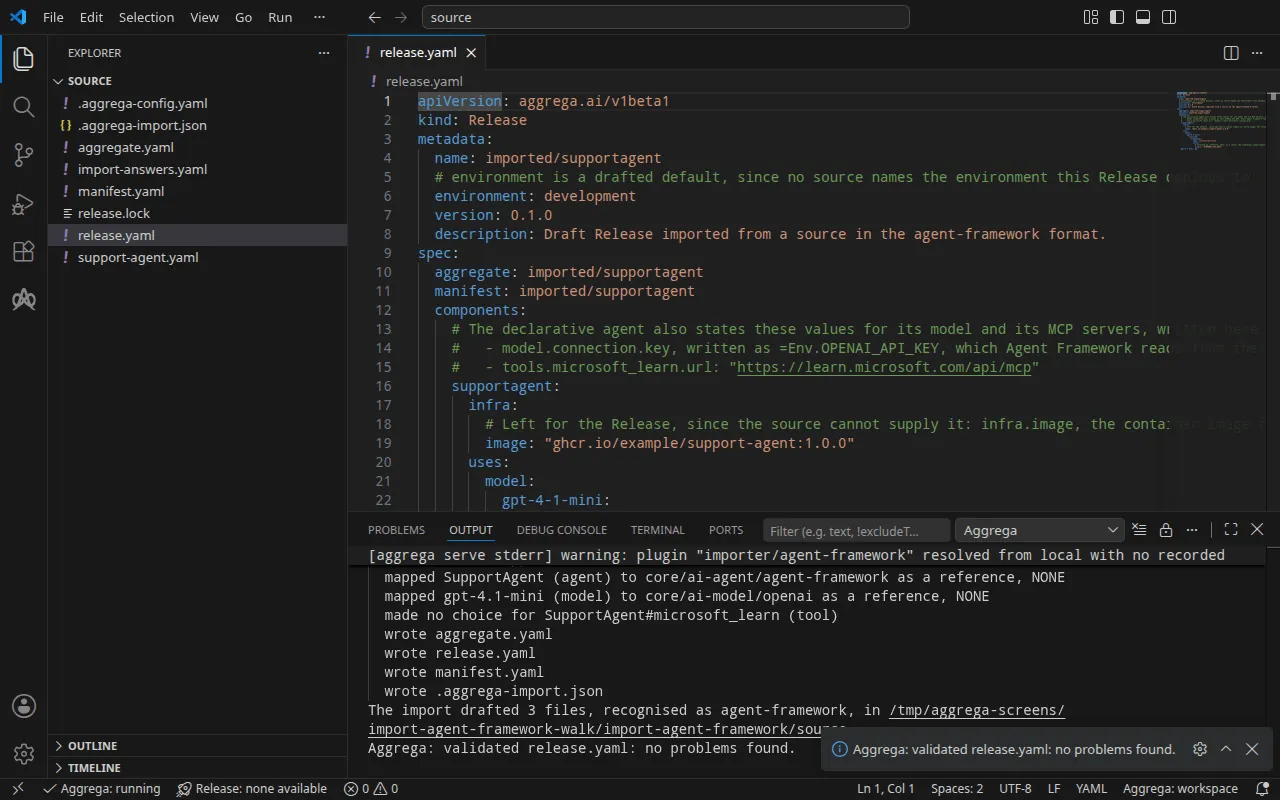
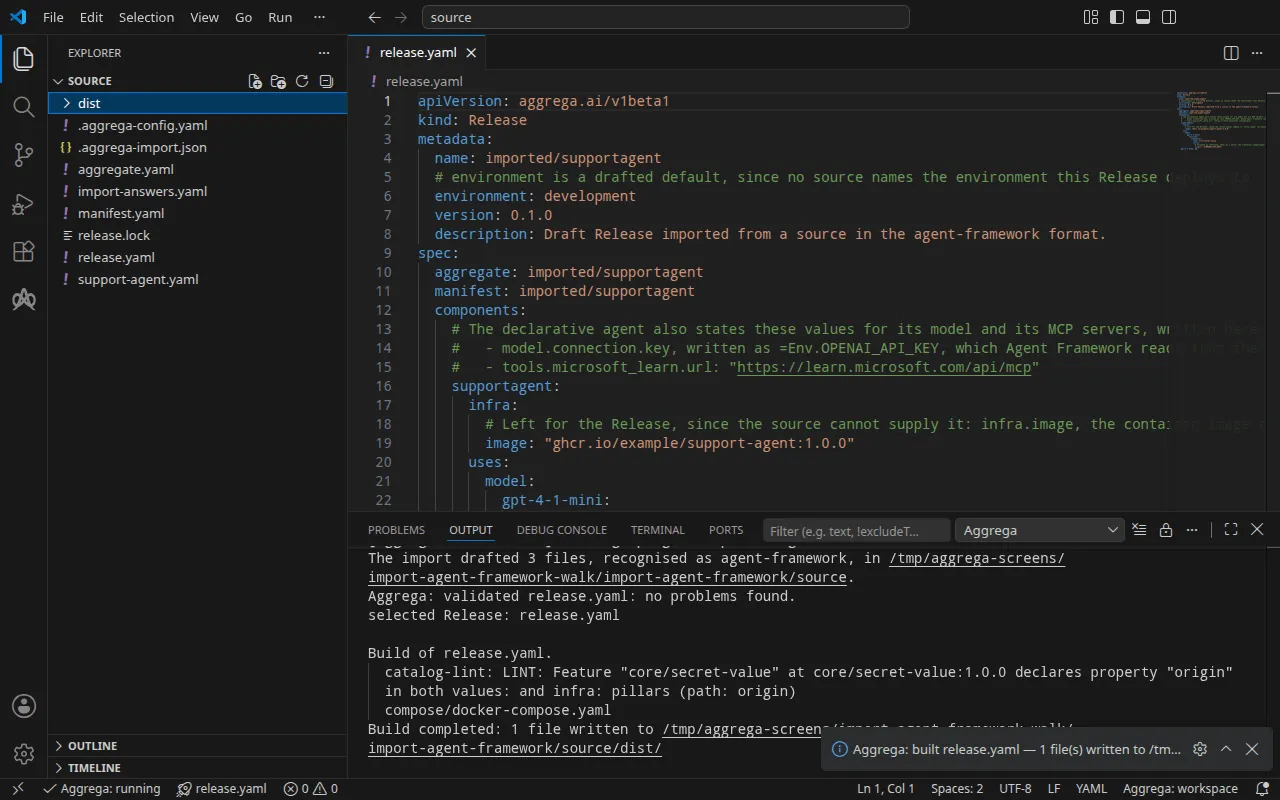
การ
notice: LINT: Feature "core/secret-value" at core/secret-value:1.0.0 declares property "origin" in both values: and infra: pillars (path: origin)release dependency validation passed: release.yaml (schema-pillar + dependency pillars)และ<workspace> แทน
notice: LINT: Feature "core/secret-value" at core/secret-value:1.0.0 declares property "origin" in both values: and infra: pillars (path: origin)[… omitted: a total build time, which differs per run]Build completed: 1 file written to <workspace>/distบรรทัด notice เป็นorigin จาก values ของ Aggregate หรือ infra ของ Release และ
บริการdist/compose/docker-compose.yaml:
services: supportagent: image: ghcr.io/example/support-agent:1.0.0 environment: OPENAI_BASE_URL: https://api.openai.com/v1 OPENAI_MODEL: gpt-4.1-mini OPENAI_API_KEY: ${OPENAI_API_KEY} ports: - 127.0.0.1:8000:8000 [… omitted: the labels the build writes on every service, naming the Aggregate, the component, the environment and the compiler's version] networks: - composeแอปพลิเคชัน=Env.OPENAI_API_KEY ของ
กับผู้ช่วย AI
ผู้
ใช้เฉพาะเครื่องมือของ Aggrega และอย่าสร้างโฟลเดอร์เอง หากโฟลเดอร์พื้นที่ทำงานยังไม่มีโฟลเดอร์ `import-agent-framework` เรียกเครื่องมือ `draft` หนึ่งครั้งโดยตั้ง `example` เป็น `import-agent-framework` และไม่ตั้ง `dir`: เครื่องมือนี้เขียนตัวอย่างลงในโฟลเดอร์ `import-agent-framework` ใหม่ ซึ่งโฟลเดอร์ `source` ของโฟลเดอร์นั้นมีสิ่งที่หน้านี้นำเข้า จากนั้นเรียกเครื่องมือ `import` โดยตั้ง `workspace_root` เป็น `import-agent-framework/source` ตั้ง `source` เป็น `support-agent.yaml` และตั้ง `target` เป็น `compose`: เครื่องมือนี้อ่านคำตอบที่ต้องใช้จาก `import-answers.yaml` ข้าง `support-agent.yaml` เขียนฉบับร่างลงใน `import-agent-framework/source` และ pull สิ่งที่ฉบับร่างต้องใช้ จากนั้นเรียกเครื่องมือ `validate` โดยตั้ง `workspace_root` เป็น `import-agent-framework/source` และ `release` เป็น `release.yaml` และเครื่องมือ `build` โดยตั้ง `workspace_root` เป็น `import-agent-framework/source` ตั้ง `release` เป็น `release.yaml` และตั้ง `write` เป็น true บอกฉันว่าบิลด์เขียนไฟล์ใดบ้าง ไฟล์เหล่านั้นอยู่ใต้ `import-agent-framework/source/dist/`เปิดใน VS Code
เมื่อimport-agent-framework/source ใน VS Code ซึ่งrelease.yaml ที่dist/ ของ
วิธีรัน
คุณ
การagent-framework-core, agent-framework-openai และ agent-framework-declarative ของ Agent Framework รันไทม์ .NET — อิมเมจDOTNET_ROOT เป็นDOTNET_SYSTEM_GLOBALIZATION_INVARIANT=1 — support-agent.yaml และAgentFactory(safe_mode=False) ดัง=Env.OPENAI_API_KEY ของPOST /ask แต่ละghcr.io/example/support-agent:1.0.0 ใน import-answers.yaml แล้ว--sync ซึ่ง
docker build -t docs-assistant:local .aggrega import support-agent.yaml --syncaggrega build --release release.yamlเมื่อdocs-assistant:local เป็น
changed spec.components.supportagent.infra.image in release.yamlจาก
export OPENAI_API_KEY='your OpenAI key'docker compose -p docs-assistant -f dist/compose/docker-compose.yaml up -d --wait-p ตั้ง
ทดสอบ
คำขอPOST /ask โปรแกรมpublished_port เผย
curl -sS -X POST http://127.0.0.1:8000/ask -H 'Content-Type: application/json' \ -d '{"question": "In one short sentence: what is Azure Container Apps?"}'{"error": "the agent failed: ChatClientException: (\"<class 'agent_framework_openai._chat_client.OpenAIChatClient'> service failed to complete the prompt: Error code: 401 - Incorrect API key provided: sk-place************-key. [… omitted: where to find an API key, and the same error repeated as the exception it wraps]"}การOPENAI_API_KEY เป็น=Env.OPENAI_API_KEY ของ
หยุด
docker compose -p docs-assistant -f dist/compose/docker-compose.yaml downบน Kubernetes นำ--target helm และ push อิมเมจimport-answers.yaml จากopenai-api-key และ
kubectl port-forward deploy/supportagent 8000:8000Forwarding from 127.0.0.1:8000 -> 8000Forwarding from [::1]:8000 -> 8000จาก
curl -sS -X POST http://127.0.0.1:8000/ask -H 'Content-Type: application/json' \ -d '{"question": "In one short sentence: what is Azure Container Apps?"}'{"error": "the agent failed: ChatClientException: (\"<class 'agent_framework_openai._chat_client.OpenAIChatClient'> service failed to complete the prompt: Error code: 401 - Incorrect API key provided: sk-place************-key. [… omitted: where to find an API key, and the same error repeated as the exception it wraps]"}