



استيراد وكيل تصريحي من Microsoft Agent Framework
يستورد هذا الشرح العملي وكيلًا تصريحيًا من Microsoft Agent Framework — مساعدًا يجيب عن الأسئلة من توثيق يبحث فيه عبر خادم MCP — ويبني التطبيق من أجل Docker Compose. ويصوغ الاستيراد مسودة كل ملف يقرؤه البناء: الوكيل ونموذجه، والمفتاح الذي يقدّمه الوكيل إلى النموذج على هيئة إشارة إلى متغير، وتحقيقات كل منهما. ويطلب مرة واحدة القيمة الوحيدة التي لا يحملها أي وكيل تصريحي، وهي صورة الحاوية التي يعمل بها تطبيقك. كل ملف وكل كتلة من الإخراج أدناه مأخوذ من تشغيل فعلي؛ والوكيل التصريحي وكل مرحلة من الشرح العملي موجودان في المثال import-agent-framework، حيث يشغّل نص فحص برمجي الاستيراد مرة أخرى، ويقارن ما يكتبه وما يطبعه والكتل التي تقتبسها هذه الصفحة بالملفات المحفوظة هناك، ويتحقق مما كتبه الاستيراد ويبنيه.
صُغ مسودة المثال
يمكنك تشغيل هذا الاستيراد بالأوامر الواردة في هذه الصفحة، أو اجعل مساعد الذكاء الاصطناعي يشغّله نيابةً عنك.
اكتب المثال في مجلد جديد يحمل اسمه:
aggrega draft --example import-agent-frameworkثم يطبع الأوامر التي تُشغَّل بعد ذلك. يدخل الأول إلى المجلد الجديد؛ ويدخل الذي يليه، أدناه، إلى مجلد source الخاص به، الذي يحوي ما تستورده هذه الصفحة وهو المكان الذي يجري فيه الاستيراد:
cd import-agent-framework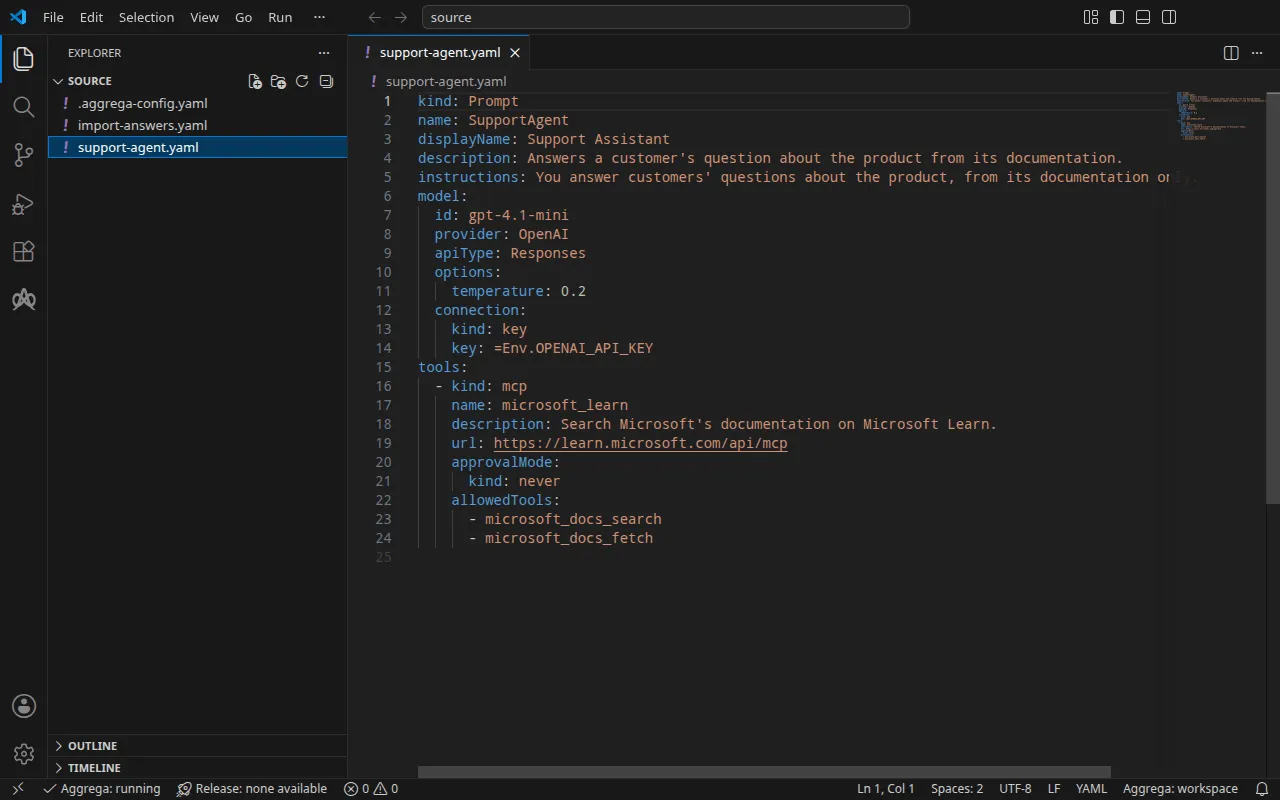
المشروع
يمكن لتطبيق مبني على Agent Framework أن يحمّل وكيلًا من وكيل تصريحي: مستند YAML من النوع Prompt يسمّي نموذج الوكيل وتعليماته وأدواته. وهذا المستند، المكتوب لهذا الشرح العملي، يسمّي gpt-4.1-mini من OpenAI وخادم MCP الذي تطرحه Microsoft Learn:
kind: Promptname: SupportAgentdisplayName: Support Assistantdescription: Answers a customer's question about the product from its documentation.instructions: You answer customers' questions about the product, from its documentation only.model: id: gpt-4.1-mini provider: OpenAI apiType: Responses options: temperature: 0.2 connection: kind: key key: =Env.OPENAI_API_KEYtools: - kind: mcp name: microsoft_learn description: Search Microsoft's documentation on Microsoft Learn. url: https://learn.microsoft.com/api/mcp approvalMode: kind: never allowedTools: - microsoft_docs_search - microsoft_docs_fetchيُكتب مفتاح النموذج على هيئة =Env.OPENAI_API_KEY، فلا يحوي الملف أي مفتاح. ويقرأ Agent Framework ذلك التعبير من متغير البيئة OPENAI_API_KEY فقط حيث يحمّل التطبيق الوكيل التصريحي عبر AgentFactory(safe_mode=False)، وهو إعداد الأمان في Agent Framework نفسه، وتكون بيئة تشغيل .NET موجودة؛ وإلا فإن المفتاح هو نص التعبير كما هو مكتوب. ولا يقرأ الاستيراد شيفرة التطبيق البرمجية، التي تحمّل الوكيل التصريحي، أبدًا، وليست جزءًا من المثال. وبجوار الملف، يجعل .aggrega-config.yaml المجلد مساحة عمل:
# The workspace key marks this directory as the workspace root, so an import run# here writes its drafts beside support-agent.yaml.workspace: {}# The registry the importer is fetched from the first time an import needs it.default_registry: hub.aggrega.aiيشير الاستيراد إلى Components وكيل Agent Framework ونموذج OpenAI من الكتالوج، ويصوغ --target مسودة Manifest من Recipes الخاصة به. ولا تسمّي مساحة العمل أي مجلد كتالوج، لذا يقرأ الاستيراد كتالوج المكتبة القياسية من registry الذي يجلب منه مستورِده: لقطة موقَّعة من الكتالوج المطروح، يجلبها أول استيراد ويتحقق منها ويحفظها في ذاكرة التخزين المؤقت للمحتوى في مساحة العمل، ويسمّيها بملخّصها في ملف السجل الذي يكتبه الاستيراد بجوار مسوداته. وتقرأ مساحة العمل التي تسمّي مجلدات كتالوج خاصة بها — في AGGREGA_CATALOG_DIRS، أو تحت workspace.catalog_dirs — تلك المجلدات أولًا، واللقطة المطروحة خلفها.
ما يطلبه الاستيراد
يسمّي الوكيل التصريحي نموذجه، ولا يسمّي أبدًا صورة الحاوية التي يعمل بها التطبيق: فأنت تبني تلك الصورة من مشروعك. ولا يحوي الكتالوج صورة حاوية افتراضية لتطبيق مبني على Agent Framework، لذا يطلبها الاستيراد. وعند تشغيله في الطرفية دون إجابة جاهزة، يسأل:
The drafts leave values empty that the source cannot hold. Answer each one, or press Enter to leave it for later in the answers file:
release.yaml spec.components.supportagent.infra.image  Container image running the application built on Microsoft Agent Framework.>
ويكتب الإجابة في المسودات وفي import-answers.yaml، بجوار support-agent.yaml، فيقرؤها الاستيراد التالي من هناك ولا يسأل شيئًا. ومن دون طرفية — في التكامل المستمر، أو عبر أنبوب — لا يسأل شيئًا: بل يكتب الملف والمفتاح فارغ، ويتوقف، مسمّيًا الملف. ويحوي المثال الملف مسبقًا، وقد أُجيب عن الصورة فيه، ghcr.io/example/support-agent:1.0.0، وهي تمثّل صورة الحاوية التي تبنيها:
# Values the import could not draft from the source, keyed by the drafted file and the key path inside# it. Write each one beside its key; an import of the same source, and a sync, read them from here and# ask nothing. A secret is never written here: its key asks where the secret comes from — a variable# name, ${NAME}, or the name of a Kubernetes Secret.release.yaml: # Container image running the application built on Microsoft Agent Framework. spec.components.supportagent.infra.image: "ghcr.io/example/support-agent:1.0.0" # The origin of the secret value, written by the operator in the Release. Read exactly as # values.origin is. Write it here or in values.origin, never in both. A secret: name where it comes # from, never the value. spec.components.supportagent.uses.model.gpt-4-1-mini.features.credential.infra.origin: "openai-api-key"الإجابة الثانية مخصصة لبناء Kubernetes، مع --target helm: هناك يقرأ الوكيل مفتاح OpenAI من Kubernetes Secret، والإجابة هي اسم Secret، openai-api-key، لا المفتاح أبدًا. أما بناء Docker Compose فيقرأ المفتاح من shell لديك بدلًا من ذلك، لذا لا يستخدم هذا الاستيراد تلك الإجابة. يصف ملف إجابات الاستيراد الملف والأسئلة وقواعد الإجابة عن السرّ.
يسرد aggrega import كل علامة يقبلها الأمر، ومنها --answers التي تسمّي ملف إجابات محفوظًا في مكان آخر.
انتقل إلى source:
cd sourceشغّل الاستيراد
سمِّ ملف الوكيل التصريحي. يقرأ الاستيراد كل وكيل تصريحي بوصفه ملفًا قائمًا بذاته ولا يقرؤه دليلًا أبدًا:
aggrega import support-agent.yaml --target composeيسرد على الإخراج القياسي ما كتبه:
wrote aggregate.yamlwrote release.yamlwrote manifest.yamlwrote .aggrega-import.jsonعلى الخطأ القياسي، حيث يمثّل <workspace> المجلد الذي شغّلته فيه:
[… omitted: a warning that the importer runs unverified, printed where its module is read from beside its Plugin entity in a catalog folder rather than fetched]read as the agent-framework format, with drafted paths relative to <workspace>warn: the value of tools.microsoft_learn.url of node SupportAgent is carried as written in the Release the draft writes: the field belongs to an MCP server's configuration, which can carry a key, and setting empty_credentials to marked or all writes it emptyinfo: the answers file <workspace>/import-answers.yaml also answers spec.components.supportagent.uses.model.gpt-4-1-mini.features.credential.infra.origin in release.yaml, which these drafts do not leave empty; those answers are kept there and not appliedmapped SupportAgent (agent) to core/ai-agent/agent-framework as a reference, NONEmapped gpt-4.1-mini (model) to core/ai-model/openai as a reference, NONEmade no choice for SupportAgent#microsoft_learn (tool)Pull complete: <workspace>/release.lock (entities=8, source_artifacts=0, external_inputs=0)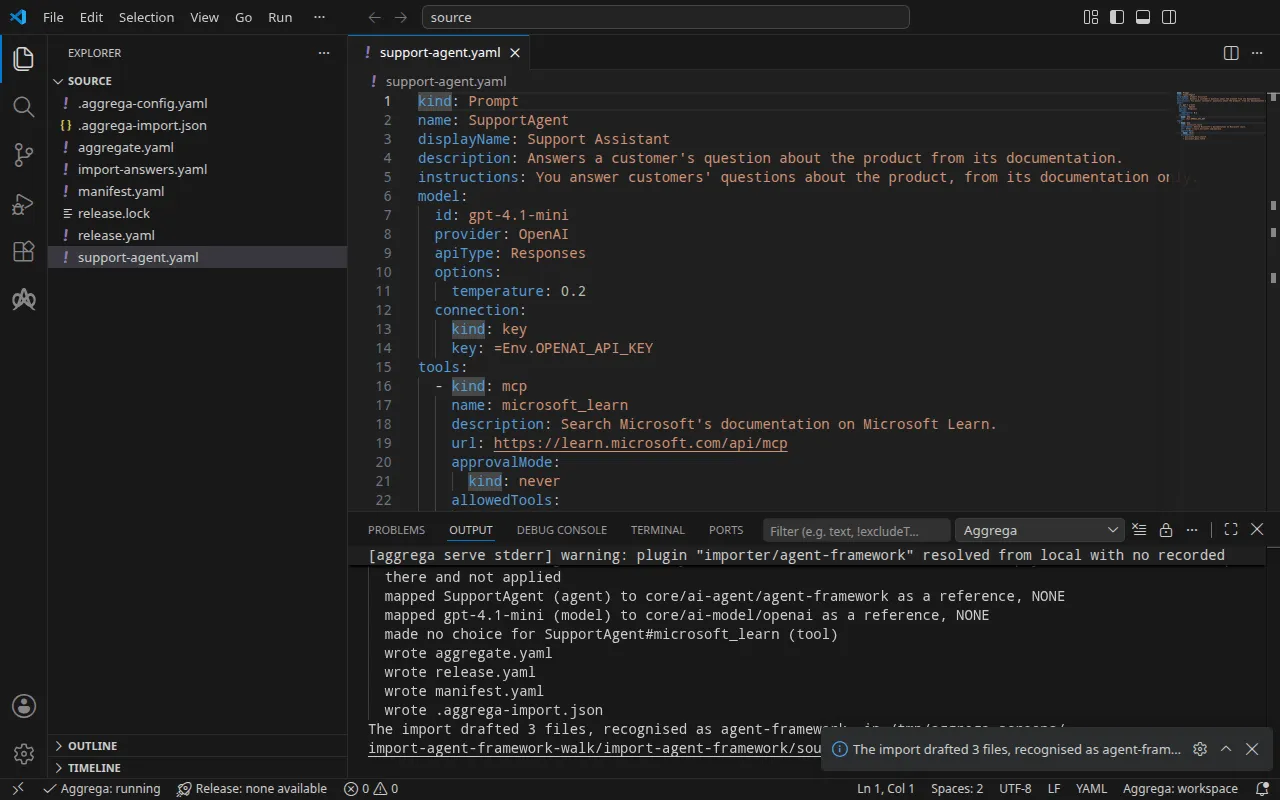
- السطر
warnيسمّي قيمة قد تحمل مفتاحًا — عنوان خادم MCP — ويقول إنها تُنقل كما هي مكتوبة. وهذا العنوان لا يحمل أيًّا منها. - السطر
infoيسمّي الإجابة التي لا تستخدمها مسودات Docker Compose، المحفوظة في ملف الإجابات لبناء Kubernetes. - الأسطر
mappedتقول إن الوكيل هو مثيل من وكيل Agent Framework في المكتبة القياسية،core/ai-agent/agent-framework، وإن نموذجه مثيل منcore/ai-model/openai. وطبقتهاNONE: إذ يشير استيراد Agent Framework إلى Components هذه بحسب ما يسمّيه الوكيل التصريحي بدلًا من تقييم كل منها مقابل الكتالوج. - السطر
made no choiceهو خادم MCP، الذي لا يصوغه الاستيراد مسودةً كأي Component، للسبب الذي تذكره التعليقات فيaggregate.yaml. - السطر
Pull completeهو الاستيراد وهو يجلب ما يعتمد عليه Release المسوَّد، كما يفعلaggrega pull، إلىrelease.lock، فتجتاز المسودات التحقق وتُبنى فورًا. وتحت--offlineلا يجلب الاستيراد شيئًا ويسمّي الأمرaggrega pullالذي ينبغي تشغيله.
ما يكتبه
تحمل ملفات Aggregate و Release و Manifest الاسم imported/supportagent، نسبةً إلى name الخاص بالوكيل، SupportAgent، مختصرًا إلى supportagent — ولا يُقرأ displayName الخاص به — تحت مساحة الأسماء التي يحددها إعداد target_namespace للمستورِد، وهي imported ما لم تحدد غيرها (الإعدادات).
aggregate.yaml — الوكيل، موصَّلًا بنموذجه مع المفتاح الذي يقدّمه معلنًا على الاتصال، والنموذج:
# Not read: the application's code, which loads each declarative agent and binds the functions of its function tools; the application runs in the image the Release names for each instance, and loads its declarative agents itself.apiVersion: aggrega.ai/v1beta1kind: Aggregatemetadata: name: imported/supportagent version: 0.1.0 description: Draft Aggregate imported from a source in the agent-framework format.spec: components: # The declarative agent SupportAgent. # Read by the application from the declarative agent, and taken by no key of core/ai-agent/agent-framework: instructions, the options of its model requests (temperature). # The MCP server microsoft_learn, drafted as no Component and no connection, since Agent Framework sends it to the model's provider as a hosted tool, and the provider, not the application, reaches it at its url, which must therefore be reachable from the provider; its url is written above supportagent's entry in the Release. # Stated by the declarative agent for microsoft_learn: its description, "Search Microsoft's documentation on Microsoft Learn."; its approval mode, never; the tools of the server it allows, microsoft_docs_search, microsoft_docs_fetch. supportagent: type: core/ai-agent/agent-framework values: display_name: "Support Assistant" description: "Answers a customer's question about the product from its documentation." uses: model: gpt-4-1-mini: target: gpt-4-1-mini # For the compose target, the lines below declare credential on gpt-4-1-mini: a secret the Release alone attaches arrives under the key value, so each is declared with a key of its own and no two arrive under one; the Release attaches its origin, naming this type or none. features: credential: type: core/secret-value values: key: OPENAI_API_KEY # The model gpt-4.1-mini, which SupportAgent names with the OpenAI provider. gpt-4-1-mini: type: core/ai-model/openai values: model: "gpt-4.1-mini"خادم MCP ليس Component ولا اتصالًا للوكيل: يرسله Agent Framework إلى موفِّر النموذج بوصفه أداة مستضافة، ويصل إليه الموفِّر، لا التطبيق، عند url الخاص به، الذي يجب لذلك أن يكون قابلًا للوصول من الموفِّر. وتبقى التعليمات وخيارات طلبات النموذج ووصف الخادم ووضع الموافقة والأدوات المسموح بها في الوكيل التصريحي، الذي يقرؤه التطبيق؛ وتسمّي التعليقات كلًّا منها. وواجهة OpenAI API خدمة مستضافة، لذا يرفض Component الوكيل اتصالًا إليها لا يحمل بيانات اعتماد؛ ويعلن الاتصال واحدة، تحت المفتاح OPENAI_API_KEY، وهو المتغيّر الذي يقرأ منه الوكيل التصريحي مفتاحه.
release.yaml — البيئة، وصورة الحاوية، والمنفذ المطروح، ومصدر المفتاح:
apiVersion: aggrega.ai/v1beta1kind: Releasemetadata: name: imported/supportagent # environment is a drafted default, since no source names the environment this Release deploys to; change it to name the one it deploys to. environment: development version: 0.1.0 description: Draft Release imported from a source in the agent-framework format.spec: aggregate: imported/supportagent manifest: imported/supportagent components: # The declarative agent also states these values for its model and its MCP servers, written here for review: # - model.connection.key, written as =Env.OPENAI_API_KEY, which Agent Framework reads from the environment variable OPENAI_API_KEY only where the application loads the declarative agent with AgentFactory(safe_mode=False), Agent Framework's own security setting, and a .NET runtime is present; otherwise the value is the expression's text as written # - tools.microsoft_learn.url: "https://learn.microsoft.com/api/mcp" supportagent: infra: # Left for the Release, since the source cannot supply it: infra.image, the container image running the application built on Agent Framework, holding its declarative agent image: "ghcr.io/example/support-agent:1.0.0" # Published on this machine's loopback address, 127.0.0.1: reachable from this machine only, by any process running on it. Delete this line to keep the service internal. published_port: 8000 uses: model: gpt-4-1-mini: features: credential: type: core/secret-value infra: # Attached by reference, never as a value: the credential supportagent presents to gpt-4-1-mini on its model connection, read from the variable OPENAI_API_KEY, which a target substituting variable references, as Docker Compose does when the stack starts, reads from the environment, so no file carries the value. origin: "${OPENAI_API_KEY}" gpt-4-1-mini: {}البيئة، development، قيمة افتراضية يكتبها الاستيراد لأن أي وكيل تصريحي لا يسمّي واحدة؛ غيّرها حيث ينشر Release في مكان آخر. وصورة الحاوية هي الإجابة التي قرأها الاستيراد من import-answers.yaml. ويُطرح الوكيل على عنوان الحلقة المحلية في جهازك، على 8000، مع إعادة التوجيه إلى المنفذ الذي يستمع إليه برنامجه، infra.port، وهو 8000 ما لم تحدد غيره. والمفتاح هو الإشارة إلى المتغير ${OPENAI_API_KEY}، المسمّاة باسم المتغير الذي يقرؤه الوكيل التصريحي، ولا قيمة أبدًا. ويُكتب عنوان خادم MCP كما يذكره الوكيل التصريحي، للمراجعة، ولا يُضبط في أي مكان آخر: يسلّمه Agent Framework إلى الموفِّر في طلبه إلى النموذج.
manifest.yaml — Recipe منصة Compose للوكيل وللنموذج، والتحقيق الذي يكتب الإشارة إلى متغير المفتاح في ملف Compose كما هي مكتوبة:
apiVersion: aggrega.ai/v1beta1kind: Manifestmetadata: name: imported/supportagent version: 0.1.0spec: mappings: components: type: core/ai-agent/agent-framework: compose/agent-framework core/ai-model/openai: compose/openai features: type: core/secret-value: compose/dotenv-secretيسجّل release.lock كيانات الكتالوج التي انتهى إليها Release، بحسب الملخّص، أما .aggrega-import.json فهو سجل ما كتبه الاستيراد، الذي يقرؤه aggrega import --sync لاحقًا.
التحقق والبناء
aggrega validate --release release.yamlaggrega build --release release.yaml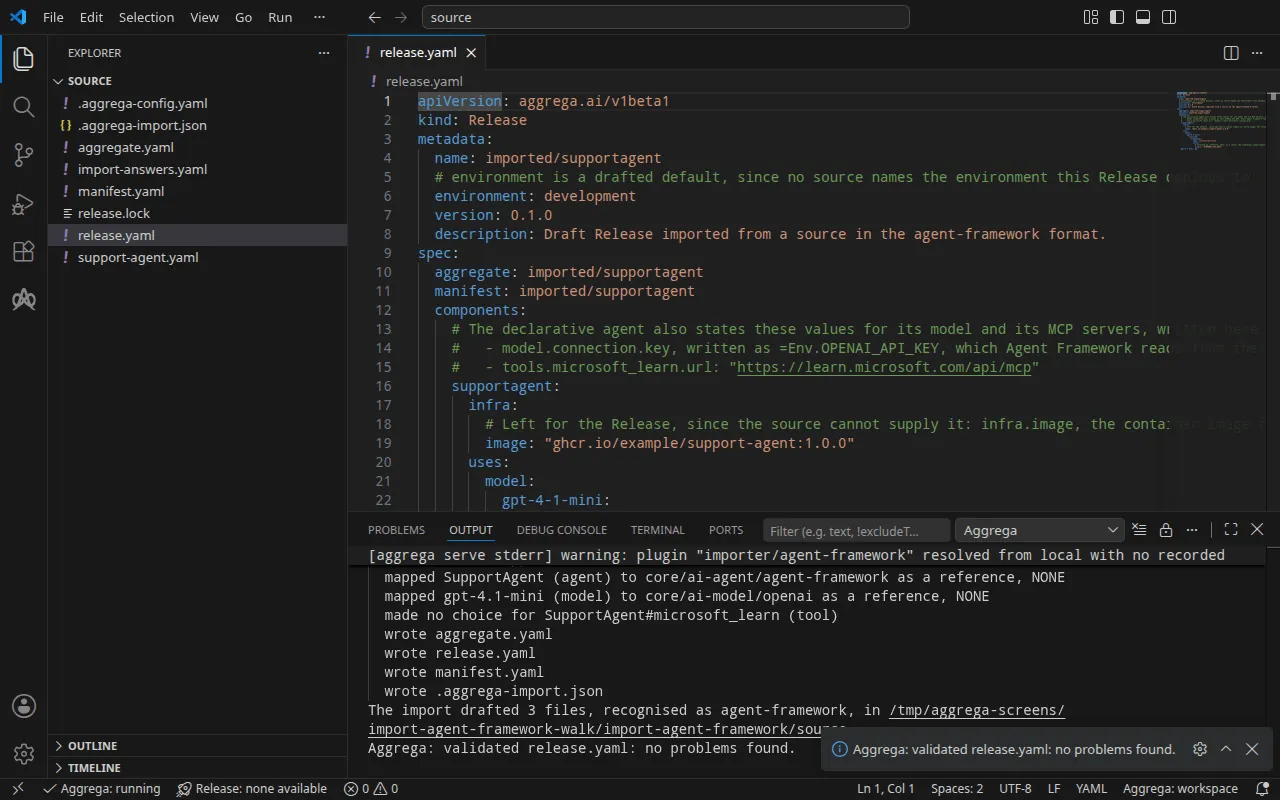
يطبع التحقق:
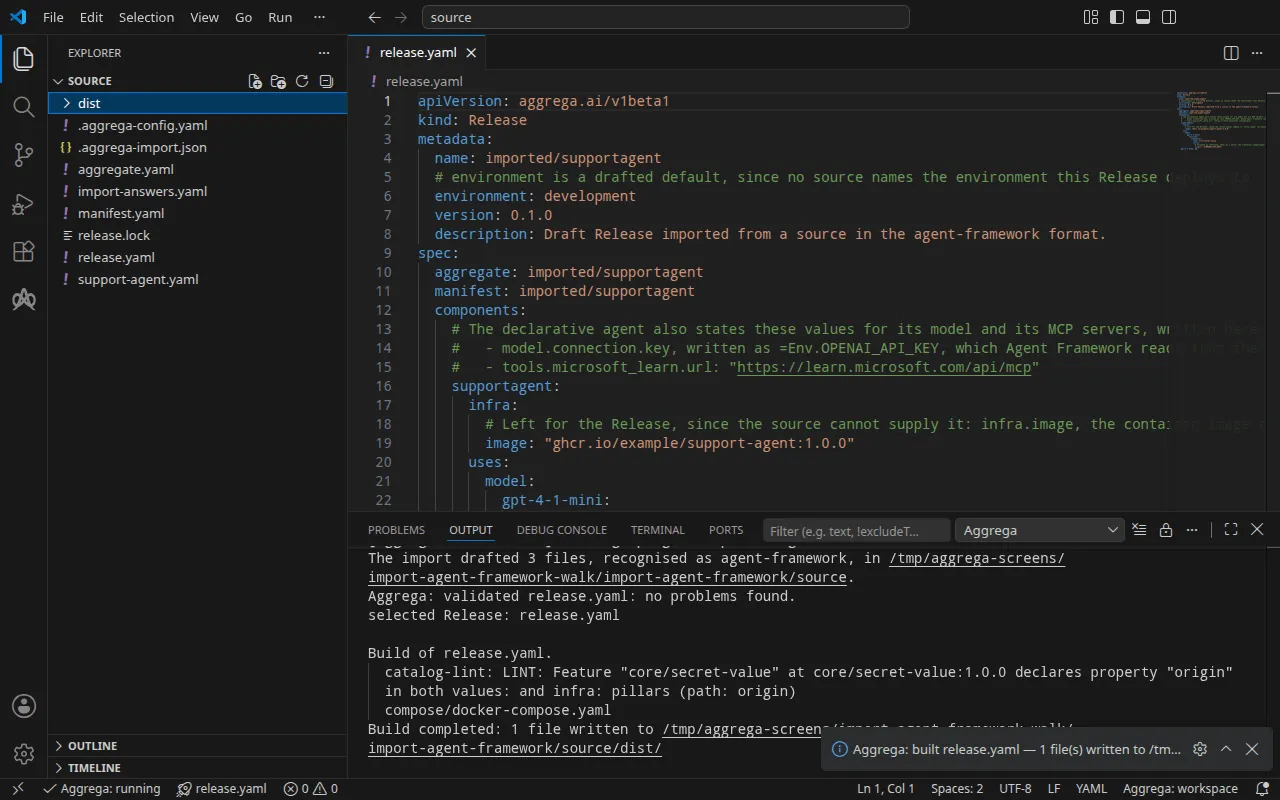
notice: LINT: Feature "core/secret-value" at core/secret-value:1.0.0 declares property "origin" in both values: and infra: pillars (path: origin)release dependency validation passed: release.yaml (schema-pillar + dependency pillars)ويطبع البناء، حيث يمثّل <workspace> المجلد الذي شغّلته فيه:
notice: LINT: Feature "core/secret-value" at core/secret-value:1.0.0 declares property "origin" in both values: and infra: pillars (path: origin)[… omitted: a total build time, which differs per run]Build completed: 1 file written to <workspace>/distالسطر notice استشاري: يقبل Feature السرّ قيمة origin من values في Aggregate أو من infra في Release، ويبلّغ الإشعار بأن ورقة واحدة معلنة في كليهما. ولا يغيّر أي حكم.
خدمة الوكيل في dist/compose/docker-compose.yaml:
services: supportagent: image: ghcr.io/example/support-agent:1.0.0 environment: OPENAI_BASE_URL: https://api.openai.com/v1 OPENAI_MODEL: gpt-4.1-mini OPENAI_API_KEY: ${OPENAI_API_KEY} ports: - 127.0.0.1:8000:8000 [… omitted: the labels the build writes on every service, naming the Aggregate, the component, the environment and the compiler's version] networks: - composeيتلقى التطبيق عنوان النموذج واسمه ومفتاحه في المتغيرات التي يقرؤها عملاء OpenAI في Agent Framework، فيقرأ =Env.OPENAI_API_KEY الخاص بالوكيل التصريحي المفتاح الذي ألحقه Release حيث يحمّله التطبيق كما يصف المشروع. ولا يحمل أي متغير عنوان خادم MCP، الذي يصل إليه الموفِّر. ولا يحصل النموذج على خدمة خاصة به: فالوكيل يصل إلى OpenAI API على عنوانه الخاص. والمفتاح إشارة إلى متغير، تُملأ من shell لديك عند بدء مكدس Compose. وتطرح الخدمة منفذها على 127.0.0.1 وحده.
مع مساعد الذكاء الاصطناعي
يستطيع مساعد الذكاء الاصطناعي المُعَدّ بأدوات Aggrega أن يفعل الشيء نفسه: الصق هذا الموجِّه فيه.
استخدم أدوات Aggrega فقط، ولا تنشئ أي مجلد بنفسك. إذا كان مجلد مساحة العمل لا يحوي مجلد `import-agent-framework` بعد، فاستدعِ الأداة `draft` مرة واحدة مع ضبط `example` على `import-agent-framework` ومن دون `dir`: فهي تكتب المثال في مجلد `import-agent-framework` جديد، يحوي مجلد `source` فيه ما تستورده هذه الصفحة. ثم استدعِ الأداة `import` مع ضبط `workspace_root` على `import-agent-framework/source`، و `source` على `support-agent.yaml`، و `target` على `compose`: فهي تقرأ الإجابات التي تحتاج إليها من `import-answers.yaml` بجوار `support-agent.yaml`، وتكتب مسوداتها في `import-agent-framework/source` وتجري pull لما تحتاج إليه. ثم استدعِ الأداة `validate` مع ضبط `workspace_root` على `import-agent-framework/source` و `release` على `release.yaml`، والأداة `build` مع ضبط `workspace_root` على `import-agent-framework/source`، و `release` على `release.yaml`، و `write` على true. أخبرني بالملفات التي كتبها البناء؛ فهي تحت `import-agent-framework/source/dist/`.افتحه في VS Code
مع تثبيت امتداد Aggrega في Visual Studio Code، افتح المجلد import-agent-framework/source في VS Code، حيث كتب الاستيراد مسوداته. ويحوي المجلد Release واحدًا، هو release.yaml المسوَّد، فيحدده المحرر لك، ويتحقق من المسودات مقابل ذلك Release أثناء تحريرك لها، ويعلّم ما يجده في الملف وفي لوحة Problems. ويرسم Aggrega: Show topology graph، في لوحة الأوامر، مكوِّنات Release والتوصيلات بينها. وتعمل Aggrega: Build و Aggrega: Preview build و Aggrega: Pull على Release نفسه، وكل منها زر أيضًا في لوحة Commands من عرض Aggrega في شريط النشاط؛ ويكتب Build ملفاته في dist/ الخاص بالمجلد. ويغطي استخدام Aggrega في Visual Studio Code الباقي.
شغِّله
تبني صورة الحاوية من المشروع، باستخدام Dockerfile خاص بك: شيفرة التطبيق البرمجية، مع Agent Framework مثبَّتًا والوكيل التصريحي بداخلها. ويشغّل Docker Compose أمر الصورة نفسها خدمةً للوكيل، لأن Recipe لا يضبط أيًّا منها، لذا يجب أن يستمر ذلك الأمر في العمل، ويجب أن يخدم الطلبات إن أردت الوصول إلى الوكيل. ويقرر برنامجك العنوان ومسار الطلب والاستجابة.
استخدم التشغيل أدناه صورةً كهذه: Python مع حزم Agent Framework agent-framework-core و agent-framework-openai و agent-framework-declarative، وبيئة تشغيل .NET — ضبطت الصورة DOTNET_ROOT على دليلها و DOTNET_SYSTEM_GLOBALIZATION_INVARIANT=1 — و support-agent.yaml، وبوصفه أمر الصورة، خادم HTTP صغير خاص بالبرنامج على المنفذ 8000. ويحمّل الخادم الوكيل التصريحي عبر AgentFactory(safe_mode=False)، فيقرأ =Env.OPENAI_API_KEY الخاص به المفتاح الذي يسلّمه البناء، ويشغّل الوكيل مرة لكل طلب POST /ask. ابنِ صورتك في جذر المشروع، واكتب اسمها بدلًا من ghcr.io/example/support-agent:1.0.0 في import-answers.yaml، وشغّل الاستيراد مرة أخرى مع --sync، الذي يكتب الإجابة الجديدة في المسودات ويجري pull مرة أخرى؛ ثم ابنِ:
docker build -t docs-assistant:local .aggrega import support-agent.yaml --syncaggrega build --release release.yamlمع docs-assistant:local إجابةً، يسمّي sync القيمة الوحيدة التي غيّرها، ضمن الأسطر التي يطبعها:
changed spec.components.supportagent.infra.image in release.yamlثم اضبط المفتاح في shell لديك وابدأ مكدس Compose:
export OPENAI_API_KEY='your OpenAI key'docker compose -p docs-assistant -f dist/compose/docker-compose.yaml up -d --waitتسمّي -p المشروع، كما توضح خطوة التشغيل في كيف يعمل الاستيراد.
اختبره
يصل الطلب أدناه إلى البرنامج الذي تشغّله صورة هذا الشرح العملي: الوكيل التصريحي خلف خادم HTTP صغير على المنفذ 8000، يجيب عن POST /ask. ويقرر برنامجك الخاص مساره واستجابته. أرسله إلى http://127.0.0.1:8000، العنوان الذي يطرحه published_port، متى بدأ البرنامج الاستماع، بعد ثوانٍ قليلة من بدء مكدس Compose:
curl -sS -X POST http://127.0.0.1:8000/ask -H 'Content-Type: application/json' \ -d '{"question": "In one short sentence: what is Azure Container Apps?"}'{"error": "the agent failed: ChatClientException: (\"<class 'agent_framework_openai._chat_client.OpenAIChatClient'> service failed to complete the prompt: Error code: 401 - Incorrect API key provided: sk-place************-key. [… omitted: where to find an API key, and the same error repeated as the exception it wraps]"}ضبط التشغيل OPENAI_API_KEY على قيمة نائبة، لذا فالرد هو رفض OpenAI لها، يمرّره البرنامج. والمفتاح الذي رفضته OpenAI هو تلك القيمة النائبة، معروضة مقنَّعة، فقرأها =Env.OPENAI_API_KEY الخاص بالوكيل التصريحي من البيئة التي يسلّمها البناء.
أوقف مكدس Compose بما يلي:
docker compose -p docs-assistant -f dist/compose/docker-compose.yaml downعلى Kubernetes، شغّل الاستيراد مع --target helm وأجرِ push لصورة الحاوية إلى registry يجلب منه عنقودك، مسمّيًا إياها في import-answers.yaml. ثم أنشئ Secret openai-api-key وطبّق البناء، كما تصف خطوة التشغيل في كيف يعمل الاستيراد. ولا يملك Deployment الخاص بالوكيل أي Service، لذا أعد توجيه منفذ محلي إليه. ويستمر الأمر في العمل حتى توقفه:
kubectl port-forward deploy/supportagent 8000:8000Forwarding from 127.0.0.1:8000 -> 8000Forwarding from [::1]:8000 -> 8000من طرفية أخرى، أرسل الطلب نفسه إلى المنفذ المُعاد توجيهه:
curl -sS -X POST http://127.0.0.1:8000/ask -H 'Content-Type: application/json' \ -d '{"question": "In one short sentence: what is Azure Container Apps?"}'{"error": "the agent failed: ChatClientException: (\"<class 'agent_framework_openai._chat_client.OpenAIChatClient'> service failed to complete the prompt: Error code: 401 - Incorrect API key provided: sk-place************-key. [… omitted: where to find an API key, and the same error repeated as the exception it wraps]"}