



استيراد تطبيق LangGraph
يستورد هذا الشرح العملي تكوين تطبيق LangGraph — رسم بياني واحد يجيب عن أسئلة العملاء عن طلباتهم — ويبني التطبيق من أجل Docker Compose. يصوغ الاستيراد كل ملف يقرؤه البناء: الرسم البياني، وقاعدة بيانات PostgreSQL التي يحفظ فيها checkpointer الخاص به الحالة، والنموذج الذي يستدعيه، وكلمات المرور والمفتاح بوصفها مراجع متغيّرات، وتحقيقات كل منها. ويسأل مرة واحدة عن القيمتين اللتين لا يحملهما أي تكوين: النموذج الذي تستدعيه شيفرة الرسم البياني، وصورة الحاوية التي يعمل فيها التطبيق. يأتي كل ملف وكل كتلة إخراج أدناه من تشغيل فعلي؛ ويوجد التكوين وكل مرحلة من مراحل الشرح العملي في المثال import-langgraph، حيث يعيد نص فحص برمجي تشغيل الاستيراد، ويقارن ما يكتبه وما يطبعه والكتل التي تنقلها هذه الصفحة بالملفات المحفوظة هناك، ويتحقق مما كتبه الاستيراد ويبنيه.
صُغ مسودة المثال
يمكنك تشغيل هذا الاستيراد بالأوامر الواردة في هذه الصفحة، أو اجعل مساعد الذكاء الاصطناعي يشغّله نيابةً عنك.
اكتب المثال في مجلد جديد يحمل اسمه:
aggrega draft --example import-langgraphثم يطبع الأوامر التي تُشغَّل بعد ذلك. يدخل الأول إلى المجلد الجديد؛ ويدخل الذي يليه، أدناه، إلى مجلد source الخاص به، الذي يحوي ما تستورده هذه الصفحة وهو المكان الذي يجري فيه الاستيراد:
cd import-langgraph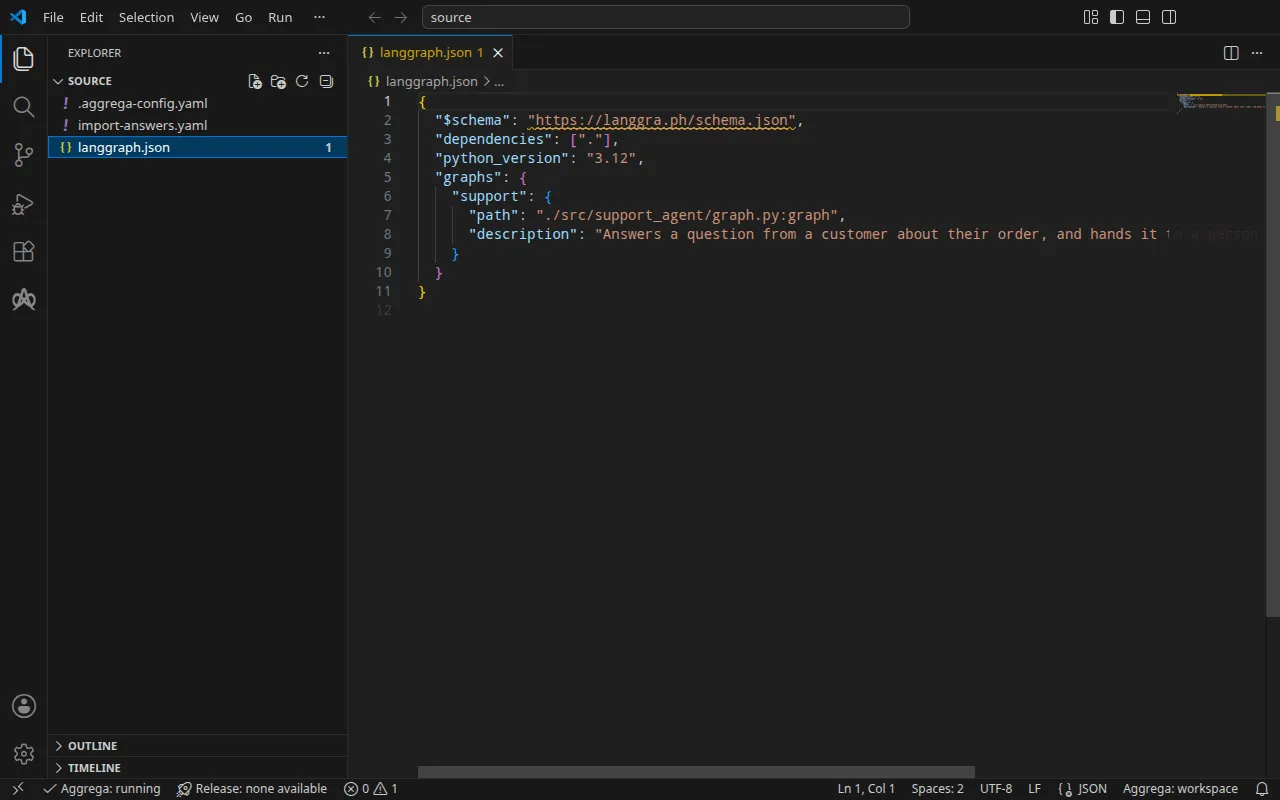
المشروع
يحتفظ تطبيق LangGraph برسومه البيانية في الشيفرة البرمجية ويعلنها في langgraph.json، ملف تكوين أداة سطر الأوامر في LangGraph. وهذا الملف، المكتوب لهذا الشرح العملي، يعلن رسمًا بيانيًا واحدًا، support، بمسار استيراد الرسم البياني في شيفرة التطبيق وبوصف له:
{ "$schema": "https://langgra.ph/schema.json", "dependencies": ["."], "python_version": "3.12", "graphs": { "support": { "path": "./src/support_agent/graph.py:graph", "description": "Answers a question from a customer about their order, and hands it to a person when it cannot." } }}يقرأ الاستيراد langgraph.json ولا يقرأ شيفرة التطبيق أبدًا، لذا لا يحمل المثال إلا التكوين. وبجانبه، يجعل .aggrega-config.yaml المجلد مساحة عمل:
# The workspace key marks this directory as the workspace root, so an import run# here writes its drafts beside langgraph.json.workspace: {}# The registry the importer is fetched from the first time an import needs it.default_registry: hub.aggrega.aiيشير الاستيراد إلى Components الكتالوج لوكيل LangGraph و PostgreSQL ونموذج OpenAI، ويصوغ --target Manifest من Recipes الخاصة بها. لا تسمّي مساحة العمل أي مجلد كتالوج، لذا يقرأ الاستيراد كتالوج المكتبة القياسية من registry الذي يجلب منه مستورِده: لقطة موقَّعة للكتالوج المطروح، تُجلب وتُتحقق وتُحفظ في ذاكرة التخزين المؤقت لمحتوى مساحة العمل عند أول استيراد، ويسمّيها ملخّصها في الملف الذي يسجّل ما كتبه الاستيراد بجانب مسوداته. وتقرأ مساحة العمل التي تسمّي مجلدات كتالوج خاصة بها — في AGGREGA_CATALOG_DIRS، أو تحت workspace.catalog_dirs — تلك أولًا، مع اللقطة المطروحة خلفها.
ما يطلبه الاستيراد
لا يسمّي تكوين LangGraph نموذجًا، لأن شيفرة الرسم البياني تختاره، ولا صورة حاوية، لأنك تبني تلك الصورة من مشروعك. لذا يسأل الاستيراد عن الاثنين: اسم النموذج الذي يستدعيه الرسم البياني، من أجل نموذج OpenAI الذي يصوغه، وصورة الحاوية التي يعمل فيها التطبيق. وفي الطرفية يسأل، ويكتب الإجابات في المسودات وفي ملف الإجابات، import-answers.yaml، داخل الدليل الذي يستورده — هنا جذر المشروع، . — فيقرؤها الاستيراد التالي من هناك ولا يسأل شيئًا. وبلا طرفية — في التكامل المستمر، أو عبر أنبوب — لا يسأل شيئًا: يكتب الملف بمفاتيح فارغة، ويتوقف:
2 values the drafts leave empty are still owed, listed in the answers file <workspace>/import-answers.yaml: write each beside its key there, then run the import againويحوي المثال الملف فعلًا، مجابًا عن أسئلته: يستدعي الرسم البياني gpt-4o-mini من OpenAI، و ghcr.io/example/support-agent:1.0.0 يمثّل الصورة التي تبنيها:
# Values the import could not draft from the source, keyed by the drafted file and the key path inside# it. Write each one beside its key; an import of the same source, and a sync, read them from here and# ask nothing. A secret is never written here: its key asks where the secret comes from — a variable# name, ${NAME}, or the name of a Kubernetes Secret.aggregate.yaml: # Left for the author, since the configuration names no model: values.model, the name of the model # core/ai-model/openai serves. spec.components.model.values.model: "gpt-4o-mini"release.yaml: # Container image running the LangGraph application code. The Docker Compose Recipe runs the catalog's # quickstart agent when it is unset. spec.components.support.infra.image: "ghcr.io/example/support-agent:1.0.0" # The origin of the secret value, written by the operator in the Release. Read exactly as # values.origin is. Write it here or in values.origin, never in both. A secret: name where it comes # from, never the value. spec.components.support.uses.checkpointer_db.postgres.features.credential.infra.origin: "support-db-password" # The origin of the secret value, written by the operator in the Release. Read exactly as # values.origin is. Write it here or in values.origin, never in both. A secret: name where it comes # from, never the value. spec.components.support.uses.model.model.features.credential.infra.origin: "openai-api-key" # The origin of the secret value, written by the operator in the Release. Read exactly as # values.origin is. Write it here or in values.origin, never in both. A secret: name where it comes # from, never the value. spec.components.postgres.features.password.infra.origin: "support-db-password"إجابات origin الثلاث لبناء من أجل Kubernetes، مع --target helm: هناك تُقرأ كلمة مرور قاعدة البيانات ومفتاح OpenAI من كيانات Secret في Kubernetes، وكل إجابة هي اسم Secret — كلمة مرور قاعدة البيانات من support-db-password، على الطرفين، والمفتاح من openai-api-key — لا كلمة المرور أو المفتاح أبدًا. أما البناء من أجل Docker Compose فيقرؤهما من shell لديك، لذا لا يستخدم هذا الاستيراد تلك الإجابات. ويصف ملف إجابات الاستيراد الملف والأسئلة وقواعد إجابة السرّ.
يسرد aggrega import كل علامة يقبلها الأمر، ومنها --answers التي تسمّي ملف إجابات محفوظًا في مكان آخر.
انتقل إلى source:
cd sourceشغّل الاستيراد
سمِّ دليل التطبيق. يقرأ الاستيراد منه langgraph.json ولا يقرأ أي ملف آخر منه:
aggrega import . --target composeيسرد على الإخراج القياسي ما كتبه:
wrote aggregate.yamlwrote release.yamlwrote manifest.yamlwrote .aggrega-import.jsonعلى الخطأ القياسي، حيث يمثّل <workspace> المجلد الذي شغّلته فيه:
[… omitted: a warning that the importer runs unverified, printed where its module is read from beside its Plugin entity in a catalog folder rather than fetched]read as the langgraph format, with drafted paths relative to <workspace>info: the answers file <workspace>/import-answers.yaml also answers spec.components.postgres.features.password.infra.origin in release.yaml, spec.components.support.uses.checkpointer_db.postgres.features.credential.infra.origin in release.yaml, spec.components.support.uses.model.model.features.credential.infra.origin in release.yaml, which these drafts do not leave empty; those answers are kept there and not appliedmapped support (graph) to core/ai-agent/langgraph as a reference, NONEmapped checkpointer (checkpointer) to core/datastore/postgres as a reference, NONEmapped model (model) to core/ai-model/openai as a reference, NONEPull complete: <workspace>/release.lock (entities=10, source_artifacts=0, external_inputs=0)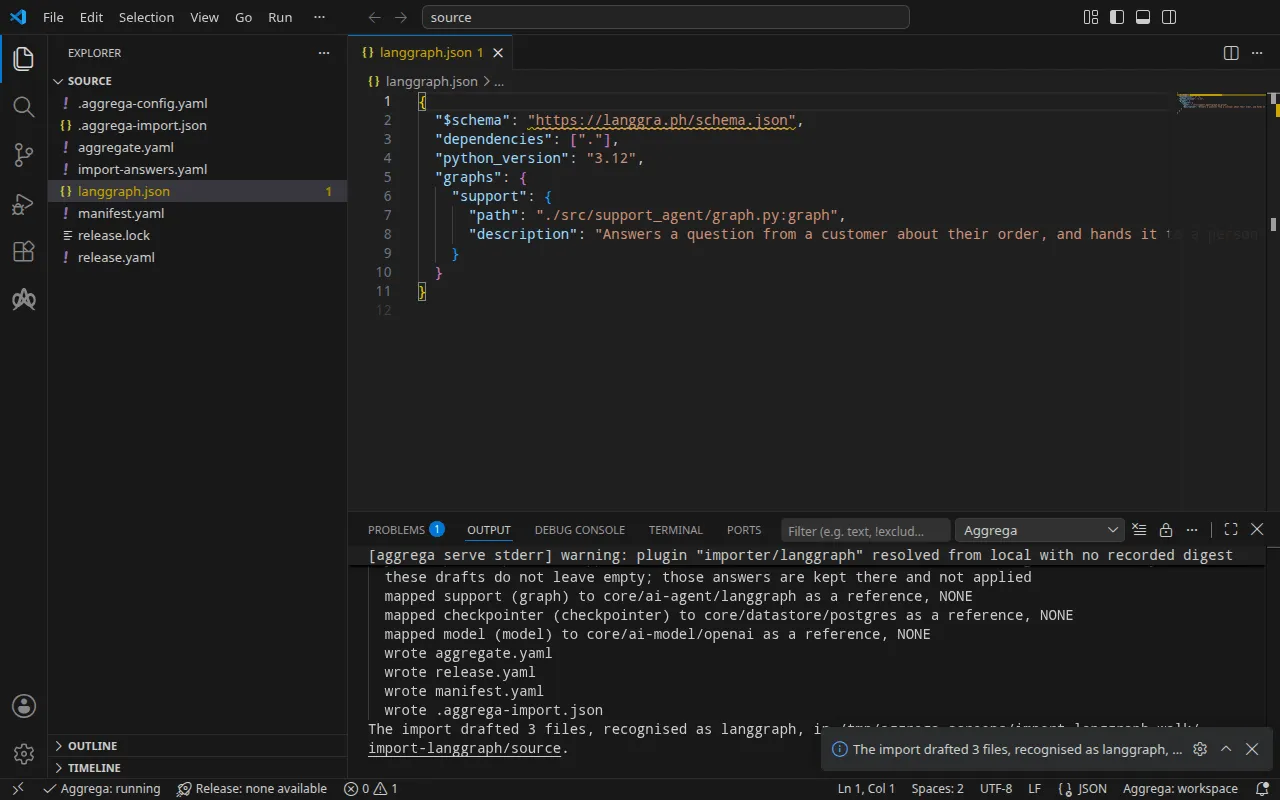
- السطر
infoيسمّي الإجابات التي لا تستخدمها مسودات Docker Compose، المحفوظة في ملف الإجابات لبناء Kubernetes. - أسطر
mappedتقول إن الرسم البياني مثيل من وكيل LangGraph في المكتبة القياسية،core/ai-agent/langgraph؛ وإن checkpointer الخاص به، حيث يحفظ LangGraph حالة كل رسم بياني، مثيل منcore/datastore/postgres، لأن التكوين لا يسمّي checkpointer فيحفظ LangGraph الحالة في PostgreSQL؛ وإن النموذج الذي يستدعيه كل رسم بياني مثيل منcore/ai-model/openai. وتقرأ طبقتهاNONE: يشير استيراد LangGraph إلى هذه Components بحسب ما يعلنه التكوين، لا بتقييم كل منها مقابل الكتالوج. أما التكوين الذي يكونcheckpointer.backendفيه هوmongoفيُصاغ باستخدامcore/datastore/ferretdb، الذي يتحدث بروتوكول MongoDB، فوقcore/datastore/documentdb، ويوصَّل الاثنان كما يوصلهما Aggregate FerretDB في الكتالوج، بكلمة مرور واحدة للاثنين. - السطر
Pull completeهو الاستيراد وهو يجلب ما يعتمد عليه Release المسوَّد، كما يفعلaggrega pull، إلىrelease.lock، فتجتاز المسودات التحقق وتُبنى فورًا. وتحت--offlineلا يجلب الاستيراد شيئًا ويسمّي الأمرaggrega pullالذي ينبغي تشغيله.
ما يكتبه
يحمل كلٌّ من Aggregate و Release و Manifest الاسم imported/support، نسبةً إلى الرسم البياني الوحيد الذي يخدمه langgraph.json، support، إذ لا يحمل التكوين اسمًا خاصًا به — ويُسمّى التكوين الذي يخدم عدة رسوم بيانية باسم ملفه، أو باسم دليله حيث يُعطى الاستيراد دليله، كما هنا — ضمن مساحة الأسماء التي يحددها إعداد target_namespace للمستورِد، وهي imported ما لم تحدد غيرها (الإعدادات).
aggregate.yaml — الرسم البياني، وقاعدة البيانات التي يحفظ فيها الحالة، والنموذج الذي يستدعيه، ويعلن كل اتصال بيانات الاعتماد التي يقدمها، ويبدأ بتعليقات تقول ما قُرئ وما لم يُقرأ:
# LangGraph configurations read:# - langgraph.json# Not read: the application's code, which defines each graph; it runs in the image the Release names for each graph.# Not carried, since they configure the server image langgraph build builds, and the image the Release names is the application's own: dependencies, python_version.apiVersion: aggrega.ai/v1beta1kind: Aggregatemetadata: name: imported/support version: 0.1.0 description: Draft Aggregate imported from a source in the langgraph format.spec: components: support: type: core/ai-agent/langgraph values: graph_entrypoint: "./src/support_agent/graph.py:graph" description: "Answers a question from a customer about their order, and hands it to a person when it cannot." uses: checkpointer_db: postgres: target: postgres # For the compose target, the lines below declare credential on postgres: a secret the Release alone attaches arrives under the key value, so each is declared with a key of its own and no two arrive under one; the Release attaches its origin, naming this type or none. features: credential: type: core/secret-value values: key: POSTGRES_PASSWORD model: model: target: model # For the compose target, the lines below declare credential on model: a secret the Release alone attaches arrives under the key value, so each is declared with a key of its own and no two arrive under one; the Release attaches its origin, naming this type or none. features: credential: type: core/secret-value values: key: OPENAI_API_KEY # The database the configuration's checkpointer keeps each graph's state in, PostgreSQL. postgres: type: core/datastore/postgres features: # For the compose target, the lines below declare password on postgres: a secret the Release alone attaches arrives under the key value, so each is declared with a key of its own and no two arrive under one; the Release attaches its origin, naming this type or none. password: type: core/secret-value values: key: POSTGRES_PASSWORD # The model every graph calls, which the configuration does not name. model: type: core/ai-model/openai values: # Left for the author, since the configuration names no model: values.model, the name of the model core/ai-model/openai serves. model: "gpt-4o-mini"graph_entrypoint هو مسار استيراد الرسم البياني كما يكتبه التكوين. واتصاله checkpointer_db موصَّل بقاعدة البيانات واتصاله model بالنموذج، الذي اسمه الإجابة التي قرأها الاستيراد من import-answers.yaml. ولا يُكتب recursion_limit، فتبقى قيمة Component الافتراضية، 25. وتُعطى قاعدة البيانات كلمة مرور، فلا يكتب Recipe PostgreSQL كلمة مرور من عنده، ويقدم الرسم البياني كلمة المرور نفسها في اتصاله بقاعدة البيانات.
release.yaml — البيئة، والصورة، والمنفذ المطروح، ومصدر المفتاح وكلمات المرور، مع تعليقات فوق الرسم البياني تقول ما صورته وما يُسلَّم إليه:
apiVersion: aggrega.ai/v1beta1kind: Releasemetadata: name: imported/support # environment is a drafted default, since no source names the environment this Release deploys to; change it to name the one it deploys to. environment: development version: 0.1.0 description: Draft Release imported from a source in the langgraph format.spec: aggregate: imported/support manifest: imported/support components: # Each graph's image is the application's own, not the server image langgraph build builds: its code, with LangGraph installed. # It is handed, for its code to read, the graph to run as LANGGRAPH_GRAPH_ENTRYPOINT, the model's name as OPENAI_MODEL, the checkpointer store's host and port as LANGGRAPH_CHECKPOINTER_HOST and LANGGRAPH_CHECKPOINTER_PORT, its user and database, where the store publishes them, as LANGGRAPH_CHECKPOINTER_USER and LANGGRAPH_CHECKPOINTER_DATABASE, and a password attached on the checkpointer_db connection as LANGGRAPH_CHECKPOINTER_PASSWORD. # It is also handed the model's address as OPENAI_BASE_URL and a key attached on the model connection as OPENAI_API_KEY, which the OpenAI client library reads, and recursion_limit as LANGGRAPH_DEFAULT_RECURSION_LIMIT, which LangGraph reads. # An inject: block on the graph's own instance, through an entry reading graph_entrypoint alone, replaces LANGGRAPH_GRAPH_ENTRYPOINT with the name it writes; one on the model connection replaces OPENAI_MODEL, and one on the checkpointer_db connection the store's host, port, user and database, with the names it writes. support: infra: # Left for the Release, since the source cannot supply it: infra.image, the container image running the application image: "ghcr.io/example/support-agent:1.0.0" # Published on this machine's loopback address, 127.0.0.1: reachable from this machine only, by any process running on it. Delete this line to keep the service internal. published_port: 8000 uses: checkpointer_db: postgres: features: credential: type: core/secret-value infra: # Attached by reference, never as a value: the credential support presents to postgres on its checkpointer_db connection, the password of postgres (the configuration names no variable for it), read from the variable POSTGRES_PASSWORD, which a target substituting variable references, as Docker Compose does when the stack starts, reads from the environment, so no file carries the value. origin: "${POSTGRES_PASSWORD}" model: model: features: credential: type: core/secret-value infra: # Attached by reference, never as a value: the credential support presents to model on its model connection (the source names no variable for it, so it is read from the one OpenAI's client libraries read the API key from), read from the variable OPENAI_API_KEY, which a target substituting variable references, as Docker Compose does when the stack starts, reads from the environment, so no file carries the value. origin: "${OPENAI_API_KEY}" postgres: features: password: type: core/secret-value infra: # Attached by reference, never as a value: the password of postgres (the configuration names no variable for it), read from the variable POSTGRES_PASSWORD, which a target substituting variable references, as Docker Compose does when the stack starts, reads from the environment, so no file carries the value. origin: "${POSTGRES_PASSWORD}" model: {}البيئة، development، قيمة افتراضية يكتبها الاستيراد لأن أي تكوين لا يسمّي واحدة؛ غيّرها حيث ينشر Release في مكان آخر. والصورة هي الإجابة التي قرأها الاستيراد من import-answers.yaml. ويُطرح الرسم البياني على عنوان loopback في جهازك، على 8000، مع توجيه إلى المنفذ الذي يستمع إليه برنامجه، infra.port، وهو 8000 ما لم تضبطه. والمفتاح وكلمة المرور مرجعا متغيّر، ${OPENAI_API_KEY} و ${POSTGRES_PASSWORD}، لا قيمتين أبدًا.
manifest.yaml — Recipe من نوع Compose لكل نوع، والتحقيق الذي يكتب كل مرجع متغيّر في ملف Compose كما هو:
apiVersion: aggrega.ai/v1beta1kind: Manifestmetadata: name: imported/support version: 0.1.0spec: mappings: components: type: core/ai-agent/langgraph: compose/langgraph core/datastore/postgres: compose/postgres core/ai-model/openai: compose/openai features: type: core/secret-value: compose/dotenv-secretيسجّل release.lock كيانات الكتالوج التي انتهى إليها Release، بحسب الملخّص، أما .aggrega-import.json فهو سجل ما كتبه الاستيراد، الذي يقرؤه aggrega import --sync لاحقًا.
التحقق والبناء
aggrega validate --release release.yamlaggrega build --release release.yaml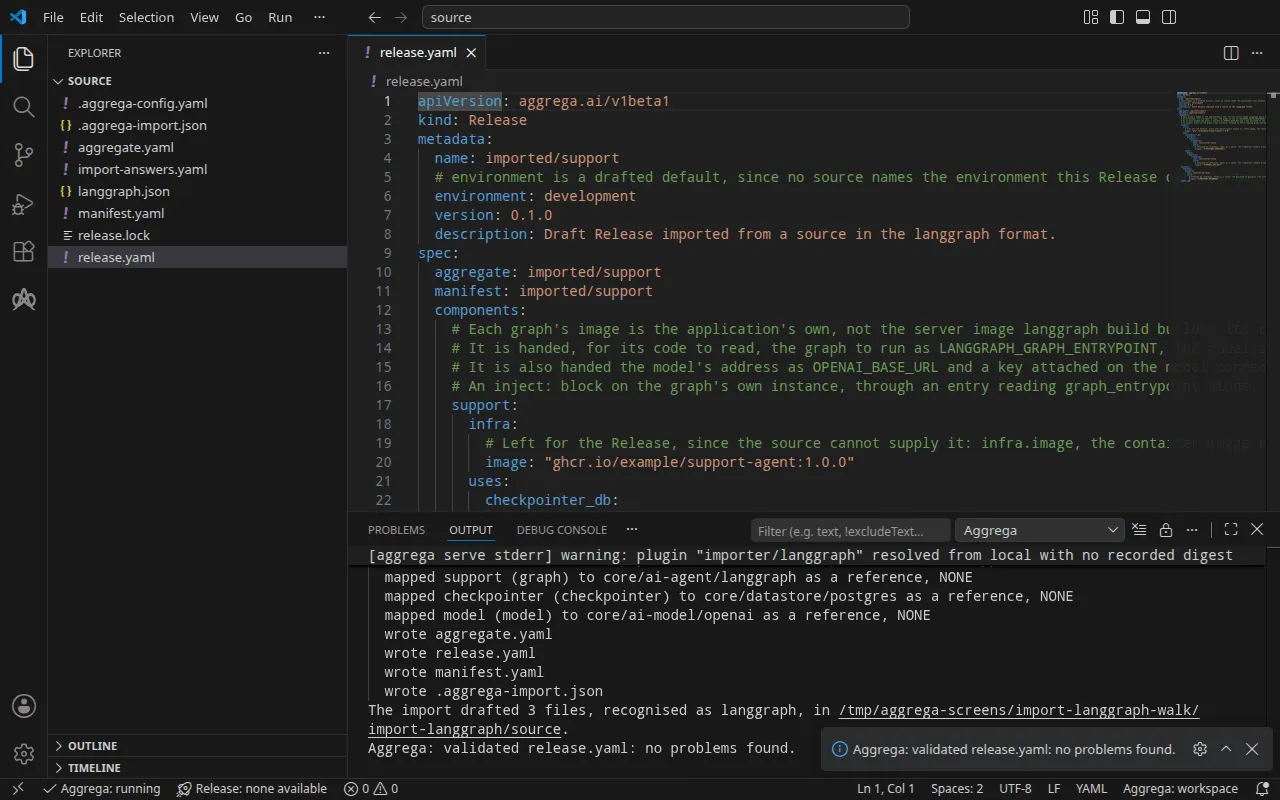
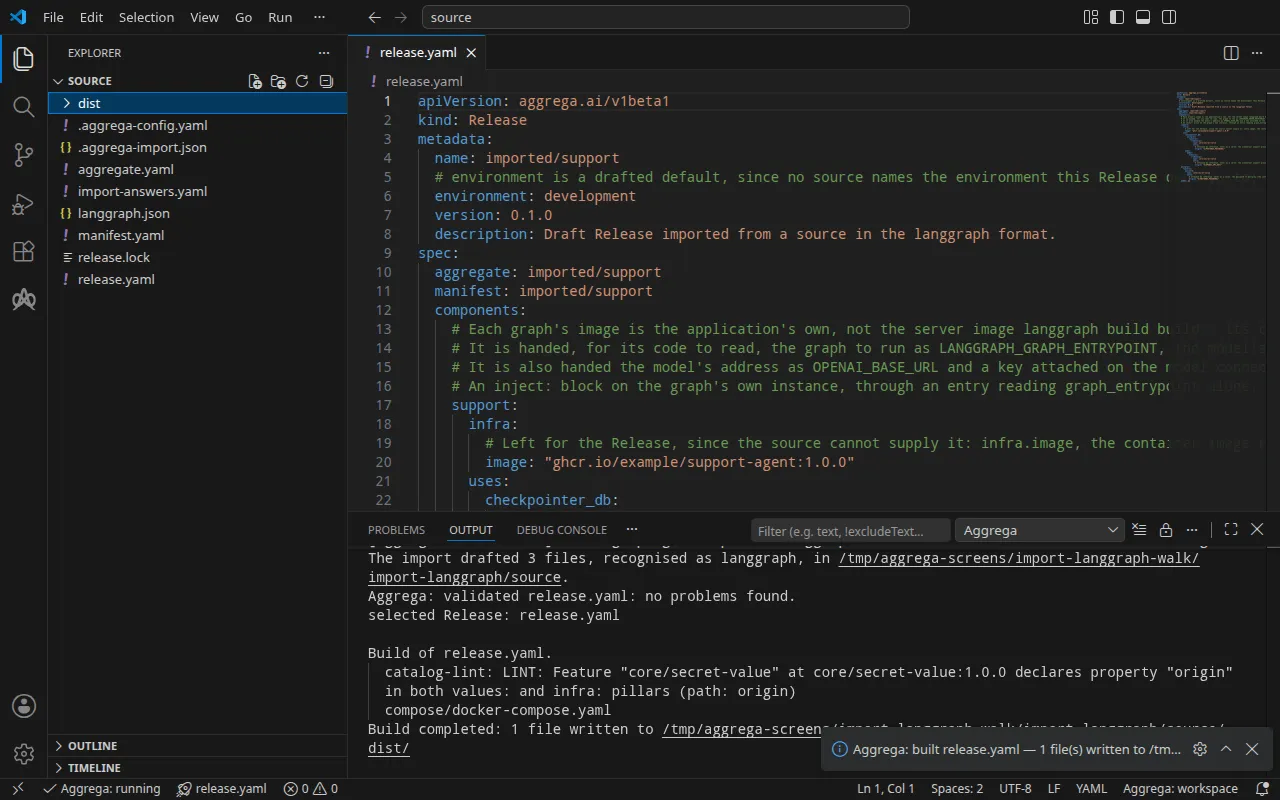
يطبع التحقق:
notice: LINT: Feature "core/secret-value" at core/secret-value:1.0.0 declares property "origin" in both values: and infra: pillars (path: origin)release dependency validation passed: release.yaml (schema-pillar + dependency pillars)ويطبع البناء، حيث يمثّل <workspace> المجلد الذي شغّلته فيه:
notice: LINT: Feature "core/secret-value" at core/secret-value:1.0.0 declares property "origin" in both values: and infra: pillars (path: origin)[… omitted: a total build time, which differs per run]Build completed: 1 file written to <workspace>/distالسطر notice استشاري: يقبل Feature السرّ قيمة origin من values في Aggregate أو من infra في Release، ويبلّغ الإشعار بأن ورقة واحدة معلنة في كليهما. ولا يغيّر أي حكم.
يكتب البناء dist/compose/docker-compose.yaml، بخدمة للرسم البياني، وأخرى لقاعدة البيانات، وثالثة تنتظر قاعدة البيانات. خدمة الرسم البياني:
support: image: ghcr.io/example/support-agent:1.0.0 environment: LANGGRAPH_DEFAULT_RECURSION_LIMIT: "25" OPENAI_BASE_URL: https://api.openai.com/v1 OPENAI_MODEL: gpt-4o-mini LANGGRAPH_CHECKPOINTER_HOST: postgres LANGGRAPH_CHECKPOINTER_PORT: "5432" LANGGRAPH_CHECKPOINTER_USER: appuser LANGGRAPH_CHECKPOINTER_DATABASE: appdb LANGGRAPH_GRAPH_ENTRYPOINT: ./src/support_agent/graph.py:graph OPENAI_API_KEY: ${OPENAI_API_KEY} LANGGRAPH_CHECKPOINTER_PASSWORD: ${POSTGRES_PASSWORD} ports: - 127.0.0.1:8000:8000 [… omitted: the labels the build writes on every service, naming the Aggregate, the component, the environment and the compiler's version] networks: - compose depends_on: support--wait-for-store: condition: service_completed_successfully postgres: condition: service_startedيتلقى الرسم البياني عنوان النموذج واسمه ومفتاحه، ومضيف قاعدة البيانات ومنفذها ومستخدمها واسمها وكلمة مرورها، ونقطة دخوله هو. المستخدم واسم قاعدة البيانات هما القيمتان الافتراضيتان في Component PostgreSQL، appuser و appdb، اللتان تُنشأ بهما خدمة قاعدة البيانات أدناه؛ ويُسلَّم الرسم البياني إياهما لأن Recipe PostgreSQL يطرح الاثنين، والمخزن الذي لا يطرح أيًّا منهما، كما يفعل Valkey، لا يُسلَّم أيًّا منهما. ويصل اسم النموذج ومضيف قاعدة البيانات ومنفذها ومستخدمها واسمها ونقطة دخول الرسم البياني بالأسماء التي يسلّمها Component LangGraph افتراضيًا، والتي تستبدلها كتلة inject: على الاتصال، أو على المكوِّن نفسه لقيمه، بالأسماء التي تقرؤها شيفرتك البرمجية. أما عنوان النموذج ومفتاحه وكلمة مرور قاعدة البيانات فتبقى كما تسميها الكتل، وكذلك LANGGRAPH_DEFAULT_RECURSION_LIMIT، الذي يقرؤه LangGraph بنفسه بوصفه سقف الخطوات لتشغيل لا يضبط تكوينه شيئًا. وتأخذ خدمة قاعدة البيانات نفسها كلمة المرور نفسها:
postgres: image: postgres:16 environment: POSTGRES_USER: appuser POSTGRES_PASSWORD: ${POSTGRES_PASSWORD} POSTGRES_DB: appdb [… omitted: the labels the build writes on every service, the network, and a health check running PostgreSQL's pg_isready]تبدأ خدمة الرسم البياني بعد اكتمال الخدمة الثالثة فقط. وتعمل مرة واحدة، في صورة وكيل البدء السريع في الكتالوج لا في صورة الرسم البياني نفسه، وتنتظر حتى يقبل عنوان قاعدة البيانات اتصال TCP، فتحاول كل 2 s حتى 300 s؛ وإن لم تحصل على اتصال حينها فإنها تنتهي مسمّيةً العنوان، ولا يبدأ الرسم البياني. ويُسلَّم إليها مضيف قاعدة البيانات ومنفذها ولا شيء غيرهما:
support--wait-for-store: image: hub.aggrega.ai/tools/quickstart-agent:1.0.1@sha256:a5f8dcfbb670d86a0cae0aadd2844bec93221a651238f8be3863873e261ee168 [… omitted: the command and the entrypoint, a bash loop that opens a connection to the address] environment: STORE_HOST: postgres STORE_PORT: "5432" [… omitted: the labels the build writes on every service, and the network] restart: "no"المفتاح وكلمة المرور مرجعا متغيّر، يُملآن من shell لديك عند بدء مكدس Compose. ولا يحصل النموذج على خدمة خاصة به: يصل الرسم البياني إلى OpenAI API على عنوانه هو. وتطرح خدمة الرسم البياني منفذها على 127.0.0.1 وحده، ويُوصل إلى منفذ قاعدة البيانات نفسه على شبكة مكدس Compose، دون طرح أي شيء.
مع مساعد الذكاء الاصطناعي
يستطيع مساعد الذكاء الاصطناعي المُعَدّ بأدوات Aggrega أن يفعل الشيء نفسه: الصق هذا الموجِّه فيه.
استخدم أدوات Aggrega وحدها، ولا تنشئ أي مجلد بنفسك. إن لم يكن في مجلد مساحة العمل مجلد `import-langgraph` بعد، فاستدعِ الأداة `draft` مرة واحدة مع ضبط `example` على `import-langgraph` ودون `dir`: فهي تكتب المثال في مجلد `import-langgraph` جديد، ويحوي مجلده `source` ما تستورده هذه الصفحة. ثم استدعِ الأداة `import` مع ضبط `workspace_root` على `import-langgraph/source` و `source` على `.` و `target` على `compose`: فهي تقرأ الإجابات التي تحتاجها من `import-answers.yaml` بجانب `langgraph.json`، وتكتب مسوداتها في `import-langgraph/source` وتنفّذ pull لما تحتاجه. ثم استدعِ الأداة `validate` مع ضبط `workspace_root` على `import-langgraph/source` و `release` على `release.yaml`، والأداة `build` مع ضبط `workspace_root` على `import-langgraph/source` و `release` على `release.yaml` و `write` على true. أخبرني بالملفات التي كتبها البناء؛ وهي تحت `import-langgraph/source/dist/`.افتحه في VS Code
مع امتداد Aggrega لمحرر Visual Studio Code المثبَّت، افتح المجلد import-langgraph/source في VS Code، حيث كتب الاستيراد مسوداته. يضم المجلد Release واحدًا هو release.yaml المصوغ، فيحدده المحرر لك، ويتحقق من المسودات مقابل ذلك Release أثناء تحريرك لها، ويعلّم ما يجده في الملف وفي لوحة Problems. يرسم Aggrega: Show topology graph، في لوحة الأوامر، مكوِّنات Release والاتصالات بينها. وتعمل Aggrega: Build و Aggrega: Preview build و Aggrega: Pull على Release نفسه، وكلٌّ منها زر أيضًا في لوحة Commands من عرض Aggrega في شريط الأنشطة؛ ويكتب Build ملفاته في dist/ داخل المجلد. ويغطي استخدام Aggrega في Visual Studio Code ما تبقى.
شغِّله
تبني صورة الحاوية من المشروع، بملف Dockerfile خاص بك: شيفرة الرسم البياني، مع تثبيت LangGraph. ويشغّل Docker Compose أمر الصورة نفسه خدمةً للرسم البياني، إذ لا يضبط Recipe أمرًا، لذا يجب أن يبقى ذلك الأمر يعمل، وأن يخدم الطلبات إن أردت الوصول إلى الرسم البياني. وهو يجد الرسم البياني والنموذج وقاعدة البيانات عبر المتغيّرات أعلاه. وبرنامجك هو الذي يقرر العنوان والمسار والرد.
استخدم التشغيل أدناه صورة كهذه: الرسم البياني في المسار الذي يسمّيه langgraph.json، src/support_agent/graph.py، وعقدة واحدة تجيب عبر النموذج الذي يسمّيه OPENAI_MODEL، وبوصفه أمر الصورة، خادم HTTP صغير من برنامجه على المنفذ 8000. وتحتفظ الصورة ببنية المشروع في دليل عملها، فيجد المسار الذي يسمّيه LANGGRAPH_GRAPH_ENTRYPOINT، نسبةً إليه، الرسم البياني. ويحمّل الخادم ذلك الرسم البياني، ويحفظ حالة كل محادثة في قاعدة البيانات عبر checkpointer PostgreSQL في LangGraph، مفتوحًا بمضيف قاعدة البيانات ومنفذها ومستخدمها واسمها وكلمة مرورها، تُقرأ كلٌّ منها من متغيّر LANGGRAPH_CHECKPOINTER_ الذي تصل تحته، فلا يكتب البرنامج أيًّا منها بنفسه، ويشغّل الرسم البياني مرة لكل POST /threads/<thread>/runs. وتبدأ خدمة الرسم البياني حين تقبل قاعدة البيانات الاتصالات، فالخادم الذي يفتح checkpointer عند بدئه يجد قاعدة البيانات تقبل الاتصالات. ابنِ صورتك في جذر المشروع، واكتب اسمها مكان ghcr.io/example/support-agent:1.0.0 في import-answers.yaml، واستورد من جديد مع --sync، الذي يكتب الإجابة الجديدة في المسودات وينفّذ pull من جديد؛ ثم ابنِ:
docker build -t order-support:local .aggrega import . --syncaggrega build --release release.yamlثم اضبط المفتاح وكلمة مرور قاعدة البيانات في shell لديك وابدأ مكدس Compose:
export OPENAI_API_KEY='your OpenAI key'export POSTGRES_PASSWORD='a password of your own'docker compose -p order-support -f dist/compose/docker-compose.yaml up -d --waitيسمّي -p المشروع، كما تشرح خطوة التشغيل في كيف يعمل الاستيراد. ويعود --wait بمجرد أن تبلّغ قاعدة البيانات أنها بحالة سليمة، ويكتمل الانتظار عليها وتعمل خدمة الرسم البياني.
اختبره
يصل الطلب أدناه إلى البرنامج الذي تشغّله صورة هذا الشرح العملي: الرسم البياني خلف خادم HTTP صغير على المنفذ 8000، يجيب على POST /threads/<thread>/runs. ويقرر برنامجك مساره وردّه. أرسله إلى http://127.0.0.1:8000، العنوان الذي يطرحه published_port:
curl -sS -X POST http://127.0.0.1:8000/threads/order-1234/runs -H 'Content-Type: application/json' \ -d '{"message": "Where is my order 1234? It has not arrived yet."}'{ "thread": "order-1234", "error": "the run failed: OpenAIAuthenticationError: Error code: 401 - Incorrect API key provided: sk-place************-key. [… omitted: where to find an API key]"}ضبط التشغيل OPENAI_API_KEY على قيمة مؤقتة، فالرد هو رفض OpenAI لها، يمرّره البرنامج. وصل طلب الرسم البياني إلى OpenAI API بالمفتاح الذي سلّمه البناء، من برنامج فتح checkpointer الخاص به في قاعدة البيانات ببيانات الاعتماد التي سلّمها البناء.
أوقف مكدس Compose بما يلي:
docker compose -p order-support -f dist/compose/docker-compose.yaml down -vيزيل -v وحدة التخزين التي تحفظ فيها قاعدة البيانات بياناتها، ومعها المحادثات.
على Kubernetes، استورد مع --target helm وارفع الصورة إلى registry يجلب منه عنقودك، مسمّيًا إياها في import-answers.yaml. ثم أنشئ كيانَي Secret هما openai-api-key و support-db-password وطبّق البناء، كما تصف خطوة التشغيل في كيف يعمل الاستيراد. ولا يملك كيان Deployment الخاص بالرسم البياني أي Service. ويُعاد تشغيل pod الخاص به إلى أن تقبل قاعدة البيانات الاتصالات، لأن البرنامج يفتح checkpointer الخاص به عند بدئه. أعِد توجيه منفذ محلي إليه؛ ويعمل الأمر إلى أن توقفه:
kubectl port-forward deploy/support 8000:8000Forwarding from 127.0.0.1:8000 -> 8000Forwarding from [::1]:8000 -> 8000من طرفية أخرى، أرسل الطلب نفسه إلى المنفذ المُعاد توجيهه:
curl -sS -X POST http://127.0.0.1:8000/threads/order-1234/runs -H 'Content-Type: application/json' \ -d '{"message": "Where is my order 1234? It has not arrived yet."}'{ "thread": "order-1234", "error": "the run failed: OpenAIAuthenticationError: Error code: 401 - Incorrect API key provided: sk-place************-key. [… omitted: where to find an API key]"}