



استيراد تدفق محادثة من Flowise
يستورد هذا الشرح العملي تدفق محادثة مُصدَّرًا من Flowise — سلسلة محادثة بنموذج محادثة وذاكرة — إلى Aggregate و Release و Manifest تبني معًا Flowise حاملًا تدفق المحادثة من أجل Docker Compose كما هي مكتوبة، ثم يبنيها ويشغّل النتيجة. يأتي كل ملف وكل كتلة إخراج أدناه من تشغيل فعلي؛ ويوجد تدفق المحادثة وكل مرحلة من مراحل الشرح العملي في المثال import-flowise، حيث يعيد نص فحص برمجي تشغيل الاستيراد، ويقارن ما يكتبه وما يطبعه والكتل التي تنقلها هذه الصفحة بالملفات المحفوظة هناك، ويتحقق مما كتبه الاستيراد ويبنيه.
صُغ مسودة المثال
يمكنك تشغيل هذا الاستيراد بالأوامر الواردة في هذه الصفحة، أو اجعل مساعد الذكاء الاصطناعي يشغّله نيابةً عنك.
اكتب المثال في مجلد جديد يحمل اسمه:
aggrega draft --example import-flowiseثم يطبع الأوامر التي تشغّلها بعد ذلك. ينتقل الأول إلى المجلد الجديد؛ وينتقل الذي بعده، أدناه، إلى مجلده source، حيث يعمل الاستيراد. ويحمل ذلك المجلد ملف تدفق المحادثة، support-chat.json، الذي تصفه هذه الصفحة ولا تنقله:
cd import-flowise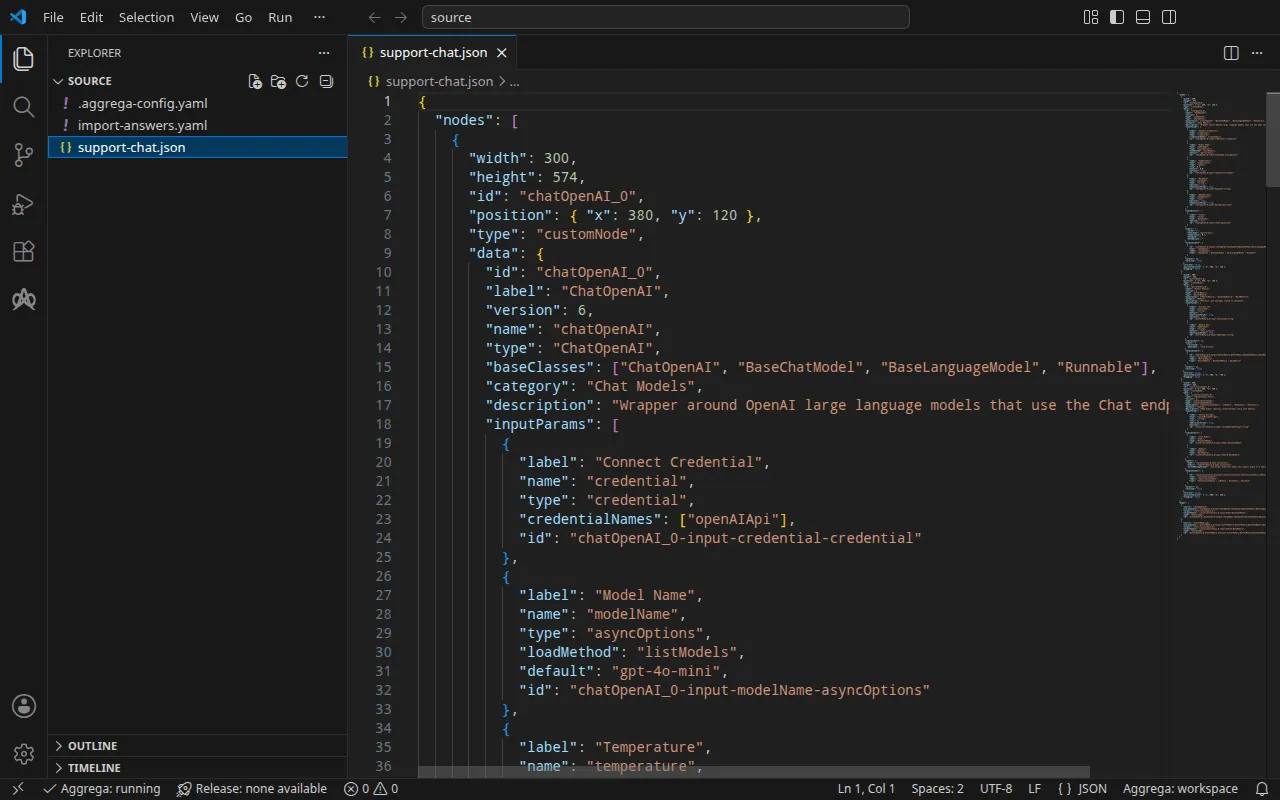
تدفق المحادثة
يحمل support-chat.json، المكتوب لهذا الشرح العملي على الشكل الذي يصدّر به محرر Flowise تدفق المحادثة، ثلاث عقد وحافتين بينها: عقدة ChatOpenAI تختار gpt-4o-mini، وعقدة Buffer Memory، وعقدة Conversation Chain تأخذ الاثنتين وتجيب برسالة نظام قصيرة. لا تختار عقدة ChatOpenAI أي بيانات اعتماد مخزنة وتترك Base Path فارغًا، فيقرأ عميل OpenAI الذي يشغّل Flowise العقدة عليه عنوانها ومفتاحها من بيئة Flowise.
بجانب تدفق المحادثة، يجعل .aggrega-config.yaml المجلد مساحة عمل:
# The workspace key marks this directory as the workspace root, so an import run# here writes its drafts beside support-chat.json.workspace: {}# The registry the importer is fetched from the first time an import needs it.default_registry: hub.aggrega.aiويحمل import-answers.yaml الإجابات عمّا لا يستطيع أي تدفق محادثة حمله. لا يحمّل Flowise تدفق محادثة من ملف عند البدء، لذا يزرعه البناء عبر API في Flowise نفسه تحت حساب مالك، ولا يسمّي أي تصدير ذلك الحساب: بريده الإلكتروني هو الإجابة الوحيدة التي يحتاجها الاستيراد من أجل Docker Compose. ويحتاج الاستيراد من أجل Kubernetes أيضًا إلى اسم Secret في Kubernetes يحمل كل سرّ — كلمة مرور المالك ومفتاح OpenAI — فيسمّي الملف هذين الكيانين Secret أيضًا (انظر على Kubernetes):
# Values the import could not draft from the source, keyed by the drafted file and the key path inside# it. Write each one beside its key; an import of the same source, and a sync, read them from here and# ask nothing. A secret is never written here: its key asks where the secret comes from — a variable# name, ${NAME}, or the name of a Kubernetes Secret.release.yaml: # Email address of the platform's owner account, read only when values.flow_definition is set. The # step that seeds the chatflow registers this account when the instance has no owner yet, which makes # it the owner, and signs in as it; on an instance that already has one, it names an account allowed # to import chatflows, and the password attached to the owner_password slot is that account's. # Required when values.flow_definition is set: the build halts when it is empty. It has no default. spec.components.flowise.infra.owner_email: "owner@example.com" # The origin of the secret value, written by the operator in the Release. Read exactly as # values.origin is. Write it here or in values.origin, never in both. A secret: name where it comes # from, never the value. spec.components.flowise.features.owner_password.infra.origin: "flowise-owner" # The origin of the secret value, written by the operator in the Release. Read exactly as # values.origin is. Write it here or in values.origin, never in both. A secret: name where it comes # from, never the value. spec.components.flowise.uses.model.chatopenai-0.features.credential.infra.origin: "openai-api-key"owner@example.com يمثّل بريدًا إلكترونيًا من عندك. وبدون الملف، يسأل الاستيراد في طرفية عن كل قيمة، سؤالًا واحدًا في كل مرة، بصياغة مأخوذة من الوصف الذي فوق مفتاحها، ويكتب إجاباتك في ملف إجابات جديد؛ وحيث لا يمكن السؤال، يكتب ذلك الملف بالمفاتيح وإجابات فارغة، ويسردها، وينتهي بالحالة 1. يصف ملف إجابات الاستيراد الملف بالتفصيل.
يقيّم الاستيراد كل عقدة مقارنةً مع Components الكتالوج في مساحة العمل، ويصوغ --target Manifest من Recipes الخاصة بها. لا تسمّي مساحة العمل أي مجلد كتالوج، لذا يقرأ الاستيراد كتالوج المكتبة القياسية من registry الذي يجلب منه مستورِده: لقطة موقَّعة للكتالوج المطروح، تُجلب وتُتحقق وتُحفظ في ذاكرة التخزين المؤقت لمحتوى مساحة العمل عند أول استيراد، ويسمّيها ملخّصها في الملف الذي يسجّل ما كتبه الاستيراد بجانب مسوداته. وتُستورد مساحة العمل التي تسمّي مجلدات كتالوج خاصة بها — في AGGREGA_CATALOG_DIRS، أو تحت workspace.catalog_dirs — مقابل تلك بدلًا من ذلك. انتقل إلى source:
cd sourceشغّل الاستيراد
aggrega import support-chat.json --target composeيسرد على الإخراج القياسي ما كتبه:
wrote aggregate.yamlwrote release.yamlwrote manifest.yamlwrote .aggrega-import.jsonعلى الخطأ القياسي، حيث يمثّل <workspace> المجلد الذي شغّلته فيه:
[… omitted: a warning that the importer runs unverified, printed where its module is read from beside its Plugin entity in a catalog folder rather than fetched]read as the flowise format, with drafted paths relative to <workspace>warn: node chatOpenAI_0 reaches chatopenai-0 through the model connection chatopenai-0 of core/ai-agent/flowise: its Base Path is empty, so the OpenAI client Flowise runs it on reads the address the platform delivers for this connection, OPENAI_BASE_URL, and, since it selects no credential, the key delivered as OPENAI_API_KEYinfo: the answers file <workspace>/import-answers.yaml also answers spec.components.flowise.features.owner_password.infra.origin in release.yaml, spec.components.flowise.uses.model.chatopenai-0.features.credential.infra.origin in release.yaml, which these drafts do not leave empty; those answers are kept there and not appliedmapped chatOpenAI_0 (chatOpenAI) to core/ai-model/openai as a reference, HIGH at 0.9made no choice for bufferMemory_0 (bufferMemory)made no choice for conversationChain_0 (conversationChain) warning: node "flowise" (provider "compose"): artifact "flowise-flow/flowise-flow.yaml": skipped provenance label injection — the fragment declares no compose service. Compose carries build provenance as service labels, so a fragment contributing only top-level networks, volumes or configs carries none; the services this component emits elsewhere carry the full set.Pull complete: <workspace>/release.lock (entities=8, source_artifacts=0, external_inputs=0)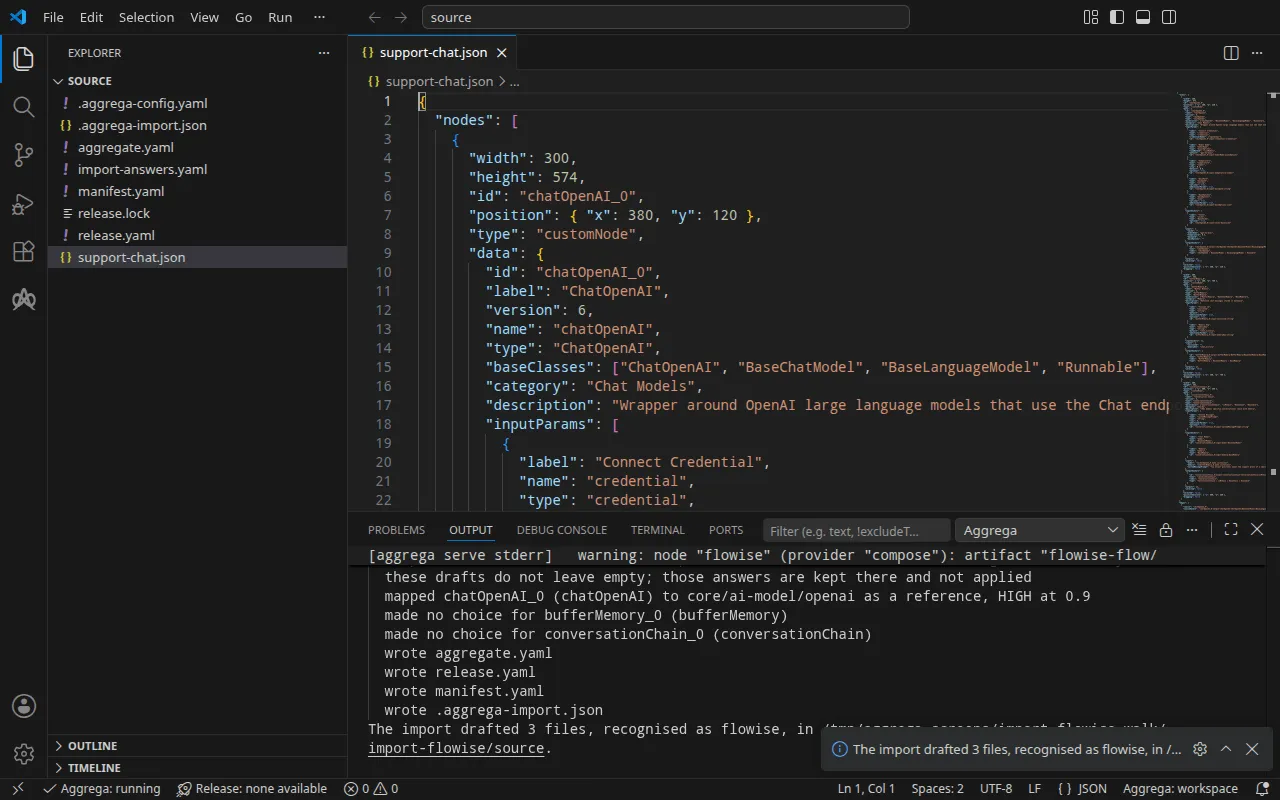
- سطر
mappedيقول إن عقدة ChatOpenAI أصبحت نموذج OpenAI في المكتبة القياسية،core/ai-model/openai، مُشارًا إليه بدل أن يُصاغ، لأنه طابق في الطبقة العالية، بدرجة 0.9: مكوِّن قائم بذاته، موصَّل بمقبسmodelفي المنصة. - سطر
warnيقول كيف يصل تدفق المحادثة إلى ذلك النموذج: تقرأ العقدة العنوان والمفتاح اللذين تسلّمهما المنصة لاتصال النموذج، فالمفتاح الذي يرفقه Release بالاتصال هو الذي يستخدمه تدفق المحادثة. - سطر
infoعن ملف الإجابات. فقد أجاب عن بريد المالك الإلكتروني الذي تركته المسودات فارغًا؛ أما اسما Secret فيه فيجيبان عمّا لا يتركه فارغًا إلا استيراد من أجل Kubernetes، لذا يبقيان في الملف، غير مستخدمين هنا. - أسطر
made no choiceتقول إن الذاكرة والسلسلة تبقيان داخل تدفق المحادثة: لا مقبس في المنصة يقبلهما. - السطران الأخيران هما عملية pull. بعد الإجابة عن كل القيم، نفّذ الاستيراد pull لتبعيات Release المصوغ، كما يفعل
aggrega pull، وكتبrelease.lock؛ ولا يحتاج البناء أدناه إلى شيء آخر. وسطرwarningهو سطر يطبعه البناء أيضًا، ويشرحه التحقق والبناء.
ما يكتبه
يحمل كلٌّ من Aggregate و Release و Manifest الاسم imported/support-chat، نسبةً إلى الملف، support-chat.json، إذ لا يحمل تصدير Flowise اسمًا خاصًا به، ضمن مساحة الأسماء التي يحددها إعداد target_namespace للمستورِد، وهي imported ما لم تحدد غيرها (الإعدادات).
aggregate.yaml — مثيل واحد من منصة Flowise في المكتبة القياسية، core/ai-agent/flowise، يحمل تدفق المحادثة كما صُدِّر، وقد حُذف معظمه هنا، والنموذج موصَّل بمقبس model فيه:
apiVersion: aggrega.ai/v1beta1kind: Aggregatemetadata: name: imported/support-chat version: 0.1.0 description: Draft Aggregate imported from a source in the flowise format.spec: components: flowise: type: core/ai-agent/flowise features: # For the compose target, the lines below declare owner_password on flowise: a secret the Release alone attaches arrives under the key value, so each is declared with a key of its own and no two arrive under one; the Release attaches its origin, naming this type or none. owner_password: type: core/secret-value values: key: OWNER_PASSWORD values: # chatflow_id is derived from the exported flow, which gives no identifier of its own. chatflow_id: '40d9f5c5-5187-54c1-a9f5-a8dac92f88bb' flow_definition: | { "nodes": [ [… omitted: the chatflow's nodes, as exported, up to the Conversation Chain's inputs] "inputs": { "model": "{{"{{"}}chatOpenAI_0.data.instance}}", "memory": "{{"{{"}}bufferMemory_0.data.instance}}", [… omitted: the rest of the chatflow, as exported] } uses: model: chatopenai-0: target: chatopenai-0 # For the compose target, the lines below declare credential on chatopenai-0: a secret the Release alone attaches arrives under the key value, so each is declared with a key of its own and no two arrive under one; the Release attaches its origin, naming this type or none. features: credential: type: core/secret-value values: key: OPENAI_API_KEY # swap to core/ai-model/azure-openai (score 0.4000) by setting type: core/ai-model/azure-openai chatopenai-0: type: core/ai-model/openai values: model: |- gpt-4o-mini- النموذج هو
core/ai-model/openai، مع النموذج الذي تختاره العقدة،gpt-4o-mini. ويسمّي التعليق الذي فوقه Component آخر في الكتالوج تشبهه العقدة، مع درجته. - السرّان — كلمة مرور حساب المالك الذي يُزرع تدفق المحادثة تحته، ومفتاح OpenAI الذي تقدمه المنصة إلى النموذج — يُعلنان هنا مع المتغيّر الذي يصل تحته كل منهما في بيئة Flowise،
OWNER_PASSWORDوOPENAI_API_KEY. وعلى Docker Compose يصل السرّ الذي أرفقه Release وحده تحت المفتاحvalue، فيتعارض الاثنان؛ أما المُعلَن هنا فلكل منهما مفتاح خاص. ويحدد Release مصدر كل منهما. chatflow_idمشتق من تدفق المحادثة، لأن التصدير من محرر Flowise لا يحمل معرّفًا خاصًا به، فيعطي تدفق محادثة واحد دائمًا معرّفًا واحدًا. ويكتب تدفق محادثة Flowise{{<node id>.data.instance}}لكل اتصال بين عقدتين، ويُقرأ نص Aggregate بوصفه قالبًا، لذا تكتب المسودة كل{{على صورة{{"{{"}}، ويعيدها البناء إلى القوسين المعقوفين.
release.yaml — هو Release الذي ينشر Aggregate باستخدام Manifest:
apiVersion: aggrega.ai/v1beta1kind: Releasemetadata: name: imported/support-chat # environment is a drafted default, since no source names the environment this Release deploys to; change it to name the one it deploys to. environment: development version: 0.1.0 description: Draft Release imported from a source in the flowise format.spec: aggregate: imported/support-chat manifest: imported/support-chat components: flowise: infra: # The image running core/ai-agent/flowise, at the version this importer drafts, which the catalog's Recipes for it are known to run; the import does not raise or lower it to follow the source. image: "flowiseai/flowise:3.1.3" # Left for the Release, since the source cannot supply it: infra.owner_email, the email address of the platform's owner account, required while values.flow_definition is set owner_email: "owner@example.com" # Published on this machine's loopback address, 127.0.0.1: reachable from this machine only, by any process running on it. Delete this line to keep the service internal. published_port: 3000 features: owner_password: type: core/secret-value infra: # Attached by reference, never as a value: the owner account's password, required while values.flow_definition is set, read from the variable FLOWISE_OWNER_PASSWORD, which a target substituting variable references, as Docker Compose does when the stack starts, reads from the environment, so no file carries the value. origin: "${FLOWISE_OWNER_PASSWORD}" uses: model: chatopenai-0: features: credential: type: core/secret-value infra: # Attached by reference, never as a value: the credential flowise presents to chatopenai-0 on its model connection, read from the variable OPENAI_API_KEY, which a target substituting variable references, as Docker Compose does when the stack starts, reads from the environment, so no file carries the value. origin: "${OPENAI_API_KEY}" chatopenai-0: {}environmentهوdevelopment، قيمة افتراضية يطلب التعليق الذي فوقه تغييرها إلى البيئة التي ينشر Release فيها.- صورة الحاوية هي Flowise 3.1.3، وهو الإصدار الذي تشغّله Recipes الكتالوج المخصصة لمنصة Flowise.
published_portهو 3000، المنفذ الذي يخدم عليه Flowise، فيجيب علىhttp://127.0.0.1:3000على جهازك. وكما يقول تعليقه، يمكن لأي عملية على هذا الجهاز الوصول إليه هناك ولا شيء غيرها؛ احذف السطر لإبقاء Flowise على شبكة مكدس Compose وحدها.owner_emailهو الإجابة من ملف الإجابات. ويقول التعليق الذي فوقه لماذا لم يستطع الاستيراد صياغته.- السرّان مرجعا متغيّر،
${FLOWISE_OWNER_PASSWORD}و${OPENAI_API_KEY}، يملؤهما Docker Compose من shell لديك عند بدء مكدس Compose، فلا يحمل أي ملف أيًّا من القيمتين.
manifest.yaml — Recipes من نوع Compose للمنصة وللنموذج، والتحقيق الذي يكتب مرجع متغيّر السرّ في ملف Compose كما هو:
apiVersion: aggrega.ai/v1beta1kind: Manifestmetadata: name: imported/support-chat version: 0.1.0spec: mappings: components: type: core/ai-agent/flowise: compose/flowise core/ai-model/openai: compose/openai features: type: core/secret-value: compose/dotenv-secret.aggrega-import.json هو ملف يسجّل ما كتبه الاستيراد، ويقرؤه الأمر aggrega import --sync الذي يُشغَّل لاحقًا، ويثبّت release.lock كل كيان في الكتالوج يؤول إليه Release، بحسب الإصدار والملخّص.
التحقق والبناء
aggrega validate --release release.yamlaggrega build --release release.yaml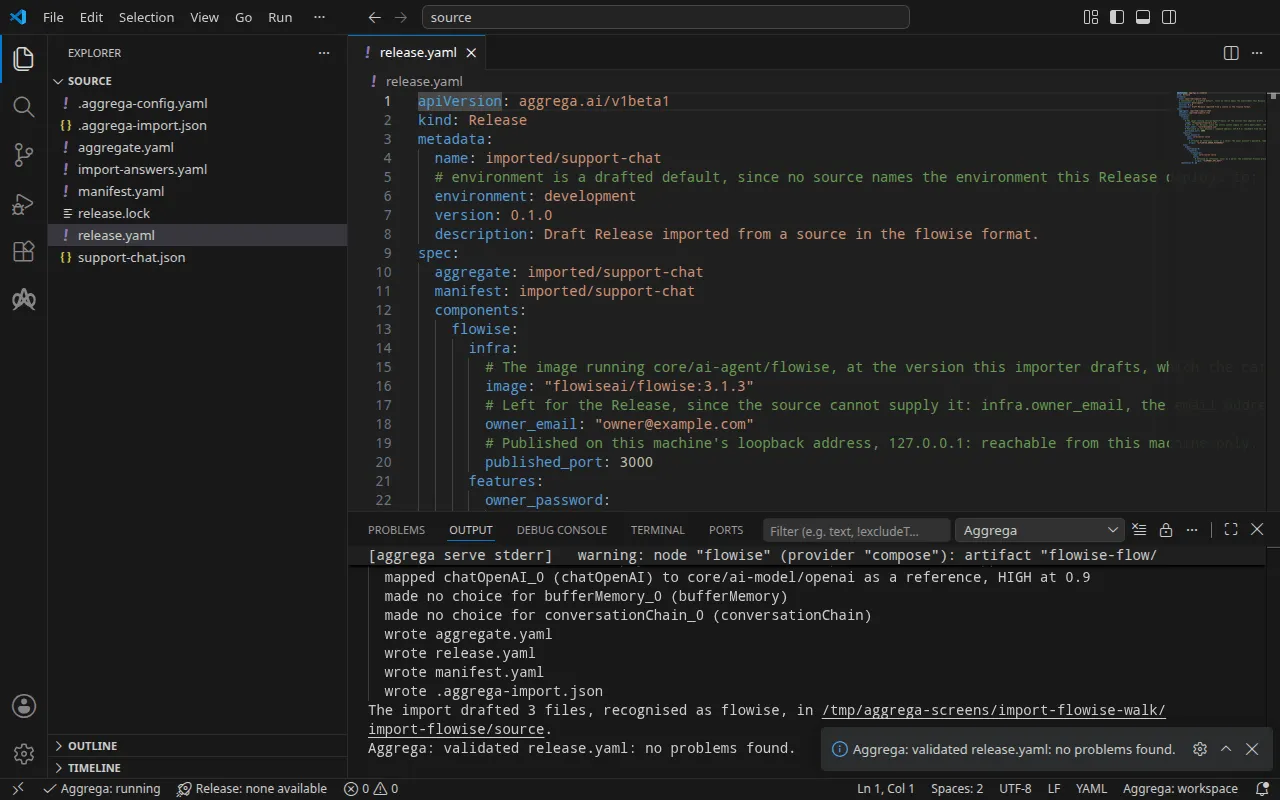
يطبع التحقق:
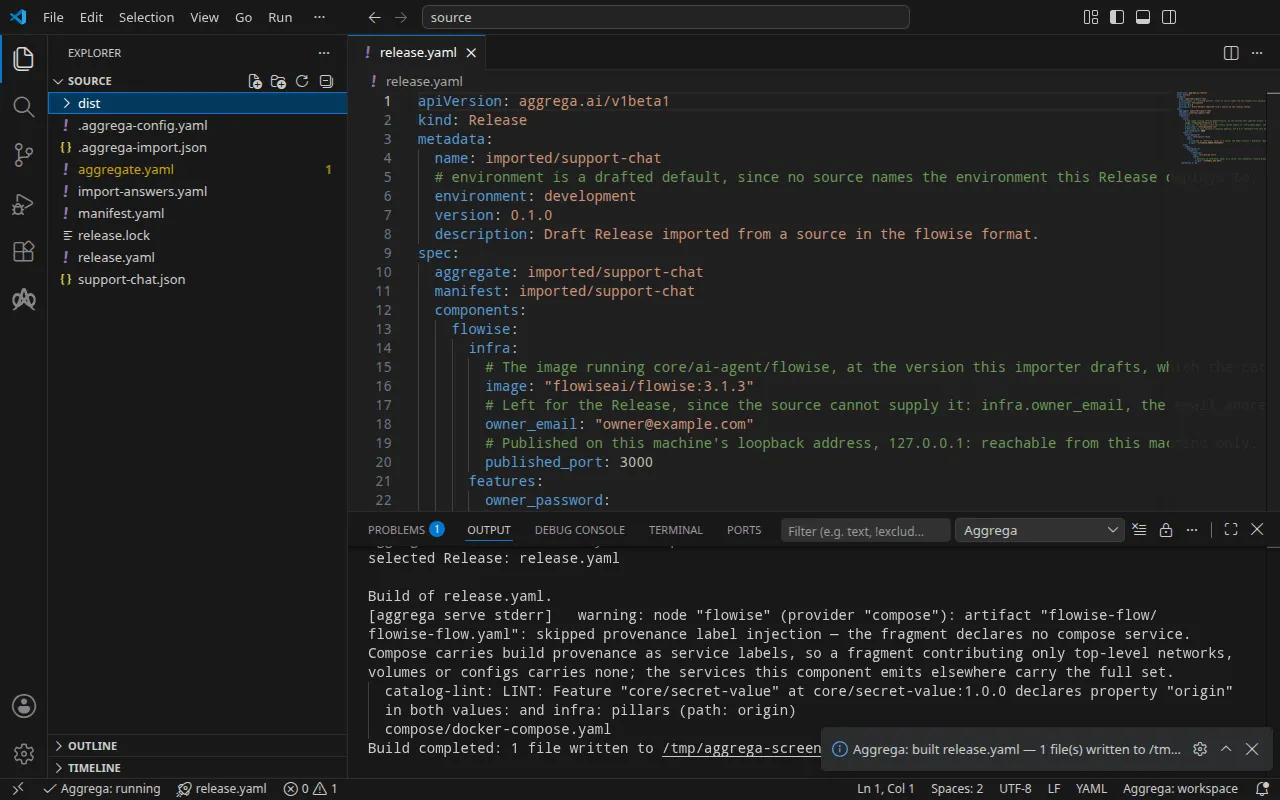
notice: LINT: Feature "core/secret-value" at core/secret-value:1.0.0 declares property "origin" in both values: and infra: pillars (path: origin)release dependency validation passed: release.yaml (schema-pillar + dependency pillars)ويطبع البناء، مع وقوف <workspace> مكان المجلد الذي يضم المسودات:
warning: node "flowise" (provider "compose"): artifact "flowise-flow/flowise-flow.yaml": skipped provenance label injection — the fragment declares no compose service. Compose carries build provenance as service labels, so a fragment contributing only top-level networks, volumes or configs carries none; the services this component emits elsewhere carry the full set. notice: LINT: Feature "core/secret-value" at core/secret-value:1.0.0 declares property "origin" in both values: and infra: pillars (path: origin)[… omitted: a total build time, which differs per run]Build completed: 1 file written to <workspace>/distيتعلق سطر warning بالجزء من ملف Compose الذي يحمل تدفق المحادثة، إدخال configs من المستوى الأعلى، وليس فيه خدمة يضع البناء عليها تسمياته. وسطر notice استشاري: يقبل Feature السرّ origin الخاص به من values في Aggregate أو من infra في Release، ويفيد الإشعار بأن ورقة واحدة معلنة في الاثنين. ولا يغيّر أي منهما الحكم.
يحمل dist/compose/docker-compose.yaml خدمتين. Flowise نفسه:
flowise: image: flowiseai/flowise:3.1.3 environment: DATABASE_PATH: /home/node/.flowise SECRETKEY_PATH: /home/node/.flowise OPENAI_BASE_URL: https://api.openai.com/v1 OPENAI_API_KEY: ${OPENAI_API_KEY} ports: - 127.0.0.1:3000:3000 [… omitted: the labels the build writes on every service, naming the Aggregate, the component, the environment and the compiler's version] volumes: - type: volume source: flowise--data target: /home/node networks: - compose [… omitted: the service's health check]والخدمة التي تزرع تدفق المحادثة بمجرد أن يبلّغ Flowise أنه بحالة سليمة، ثم تنتهي:
flowise-flow-seed: image: flowiseai/flowise:3.1.3 entrypoint: - node - /seed/seed.js environment: FLOWISE_URL: http://127.0.0.1:3000 OWNER_EMAIL: owner@example.com OWNER_PASSWORD: ${FLOWISE_OWNER_PASSWORD} CHATFLOW_ID: 40d9f5c5-5187-54c1-a9f5-a8dac92f88bb CHATFLOW_NAME: 40d9f5c5-5187-54c1-a9f5-a8dac92f88bb [… omitted: the labels the build writes on every service] network_mode: service:flowise depends_on: flowise: condition: service_healthy restart: "no" configs: - source: flowise-flow target: /seed/flow.json - source: flowise-flow-seed target: /seed/seed.jsتسجّل الخدمة حساب المالك على Flowise جديد، أو تسجّل الدخول به، وتكتب تدفق المحادثة عند chatflow_id. والمفتاح وكلمة المرور مرجعا متغيّر، يُملآن من shell لديك عند بدء مكدس Compose. ولا يطرح Recipe من نوع Compose لمنصة Flowise منفذًا على جهازك إلا حيث يضبط Release قيمة published_port في infra لمنصة Flowise، ثم على عنوان loopback، 127.0.0.1، وحده؛ ومن دونه يُوصل إلى الخدمة على شبكة مكدس Compose وحدها.
مع مساعد الذكاء الاصطناعي
يستطيع مساعد الذكاء الاصطناعي المُعَدّ بأدوات Aggrega أن يفعل الشيء نفسه: الصق هذا الموجِّه فيه.
استخدم أدوات Aggrega وحدها، ولا تنشئ أي مجلد بنفسك. إن لم يكن في مجلد مساحة العمل مجلد `import-flowise` بعد، فاستدعِ الأداة `draft` مرة واحدة مع ضبط `example` على `import-flowise` ودون `dir`: فهي تكتب المثال في مجلد `import-flowise` جديد، ويحوي مجلده `source` ما تستورده هذه الصفحة. ثم استدعِ الأداة `import` مع ضبط `workspace_root` على `import-flowise/source` و `source` على `support-chat.json` و `target` على `compose`: فهي تقرأ الإجابات التي تحتاجها من `import-answers.yaml` بجانب `support-chat.json`، وتكتب مسوداتها في `import-flowise/source` وتنفّذ pull لما تحتاجه. ثم استدعِ الأداة `validate` مع ضبط `workspace_root` على `import-flowise/source` و `release` على `release.yaml`، والأداة `build` مع ضبط `workspace_root` على `import-flowise/source` و `release` على `release.yaml` و `write` على true. أخبرني بالملفات التي كتبها البناء؛ وهي تحت `import-flowise/source/dist/`.افتحه في VS Code
مع امتداد Aggrega لمحرر Visual Studio Code المثبَّت، افتح المجلد import-flowise/source في VS Code، حيث كتب الاستيراد مسوداته. يضم المجلد Release واحدًا هو release.yaml المصوغ، فيحدده المحرر لك، ويتحقق من المسودات مقابل ذلك Release أثناء تحريرك لها، ويعلّم ما يجده في الملف وفي لوحة Problems. يرسم Aggrega: Show topology graph، في لوحة الأوامر، مكوِّنات Release والاتصالات بينها. وتعمل Aggrega: Build و Aggrega: Preview build و Aggrega: Pull على Release نفسه، وكلٌّ منها زر أيضًا في لوحة Commands من عرض Aggrega في شريط الأنشطة؛ ويكتب Build ملفاته في dist/ داخل المجلد. ويغطي استخدام Aggrega في Visual Studio Code ما تبقى.
شغِّله
اضبط المفتاح وكلمة مرور المالك في shell لديك، وابدأ Flowise، ثم شغّل خطوة الزرع:
export OPENAI_API_KEY='your OpenAI key'export FLOWISE_OWNER_PASSWORD='a password of your own'docker compose -p support-chat -f dist/compose/docker-compose.yaml up -d --wait flowisedocker compose -p support-chat -f dist/compose/docker-compose.yaml up flowise-flow-seedيسمّي -p المشروع، كما تشرح خطوة التشغيل في كيف يعمل الاستيراد. ويعود --wait عندما يبلّغ Flowise أنه بحالة سليمة؛ وهو يسمّي flowise وحده لأنه يعدّ أي حاوية انتهى عملها إخفاقًا، والزرع ينتهي بحكم التصميم. ويشغّل الأمر الثاني الزرع، ويطبع سجله، ويعود حين ينتهي:
flowise-flow-seed-1 | registered the owner account owner@example.comflowise-flow-seed-1 | imported chatflow 40d9f5c5-5187-54c1-a9f5-a8dac92f88bb as "40d9f5c5-5187-54c1-a9f5-a8dac92f88bb"flowise-flow-seed-1 exited with code 0حيث يستمع برنامج آخر على جهازك فعلًا إلى 127.0.0.1:3000، يتوقف الأمر الأول برسالة failed to bind host port 127.0.0.1:3000/tcp: address already in use: اضبط published_port على منفذ حر وابنِ من جديد. وقد فعل التشغيل أدناه ذلك، بالمنفذ 3002، واستخدم ذلك المنفذ بدل 3000.
اختبره
افتح http://127.0.0.1:3000، العنوان الذي يطرحه published_port، وسجّل الدخول ببريد المالك الإلكتروني وكلمة مروره: تدفق المحادثة الذي كتبته خطوة الزرع موجود في Flowise.
يجيب تدفق محادثة لا يضبط مفتاح API خاصًا به على نقطة نهاية التنبؤ فيه دون مفتاح. اسأله سؤالًا:
curl -sS -X POST http://127.0.0.1:3000/api/v1/prediction/40d9f5c5-5187-54c1-a9f5-a8dac92f88bb \ -H 'Content-Type: application/json' -d '{"question": "In one short sentence: what is Docker Compose?"}'استخدم التشغيل قيمة مؤقتة لمفتاح OpenAI، فالإجابة هي رفض OpenAI لها، وهذا يبيّن أن تدفق المحادثة عمل حتى استدعائه النموذج:
{"statusCode":500,"success":false,"message":"401 Unauthorized – check your API key and ensure it has access to the requested model.","stack":{}}ومع مفتاحك، يحمل الرد الإجابة في text.
على Kubernetes، بعد تطبيق البناء الذي يصفه على Kubernetes واكتمال Job الزرع فيه، أعِد توجيه منفذ محلي إلى Service في Flowise، flowise-default، في مساحة الأسماء التي طبّقت عليها، واترك الأمر يعمل:
kubectl port-forward -n <namespace> svc/flowise-default 3000:3000من طرفية أخرى، يصل السؤال أعلاه إلى تدفق المحادثة على العنوان نفسه، دون تغيير؛ وقد حصل التشغيل على رفض المفتاح المؤقت نفسه.
أوقف مكدس Compose بالأمر أدناه. ويزيل -v أيضًا وحدة تخزين بيانات Flowise، ومعها حساب المالك وتدفق المحادثة اللذين كتبهما الزرع:
docker compose -p support-chat -f dist/compose/docker-compose.yaml down -vعلى Kubernetes
يُستورد تدفق المحادثة نفسه من أجل Kubernetes بالهدف helm. مسودات Docker Compose موجودة فعلًا في source، ولا يكتب الاستيراد فوق Aggregate هناك أبدًا، فاكتب هذه المسودات في مجلد خاص بها باستخدام --output-dir، ثم تحقق وابنِ منه:
aggrega import support-chat.json --target helm --output-dir helmcd helmaggrega validate --release release.yamlaggrega build --release release.yamlتختلف المسودات حيث يختلف الهدف. يضع Manifest helm/flowise للمنصة، و helm/openai للنموذج، و helm/k8s-existing-secret لكل سرّ، وهو يقرؤه من Secret موجود فعلًا في مساحة الأسماء. ويرفق Release كلمة مرور المالك ومفتاح OpenAI بوصفهما core/referenced-secret، يسمّي كلٌّ منهما Secret الخاص به، ويأخذ الإجابات الثلاث كلها من ملف الإجابات: بريد المالك الإلكتروني، و flowise-owner و openai-api-key.
يكتب البناء ملفات بيان Kubernetes عادية تحت dist/helm/ في جذر مساحة العمل، source، ومن helm يكون مساره ../dist/helm/، ومن بينها زرع تدفق المحادثة بوصفه Job. أنشئ كيانَي Secret في مساحة الأسماء التي تطبّق عليها، يحمل كلٌّ منهما قيمته تحت مفتاح البيانات value، ثم طبّق المجلد كما تشرح خطوة التشغيل في كيف يعمل الاستيراد.