



استيراد وكيل Google ADK
يستورد هذا الشرح العملي Agent Config لتطبيق مبني على Agent Development Kit (ADK) من Google — وكيل واحد يجيب عن أسئلة العملاء عن طلباتهم — ويبني التطبيق من أجل Docker Compose. يصوغ الاستيراد كل ملف يقرؤه البناء: الوكيل ونموذج Gemini الخاص به، والمفتاح الذي يقدمه الوكيل إلى النموذج بوصفه مرجع متغيّر، وتحقيقات كل منها. ويسأل مرة واحدة عن القيمة الوحيدة التي لا يحملها أي تكوين، وهي صورة الحاوية التي يعمل فيها التطبيق. يأتي كل ملف وكل كتلة إخراج أدناه من تشغيل فعلي؛ ويوجد التكوين وكل مرحلة من مراحل الشرح العملي في المثال import-google-adk، حيث يعيد نص فحص برمجي تشغيل الاستيراد، ويقارن ما يكتبه وما يطبعه والكتل التي تنقلها هذه الصفحة بالملفات المحفوظة هناك، ويتحقق مما كتبه الاستيراد ويبنيه.
صُغ مسودة المثال
يمكنك تشغيل هذا الاستيراد بالأوامر الواردة في هذه الصفحة، أو اجعل مساعد الذكاء الاصطناعي يشغّله نيابةً عنك.
اكتب المثال في مجلد جديد يحمل اسمه:
aggrega draft --example import-google-adkثم يطبع الأوامر التي تُشغَّل بعد ذلك. يدخل الأول إلى المجلد الجديد؛ ويدخل الذي يليه، أدناه، إلى مجلد source الخاص به، الذي يحوي ما تستورده هذه الصفحة وهو المكان الذي يجري فيه الاستيراد:
cd import-google-adk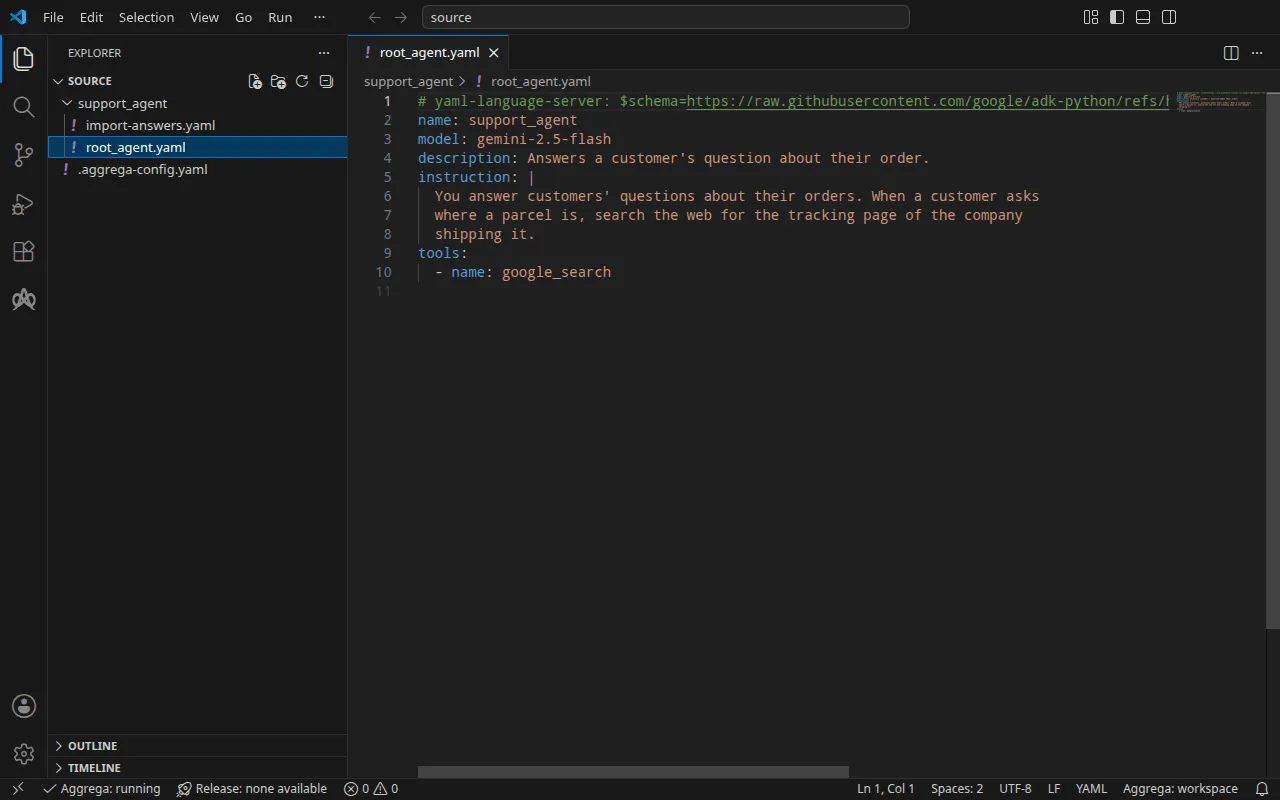
المشروع
يستطيع ADK أن يعلن وكلاء التطبيق في ملفات Agent Config بدل الشيفرة البرمجية: يكتب adk create --type=config الملف root_agent.yaml، تكوين الوكيل الجذر، وملف بيئة بجانبه. وهذا الملف، المكتوب لهذا الشرح العملي، يعلن وكيلًا واحدًا على gemini-2.5-flash من Gemini، مع أداة Google Search التي يوفرها ADK:
# yaml-language-server: $schema=https://raw.githubusercontent.com/google/adk-python/refs/heads/main/src/google/adk/agents/config_schemas/AgentConfig.jsonname: support_agentmodel: gemini-2.5-flashdescription: Answers a customer's question about their order.instruction: | You answer customers' questions about their orders. When a customer asks where a parcel is, search the web for the tracking page of the company shipping it.tools: - name: google_searchلا يقرأ الاستيراد ملف البيئة أبدًا، وهو يحمل عادة المفتاح الذي يرسله التطبيق إلى Gemini، لذا لا يحمل المثال مفتاحًا. وفي جذر المشروع، يجعل .aggrega-config.yaml المجلد مساحة عمل:
# The workspace key marks this directory as the workspace root, so an import run# here writes its drafts beside support_agent/.workspace: {}# The registry the importer is fetched from the first time an import needs it.default_registry: hub.aggrega.aiيشير الاستيراد إلى Components الكتالوج لوكيل ADK ونموذج Gemini، ويصوغ --target Manifest من Recipes الخاصة بها. لا تسمّي مساحة العمل أي مجلد كتالوج، لذا يقرأ الاستيراد كتالوج المكتبة القياسية من registry الذي يجلب منه مستورِده: لقطة موقَّعة للكتالوج المطروح، تُجلب وتُتحقق وتُحفظ في ذاكرة التخزين المؤقت لمحتوى مساحة العمل عند أول استيراد، ويسمّيها ملخّصها في الملف الذي يسجّل ما كتبه الاستيراد بجانب مسوداته. وتقرأ مساحة العمل التي تسمّي مجلدات كتالوج خاصة بها — في AGGREGA_CATALOG_DIRS، أو تحت workspace.catalog_dirs — تلك أولًا، مع اللقطة المطروحة خلفها.
ما يطلبه الاستيراد
يسمّي Agent Config نموذج الوكيل، ولا يسمّي أبدًا صورة الحاوية التي يعمل فيها التطبيق: فأنت تبني تلك الصورة من مشروعك. ولا يحوي الكتالوج صورة افتراضية لتطبيق مبني على ADK، لذا يسأل الاستيراد عنها. وفي الطرفية يسأل، ويكتب الإجابة في المسودات وفي ملف الإجابات، import-answers.yaml، داخل الدليل الذي يستورده، support_agent/، فيقرؤها الاستيراد التالي من هناك ولا يسأل شيئًا. وبلا طرفية — في التكامل المستمر، أو عبر أنبوب — لا يسأل شيئًا: يكتب الملف بمفتاح فارغ، ويتوقف، مسمّيًا الملف. ويحوي المثال الملف فعلًا، مع الإجابة عن الصورة، ghcr.io/example/support-agent:1.0.0، التي تمثّل الصورة التي تبنيها:
# Values the import could not draft from the source, keyed by the drafted file and the key path inside# it. Write each one beside its key; an import of the same source, and a sync, read them from here and# ask nothing. A secret is never written here: its key asks where the secret comes from — a variable# name, ${NAME}, or the name of a Kubernetes Secret.release.yaml: # Container image running the application built on ADK, serving its API on infra.port on every # interface. spec.components.support-agent.infra.image: "ghcr.io/example/support-agent:1.0.0" # The origin of the secret value, written by the operator in the Release. Read exactly as # values.origin is. Write it here or in values.origin, never in both. A secret: name where it comes # from, never the value. spec.components.support-agent.uses.model.gemini-2-5-flash.features.credential.infra.origin: "google-api-key"الإجابة الثانية لبناء من أجل Kubernetes، مع --target helm: هناك يقرأ الوكيل مفتاح Gemini API من Secret في Kubernetes، والإجابة هي اسم Secret، google-api-key، لا المفتاح أبدًا. أما البناء من أجل Docker Compose فيقرأ المفتاح من shell لديك، لذا لا يستخدم هذا الاستيراد تلك الإجابة. ويصف ملف إجابات الاستيراد الملف والأسئلة وقواعد إجابة السرّ.
يسرد aggrega import كل علامة يقبلها الأمر، ومنها --answers التي تسمّي ملف إجابات محفوظًا في مكان آخر.
انتقل إلى source:
cd sourceشغّل الاستيراد
سمِّ دليل الوكيل. يقرأ الاستيراد منه root_agent.yaml:
aggrega import support_agent --target composeيسرد على الإخراج القياسي ما كتبه:
wrote aggregate.yamlwrote release.yamlwrote manifest.yamlwrote .aggrega-import.jsonعلى الخطأ القياسي، حيث يمثّل <workspace> المجلد الذي شغّلته فيه:
[… omitted: a warning that the importer runs unverified, printed where its module is read from beside its Plugin entity in a catalog folder rather than fetched]read as the google-adk format, with drafted paths relative to <workspace>info: the answers file <workspace>/support_agent/import-answers.yaml also answers spec.components.support-agent.uses.model.gemini-2-5-flash.features.credential.infra.origin in release.yaml, which these drafts do not leave empty; those answers are kept there and not appliedmapped support_agent (agent) to core/ai-agent/google-adk as a reference, NONEmapped gemini-2.5-flash (model) to core/ai-model/gemini as a reference, NONEmade no choice for google_search (tool)Pull complete: <workspace>/release.lock (entities=8, source_artifacts=0, external_inputs=0)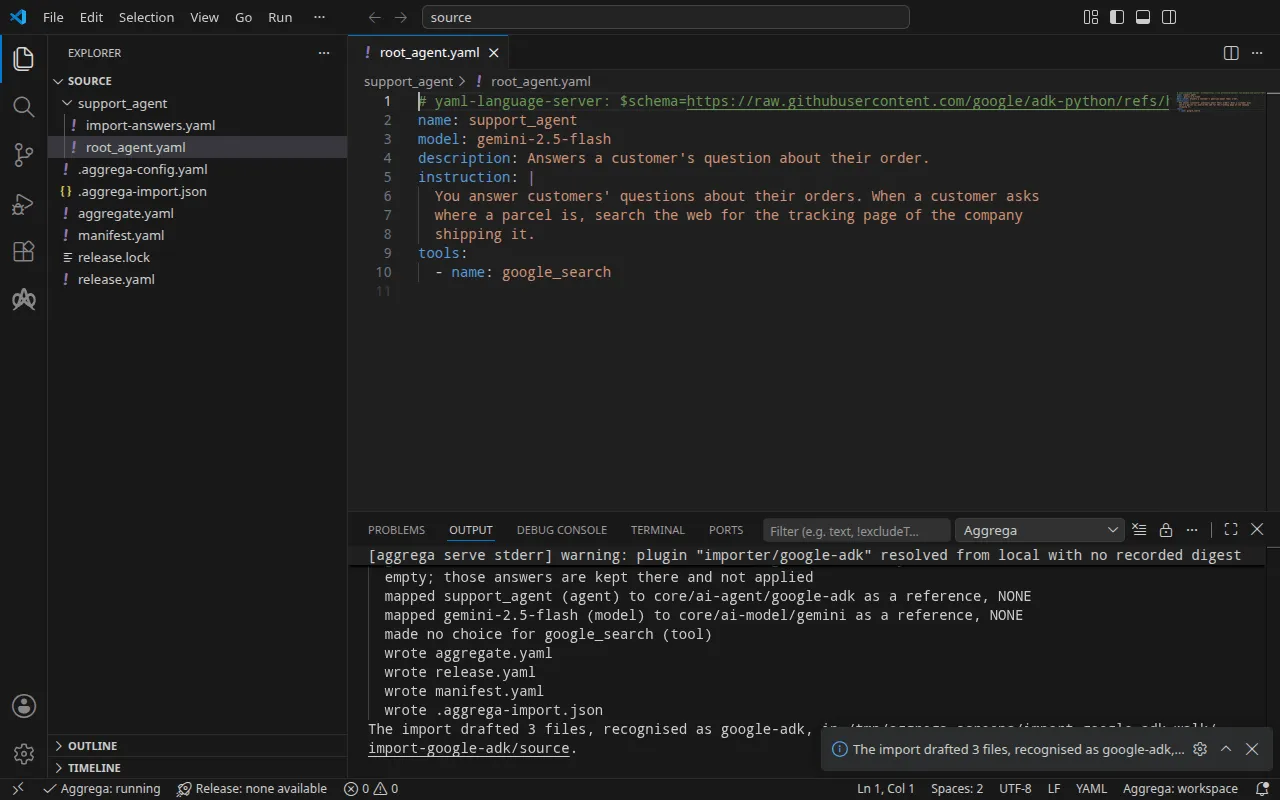
- السطر
infoيسمّي الإجابة التي لا تستخدمها مسودات Docker Compose، المحفوظة في ملف الإجابات لبناء Kubernetes. - أسطر
mappedتقول إن الوكيل مثيل من وكيل ADK في المكتبة القياسية،core/ai-agent/google-adk، وإن النموذج الذي يسمّيه مثيل منcore/ai-model/gemini. وتقرأ طبقتهاNONE: يشير استيراد ADK إلى هذه Components بحسب ما يسمّيه التكوين، لا بتقييم كل منها مقابل الكتالوج. - سطر
made no choiceيقول إن أداة Google Search تُصاغ على أنها لا شيء: فهي أداة يوفرها ADK، وتعمل داخل التطبيق. - السطر
Pull completeهو الاستيراد وهو يجلب ما يعتمد عليه Release المسوَّد، كما يفعلaggrega pull، إلىrelease.lock، فتجتاز المسودات التحقق وتُبنى فورًا. وتحت--offlineلا يجلب الاستيراد شيئًا ويسمّي الأمرaggrega pullالذي ينبغي تشغيله.
ما يكتبه
يحمل كلٌّ من Aggregate و Release و Manifest الاسم imported/support-agent، نسبةً إلى name الوكيل الجذر، support_agent، بعد اختصاره إلى support-agent، ضمن مساحة الأسماء التي يحددها إعداد target_namespace للمستورِد، وهي imported ما لم تحدد غيرها (الإعدادات).
aggregate.yaml — الوكيل، موصَّلًا بالنموذج مع المفتاح الذي يقدمه معلَنًا على الاتصال، والنموذج، ويبدأ بتعليقات تقول ما قُرئ وما لم يُقرأ:
# Google ADK agent configurations read:# - root_agent.yaml# Not read: the application's code, which defines the tools, callbacks and agents a configuration names by their code, nor the environment file ADK's scaffold writes beside root_agent.yaml; the application runs in the image the Release names for each instance, and loads its configurations itself.# ADK states that its Agent Config is experimental. An agent's model is a Gemini model by default; ADK serves some other providers' models by name through classes of its own, such as claude-sonnet-4-5 and gpt-4o, and others through a LiteLLM model string.apiVersion: aggrega.ai/v1beta1kind: Aggregatemetadata: name: imported/support-agent version: 0.1.0 description: Draft Aggregate imported from a source in the google-adk format.spec: components: # The agent tree of root_agent.yaml, served from its root agent support_agent. # Tools ADK ships, which run inside the application, drafted as no Component: google_search. support-agent: type: core/ai-agent/google-adk values: description: "Answers a customer's question about their order." uses: model: gemini-2-5-flash: target: gemini-2-5-flash # For the compose target, the lines below declare credential on gemini-2-5-flash: a secret the Release alone attaches arrives under the key value, so each is declared with a key of its own and no two arrive under one; the Release attaches its origin, naming this type or none. features: credential: type: core/secret-value values: key: GOOGLE_API_KEY # The model gemini-2.5-flash. gemini-2-5-flash: type: core/ai-model/gemini values: model: "gemini-2.5-flash"يخدم ADK التطبيق من وكيله الجذر، لذا تحمل المسودة مثيلًا واحدًا لكل شجرة وكلاء، مسمّى باسم وكيلها الجذر. ولا يُحمل instruction الوكيل: يقرؤه التطبيق من تكوينه الخاص، الذي تحمله صورة الحاوية.
يخدم ADK النموذج gemini-2.5-flash عبر فئة Gemini، التي ترسل طلباتها إلى Gemini API، لذا توصّل المسودة النموذج بمقبس model في الوكيل، الذي لا يقبل إلا Gemini API. Gemini خدمة مستضافة، لذا يرفض Component الوكيل اتصالًا بها لا يحمل بيانات اعتماد؛ ويعلن الاتصال بيانات اعتماد واحدة، تحت المفتاح GOOGLE_API_KEY. أما النموذج الذي يخدمه ADK بطريقة أخرى — اسم مثل gpt-4o يخدمه ADK عبر فئة خاصة به، أو سلسلة نموذج LiteLLM مثل openai/gpt-4o — فلا يوصَّل بشيء: يسمّيه تعليق فوق المثيل، ويُترك الاتصال لك، كما يصف ما تصبح عليه شجرة الوكلاء.
release.yaml — البيئة، وصورة الحاوية، والمنفذ المطروح، ومصدر المفتاح:
apiVersion: aggrega.ai/v1beta1kind: Releasemetadata: name: imported/support-agent # environment is a drafted default, since no source names the environment this Release deploys to; change it to name the one it deploys to. environment: development version: 0.1.0 description: Draft Release imported from a source in the google-adk format.spec: aggregate: imported/support-agent manifest: imported/support-agent components: support-agent: infra: # Left for the Release, since the source cannot supply it: infra.image, the container image running the application built on ADK, holding its configurations image: "ghcr.io/example/support-agent:1.0.0" # Published on this machine's loopback address, 127.0.0.1: reachable from this machine only, by any process running on it. Delete this line to keep the service internal. published_port: 8000 uses: model: gemini-2-5-flash: features: credential: type: core/secret-value infra: # Attached by reference, never as a value: the credential support-agent presents to gemini-2-5-flash on its model connection (the source names no variable for it, so it is read from the one Google's Gemini API's client libraries read the API key from), read from the variable GOOGLE_API_KEY, which a target substituting variable references, as Docker Compose does when the stack starts, reads from the environment, so no file carries the value. origin: "${GOOGLE_API_KEY}" gemini-2-5-flash: {}البيئة، development، قيمة افتراضية يكتبها الاستيراد لأن أي تكوين لا يسمّي واحدة؛ غيّرها حيث ينشر Release في مكان آخر. وصورة الحاوية هي الإجابة التي قرأها الاستيراد من support_agent/import-answers.yaml. و published_port هو 8000، المنفذ الذي يستمع إليه التطبيق، فيجيب على http://127.0.0.1:8000 على جهازك؛ وكما يقول تعليقه، يمكن لأي عملية على هذا الجهاز الوصول إليه هناك ولا شيء غيرها، ويُبقي حذف السطر التطبيق على شبكة مكدس Compose وحدها. ولا يسمّي التكوين متغيّرًا للمفتاح، فيقرؤه الاتصال من ${GOOGLE_API_KEY}، المتغيّر الذي تقرؤه مكتبات عميل Gemini API، بوصفه مرجع متغيّر لا قيمة أبدًا.
manifest.yaml — Recipe من نوع Compose لكل نوع، والتحقيق الذي يكتب مرجع متغيّر المفتاح في ملف Compose كما هو:
apiVersion: aggrega.ai/v1beta1kind: Manifestmetadata: name: imported/support-agent version: 0.1.0spec: mappings: components: type: core/ai-agent/google-adk: compose/google-adk core/ai-model/gemini: compose/gemini features: type: core/secret-value: compose/dotenv-secretيسجّل release.lock كيانات الكتالوج التي انتهى إليها Release، بحسب الملخّص، أما .aggrega-import.json فهو سجل ما كتبه الاستيراد، الذي يقرؤه aggrega import --sync لاحقًا.
التحقق والبناء
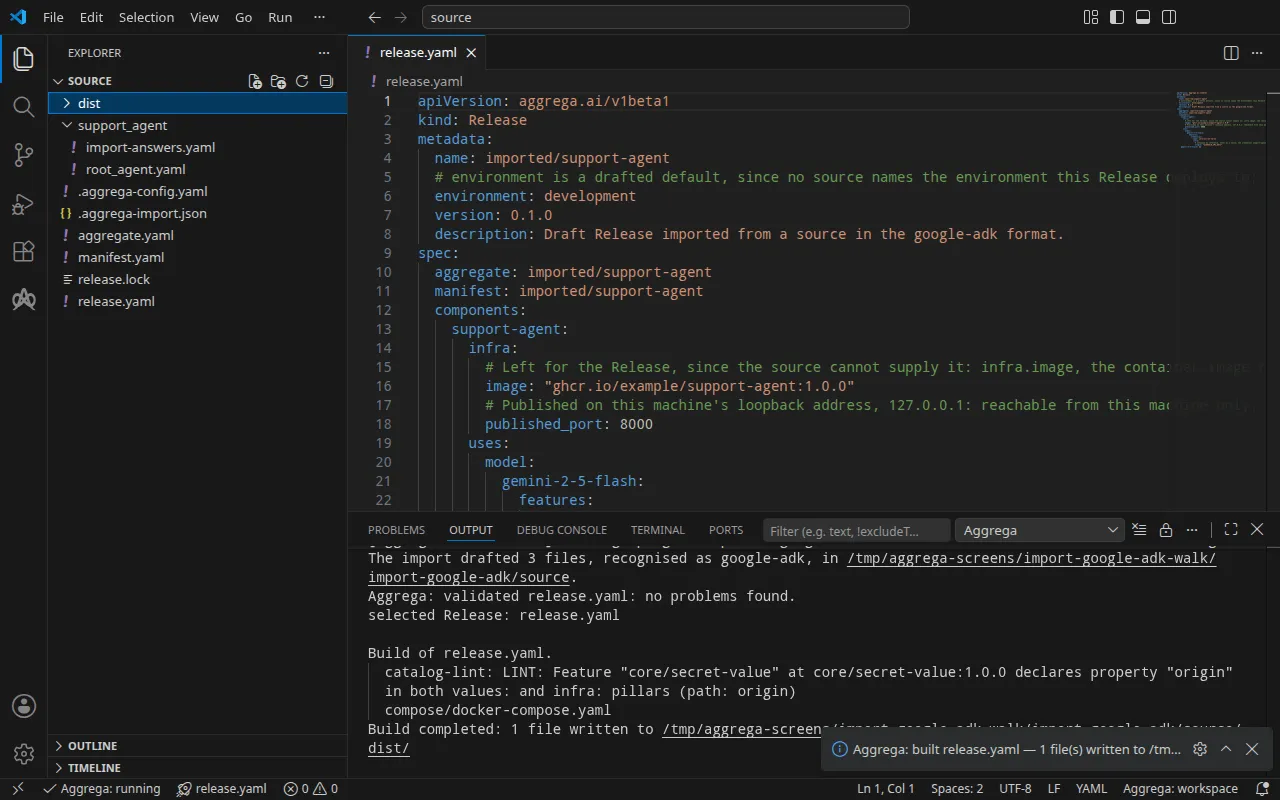
aggrega validate --release release.yamlaggrega build --release release.yaml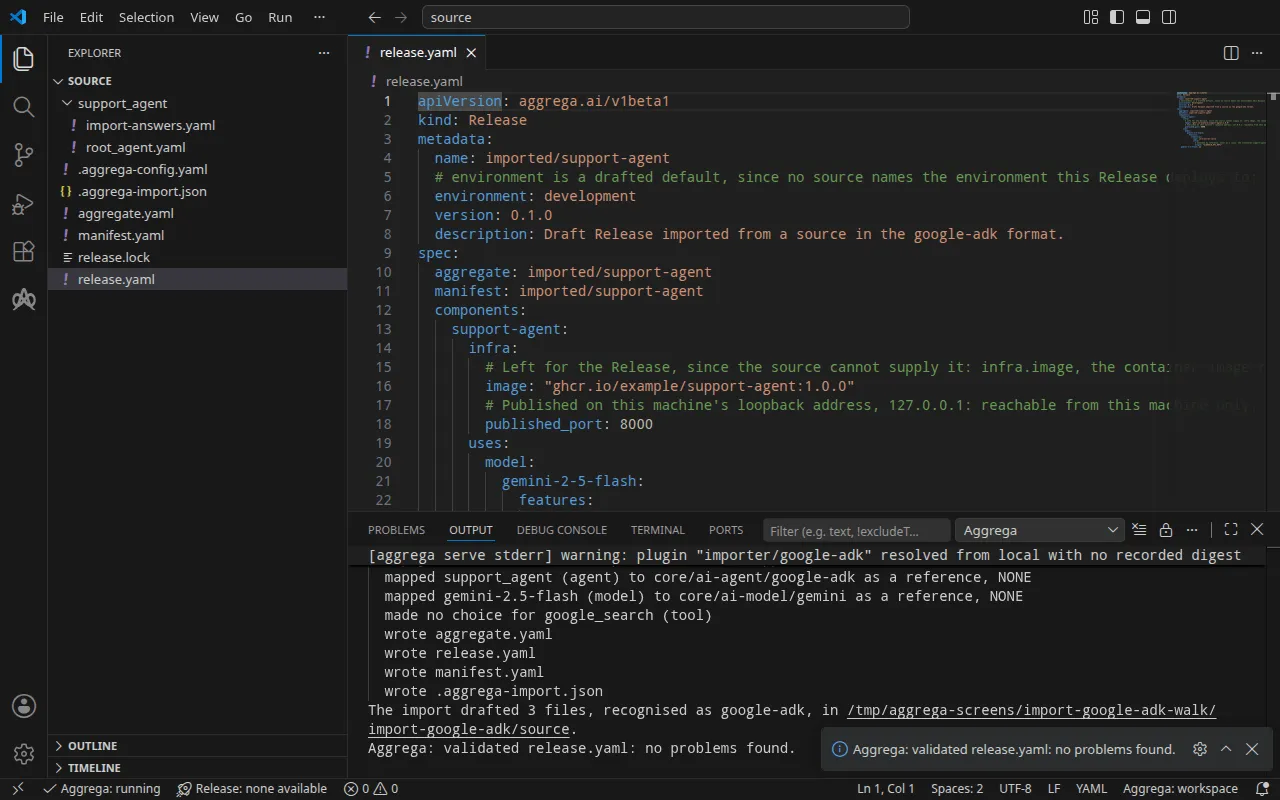
يطبع التحقق:
notice: LINT: Feature "core/secret-value" at core/secret-value:1.0.0 declares property "origin" in both values: and infra: pillars (path: origin)release dependency validation passed: release.yaml (schema-pillar + dependency pillars)ويطبع البناء، حيث يمثّل <workspace> المجلد الذي شغّلته فيه:
notice: LINT: Feature "core/secret-value" at core/secret-value:1.0.0 declares property "origin" in both values: and infra: pillars (path: origin)[… omitted: a total build time, which differs per run]Build completed: 1 file written to <workspace>/distالسطر notice استشاري: يقبل Feature السرّ قيمة origin من values في Aggregate أو من infra في Release، ويبلّغ الإشعار بأن ورقة واحدة معلنة في كليهما. ولا يغيّر أي حكم.
خدمة الوكيل في dist/compose/docker-compose.yaml:
services: support-agent: image: ghcr.io/example/support-agent:1.0.0 environment: PORT: "8000" GOOGLE_API_KEY: ${GOOGLE_API_KEY} ports: - 127.0.0.1:8000:8000 [… omitted: the labels the build writes on every service, naming the Aggregate, the component, the environment and the compiler's version] networks: - composeيتلقى التطبيق المنفذ الذي يستمع إليه خادمه باسم PORT، والمفتاح باسم GOOGLE_API_KEY، الذي يرسله عميل Gemini في ADK إلى Gemini API. ولا يحصل النموذج على خدمة خاصة به: يرسل العميل طلباته إلى عنوان Gemini API نفسه، ولا يقرأ عنوانًا آخر من بيئته. والمفتاح مرجع متغيّر، يُملأ من shell لديك عند بدء مكدس Compose. ولا يطرح Recipe وكيل ADK من نوع Compose منفذًا على جهازك إلا حيث يضبط Release قيمة published_port في infra الوكيل، ثم على عنوان loopback، 127.0.0.1، وحده؛ ومن دونه يُوصل إلى الخدمة على شبكة مكدس Compose وحدها.
مع مساعد الذكاء الاصطناعي
يستطيع مساعد الذكاء الاصطناعي المُعَدّ بأدوات Aggrega أن يفعل الشيء نفسه: الصق هذا الموجِّه فيه.
استخدم أدوات Aggrega وحدها، ولا تنشئ أي مجلد بنفسك. إن لم يكن في مجلد مساحة العمل مجلد `import-google-adk` بعد، فاستدعِ الأداة `draft` مرة واحدة مع ضبط `example` على `import-google-adk` ودون `dir`: فهي تكتب المثال في مجلد `import-google-adk` جديد، ويحوي مجلده `source` ما تستورده هذه الصفحة. ثم استدعِ الأداة `import` مع ضبط `workspace_root` على `import-google-adk/source` و `source` على `support_agent` و `target` على `compose`: فهي تقرأ الإجابات التي تحتاجها من `import-answers.yaml` داخل مجلد `support_agent`، وتكتب مسوداتها في `import-google-adk/source` وتنفّذ pull لما تحتاجه. ثم استدعِ الأداة `validate` مع ضبط `workspace_root` على `import-google-adk/source` و `release` على `release.yaml`، والأداة `build` مع ضبط `workspace_root` على `import-google-adk/source` و `release` على `release.yaml` و `write` على true. أخبرني بالملفات التي كتبها البناء؛ وهي تحت `import-google-adk/source/dist/`.افتحه في VS Code
مع امتداد Aggrega لمحرر Visual Studio Code المثبَّت، افتح المجلد import-google-adk/source في VS Code، حيث كتب الاستيراد مسوداته. يضم المجلد Release واحدًا هو release.yaml المصوغ، فيحدده المحرر لك، ويتحقق من المسودات مقابل ذلك Release أثناء تحريرك لها، ويعلّم ما يجده في الملف وفي لوحة Problems. يرسم Aggrega: Show topology graph، في لوحة الأوامر، مكوِّنات Release والاتصالات بينها. وتعمل Aggrega: Build و Aggrega: Preview build و Aggrega: Pull على Release نفسه، وكلٌّ منها زر أيضًا في لوحة Commands من عرض Aggrega في شريط الأنشطة؛ ويكتب Build ملفاته في dist/ داخل المجلد. ويغطي استخدام Aggrega في Visual Studio Code ما تبقى.
شغِّله
يشغّل Docker Compose صورة الحاوية الخاصة بك بوصفها الخدمة المصيَّرة أعلاه، بما فيها PORT. ويجب أن تستمع الصورة إلى ذلك المنفذ على كل واجهة، لا على 127.0.0.1، العنوان الافتراضي لخادم API في ADK. أما خادم API في ADK نفسه، adk api_server، فيخدم دليل التكوين كما هو، لذا لا تحتاج الصورة إلى أي شيفرة برمجية منك. ملف Dockerfile في جذر المشروع، بجانب support_agent/:
FROM python:3.12-slimRUN pip install --no-cache-dir google-adk==2.13.0COPY support_agent/ /app/agents/support_agent/CMD ["sh", "-c", "exec adk api_server --host 0.0.0.0 --port \"$PORT\" --auto_create_session /app/agents"]يخدم adk api_server أدلة الوكلاء في المجلد الذي يسمّيه، ويمرّر الأمر PORT إليه. ويفتح --auto_create_session جلسة أول مرة يسمّيها طلب إلى /run، فيصل طلب واحد إلى الوكيل. ابنِ الصورة، واكتب اسمها مكان ghcr.io/example/support-agent:1.0.0 في support_agent/import-answers.yaml، واستورد من جديد مع --sync، الذي يكتب الإجابة الجديدة في المسودات وينفّذ pull من جديد؛ ثم ابنِ:
docker build -t support-agent:local .aggrega import support_agent --syncaggrega build --release release.yamlثم اضبط المفتاح في shell لديك وابدأ مكدس Compose:
export GOOGLE_API_KEY='your Gemini API key'docker compose -p support-agent -f dist/compose/docker-compose.yaml up -d --waitيسمّي -p المشروع، كما تشرح خطوة التشغيل في كيف يعمل الاستيراد. ويعود --wait بمجرد أن تعمل الحاوية، إذ لا يعطي البناء الخدمة فحص سلامة، ويجيب الخادم بعد لحظة، فكرّر أي طلب يرفضه.
اختبره
أرسل إلى الوكيل رسالة على http://127.0.0.1:8000، العنوان الذي يطرحه published_port. يسمّي الطلب مستخدمًا وجلسة، ويفتح /run الجلسة عند أول رسالة:
curl -sS -X POST http://127.0.0.1:8000/run -H 'Content-Type: application/json' \ -d '{"app_name": "support_agent", "user_id": "u1", "session_id": "s1", "new_message": {"role": "user", "parts": [{"text": "Where is my order 1234? Answer in one short sentence."}]}}'يعود الرد، وهو من Gemini، على صورة قائمة بالأحداث التي أضافها الدور إلى الجلسة. وقد استخدم التشغيل قيمة مؤقتة للمفتاح، فرفضها Gemini: أجاب الطلب برمز HTTP 500، Internal Server Error، وسجل الخدمة، docker compose -p support-agent -f dist/compose/docker-compose.yaml logs support-agent، يسمّي السبب:
google.genai.errors.ClientError: 400 INVALID_ARGUMENT. {'error': {'code': 400, 'message': 'API key not valid. Please pass a valid API key.', 'status': 'INVALID_ARGUMENT', [… omitted: the error's details]}}يُرجع curl -sS http://127.0.0.1:8000/list-apps القيمة ["support_agent"]، أي الوكلاء الذين يحملهم الخادم.
أوقف مكدس Compose بما يلي:
docker compose -p support-agent -f dist/compose/docker-compose.yaml downعلى Kubernetes
يُستورد الوكيل نفسه من أجل Kubernetes مع --target helm. يجلب العنقود صوره من registry، لذا ارفع الصورة التي بنيتها إلى registry يقرأ منه عنقودك، واكتب اسمها مكان الصورة المُجاب بها في support_agent/import-answers.yaml؛ وقد رفعها التشغيل إلى registry على جهاز العنقود نفسه، بوصفها localhost:5000/support-agent:1.0.0. وتسمّي الإجابة الثانية هناك Secret الذي يقرأ منه الوكيل مفتاح Gemini API، google-api-key. ومسودات Docker Compose موجودة فعلًا في source، لذا اكتب هذه في مجلد خاص بها، وابنِ منه:
aggrega import support_agent --target helm --output-dir helmcd helmaggrega build --release release.yamlيكتب البناء ملفات بيان Kubernetes عادية تحت dist/helm/ في جذر مساحة العمل، source، وهو ../dist/helm/ من helm. أنشئ Secret باسم google-api-key في مساحة الأسماء التي تطبّق عليها، يحمل المفتاح تحت مفتاح البيانات value، وطبّق المجلد كما تشرح خطوة التشغيل في كيف يعمل الاستيراد. أما Service الوكيل فهو support-agent-default: أعِد توجيه منفذ محلي إليه، واترك الأمر يعمل:
kubectl port-forward -n <namespace> svc/support-agent-default 8000:8000من طرفية أخرى، تصل الرسالة أعلاه إلى الوكيل على العنوان نفسه، دون تغيير. وقد حصل التشغيل على Internal Server Error نفسه، ويسمّي kubectl logs -n <namespace> deploy/support-agent رفض المفتاح المؤقت نفسه.