



Google ADK एजेंट इम्पोर्ट करें
यह वॉकथ्रू Google के Agent Development Kit (ADK) पर बने एक एप्लिकेशन का Agent Config इम्पोर्ट करता है — एक एजेंट जो ग्राहकों के उनके ऑर्डर के बारे में प्रश्नों का उत्तर देता है — और एप्लिकेशन को Docker Compose के लिए बिल्ड करता है। इम्पोर्ट हर वह फ़ाइल ड्राफ़्ट करता है जिसे बिल्ड पढ़ता है: एजेंट और उसका Gemini मॉडल, वह कुंजी जो एजेंट मॉडल को एक वेरिएबल संदर्भ के रूप में प्रस्तुत करता है, और हर एक के रियलाइज़ेशन। यह उस एक मान के लिए एक बार पूछता है जो कोई कॉन्फ़िगरेशन नहीं रखता, यानी वह इमेज जिसमें एप्लिकेशन चलता है। नीचे की हर फ़ाइल और आउटपुट का हर ब्लॉक एक वास्तविक रन से आता है; कॉन्फ़िगरेशन और वॉकथ्रू का हर चरण import-google-adk उदाहरण में है, जहाँ एक चेक स्क्रिप्ट इम्पोर्ट को फिर से चलाती है, वह जो लिखता है, जो प्रिंट करता है और यह पेज जिन ब्लॉकों को उद्धृत करता है, उनकी तुलना वहाँ रखी फ़ाइलों से करती है, और इम्पोर्ट द्वारा लिखी गई चीज़ों को वैलिडेट और बिल्ड करती है।
उदाहरण ड्राफ़्ट करें
आप यह इम्पोर्ट इस पेज के कमांडों से चला सकते हैं, या इसे अपने AI असिस्टेंट से चलवा सकते हैं।
उदाहरण को उसी के नाम वाले एक नए फ़ोल्डर में लिखें:
aggrega draft --example import-google-adkफिर यह आगे चलाने के लिए कमांड प्रिंट करता है। पहला कमांड नए फ़ोल्डर में ले जाता है; उसके बाद वाला, नीचे दिया गया, उसके source फ़ोल्डर में ले जाता है, जिसमें वह है जिसे यह पेज इम्पोर्ट करता है और जहाँ इम्पोर्ट चलता है:
cd import-google-adk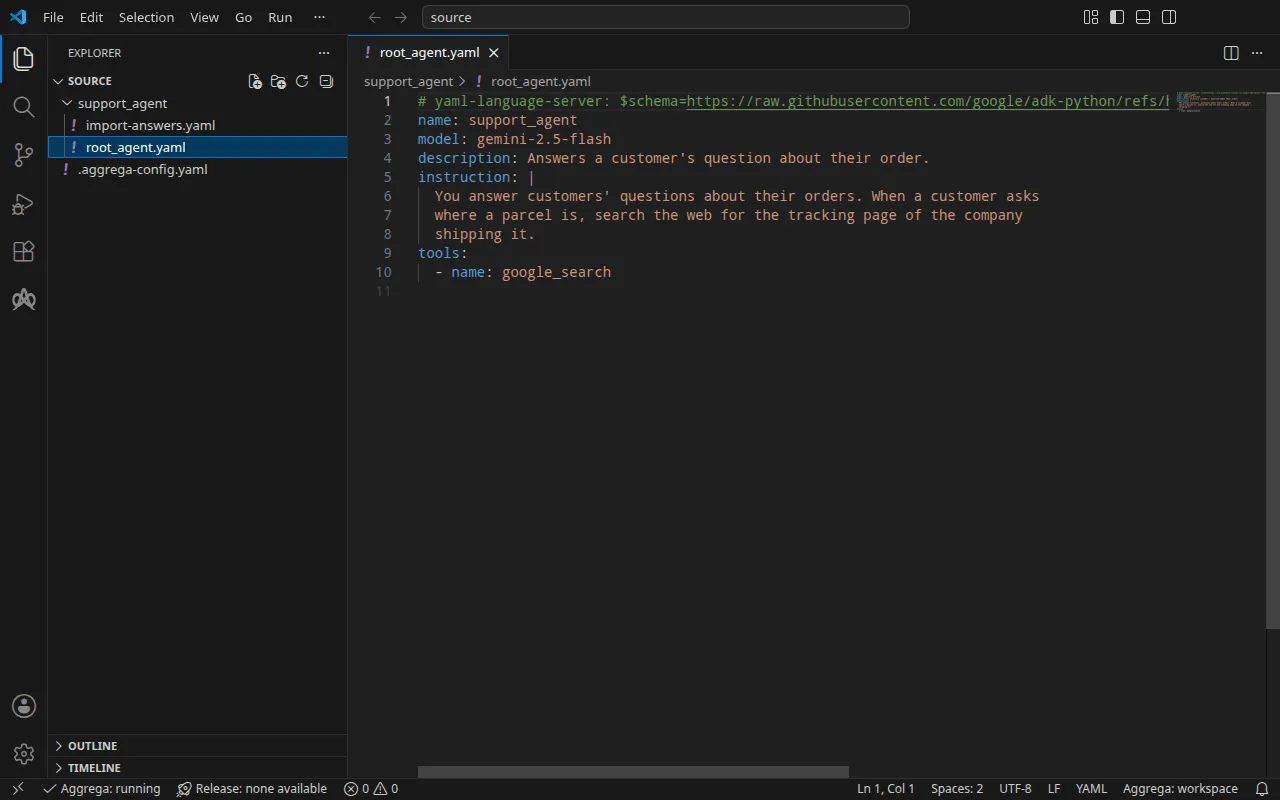
प्रोजेक्ट
ADK किसी एप्लिकेशन के एजेंटों को कोड के बजाय Agent Config फ़ाइलों में घोषित कर सकता है: adk create --type=config रूट एजेंट का कॉन्फ़िगरेशन root_agent.yaml लिखता है, और उसके बगल में एक एनवायरनमेंट फ़ाइल। यह कॉन्फ़िगरेशन, जो इस वॉकथ्रू के लिए लिखा गया है, Gemini के gemini-2.5-flash पर एक एजेंट घोषित करता है, उस Google Search टूल के साथ जो ADK के साथ आता है:
# yaml-language-server: $schema=https://raw.githubusercontent.com/google/adk-python/refs/heads/main/src/google/adk/agents/config_schemas/AgentConfig.jsonname: support_agentmodel: gemini-2.5-flashdescription: Answers a customer's question about their order.instruction: | You answer customers' questions about their orders. When a customer asks where a parcel is, search the web for the tracking page of the company shipping it.tools: - name: google_searchइम्पोर्ट एनवायरनमेंट फ़ाइल को कभी नहीं पढ़ता, जिसमें आम तौर पर वह कुंजी होती है जो एप्लिकेशन Gemini को भेजता है, इसलिए उदाहरण में ऐसी कोई फ़ाइल नहीं है। प्रोजेक्ट के रूट पर एक .aggrega-config.yaml फ़ोल्डर को वर्कस्पेस बनाता है:
# The workspace key marks this directory as the workspace root, so an import run# here writes its drafts beside support_agent/.workspace: {}# The registry the importer is fetched from the first time an import needs it.default_registry: hub.aggrega.aiइम्पोर्ट कैटलॉग के ADK एजेंट और Gemini मॉडल Components का संदर्भ देता है, और --target उसके Recipes से एक Manifest ड्राफ़्ट करता है। वर्कस्पेस किसी कैटलॉग फ़ोल्डर का नाम नहीं देता, इसलिए इम्पोर्ट स्टैंडर्ड लाइब्रेरी का कैटलॉग उसी रजिस्ट्री से पढ़ता है जिससे वह अपना इम्पोर्टर लाता है: प्रकाशित कैटलॉग का एक हस्ताक्षरित स्नैपशॉट, जिसे पहला इम्पोर्ट लाता है, सत्यापित करता है और वर्कस्पेस के कंटेंट कैश में रखता है, और जिसका नाम उसके डाइजेस्ट से उस रिकॉर्ड में दिया जाता है जिसे इम्पोर्ट अपने ड्राफ़्ट के बगल में लिखता है। जो वर्कस्पेस अपने कैटलॉग फ़ोल्डरों के नाम देता है — AGGREGA_CATALOG_DIRS में, या workspace.catalog_dirs के अंतर्गत — उन्हें पहले पढ़ता है, उनके पीछे प्रकाशित स्नैपशॉट के साथ।
इम्पोर्ट क्या पूछता है
एक Agent Config एजेंट के मॉडल का नाम देता है, उस इमेज का कभी नहीं जिसमें एप्लिकेशन चलता है: वह इमेज आप अपने प्रोजेक्ट से बनाते हैं। ADK पर बने एप्लिकेशन के लिए कैटलॉग में कोई डिफ़ॉल्ट इमेज नहीं है, इसलिए इम्पोर्ट उसके बारे में पूछता है। टर्मिनल पर वह पूछता है, और उत्तर को ड्राफ़्ट में तथा उत्तर फ़ाइल import-answers.yaml में लिखता है, जो उस डायरेक्टरी के भीतर होती है जिसे वह इम्पोर्ट करता है, support_agent/, ताकि अगला इम्पोर्ट उसे वहीं से पढ़े और कुछ न पूछे। टर्मिनल के बिना — कंटीन्यूअस इंटीग्रेशन में, या किसी पाइप के ज़रिए — वह कुछ नहीं पूछता: वह फ़ाइल को खाली कुंजी के साथ लिखता है, और फ़ाइल का नाम बताते हुए रुक जाता है। उदाहरण में यह फ़ाइल पहले से है, जिसमें इमेज का उत्तर दिया गया है, ghcr.io/example/support-agent:1.0.0, जो उस इमेज के स्थान पर है जिसे आप बनाते हैं:
# Values the import could not draft from the source, keyed by the drafted file and the key path inside# it. Write each one beside its key; an import of the same source, and a sync, read them from here and# ask nothing. A secret is never written here: its key asks where the secret comes from — a variable# name, ${NAME}, or the name of a Kubernetes Secret.release.yaml: # Container image running the application built on ADK, serving its API on infra.port on every # interface. spec.components.support-agent.infra.image: "ghcr.io/example/support-agent:1.0.0" # The origin of the secret value, written by the operator in the Release. Read exactly as # values.origin is. Write it here or in values.origin, never in both. A secret: name where it comes # from, never the value. spec.components.support-agent.uses.model.gemini-2-5-flash.features.credential.infra.origin: "google-api-key"दूसरा उत्तर Kubernetes के लिए बिल्ड के लिए है, --target helm के साथ: वहाँ एजेंट Gemini API कुंजी को एक Kubernetes Secret से पढ़ता है, और उत्तर उस Secret का नाम है, google-api-key, कभी कुंजी नहीं। Docker Compose के लिए बिल्ड इसके बजाय कुंजी को आपके शेल से पढ़ता है, इसलिए यह इम्पोर्ट उस उत्तर का उपयोग नहीं करता। इम्पोर्ट उत्तर फ़ाइल फ़ाइल, प्रश्नों और किसी सीक्रेट के उत्तर के नियमों का वर्णन करती है।
aggrega import उन सभी फ़्लैग की सूची देता है जिन्हें कमांड लेता है, और उनमें --answers भी है, जो कहीं और रखी गई उत्तर फ़ाइल का नाम देता है।
source में जाएँ:
cd sourceइम्पोर्ट चलाएं
एजेंट की डायरेक्टरी का नाम दें। इम्पोर्ट उसकी root_agent.yaml पढ़ता है:
aggrega import support_agent --target composeस्टैंडर्ड आउटपुट पर यह सूची देता है कि इसने क्या लिखा:
wrote aggregate.yamlwrote release.yamlwrote manifest.yamlwrote .aggrega-import.jsonस्टैंडर्ड एरर पर, जहाँ <workspace> उस फ़ोल्डर के स्थान पर है जिसमें आपने इसे चलाया:
[… omitted: a warning that the importer runs unverified, printed where its module is read from beside its Plugin entity in a catalog folder rather than fetched]read as the google-adk format, with drafted paths relative to <workspace>info: the answers file <workspace>/support_agent/import-answers.yaml also answers spec.components.support-agent.uses.model.gemini-2-5-flash.features.credential.infra.origin in release.yaml, which these drafts do not leave empty; those answers are kept there and not appliedmapped support_agent (agent) to core/ai-agent/google-adk as a reference, NONEmapped gemini-2.5-flash (model) to core/ai-model/gemini as a reference, NONEmade no choice for google_search (tool)Pull complete: <workspace>/release.lock (entities=8, source_artifacts=0, external_inputs=0)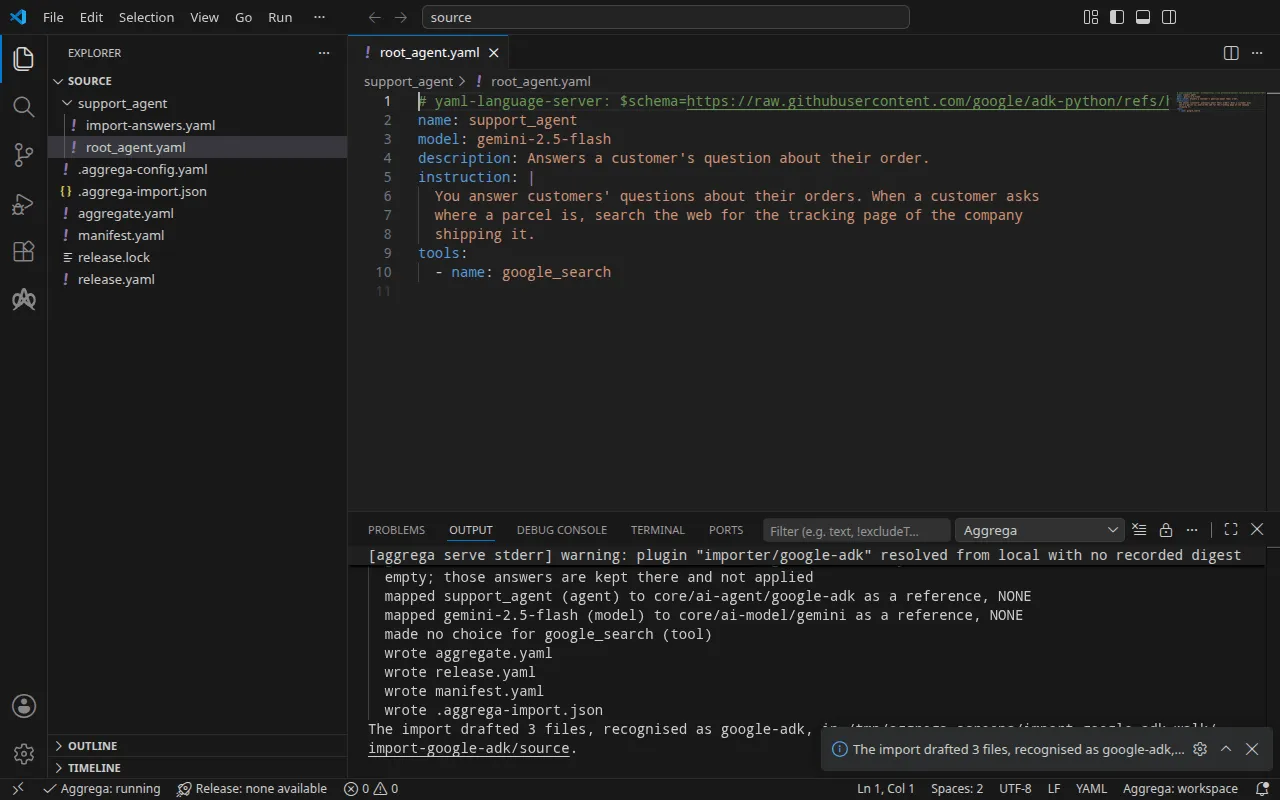
infoपंक्ति उस उत्तर का नाम देती है जिसका Docker Compose ड्राफ़्ट उपयोग नहीं करते, और जो Kubernetes के लिए बिल्ड हेतु उत्तर फ़ाइल में रखा गया है।mappedपंक्तियाँ बताती हैं कि एजेंट स्टैंडर्ड लाइब्रेरी के ADK एजेंटcore/ai-agent/google-adkका एक इंस्टेंस है, और जिस मॉडल का वह नाम देता है वहcore/ai-model/geminiका एक इंस्टेंस है। उनका स्तरNONEपढ़ता है: ADK इम्पोर्ट इन Components का संदर्भ इस आधार पर देता है कि कॉन्फ़िगरेशन किसका नाम देता है, न कि हर एक को कैटलॉग से तौलकर।made no choiceपंक्ति बताती है कि Google Search टूल को किसी चीज़ के रूप में ड्राफ़्ट नहीं किया गया: यह एक ऐसा टूल है जो ADK के साथ आता है, और यह एप्लिकेशन के भीतर चलता है।Pull completeपंक्ति इम्पोर्ट द्वारा वह लाना है जिस पर ड्राफ़्ट किया गया Release निर्भर है, जैसेaggrega pullकरता है,release.lockमें, ताकि ड्राफ़्ट तुरंत वैलिडेट और बिल्ड हों।--offlineके अंतर्गत इम्पोर्ट कुछ भी पुल नहीं करता और चलाने के लिएaggrega pullका नाम देता है।
यह क्या लिखता है
Aggregate, Release और Manifest का नाम imported/support-agent रखा जाता है, रूट एजेंट के name, support_agent, के आधार पर, जिसे घटाकर support-agent किया जाता है, उस नेमस्पेस के अंतर्गत जिसे इम्पोर्टर की target_namespace सेटिंग तय करती है, जो imported है जब तक आप कोई और सेट न करें (सेटिंग्स)।
aggregate.yaml — एजेंट, जो मॉडल से वायर किया गया है और जिसके कनेक्शन पर वह कुंजी घोषित है जो वह प्रस्तुत करता है, और मॉडल, जो ऐसी टिप्पणियों से शुरू होता है जो बताती हैं कि क्या पढ़ा गया और क्या नहीं:
# Google ADK agent configurations read:# - root_agent.yaml# Not read: the application's code, which defines the tools, callbacks and agents a configuration names by their code, nor the environment file ADK's scaffold writes beside root_agent.yaml; the application runs in the image the Release names for each instance, and loads its configurations itself.# ADK states that its Agent Config is experimental. An agent's model is a Gemini model by default; ADK serves some other providers' models by name through classes of its own, such as claude-sonnet-4-5 and gpt-4o, and others through a LiteLLM model string.apiVersion: aggrega.ai/v1beta1kind: Aggregatemetadata: name: imported/support-agent version: 0.1.0 description: Draft Aggregate imported from a source in the google-adk format.spec: components: # The agent tree of root_agent.yaml, served from its root agent support_agent. # Tools ADK ships, which run inside the application, drafted as no Component: google_search. support-agent: type: core/ai-agent/google-adk values: description: "Answers a customer's question about their order." uses: model: gemini-2-5-flash: target: gemini-2-5-flash # For the compose target, the lines below declare credential on gemini-2-5-flash: a secret the Release alone attaches arrives under the key value, so each is declared with a key of its own and no two arrive under one; the Release attaches its origin, naming this type or none. features: credential: type: core/secret-value values: key: GOOGLE_API_KEY # The model gemini-2.5-flash. gemini-2-5-flash: type: core/ai-model/gemini values: model: "gemini-2.5-flash"ADK किसी एप्लिकेशन को उसके रूट एजेंट से सर्व करता है, इसलिए ड्राफ़्ट में प्रति एजेंट ट्री एक इंस्टेंस होता है, जिसका नाम उसके रूट एजेंट के नाम पर रखा जाता है। एजेंट का instruction वहन नहीं किया जाता: एप्लिकेशन उसे अपने स्वयं के कॉन्फ़िगरेशन से पढ़ता है, जो इमेज में होता है।
ADK gemini-2.5-flash को अपनी Gemini क्लास के ज़रिए सर्व करता है, जो अपने अनुरोध Gemini API को भेजती है, इसलिए ड्राफ़्ट मॉडल को एजेंट के model सॉकेट से वायर करता है, जो केवल Gemini API को स्वीकार करता है। Gemini एक होस्टेड सेवा है, इसलिए एजेंट का Component उससे ऐसे कनेक्शन को अस्वीकार करता है जिसमें कोई क्रेडेंशियल न हो; कनेक्शन GOOGLE_API_KEY कुंजी के अंतर्गत एक क्रेडेंशियल घोषित करता है। जिस मॉडल को ADK किसी और तरीके से सर्व करता है — जैसे gpt-4o जैसा नाम, जिसे ADK अपनी एक अलग क्लास के ज़रिए सर्व करता है, या openai/gpt-4o जैसी LiteLLM मॉडल स्ट्रिंग — वह किसी से वायर नहीं किया जाता: इंस्टेंस के ऊपर एक टिप्पणी उसका नाम देती है, और कनेक्शन आपके लिए छोड़ दिया जाता है, जैसा कि एक एजेंट ट्री क्या बनता है में वर्णित है।
release.yaml — एनवायरनमेंट, इमेज, प्रकाशित पोर्ट, और कुंजी कहाँ से आती है:
apiVersion: aggrega.ai/v1beta1kind: Releasemetadata: name: imported/support-agent # environment is a drafted default, since no source names the environment this Release deploys to; change it to name the one it deploys to. environment: development version: 0.1.0 description: Draft Release imported from a source in the google-adk format.spec: aggregate: imported/support-agent manifest: imported/support-agent components: support-agent: infra: # Left for the Release, since the source cannot supply it: infra.image, the container image running the application built on ADK, holding its configurations image: "ghcr.io/example/support-agent:1.0.0" # Published on this machine's loopback address, 127.0.0.1: reachable from this machine only, by any process running on it. Delete this line to keep the service internal. published_port: 8000 uses: model: gemini-2-5-flash: features: credential: type: core/secret-value infra: # Attached by reference, never as a value: the credential support-agent presents to gemini-2-5-flash on its model connection (the source names no variable for it, so it is read from the one Google's Gemini API's client libraries read the API key from), read from the variable GOOGLE_API_KEY, which a target substituting variable references, as Docker Compose does when the stack starts, reads from the environment, so no file carries the value. origin: "${GOOGLE_API_KEY}" gemini-2-5-flash: {}एनवायरनमेंट, development, एक डिफ़ॉल्ट है जिसे इम्पोर्ट इसलिए लिखता है क्योंकि कोई कॉन्फ़िगरेशन किसी एनवायरनमेंट का नाम नहीं देता; जहाँ Release कहीं और डिप्लॉय होता है, वहाँ इसे बदलें। इमेज वह उत्तर है जिसे इम्पोर्ट ने support_agent/import-answers.yaml से पढ़ा। published_port 8000 है, वह पोर्ट जिस पर एप्लिकेशन सुनता है, इसलिए वह आपकी मशीन पर http://127.0.0.1:8000 पर उत्तर देता है; जैसा कि उसकी टिप्पणी कहती है, इस मशीन की कोई भी प्रोसेस वहाँ उस तक पहुँच सकती है और कोई अन्य नहीं, और इस पंक्ति को हटाने से एप्लिकेशन केवल स्टैक के नेटवर्क पर रहता है। कॉन्फ़िगरेशन कुंजी के लिए किसी वेरिएबल का नाम नहीं देता, इसलिए कनेक्शन उसे ${GOOGLE_API_KEY} से पढ़ता है, वह वेरिएबल जिसे Gemini API की क्लाइंट लाइब्रेरी पढ़ती हैं, एक वेरिएबल संदर्भ के रूप में और कभी किसी मान के रूप में नहीं।
manifest.yaml — हर टाइप की Compose Recipe, और वह रियलाइज़ेशन जो कुंजी के वेरिएबल संदर्भ को Compose फ़ाइल में ज्यों-का-त्यों लिखता है:
apiVersion: aggrega.ai/v1beta1kind: Manifestmetadata: name: imported/support-agent version: 0.1.0spec: mappings: components: type: core/ai-agent/google-adk: compose/google-adk core/ai-model/gemini: compose/gemini features: type: core/secret-value: compose/dotenv-secretrelease.lock उन कैटलॉग एंटिटी को, डाइजेस्ट के साथ, रिकॉर्ड करता है जिन पर Release रिज़ॉल्व हुआ, और .aggrega-import.json इस बात का रिकॉर्ड है कि इम्पोर्ट ने क्या लिखा, जिसे बाद में कोई aggrega import --sync पढ़ता है।
वैलिडेट और बिल्ड करें
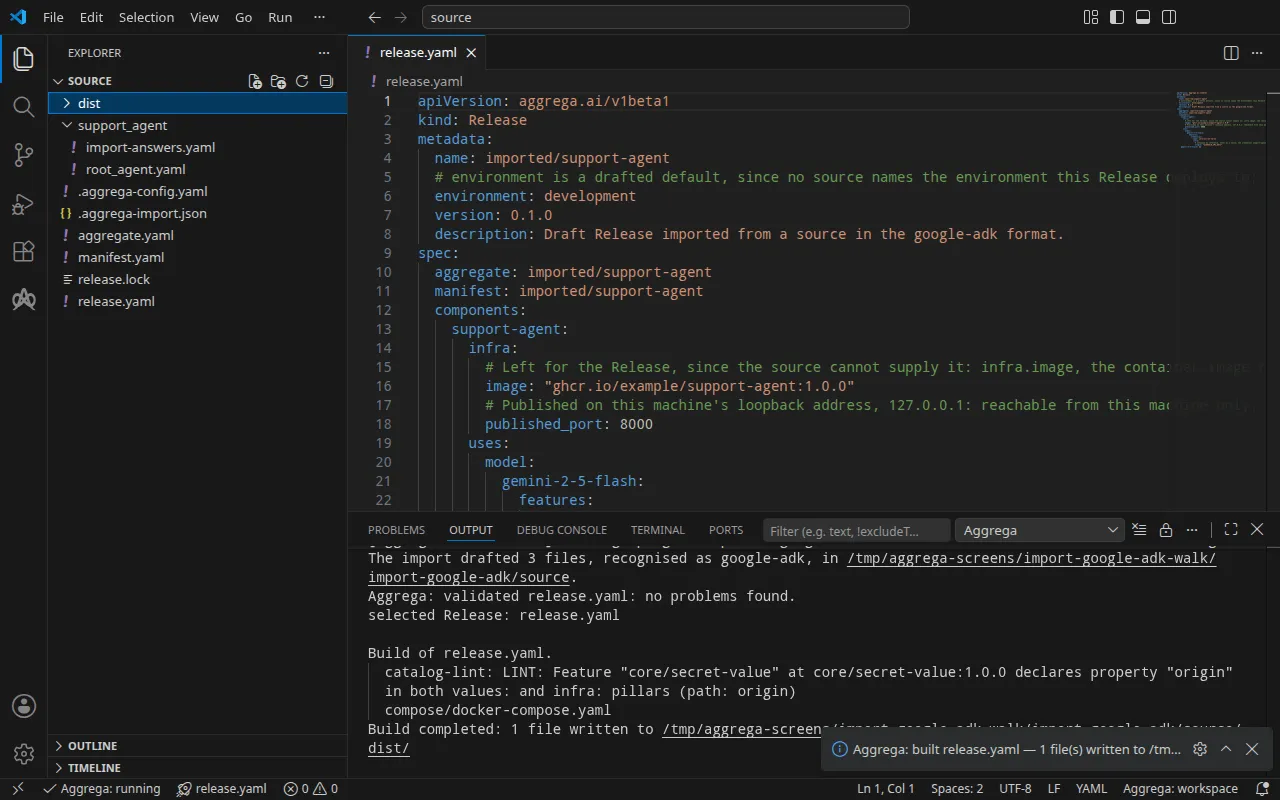
aggrega validate --release release.yamlaggrega build --release release.yaml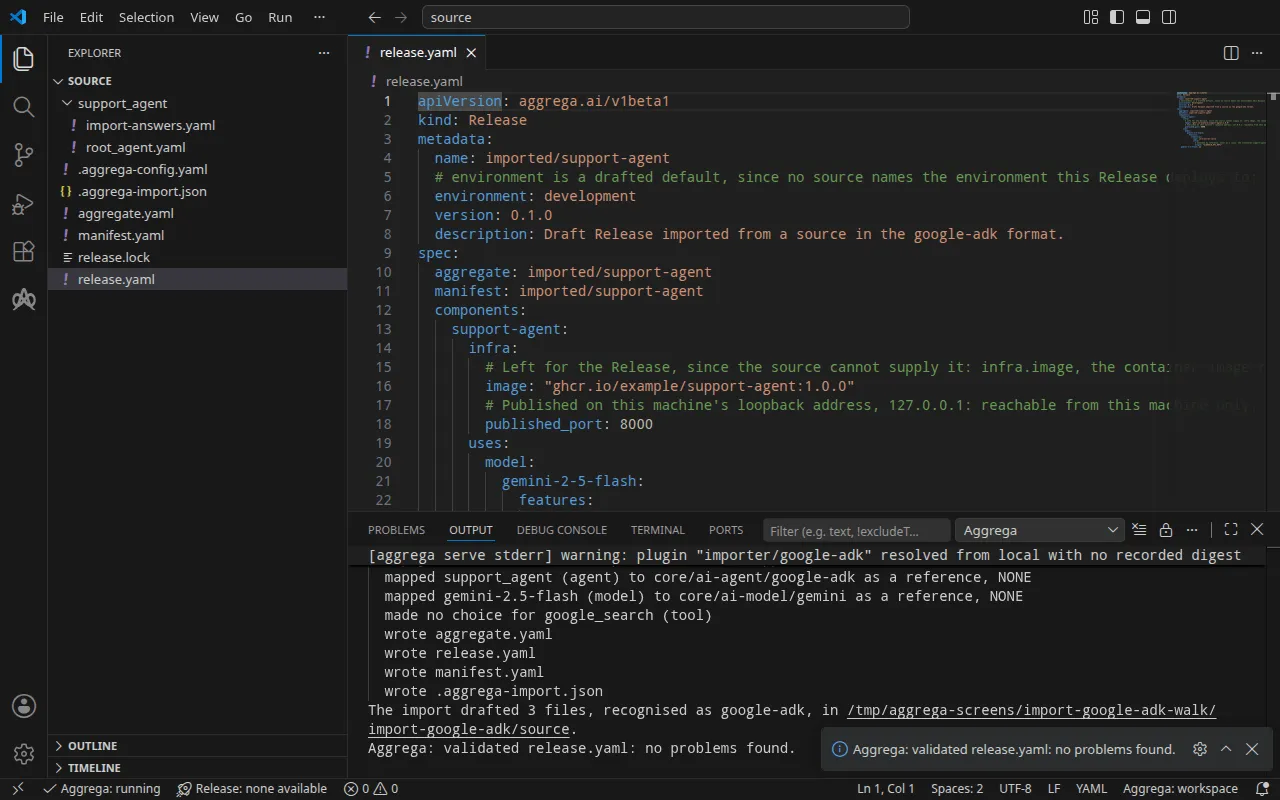
वैलिडेशन प्रिंट करता है:
notice: LINT: Feature "core/secret-value" at core/secret-value:1.0.0 declares property "origin" in both values: and infra: pillars (path: origin)release dependency validation passed: release.yaml (schema-pillar + dependency pillars)और बिल्ड, जहाँ <workspace> उस फ़ोल्डर के स्थान पर है जिसमें आपने इसे चलाया:
notice: LINT: Feature "core/secret-value" at core/secret-value:1.0.0 declares property "origin" in both values: and infra: pillars (path: origin)[… omitted: a total build time, which differs per run]Build completed: 1 file written to <workspace>/distnotice पंक्ति सलाहकारी है: सीक्रेट Feature अपना origin Aggregate के values से या Release के infra से स्वीकार करता है, और नोटिस बताता है कि एक लीफ़ दोनों में घोषित है। यह कोई निर्णय नहीं बदलती।
dist/compose/docker-compose.yaml में एजेंट की सेवा:
services: support-agent: image: ghcr.io/example/support-agent:1.0.0 environment: PORT: "8000" GOOGLE_API_KEY: ${GOOGLE_API_KEY} ports: - 127.0.0.1:8000:8000 [… omitted: the labels the build writes on every service, naming the Aggregate, the component, the environment and the compiler's version] networks: - composeएप्लिकेशन को वह पोर्ट, जिस पर उसका सर्वर सुनता है, PORT के रूप में मिलता है, और कुंजी GOOGLE_API_KEY के रूप में, जिसे ADK का Gemini क्लाइंट Gemini API को भेजता है। मॉडल को अपनी कोई सेवा नहीं मिलती: क्लाइंट अपने अनुरोध Gemini API के अपने पते पर भेजता है, और अपने एनवायरनमेंट से कोई अन्य पता नहीं पढ़ता। कुंजी एक वेरिएबल संदर्भ है, जो स्टैक शुरू होने पर आपके शेल से भरी जाती है। ADK एजेंट का Compose Recipe आपकी मशीन पर पोर्ट केवल वहीं प्रकाशित करता है जहाँ Release एजेंट के infra में published_port सेट करता है, और तब भी केवल लूपबैक पते, 127.0.0.1, पर; इसके बिना, सेवा तक केवल स्टैक के नेटवर्क पर पहुँचा जाता है।
AI असिस्टेंट के साथ
Aggrega के टूल के साथ सेट अप किया गया AI असिस्टेंट भी यही कर सकता है: यह प्रॉम्प्ट उसमें पेस्ट करें।
केवल Aggrega टूल का उपयोग करें, और स्वयं कोई फ़ोल्डर न बनाएं। यदि Workspace फ़ोल्डर में अभी कोई `import-google-adk` फ़ोल्डर नहीं है, तो `draft` टूल को एक बार कॉल करें, `example` को `import-google-adk` पर सेट करके और बिना `dir` के: यह उदाहरण को एक नए `import-google-adk` फ़ोल्डर में लिखता है, जिसका `source` फ़ोल्डर वह रखता है जिसे यह पेज इम्पोर्ट करता है। फिर `import` टूल को कॉल करें, `workspace_root` को `import-google-adk/source` पर, `source` को `support_agent` पर और `target` को `compose` पर सेट करके: यह जिन उत्तरों की उसे ज़रूरत है उन्हें `support_agent` फ़ोल्डर के भीतर `import-answers.yaml` से पढ़ता है, अपने ड्राफ़्ट `import-google-adk/source` में लिखता है और उनकी ज़रूरत की चीज़ें पुल करता है। फिर `validate` टूल को कॉल करें, `workspace_root` को `import-google-adk/source` पर और `release` को `release.yaml` पर सेट करके, और `build` टूल को, `workspace_root` को `import-google-adk/source` पर, `release` को `release.yaml` पर और `write` को true पर सेट करके। मुझे बताएं कि बिल्ड ने कौन-सी फ़ाइलें लिखीं; वे `import-google-adk/source/dist/` के अंतर्गत हैं।इसे VS Code में खोलें
Visual Studio Code के लिए Aggrega एक्सटेंशन इंस्टॉल होने पर, VS Code में import-google-adk/source फ़ोल्डर खोलें, जहाँ इम्पोर्ट ने अपने ड्राफ़्ट लिखे। फ़ोल्डर में एक Release है, ड्राफ़्ट की गई release.yaml, इसलिए एडिटर उसे आपके लिए चुन लेता है, और जैसे-जैसे आप ड्राफ़्ट संपादित करते हैं वह उन्हें उस Release के विरुद्ध जाँचता है, और जो कुछ पाता है उसे फ़ाइल में और Problems पैनल में चिह्नित करता है। कमांड पैलेट में Aggrega: Show topology graph Release के घटकों और उनके बीच के कनेक्शनों को बनाता है। Aggrega: Build, Aggrega: Preview build और Aggrega: Pull उसी Release पर काम करते हैं, और हर एक एक्टिविटी बार के Aggrega व्यू के Commands पैनल पर एक बटन भी है; Build अपनी फ़ाइलें फ़ोल्डर के dist/ में लिखता है। बाकी सब Visual Studio Code में Aggrega का उपयोग करें में है।
इसे चलाएं
Docker Compose आपकी इमेज को ऊपर रेंडर की गई सेवा के रूप में चलाता है, PORT सहित। इमेज को उस पोर्ट पर हर इंटरफ़ेस पर सुनना चाहिए, 127.0.0.1 पर नहीं, जो ADK के API सर्वर का डिफ़ॉल्ट पता है। ADK का अपना API सर्वर, adk api_server, कॉन्फ़िगरेशन डायरेक्टरी को ज्यों-का-त्यों सर्व करता है, इसलिए इमेज को आपके किसी कोड की ज़रूरत नहीं होती। प्रोजेक्ट के रूट पर, support_agent/ के बगल में, एक Dockerfile:
FROM python:3.12-slimRUN pip install --no-cache-dir google-adk==2.13.0COPY support_agent/ /app/agents/support_agent/CMD ["sh", "-c", "exec adk api_server --host 0.0.0.0 --port \"$PORT\" --auto_create_session /app/agents"]adk api_server उस फ़ोल्डर की एजेंट डायरेक्टरियों को सर्व करता है जिसका वह नाम लेता है, और कमांड PORT को उसे पास करता है। --auto_create_session एक सेशन को तब खोलता है जब /run को भेजा गया कोई अनुरोध पहली बार उसका नाम लेता है, इसलिए एक ही अनुरोध एजेंट तक पहुँच जाता है। इमेज बनाएं, support_agent/import-answers.yaml में ghcr.io/example/support-agent:1.0.0 के स्थान पर उसका नाम लिखें, और --sync के साथ फिर से इम्पोर्ट करें, जो नया उत्तर ड्राफ़्ट में लिखता है और फिर से पुल करता है; फिर बिल्ड करें:
docker build -t support-agent:local .aggrega import support_agent --syncaggrega build --release release.yamlफिर अपने शेल में कुंजी सेट करें और स्टैक शुरू करें:
export GOOGLE_API_KEY='your Gemini API key'docker compose -p support-agent -f dist/compose/docker-compose.yaml up -d --wait-p प्रोजेक्ट का नाम देता है, जैसा कि इम्पोर्ट कैसे चलता है का रन चरण समझाता है। --wait कंटेनर के चलते ही लौट आता है, क्योंकि बिल्ड सेवा को कोई हेल्थ चेक नहीं देता, और सर्वर एक क्षण बाद उत्तर देता है, इसलिए जिस अनुरोध को वह अस्वीकार करे उसे दोहराएं।
इसे जाँचें
एजेंट को http://127.0.0.1:8000 पर एक संदेश भेजें, वह पता जिसे published_port प्रकाशित करता है। अनुरोध एक उपयोगकर्ता और एक सेशन का नाम देता है, और /run पहले संदेश पर सेशन खोलता है:
curl -sS -X POST http://127.0.0.1:8000/run -H 'Content-Type: application/json' \ -d '{"app_name": "support_agent", "user_id": "u1", "session_id": "s1", "new_message": {"role": "user", "parts": [{"text": "Where is my order 1234? Answer in one short sentence."}]}}'उत्तर, जो Gemini का है, उन इवेंट्स की सूची के रूप में लौटता है जिन्हें इस टर्न ने सेशन में जोड़ा। रन में कुंजी के लिए एक प्लेसहोल्डर का उपयोग हुआ, इसलिए Gemini ने उसे अस्वीकार कर दिया: अनुरोध ने HTTP 500, Internal Server Error, उत्तर दिया, और सेवा का लॉग, docker compose -p support-agent -f dist/compose/docker-compose.yaml logs support-agent, कारण बताता है:
google.genai.errors.ClientError: 400 INVALID_ARGUMENT. {'error': {'code': 400, 'message': 'API key not valid. Please pass a valid API key.', 'status': 'INVALID_ARGUMENT', [… omitted: the error's details]}}curl -sS http://127.0.0.1:8000/list-apps ["support_agent"] उत्तर देता है, यानी वे एजेंट जो सर्वर में हैं।
स्टैक को इससे रोकें:
docker compose -p support-agent -f dist/compose/docker-compose.yaml downKubernetes पर
यही एजेंट --target helm के साथ Kubernetes के लिए इम्पोर्ट होता है। एक क्लस्टर अपनी इमेज किसी रजिस्ट्री से पुल करता है, इसलिए आपने जो इमेज बनाई है उसे ऐसी रजिस्ट्री में पुश करें जिसे आपका क्लस्टर पढ़ता है, और support_agent/import-answers.yaml में दिए गए इमेज उत्तर के स्थान पर उसका नाम लिखें; रन ने उसे क्लस्टर की अपनी मशीन पर एक रजिस्ट्री में localhost:5000/support-agent:1.0.0 के रूप में पुश किया। वहाँ दूसरा उत्तर उस Secret का नाम देता है जिससे एजेंट Gemini API कुंजी पढ़ता है, google-api-key। Docker Compose के लिए ड्राफ़्ट पहले से source में हैं, इसलिए इन्हें एक अलग फ़ोल्डर में ड्राफ़्ट करें, और उसी से बिल्ड करें:
aggrega import support_agent --target helm --output-dir helmcd helmaggrega build --release release.yamlबिल्ड सादे Kubernetes मैनिफ़ेस्ट वर्कस्पेस रूट, source, पर dist/helm/ के अंतर्गत लिखता है, जो helm से ../dist/helm/ है। जिस नेमस्पेस में आप लागू करते हैं उसमें Secret google-api-key बनाएं, जिसमें कुंजी डेटा कुंजी value के अंतर्गत हो, और फ़ोल्डर को वैसे लागू करें जैसा इम्पोर्ट कैसे चलता है का रन चरण समझाता है। एजेंट की Service support-agent-default है: एक लोकल पोर्ट उस पर फ़ॉरवर्ड करें, और कमांड को चलता छोड़ दें:
kubectl port-forward -n <namespace> svc/support-agent-default 8000:8000दूसरे टर्मिनल से, ऊपर दिया गया संदेश उसी पते पर, बिना बदलाव के, एजेंट तक पहुँचता है। रन को वही Internal Server Error मिला, और kubectl logs -n <namespace> deploy/support-agent प्लेसहोल्डर कुंजी के उसी अस्वीकरण का कारण बताता है।