



匯入 Compose 專案
本逐步說明匯入一個小型 Compose 專案——一個 API、它存放筆記的 PostgreSQL 資料庫,以及一個 Redis 快取——並為 Docker Compose 建置其結果。匯入會草擬建置所讀取的每個檔案,並帶上 Compose 檔案所陳述的內容:API 對資料庫與快取的連線、資料庫的使用者與名稱、以變數參照呈現的密碼,以及每個映像檔的標籤。下面的每個檔案與每一段輸出都來自一次真實的執行;專案與逐步說明的每個階段都在 import-compose 範例中,其中有一個檢查指令碼會再次執行匯入,把它寫出的內容、它印出的內容,以及本頁所引用的區塊,與保存在那裡的檔案比較,並驗證與建置匯入所寫出的內容。
草擬範例
你可以用本頁的命令執行這個匯入,或是讓你的 AI 助理替你執行。
把範例寫入一個以它命名的新資料夾:
aggrega draft --example import-compose接著它會印出下一步要執行的命令。第一個切換到新資料夾;其後的那一個(見下方)切換到它的 source 資料夾,其中存放本頁所匯入的內容,也是匯入執行的位置:
cd import-compose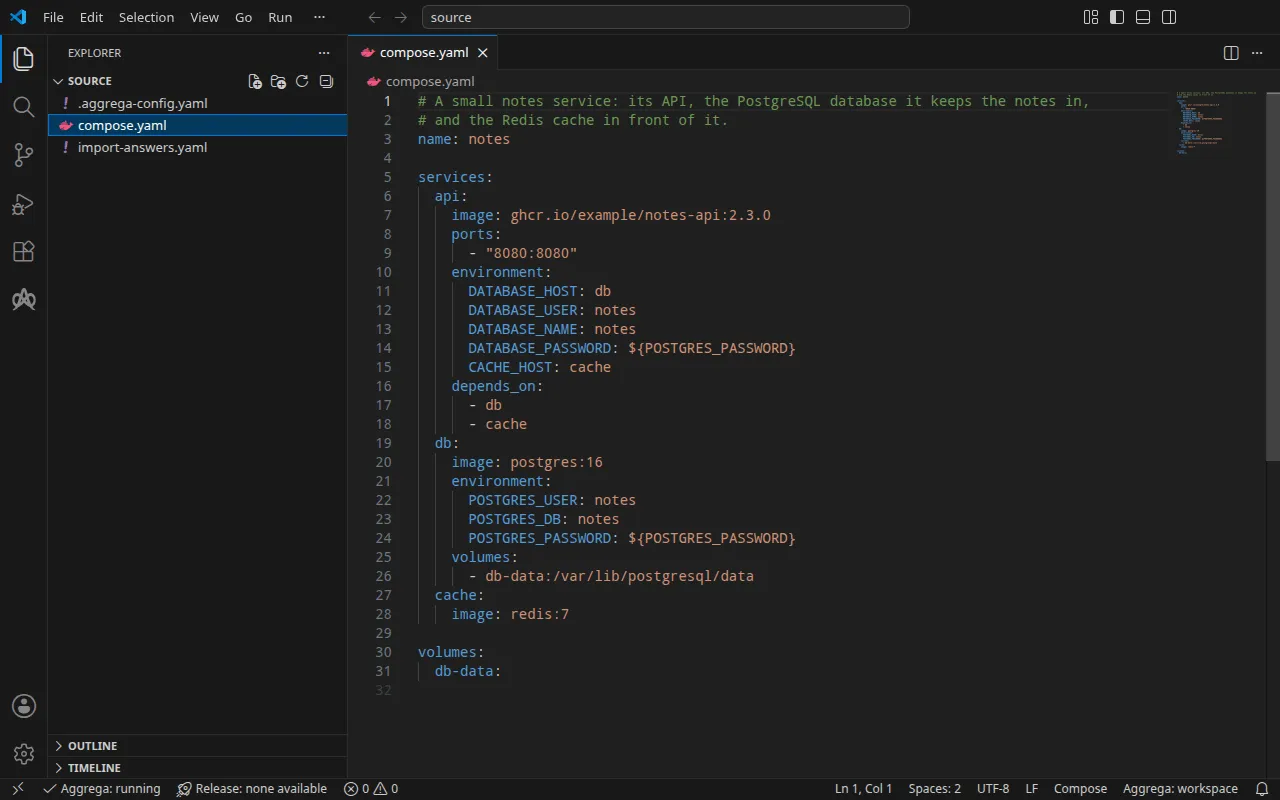
專案
compose.yaml:
# A small notes service: its API, the PostgreSQL database it keeps the notes in,# and the Redis cache in front of it.name: notes
services:  api:    image: ghcr.io/example/notes-api:2.3.0    ports:      - "8080:8080"    environment:      DATABASE_HOST: db      DATABASE_USER: notes      DATABASE_NAME: notes      DATABASE_PASSWORD: ${POSTGRES_PASSWORD}      CACHE_HOST: cache    depends_on:      - db      - cache  db:    image: postgres:16    environment:      POSTGRES_USER: notes      POSTGRES_DB: notes      POSTGRES_PASSWORD: ${POSTGRES_PASSWORD}    volumes:      - db-data:/var/lib/postgresql/data  cache:    image: redis:7
volumes:  db-data:
在它旁邊,一個 .aggrega-config.yaml 讓資料夾成為工作區,所以匯入會把草稿寫在那裡:
# The workspace key marks this directory as the workspace root, so an import run# here writes its drafts beside compose.yaml.workspace: {}# The registry the importer is fetched from the first time an import needs it.default_registry: hub.aggrega.ai匯入會把每個服務與工作區目錄中的 Components 比較,而 --target 會從它們的 Recipes 草擬 Manifest。工作區沒有指名目錄資料夾,所以匯入會從它擷取匯入器的登錄庫讀取標準程式庫目錄:已發布目錄的簽署快照,由第一次匯入擷取、驗證並保存在工作區的內容快取中,並在匯入寫於草稿旁的記錄中以其摘要來指名。指名自己目錄資料夾的工作區——在 AGGREGA_CATALOG_DIRS 中,或在 workspace.catalog_dirs 之下——會先讀取那些資料夾,再讀取其後的已發布快照。
答案檔
針對 Docker Compose 的建置不需要 Compose 檔案沒有陳述的任何內容,所以這次匯入什麼也不問。同一專案針對 Kubernetes 的建置,使用 --target helm,需要一個 Compose 檔案沒有的值:資料庫密碼所讀取的 Kubernetes Secret 的名稱,因為 Kubernetes 建置是從 Secret 而不是從你的 shell 讀取密碼。範例把那個答案保存在 compose.yaml 旁的 import-answers.yaml 中,也就是匯入會尋找它的地方:
# Values the import could not draft from the source, keyed by the drafted file and the key path inside# it. Write each one beside its key; an import of the same source, and a sync, read them from here and# ask nothing. A secret is never written here: its key asks where the secret comes from — a variable# name, ${NAME}, or the name of a Kubernetes Secret.release.yaml: # The origin of the secret value, written by the operator in the Release. Read exactly as # values.origin is. Write it here or in values.origin, never in both. A secret: name where it comes # from, never the value. spec.components.db.features.password.infra.origin: "notes-db-password"匯入在第一次以 --target helm 執行時自己寫出了這個檔案:它列出了無法草擬的值,鍵為空,然後停下來。答案是 Secret 的名稱,絕不是密碼。針對 Docker Compose 的匯入不欠這樣的值,會把答案保留在檔案中,並且不使用它。匯入答案檔說明該檔案、匯入在終端機上改為詢問的問題,以及兩者都沒有時它會怎麼做。
aggrega import 列出該命令接受的每個旗標,其中包括 --answers,它可指名保存在別處的答案檔。
切換到 source:
cd source執行匯入
aggrega import compose.yaml --target compose在標準輸出上,它會列出所寫出的內容:
wrote aggregate.yamlwrote release.yamlwrote manifest.yamlwrote .aggrega-import.json在標準錯誤上,其中 <workspace> 代表你執行它所在的資料夾:
[… omitted: a warning that the importer runs unverified, printed where its module is read from beside its Plugin entity in a catalog folder rather than fetched]read as the compose format, with drafted paths relative to <workspace>warn: the value of environment.POSTGRES_USER of node db is carried as written in the drafts: its format marks the field as no credential, though it can carry one, and setting empty_credentials to all writes it emptywarn: the value of environment.POSTGRES_DB of node db is carried as written in the drafts: its format marks the field as no credential, though it can carry one, and setting empty_credentials to all writes it emptymapped api (ghcr.io/example/notes-api) to core/compute/server as a reference, NONEmapped db (postgres) to core/datastore/postgres as a reference, HIGH at 0.9mapped cache (redis) to core/datastore/redis as a reference, HIGH at 0.9Pull complete: <workspace>/release.lock (entities=10, source_artifacts=0, external_inputs=0)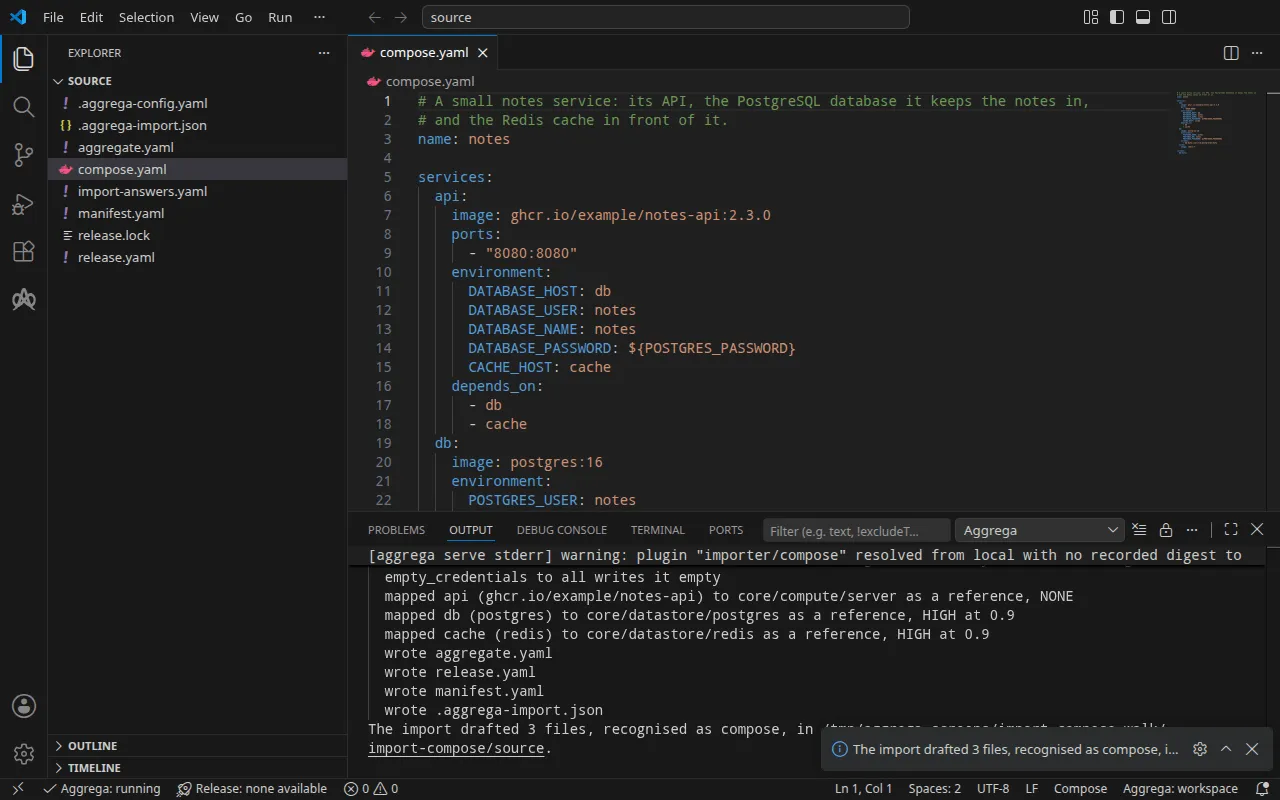
warn那幾行依服務與變數指出每個被草稿照原樣帶入的值,絕不顯示其值:Compose 不會把任何值標記為認證,而其中任何一個都可能帶有認證。這裡兩者都沒有。API 從另一個服務讀取的變數根本不會被當作值帶入——由連線傳遞它們——而讀取${POSTGRES_PASSWORD}的那兩個只是變數參照,沒有別的,所以沒有警告指出它們。mapped那幾行說明每個服務變成了什麼。api執行自己的映像檔,所以它是標準程式庫通用伺服器core/compute/server的實例。db與cache執行標準程式庫 Compose Recipes 為core/datastore/postgres與core/datastore/redis所執行的映像檔;每一個都在高層級以 0.9 比對到該 Component,而草稿會參照它。Pull complete那一行是匯入在擷取草擬 Release 所依賴的內容,就像aggrega pull所做的那樣,寫入release.lock,讓草稿立即就能驗證與建置。在--offline下,匯入不拉取任何東西,並指出該執行的aggrega pull。
它寫出什麼
Aggregate、Release 與 Manifest 都命名為 imported/notes,來自 Compose 專案的 name:——沒有 name: 的 Compose 檔案會以它的檔案 compose 命名,而以目錄形式匯入的存放它的目錄,則依該目錄命名,如同 Compose 為專案命名的方式——位於匯入器的 target_namespace 設定所設的命名空間之下,除非你設定別的,否則為 imported(設定)。
aggregate.yaml — 每個服務一個項目、API 的環境所描繪的連線,以及 Compose 檔案所設定的值與密碼:
# Not carried, since the draft reads the services and the models alone: volumes.apiVersion: aggrega.ai/v1beta1kind: Aggregatemetadata: name: imported/notes version: 0.1.0 description: Draft Aggregate imported from a source in the compose format.spec: components: api: type: core/compute/server features: # For the compose target, the lines below declare database_password on api: a secret the Release alone attaches arrives under the key value, so each is declared with a key of its own and no two arrive under one; the Release attaches its origin, naming this type or none. database_password: type: core/secret-value values: key: DATABASE_PASSWORD uses: cache: cache: target: cache # The variables the source sets to what cache publishes, delivered from it under the names the source gives them. inject: env: - in: "CACHE_HOST" from: host db: db: target: db # The variables the source sets to what db publishes, delivered from it under the names the source gives them. inject: env: - in: "DATABASE_HOST" from: host - in: "DATABASE_USER" from: user - in: "DATABASE_NAME" from: database db: type: core/datastore/postgres # The values of core/datastore/postgres the source sets as POSTGRES_USER, POSTGRES_DB, the variables its Compose Recipes set from them. values: user: "notes" database: "notes" features: # For the compose target, the lines below declare password on db: a secret the Release alone attaches arrives under the key value, so each is declared with a key of its own and no two arrive under one; the Release attaches its origin, naming this type or none. password: type: core/secret-value values: key: POSTGRES_PASSWORD cache: type: core/datastore/redisAPI 中每個指名另一個服務的變數,都會變成該連線的 inject 區塊:Compose 檔案把 DATABASE_HOST 設為 db,而連線以該名稱傳遞資料庫所發布的 host,所以它在任何目標上都會跟隨資料庫,而不是被複製。DATABASE_USER 與 DATABASE_NAME 對應到 PostgreSQL 服務建立時所用的使用者與資料庫,所以它們也由它所發布的內容傳遞,而這兩個值會成為資料庫自己的 values。每個密碼都會變成 core/secret-value 附件,以讀取它的變數所用的鍵來宣告。
release.yaml — 環境、API 的映像檔與連接埠、每個資料存放區的引擎版本,以及每個密碼的來源:
apiVersion: aggrega.ai/v1beta1kind: Releasemetadata: name: imported/notes # environment is a drafted default, since no source names the environment this Release deploys to; change it to name the one it deploys to. environment: development version: 0.1.0 description: Draft Release imported from a source in the compose format.spec: aggregate: imported/notes manifest: imported/notes components: # The source also states, for the Release to carry where core/compute/server takes it: # ports: # - "8080:8080" api: infra: image: "ghcr.io/example/notes-api:2.3.0" port: 8080 # Published on this machine's loopback address, 127.0.0.1: reachable from this machine only, by any process running on it. Delete this line to keep the service internal. published_port: 8080 features: database_password: type: core/secret-value infra: # Attached by reference, never as a value: the value api reads as DATABASE_PASSWORD, read from the variable POSTGRES_PASSWORD, which a target substituting variable references, as Docker Compose does when the stack starts, reads from the environment, so no file carries the value. origin: "${POSTGRES_PASSWORD}" # The source states, for the Release to carry where core/datastore/postgres takes it: # volumes: # - "db-data:/var/lib/postgresql/data" db: infra: # The tag of the image the source runs, postgres:16, the engine_version of core/datastore/postgres its Compose Recipes run. engine_version: "16" features: password: type: core/secret-value infra: # Attached by reference, never as a value: the password of db, which the source sets as POSTGRES_PASSWORD, read from the variable POSTGRES_PASSWORD, which a target substituting variable references, as Docker Compose does when the stack starts, reads from the environment, so no file carries the value. origin: "${POSTGRES_PASSWORD}" cache: infra: # The tag of the image the source runs, redis:7, the engine_version of core/datastore/redis its Compose Recipes run. engine_version: "7"環境 development 是匯入寫入的預設值,因為沒有任何 Compose 檔案指名環境;若 Release 要部署到別處,請更改它。映像檔標籤會變成標準程式庫 Components 所接受的引擎版本。API 的 port 是它的容器所監聽的連接埠,published_port 是它的 ports 項目所發布的主機連接埠,兩者都是 Compose 檔案所陳述的 8080;如它的註解所說,這台機器上的任何處理程序都能在 http://127.0.0.1:8080 觸及 API,其他任何東西都不能,而刪除該行則讓它只留在堆疊的網路上。沒有任何鍵接受的內容,會以註解的形式留在它的項目上方:來源的 ports 項目(port 與 published_port 已經涵蓋它),以及資料庫的具名磁碟區。
manifest.yaml — 每個元件型別的 Compose Recipe,以及把密碼的變數參照照原樣寫入 Compose 檔案的實現:
apiVersion: aggrega.ai/v1beta1kind: Manifestmetadata: name: imported/notes version: 0.1.0spec: mappings: components: type: core/compute/server: compose/server core/datastore/postgres: compose/postgres core/datastore/redis: compose/redis features: type: core/secret-value: compose/dotenv-secretrelease.lock 以摘要記錄 Release 所解析到的目錄實體,而 .aggrega-import.json 是匯入所寫內容的記錄,之後的 aggrega import --sync 會讀取它。
驗證並建置
aggrega validate --release release.yamlaggrega build --release release.yaml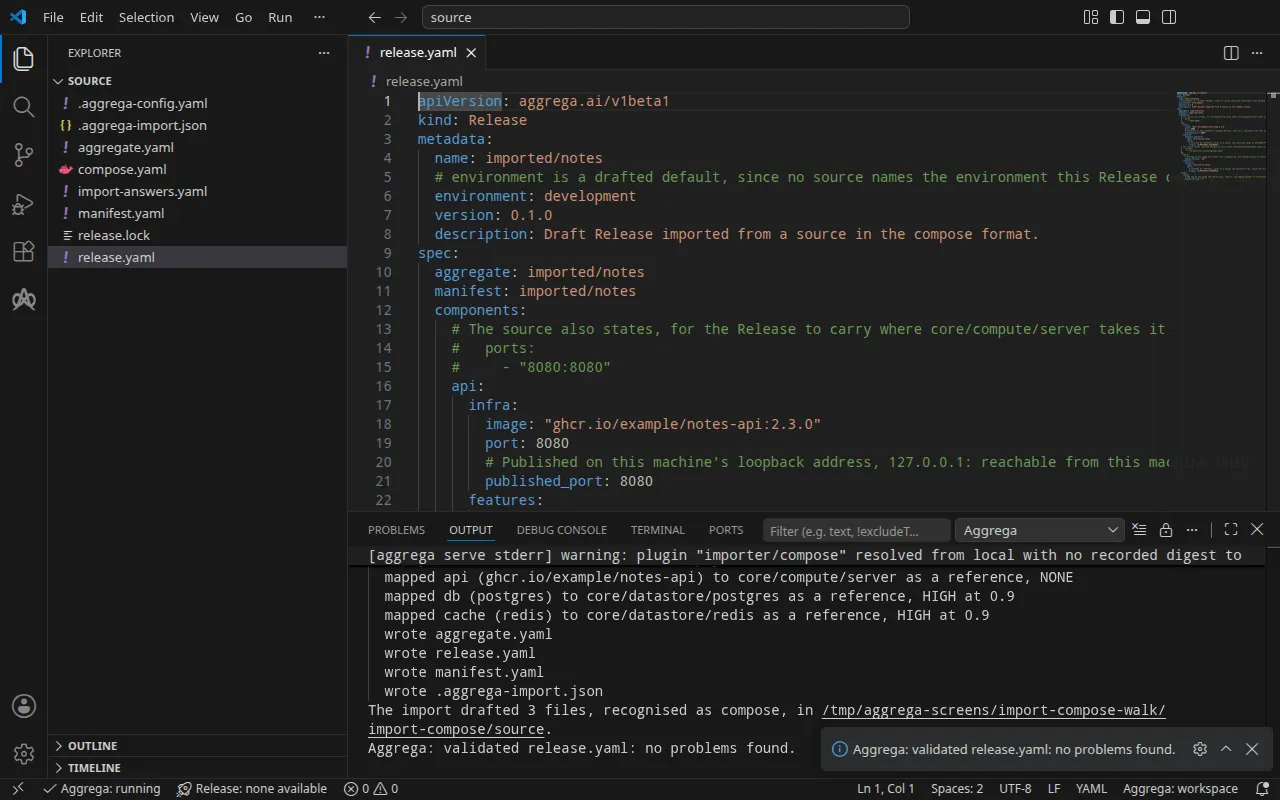
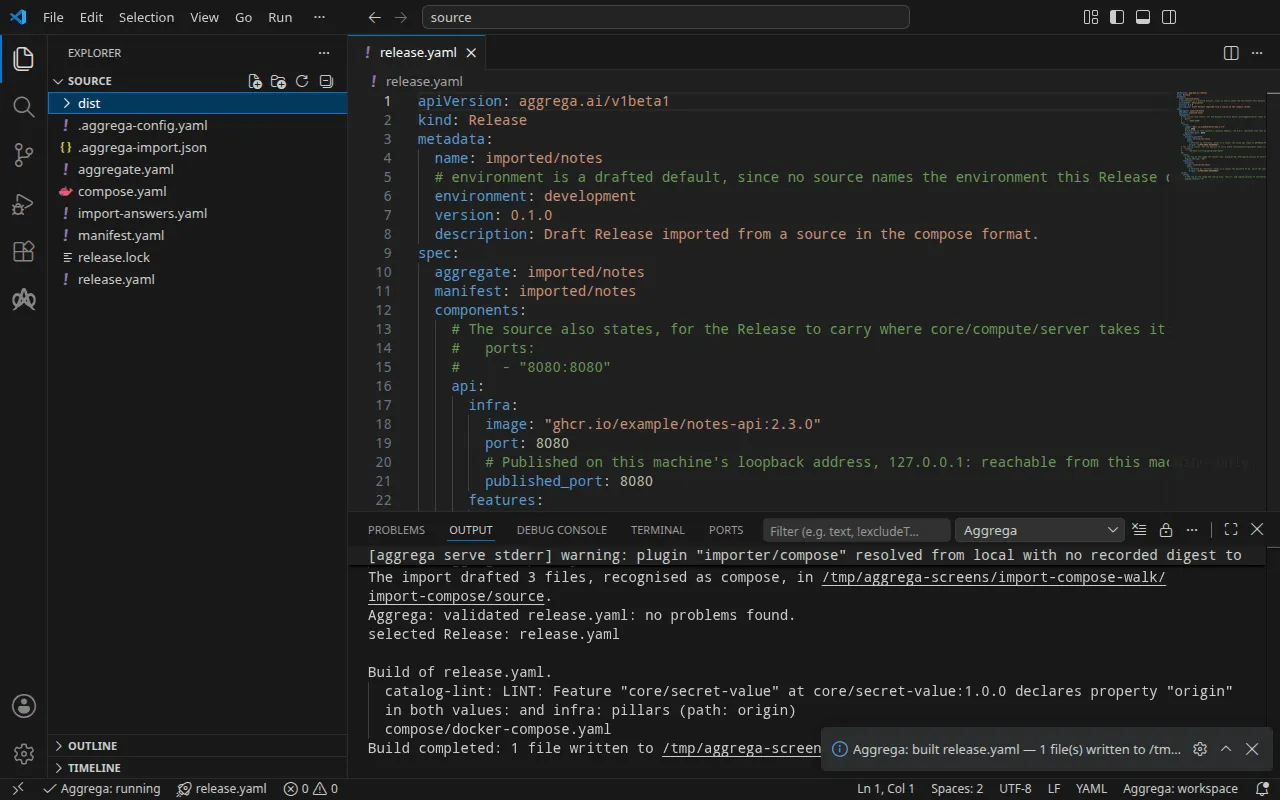
驗證會印出:
notice: LINT: Feature "core/secret-value" at core/secret-value:1.0.0 declares property "origin" in both values: and infra: pillars (path: origin)release dependency validation passed: release.yaml (schema-pillar + dependency pillars)而建置(其中 <workspace> 代表你執行它所在的資料夾)會印出:
notice: LINT: Feature "core/secret-value" at core/secret-value:1.0.0 declares property "origin" in both values: and infra: pillars (path: origin)[… omitted: a total build time, which differs per run]Build completed: 1 file written to <workspace>/distnotice 那一行僅供參考:密碼 Feature 從 Aggregate 的 values 或 Release 的 infra 接受它的 origin,而該通知回報有一個葉節點同時在兩者中宣告。它不改變任何裁定。
dist/compose/docker-compose.yaml 中的 api 服務會讀取 Compose 專案提供給它的環境,由連線與密碼附件傳遞:
api: image: ghcr.io/example/notes-api:2.3.0 environment: CACHE_HOST: cache DATABASE_HOST: db DATABASE_NAME: notes DATABASE_PASSWORD: ${POSTGRES_PASSWORD} DATABASE_USER: notes ports: - 127.0.0.1:8080:8080 [… omitted: the labels the build writes on every service, naming the Aggregate, the component, the environment and the compiler's version] networks: - compose depends_on: - cache - db [… omitted: the CPU and memory the server's defaults reserve]而資料庫與快取則執行 Compose 檔案所指名的映像檔:
db: image: postgres:16 environment: POSTGRES_USER: notes POSTGRES_PASSWORD: ${POSTGRES_PASSWORD} POSTGRES_DB: notes [… omitted: the labels, the network and a health check running PostgreSQL's pg_isready] cache: image: redis:7 [… omitted: the labels, the network and a health check running redis-cli ping]渲染出的檔案中顯示出與你起始專案的兩處差異。連接埠只發布在回送位址上,正如通用伺服器的 Compose Recipe 發布它的方式。而且 Compose 檔案為資料庫資料所掛載的具名磁碟區不會出現在任何地方:草稿把它列在資料庫項目上方的註解中,PostgreSQL Component 沒有任何鍵接受它,而渲染出的資料庫服務也不掛載任何磁碟區。
搭配 AI 助理
設定了 Aggrega 工具的 AI 助理也能做同樣的事:把這段提示貼給它。
只使用 Aggrega 工具,且不要自己建立任何資料夾。如果工作區資料夾中還沒有 `import-compose` 資料夾,請以 `example` 設為 `import-compose` 且不帶 `dir`,呼叫一次 `draft` 工具:它會把範例寫入新的 `import-compose` 資料夾,其 `source` 資料夾存放本頁所匯入的內容。接著以 `workspace_root` 設為 `import-compose/source`、`source` 設為 `compose.yaml`、`target` 設為 `compose` 呼叫 `import` 工具:它會從 `compose.yaml` 旁的 `import-answers.yaml` 讀取所需的答案,把草稿寫入 `import-compose/source`,並拉取它們所需的內容。接著以 `workspace_root` 設為 `import-compose/source`、`release` 設為 `release.yaml` 呼叫 `validate` 工具,並以 `workspace_root` 設為 `import-compose/source`、`release` 設為 `release.yaml`、`write` 設為 true 呼叫 `build` 工具。告訴我建置寫出了哪些檔案;它們位於 `import-compose/source/dist/` 之下。在 VS Code 中開啟
安裝了 Aggrega 的 Visual Studio Code 擴充功能之後,請在 VS Code 中開啟資料夾 import-compose/source,匯入就把草稿寫在那裡。該資料夾只有一個 Release,也就是草擬的 release.yaml,所以編輯器會替你選取它,並在你編輯草稿時依據該 Release 檢查它們,在檔案與 Problems 面板中標示它所發現的問題。命令選擇區(Command Palette)中的 Aggrega: Show topology graph 會繪出該 Release 的元件及它們之間的連線。Aggrega: Build、Aggrega: Preview build 與 Aggrega: Pull 都作用於同一個 Release,而且每一個也都是活動列中 Aggrega 檢視的 Commands 面板上的按鈕;Build 會把它的檔案寫入該資料夾的 dist/。在 Visual Studio Code 中使用 Aggrega 涵蓋其餘部分。
執行
ghcr.io/example/notes-api:2.3.0 代表你自己 API 的映像檔。它是預留位置,Docker Compose 會因它而停止,並顯示 Error Head "https://ghcr.io/v2/example/notes-api/manifests/2.3.0": denied。請在 release.yaml 中 api 的 infra.image 指名你 API 的映像檔。在你的 API 就緒之前,可以用一個在連接埠 8080 上回應 HTTP 的映像檔來代替它。下面的執行使用了 mendhak/http-https-echo:39,它會以它所收到請求的描述來回應每個請求:
api: infra: image: "mendhak/http-https-echo:39" port: 8080帶著這項更改再建置一次。Release 不再與匯入所寫的 release.lock 相符,所以建置需要 --auto-pull,它會再次解析;沒有它,建置會停下來並指出 aggrega pull。Docker Compose 會從你的 shell 填入兩個 ${POSTGRES_PASSWORD} 參照,所以請在啟動堆疊之前設定密碼:若未設定,Compose 會警告 The "POSTGRES_PASSWORD" variable is not set. Defaulting to a blank string.,並在其位置寫入空值。
aggrega build --release release.yaml --auto-pullexport POSTGRES_PASSWORD='a password of your own'docker compose -p notes -f dist/compose/docker-compose.yaml up -d --wait-p 會指名專案,如匯入如何執行的執行步驟所說明。--wait 會在資料庫與快取通過建置為它們提供的健康檢查,且 API 的容器正在執行時才返回:建置沒有為 API 提供健康檢查。
測試
在 http://127.0.0.1:8080,也就是 published_port 所發布的位址,詢問 API:
curl -sS http://127.0.0.1:8080/notes{ "path": "/notes", "headers": { "host": "127.0.0.1:8080", [… omitted: the user agent and the media types the client sent] }, "method": "GET", [… omitted: the rest of the request as the stand-in received it, the client's address and the container's host name]}連線所傳遞的內容位於 API 服務的環境中,以你的 API 所讀取的名稱呈現:
docker compose -p notes -f dist/compose/docker-compose.yaml exec api printenv DATABASE_HOST DATABASE_USER DATABASE_NAME CACHE_HOSTdbnotesnotescache以下列命令停止堆疊:
docker compose -p notes -f dist/compose/docker-compose.yaml down在 Kubernetes 上
同一個專案可用 --target helm 為 Kubernetes 匯入,而匯入會從上面的答案檔讀取 Secret 的名稱 notes-db-password。Docker Compose 的草稿已經在 source 中,所以請把這些草稿放進它們自己的資料夾,像 Docker Compose 那樣在其 release.yaml 中指名 API 的映像檔,並從那裡建置:
aggrega import compose.yaml --target helm --output-dir helmcd helmaggrega build --release release.yaml --auto-pull建置會把純 Kubernetes 資訊清單寫在工作區根目錄 source 的 dist/helm/ 之下,從 helm 看來是 ../dist/helm/。請在你要套用的命名空間中建立 Secret notes-db-password,把密碼放在資料鍵 value 之下,並如匯入如何執行的執行步驟所說明的那樣套用該資料夾。API 的 Service 是 api-default:把本機連接埠轉送給它,並讓該命令持續執行:
kubectl port-forward -n <namespace> svc/api-default 8080:8080從另一個終端機,上面的請求會在相同的位址觸及 API,毫無更動,而替身會以相同的方式回應,"host": "127.0.0.1:8080"。連線傳遞的是 Services 的名稱:kubectl exec -n <namespace> deploy/api -- printenv DATABASE_HOST DATABASE_USER DATABASE_NAME CACHE_HOST 會印出 db-default、notes、notes 與 cache-default。API 在 Kubernetes 上尚未收到它的資料庫密碼:Secret notes-db-password 只送達資料庫,所以 api 容器中沒有設定 DATABASE_PASSWORD。
Compose 檔案變更時
請把 .aggrega-import.json 保留在草稿旁,並在 Compose 檔案變更後執行:
aggrega import compose.yaml --sync它只更動匯入所寫出的內容,並讀取相同的答案檔。來源沒有動到的部分,無論是否編輯過,都維持它在磁碟上的樣子;若來源變更了你編輯過的部分,它會停下來、指出該部分,並且什麼也不寫,留給你手動協調。aggrega import 完整說明規則與每個旗標。